
How to make Android use the DNS server of your choice: Not all DNS servers are created equally

DNS servers translate domain names into IP addresses. If they fail, you can't access websites or find results in a search engine. Diagnosing whether the DNS server is causing problems can be tricky, but the fix is quick and easy. You can change your DNS server on any Android device, including phones, Chromebooks, and the best cheap tablets.
Your internet provider chooses your default DNS server if you have the default setting still for DHCP to provide an IP address, gateway and DNS server on connecting. The issue is, your ISP can then also see exactly what sites you are visiting, or even censor sites so you cannot visit them. Note if you use a VPN, then you do bypass your ISP completely, and the VPN's DNS server is usually used.
But you can pick from many other DNS servers to use. Some DNS servers are faster, some provide malware blocking and advert blocking, and some also encrypt DNS over TLS (DoT) or DNS over HTTPS (DoH).
See https://www.androidpolice.com/use-preferred-dns-server-android-tutorial/
#technology #DNS
You should buy dual monitors instead of an ultrawide for these 4 reasons

Single monitor setups once dominated most home and office spaces, but computer users looking to enhance their productivity have consistently turned to larger-screened workstations in recent years. For the most part, there are two main ways to add screen real estate to your desk setup. You can either swap your monitor's standard aspect ratio for an ultrawide monitor, or add more regular-sized monitors to build a multi-screened workstation. On paper, an ultrawide might sound incredibly appealing, because it provides the desktop space of a dual monitor setup without the bezels and clunkiness.
However, you shouldn't rush into buying a new ultrawide monitor before fully considering a dual monitor setup instead. If you're on the fence, here are four reasons (in the linked article below) why you should create a dual monitor setup instead of buying an ultrawide.
Since I started testing out using a second monitor, I could never go back to using a single monitor. Even at both work locations I used to sit at, I had a separate monitor to plug into my laptop.
I now use 3 monitors as standard at home, and I've upgraded them bit by bit (costs less, yes), and it's true you can choose to have one in portrait orientation (which I've only tested once). It does mean, though, you also need to ensure you have a graphics card (GPU) with enough outputs.
#technology #monitors
You should buy dual monitors instead of an ultrawide for these 4 reasons
Single monitor setups once dominated most home and office spaces, but computer users looking to enhance their productivity have consistently turned to larger-screened workstations in recent years. For the most part, there are two main ways to add screen real estate to your desk setup. You can either swap your monitor's standard aspect ratio for an ultrawide monitor, or add more regular-sized monitors to build a multi-screened workstation. On paper, an ultrawide might sound incredibly appealing, because it provides the desktop space of a dual monitor setup without the bezels and clunkiness.
However, you shouldn't rush into buying a new ultrawide monitor before fully considering a dual monitor setup instead. If you're on the fence, here are four reasons (in the linked article below) why you should create a dual monitor setup instead of buying an ultrawide.
Since I started testing out using a second monitor, I could never go back to using a single monitor. Even at both work locations I used to sit at, I had a separate monitor to plug into my laptop.
I now use 3 monitors as standard at home, and I've upgraded them bit by bit (costs less, yes), and it's true you can choose to have one in portrait orientation (which I've only tested once). It does mean, though, you also need to ensure you have a graphics card (GPU) with enough outputs.
#technology #monitors
You should buy dual monitors instead of an ultrawide for these 4 reasons
Single monitor setups once dominated most home and office spaces, but computer users looking to enhance their productivity have consistently turned to larger-screened workstations in recent years. For the most part, there are two main ways to add screen real estate to your desk setup. You can either swap your monitor's standard aspect ratio for an ultrawide monitor, or add more regular-sized monitors to build a multi-screened workstation. On paper, an ultrawide might sound incredibly appealing, because it provides the desktop space of a dual monitor setup without the bezels and clunkiness.
However, you shouldn't rush into buying a new ultrawide monitor before fully considering a dual monitor setup instead. If you're on the fence, here are four reasons (in the linked article below) why you should create a dual monitor setup instead of buying an ultrawide.
Since I started testing out using a second monitor, I could never go back to using a single monitor. Even at both work locations I used to sit at, I had a separate monitor to plug into my laptop.
I now use 3 monitors as standard at home, and I've upgraded them bit by bit (costs less, yes), and it's true you can choose to have one in portrait orientation (which I've only tested once). It does mean, though, you also need to ensure you have a graphics card (GPU) with enough outputs.
#technology #monitors
You should buy dual monitors instead of an ultrawide for these 4 reasons
Single monitor setups once dominated most home and office spaces, but computer users looking to enhance their productivity have consistently turned to larger-screened workstations in recent years. For the most part, there are two main ways to add screen real estate to your desk setup. You can either swap your monitor's standard aspect ratio for an ultrawide monitor, or add more regular-sized monitors to build a multi-screened workstation. On paper, an ultrawide might sound incredibly appealing, because it provides the desktop space of a dual monitor setup without the bezels and clunkiness.
However, you shouldn't rush into buying a new ultrawide monitor before fully considering a dual monitor setup instead. If you're on the fence, here are four reasons (in the linked article below) why you should create a dual monitor setup instead of buying an ultrawide.
Since I started testing out using a second monitor, I could never go back to using a single monitor. Even at both work locations I used to sit at, I had a separate monitor to plug into my laptop.
I now use 3 monitors as standard at home, and I've upgraded them bit by bit (costs less, yes), and it's true you can choose to have one in portrait orientation (which I've only tested once). It does mean, though, you also need to ensure you have a graphics card (GPU) with enough outputs.
#technology #monitors
You should buy dual monitors instead of an ultrawide for these 4 reasons
Single monitor setups once dominated most home and office spaces, but computer users looking to enhance their productivity have consistently turned to larger-screened workstations in recent years. For the most part, there are two main ways to add screen real estate to your desk setup. You can either swap your monitor's standard aspect ratio for an ultrawide monitor, or add more regular-sized monitors to build a multi-screened workstation. On paper, an ultrawide might sound incredibly appealing, because it provides the desktop space of a dual monitor setup without the bezels and clunkiness.
However, you shouldn't rush into buying a new ultrawide monitor before fully considering a dual monitor setup instead. If you're on the fence, here are four reasons (in the linked article below) why you should create a dual monitor setup instead of buying an ultrawide.
Since I started testing out using a second monitor, I could never go back to using a single monitor. Even at both work locations I used to sit at, I had a separate monitor to plug into my laptop.
I now use 3 monitors as standard at home, and I've upgraded them bit by bit (costs less, yes), and it's true you can choose to have one in portrait orientation (which I've only tested once). It does mean, though, you also need to ensure you have a graphics card (GPU) with enough outputs.
#technology #monitors
You should buy dual monitors instead of an ultrawide for these 4 reasons
Single monitor setups once dominated most home and office spaces, but computer users looking to enhance their productivity have consistently turned to larger-screened workstations in recent years. For the most part, there are two main ways to add screen real estate to your desk setup. You can either swap your monitor's standard aspect ratio for an ultrawide monitor, or add more regular-sized monitors to build a multi-screened workstation. On paper, an ultrawide might sound incredibly appealing, because it provides the desktop space of a dual monitor setup without the bezels and clunkiness.
However, you shouldn't rush into buying a new ultrawide monitor before fully considering a dual monitor setup instead. If you're on the fence, here are four reasons (in the linked article below) why you should create a dual monitor setup instead of buying an ultrawide.
Since I started testing out using a second monitor, I could never go back to using a single monitor. Even at both work locations I used to sit at, I had a separate monitor to plug into my laptop.
I now use 3 monitors as standard at home, and I've upgraded them bit by bit (costs less, yes), and it's true you can choose to have one in portrait orientation (which I've only tested once). It does mean, though, you also need to ensure you have a graphics card (GPU) with enough outputs.
#technology #monitors
You should buy dual monitors instead of an ultrawide for these 4 reasons
Single monitor setups once dominated most home and office spaces, but computer users looking to enhance their productivity have consistently turned to larger-screened workstations in recent years. For the most part, there are two main ways to add screen real estate to your desk setup. You can either swap your monitor's standard aspect ratio for an ultrawide monitor, or add more regular-sized monitors to build a multi-screened workstation. On paper, an ultrawide might sound incredibly appealing, because it provides the desktop space of a dual monitor setup without the bezels and clunkiness.
However, you shouldn't rush into buying a new ultrawide monitor before fully considering a dual monitor setup instead. If you're on the fence, here are four reasons (in the linked article below) why you should create a dual monitor setup instead of buying an ultrawide.
Since I started testing out using a second monitor, I could never go back to using a single monitor. Even at both work locations I used to sit at, I had a separate monitor to plug into my laptop.
I now use 3 monitors as standard at home, and I've upgraded them bit by bit (costs less, yes), and it's true you can choose to have one in portrait orientation (which I've only tested once). It does mean, though, you also need to ensure you have a graphics card (GPU) with enough outputs.
#technology #monitors
Your fingerprints can be recreated from the sounds made when you swipe on a touchscreen — Chinese and US researchers show new side channel can reproduce fingerprints to enable attacks

An interesting new attack on biometric security has been outlined by a group of researchers from China and the US. PrintListener: Uncovering the Vulnerability of Fingerprint Authentication via the Finger Friction Sound [PDF] proposes a side-channel attack on the sophisticated Automatic Fingerprint Identification System (AFIS). The attack leverages the sound characteristics of a user’s finger swiping on a touchscreen to extract fingerprint pattern features. Following tests, the researchers assert that they can successfully attack “up to 27.9% of partial fingerprints and 9.3% of complete fingerprints within five attempts at the highest security FAR [False Acceptance Rate] setting of 0.01%.” This is claimed to be the first work that leverages swiping sounds to infer fingerprint information.
Biometric fingerprint security is widespread and widely trusted. If things continue as they are, it is thought that the fingerprint authentication market will be worth nearly $100 billion by 2032.
Importantly, PrintListener went through extensive experiments “in real-world scenarios,” and, as mentioned in the intro, can facilitate successful partial fingerprint attacks in better than one in four cases, and complete fingerprint attacks in nearly one in ten cases. These results far exceed unaided MasterPrint fingerprint dictionary attacks.
I have to say, though, I'm struggling to understand how this can really work. It talks about fingerprint friction audio - does that mean the press of a fingerprint, as it sounds more like some form of swiping? The report states: "It only needs to record users’ fingertip friction sound and can be launched by leveraging a large number of social media platforms."
But it seems though they are using swiping actions to reconstruct the fingerprint, as they state this also: "In this work, we propose a new side-channel attack on fingerprints, called PrintListener, which leverages users’ swiping actions on the screen to extract fingerprint features and synthesize a stronger MasterPrint sequence based on these features to conduct dictionary attacks on users’ fingerprints".
There is a link to the original report, where it goes into some detail about how the acoustics are interpreted.
No authentication process is perfect, but fingerprints have been one of the more trusted options. But we are also learning that phone sensors such as cameras, microphones, light, vibration, etc can all be exploited in various ways. These are actually all very clever hacks. Not all can be exploited easily in the real world, but one hopes that OEMs are working to keep these exploits pinned down.
#technology #vulnerabilities #biometrics
With Superlist, Wunderlist Makers Pick Up Where They Left Off

Remember Wunderlist? It was a highly popular and well-made cloud-based to-do/task app that was free to use on all major mobile and desktop platforms, including Linux, until Microsoft acquired it and eventually shut it down.
Well, now it’s back — sort of.
The creators of Wunderlist have launched a brand-new to-do app called Superlist, positioning it as a superior spiritual successor to its esteemed predecessor.
Superlist boasts a clean, streamlined design, a easy-to-master feature set, and a liberal pricing structure allowing free, personal usage “forever.”
This is interesting as I was a big user of Wunderlist back in the day. After Microsoft bought it out my todos went all over the place and were a real mess. I have just this month started paying for a premium account with TickTick after evaluating a few of the most popular options. TickTick is about half the price of Superlist (also with a free tier). I'll probably stay where I am now, but it would have been interesting to have evaluated Superlist, although $8 pm is above my cut-off amount, so like Todoist it would probably not have been an option for a premium account.
See https://www.omgubuntu.co.uk/2024/02/wunderlist-returns-as-superlist-more-or-less
#technology #todo #organising
The Sad Reality: Firefox 123 is out with broken site reporting tool

Users of the Firefox web browser may report broken sites to Mozilla. The main idea behind the feature is to help Mozilla address compatibility issues in Firefox.
Firefox has a much smaller userbase than the Chromium-based browsers. Multiple companies, including Google and Microsoft, find and deal with compatibility issues in the Chromium source.
The new reporting tool involves the Firefox community. Select Firefox Menu > Report broken site to open the reporting tool. Select a reason, e.g., site slow or not working, ad blockers, or sign-in or sign-out and hit the send button. You may add text to the report, which you should do to provide additional details that describe the issue that you experience on the site.
Mozilla announces the new website compatibility reporter in the following way: "Having any issues with a website on Firefox, yet the site seems to be working as expected on another browser? You can now let us know via the Web Compatibility Reporting Tool! By filing a web compatibility issue, you’re directly helping us detect, target, and fix the most impacted sites to make your browsing experience on Firefox smoother."
This is a bit sad that the web is becoming so dominated by Chromium based browsers, that Firefox users have to suffer. This reminds me very much of the old Internet Explorer days, when companies often developed specifically for that browser. It breaks compatibility, and the web really does need to have open standards adhered to in order to be future-proof and allow competition.
Any business surely wants to allow the maximum possible number of customers to view and interact with their site? The problem is that executives rarely understand this, and devs just want to get their job done ASAP.
This reporting tool looks like it is going to alert the Firefox team, so that they can attempt to "make Firefox" work with the reported site (in other words, bending Firefox to work with some non-standard implementation).
See https://www.ghacks.net/2024/02/20/firefox-123-is-out-with-broken-site-reporting-tool/
#technology #browsers #interoperability
5 reasons to use AMD in your next gaming PC

AMD is already quite well known for their really easy overclocking, and their better price point for what you get.
My current PC build has had an AMD Ryzen 7 3700X CPU in it for the last 3 years or so, and running with Manjaro Linux as OS, it has been running flawlessly. This is my first AMD CPU, as I'd always been buying Intel since I moved off the Amiga. I've not run into any compatibility issues whatsoever, and I do also play quite a few Steam Games as well.
Sadly, when I did the last PC upgrade, I stuck to buying another Nvidia GPU. I just did not seriously do a proper comparison of alternatives. Next time however I'm going to do a thorough comparison give AMD a serious consideration for my next GPU card.
The only issue I've been experiencing with testing out Wayland on Linux, is some random freezes for about 40+ seconds. I get something similar with the X display, but it is exclusively limited to when the compositor gets accessed, which is only really during screenshots. Supposedly this relates to the Nvidia card on Linux (not the AMD CPU), although I'm using the Nvidia proprietary drivers. When I get time, I should actually try a different GPU, or the open source drivers, and pinpoint this issue.
The linked article though does whet my appetite a bit again for getting an AMD GPU. In today's world, full of innovation and improvement, we should be seriously considering good alternatives, and not just sticking to the one thing we know out of habit. Change is what sparks and rewards innovation, and helps cultivate a healthy market ecosystem. The days of one single company resting on their laurels, should be over.
See https://www.xda-developers.com/5-reasons-use-amd-next-gaming-pc/
#technology #AMD #competition #gaming

True, though my example mentioned is for the whole house switching over to our solar inverter power. In those 20ms my PSU keeps my PC going without missing a beat. My wife's PSU drops the ball for some reason.
Young Typewriter repairman is in high demand fort this retro technology today

Lucas started repairing typewriters about ten years ago, at the age of 14. That’s when he found a 1930s Royal No. 10 and taught himself how to fix it. Eventually, he realized there was a need for his services outside of family and friends’ machines.
Dul is more than a fixer. He’s a romantic. A purist. A crusader of sorts — an island in a digital ocean.
“It’s also about ultimate control,” says Dul, who cherishes his time alone in his workshop. “You are not being told what to do by any operating system. You don’t have to worry about spellcheck or making errors. It’s a process that’s completely in your hands and organic.”
Maybe he's summed up what is wrong with today's world! Too much connectivity 24/7 (we require laws now in France and Australia to prohibit bosses sending e-mails after hours to workers) and too many notifications. Typewriters had stopped being used for general use a good 20 years before Lucas was even born.
It's no wonder that Lucas has writers sending typewriters to him for repairs. What better way to concentrate, get on with the job, and not worry about recharging batteries, than to use a typewriter.
Artists, writers, collectors — all still want typewriters, he says.
Possibly, like vinyl records and CDs, we're going to see more uptake of older technology.
See https://hackaday.com/2024/02/19/keebin-with-kristina-the-one-with-the-200-typewriter/
#technology #typewriters #retro
10 mistakes you should not make when building a new PC for the first time

Buying a ready-made PC is full of compromises. I've always built my own PC's ever since I moved from an Amiga to using DR-DOS. It's one way of ensuring you get all the components you really want, and you can easily swap out upgraded parts as well.
In the later days, if you did not want to pay for Windows, you had to build your own PC with hard drives you sourced.
The linked post has some practical tips to consider. The power supply section is especially important. A quality PSU will not only give you many years of use, but can help prevent freezes etc. Here in South Africa, we have constant load shedding, and what I've noticed is my PC has no issue with the 20ms switch-over to back up power, whilst my wife's PC shuts off. The difference is her PC sits with my older cheap PSU in it still. The PSU is actually the last line of defence between any grid power issues and your expensive motherboard, CPU, RAM and storage. Buy well once and get many years of trouble-free use out of it.
See https://www.xda-developers.com/things-you-should-not-do-while-building-a-new-pc-for-the-first-time
#technology #hardware


Everything about Apple the company pisses me off so much. They're some of the most abusive companies out there with how they treat the needs of others.
https://open-web-advocacy.org/blog/its-official-apple-kills-web-apps-in-the-eu/
Yep ditched my iPhone beginning of 2023 for the Galaxy S23 Ultra as Apple would not allow Truecaller to manage the dialler app, so spam calls were killing me
How to keep your home network secure: Smart tricks and settings

Network security is not just for IT professionals. Even home users need to keep their networks secure to prevent unauthorized people from, for example, hogging their broadband, installing malware that turns connected devices into robots in botnets, and spying on what you and your family are doing.
In the past, the internal network was often considered safe and protection against threats from the internet was the most important thing, but today security experts recommend using encrypted connections as much as possible even within the local network.
It may seem complicated, but with basic knowledge and the right settings in your router, you’ll go a long way.
These are actually all very basic and essential considerations, and are well worth revisiting. I realised I'm not actually using the SNMP management on my router, but I'd left it enabled. Disable those types of services if you don't use them, and rather enable logins etc only from your LAN.
#technology #security #routers

Yes, this one is supposedly post-only, and the new Project Tapestry app is going to be read-only. Seems there is still space a post-read app that integrates some networks.
I've also been noticing that we're seeing more efforts around integration (clearly many users want it) with Beeper trying the same across messaging apps.
Can’t decide between Bluesky, Mastodon and Nostr? Nootti’s new app lets you post to all three
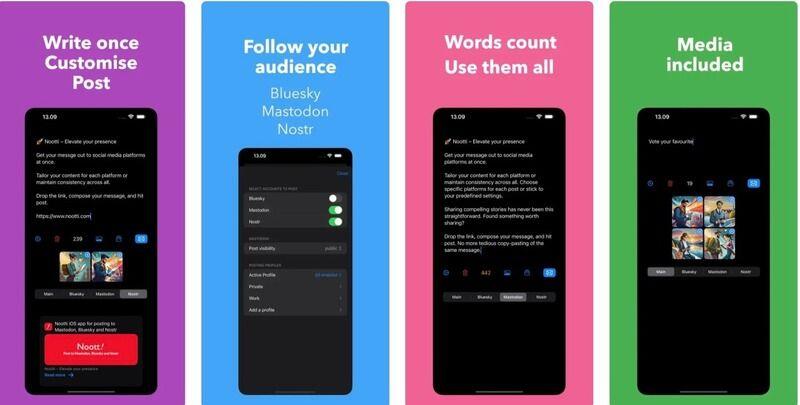
Managing a social presence these days can be tough. It’s even tougher for those who are experimenting with the new wave of Twitter-like services, like Mastodon, Nostr and Bluesky, where staying active means a lot of duplicate posts to different networks. Thankfully, developers are starting to address our needs for cross-posting tools. In addition to scheduling services like Fedica and Postpone, there’s now a new app, Nootti, that allows you to post to Mastodon, Nostr and Bluesky from one interface.
What makes Nootti compelling is that you can easily customize each post slightly for the different platforms. To do so, you first type your post in the “Main” tab, then switch over to the tabs for the other social networks. The post will be automatically filled in on each tab, but you can edit the message for the individual networks.
Which is all great, but it is only an iOS app, and there is no mention of a coming Android version at all. The Tapestry app should be coming still (no posting, and also iOS only), but I'm thinking we will see more of these integrated social network platform apps.
#technology #Mastodon #Nostr #Bluesky