The status in 2024 of Linux distros with an undo function for updates
The big names mostly can't yet, but some lesser-known Linux distributions offer the ability to undo updates and recover from damage, even automatically.
With a new version of Linux Mint available, a lot of people – especially less-technical types – are about to upgrade their PCs. As with almost all major upgrades, inevitably some stuff won't work with the new version. Going back is difficult, although Mint does have a solution, and so do some smaller distros.
Linux Mint includes the Timeshift utility, originally developed by Teejeetech, but that doesn't make it invulnerable. No operating system is, as amply demonstrated recently by CrowdStrike. If installed on a file system that supports copy-on-write (COW) snapshots, Timeshift can use that, but if you chose some other disk format, it can also back up your system files using rsync to another drive.
I reverted to ext4 from Btrfs a year or so ago after discovering it was the issue behind my much longer boot times. I've been using Timeshift with it rsyncing to a second drive, and this has served me well, when I did once or twice have to do a restore to undo an update.
The only thing I found quite promising in the linked article, is two Linux distros that actually have dual-root-volumes which sounds most interesting (I suppose a bit like Android phones have those A and B partitions?).
See https://www.theregister.com/2024/08/01/linux_rollback_options/
#technology #Linux

3 reasons magnetic switches are shaking up the keyboard scene
Mechanical keyboards have been responsible for a huge shift in user behaviour, owing to the superior typing experience they offer over traditional or membrane keyboards. Mechanical switches are at the core of that experience, offering a satisfying tactile and auditory response to users, which can't be replicated on conventional keyboards.
We are now witnessing what could be another radical shift in switch technology — magnetic switches. To be clear, magnetic switches didn't come up yesterday. The tech has existed since the 60s, and we've seen it in popular keyboards from brands like Wooting since late 2022. However, what's new is the bubbling interest in magnetic switches from consumers and manufacturers, with brands like Wooting and Razer fighting hard to come out on top.
What is interesting to me about this, is that I think of magnets as losing power over time and having imprecise points at when they trigger. It seems that I was very wrong on this.
The key thing here is these are permanent magnets and they use the Hall effect switches (like we use Hall effect sensors for measuring electrical current travelling through a wire). So this also means being able to have dynamic actuation and reset points. Also, there is no physical contact switch, so they could last a lot longer (and be silent).
See https://www.xda-developers.com/magnetic-switches-shaking-up-keyboards/
#technology #keyboards

Paperless-ngx is a privacy respecting open-source self-hosted document management solution
This is a great solution for scanning or uploading any documents, images, e-mails, etc into your own self-hosted solution for home or business use. Nothing is shared out to other services, and being self-hosted, it's not going to get hacked in someone's cloud either.
All documents are OCR'd for full text searching, and separately saved into PDF/A format.
It's a great way to organise all your family, or business, receipts, contracts, images, equipment manuals, e-mails, etc so that anyone with the permissions in the family or team can find them later.
If being organised is not your thing, I also do a quick demo at the end of a good full-text desktop indexer/searcher, as an alternative, that will find your documents scattered across your drive.
Watch https://youtu.be/urwuTnrYEWE
#technology #opensource #documentmanagement #paperlessngx #selfhosting
Why Snap and Flatpak make Linux a better OS and how they're different
One of the reasons why Snap and Flatpak were developed was to remove the dependency issues found with traditional package managers. Snap and Flatpak packages contain all the software necessary to install the package in question, including dependencies.
So, when you go to install a certain piece of software via either Snap or Flatpak, you don't have to worry about installing dependencies because the Snap or Flatpak package has taken care of that issue for you.
I've certainly found Flatpak's to be great when some software updates had been breaking due to dependencies which were at different versions to the one that the software wanted. Also, some devs are preferring to distribute Flatpaks or Snaps as it makes support so much easier, and installing on different distro's is also a "snap".
Yes it's true, I suppose, that proprietary software could also be packaged into a Snap or Flatpak, as the app is not being built from compiling the source code at all.
The linked article also gives a nice comparison between the two formats. Of course, as a user, you can use either, or you can use both if you wish.
See https://www.zdnet.com/article/why-snap-and-flatpak-make-linux-a-better-os-and-how-theyre-different
#technology #Linux #Flatpak #Snap #opensource

5 Excellent reasons you should try using open source software
Open-source software has existed in some form or another since the early 1980s and is now used in almost every technology sector. Open-source tools and software are used in everything from TVs to ChatGPT, so the chances are high that you've already used it, even if you didn't realize it. It powers web browsers, operating systems, apps, and games, and is often licensed so other developers can modify it. There are many reasons to use open-source software instead of proprietary programs, from feeling part of a community to keeping your data more secure.
The linked article lists the following reasons and expands on each of them a bit further:
* Giving new life to old hardware
* Get out of vendor locks and other annoyances
* Everyone being able to read your code makes for better security practices
* Lower upfront costs
* Your data is yours, and not sold to others
You'd think with all the above, open source would be the absolute go-to software, but it does lack any form of marketing and lobbying (apart from enterprise level open source).
I can also add, though, for corporates needing support there are many companies that can be paid to provide support (without lock-in). Additionally, as open standards are usually used, the data survives into the future and can still be accessed and used even with other software applications. Many open source apps are also fully cross-platform.
See https://www.xda-developers.com/5-reasons-you-should-try-using-open-source-software/
#technology #opensource

The Continent is a free (of cost, ads and trackers) news publication for Africans by Africans
The Continent is a weekly newspaper produced by African reporters, photographers, illustrators and editors. It is designed to be read and shared on WhatsApp, Telegram channel, Signal or e-mail, and has become the continent's most widely distributed newspaper.
It is designed to be read on a mobile screen, with mostly short news pieces of 250 to 400 words, and a few longer pieces of about 900 words. Editions are sent out as a PDF on Fridays.
Led by a small team of nine (all working remotely) and having published contributions from nearly 200 journalists, writers, photographers and illustrators from across Africa in the past year, The Continent has covered numerous important and urgent stories, starting with reliable information from African researchers and public health experts on the Covid-19 pandemic, and on to other ground-breaking reporting: the injustice of “vaccine apartheid” with rich countries hoarding Covid-19 vaccines; the impact of Nigeria’s sudden and dramatic Twitter ban (applauded by none other than Donald Trump); a tender photo essay on being queer in Uganda, in a country where it is dangerous to be LGBTQ.
The Continent is published by the All Protocol Observed, a registered non-profit based in South Africa. It was initially funded by the editorial team, but has since attracted donor and commercial funding. So a refreshing difference is no adverts and also no tracking. You receive the PDF weekly via your channel of choice (or you can just download it from their website), and you can reshare this with anyone you wish to.
Credit to Jan Wildeboer @jwildeboer@social.wildeboer.net for sharing this on the Fediverse.
See https://www.thecontinent.org/
#news #Africa #TheContinent #journalism

How to test if your VPN is working
Keeping your online activities and data private is a top priority nowadays. VPNs, or virtual private networks, are one of the best ways to do this. Not only do they encrypt your internet connection, but they reroute all of your traffic through a private tunnel to keep it safe from prying eyes. Even the best VPNs can have problems, though.
Maybe you’re not sure if your VPN is working properly. Or maybe you just want to test out the service for yourself to better understand how it safeguards your privacy.
I especially liked that the ipleak site also does a torrent address detection test. Happy to see my ProtonVPN service passed all the test with zero leaking of my actual IP address.
See https://www.pcworld.com/article/2406999/how-to-test-if-your-vpn-is-working.html
#technology #VPN #privacy

6 myths about mechanical keyboards that are no longer true
For better or worse, the "mech keeb" community is still a niche one, so there are many more people outside of it than the ones in the know. So, a regular PC user might still have some misconceptions about mechanical keyboards that are far from the truth.
These myths range across all aspects of mechanical keyboards, from the look and feel to the sound and price. Perhaps the only silver lining we have is that most of these myths are super easy to debunk, so people don't have an excuse to stay uninformed any longer.
It's always interesting to me, no matter what the technology, so many people tend to get hung up about issues that existed when it launched, and those perceptions stubbornly persist. Yes you can buy really cheap membrane keyboards, but the experience is not the same, and a better keyboard is going to last you a long time. Both a keyboard and mouse are intensively used with a computer, so you may as well be a bit more discerning when choosing them. I've realised over time too that RGB colour lights are not the biggest thing (unless you want to set certain shortcut keys in their own colours) but I really do value backlit keys to see them clearer (I do visual typing not touch typing).
See https://www.xda-developers.com/mechanical-keyboards-myths-not-true/
#technology #keyboards


Yes, maybe not, but I think Julia's point was where something is going to be more CPU or GPU intensive, Julia would better utilise available processing with its parallel processing. But yes, I think in many cases Python is going to be just fine.
7 password rules to live by in 2024, according to security experts - No, frequent changes not one of the rules
If you really want to get deep into the details of digital security, read the four-volume Digital Identity Guidelines from the National Institute of Standards and Technology (NIST). It's a massive document, and much of it is aimed at Federal agencies that need extremely robust security. There's plenty of practical, easy-to-read information there as well, such as the discussion of how long and complex passwords really need to be. You'll find those details in the short appendix titled "Strength of Memorized Secrets."
The folks at NIST have created a simple Cybersecurity Basics page that boils all that technical information down to a set of crisp guidelines for small business owners and managers.
Experts agree that changing passwords regularly isn't necessary, and that organizations requiring users to change their password for no reason are actually making their networks less secure.
Why? Because people who are forced to change passwords regularly are likely to choose a weak, easy-to-guess password. If you've done a solid job of choosing a strong and unique password, there's no need to change it under normal circumstances.
They're all very sensible rules, and changing a well-chosen unique password every month, is not one of the recommendations. I recall making a post about this a year or two back, where the originator of that idea of monthly changes had explained where he came up with that idea, and it had no basis on any fact at all. And yet to this day most IT departments still require such changes, and of course users just tack on a number they keep changing (defeating the whole objective of that idea anyway).
See https://www.zdnet.com/article/7-password-rules-to-live-by-in-2024-according-to-security-experts
#technology #passwords #security

The Julia programming language: a missed opportunity for AI
Admittedly, it was the headline that caught my attention, and I've only briefly looked a bit into Julia. Of course, there is also more to a language than just speed, such as wealth of libraries, wealth of documentation and tutorials, cross-platform compatibility, etc.
Its creators, in a 2012 blog post, stated they aimed to combine the speed of C with the ease of use of Python, while adopting additional positive qualities from various other leading programming languages.
On the face of it, Julia is pretty easy to pick up if you know any high-level language well. Python users could quite easily adapt to using it once you know some of the minor differences such as indexing of arrays starting at 1 instead of 0, concatenation of strings is with a "*" and not a "+", etc. Julia’s syntax is straightforward and intuitive, similar to that of Python, meaning it can be used extensively for exploratory programming and data analysis. They have a good FAQ itemising the differences to many other common languages such as Python, Common Lisp, C/C++, MATLAB, and R.
A FAQ is often why they did not just plug a Matlab or Python front-end into a Julia back-end (or “transpile” code to Julia) in order to get all the performance benefits of Julia without requiring programmers to learn a new language. Julia's performance advantage derives almost entirely from its front-end: its language semantics allow a well-written Julia program to give more opportunities to the compiler to generate efficient code and memory layouts. If you tried to compile Matlab or Python code to Julia, the compiler would be limited by the semantics of Matlab or Python to producing code no better than that of existing compilers for those languages (and probably worse).
There is also a build_executable function, but it is noted that this compatible across Windows and macOS, but not on Linux. To increase the portability, they suggest you use an older "cpu_target" target as "core2" instead of "native".
Importantly, too, the language is open-source and not affiliated to any company. That said, one programmer who no longer recommends Julia, state it was because the community swept some problems under the rug.
It is already used in many areas, for example NASA has deployed Julia to calculate the courses of spacecraft. It excels is financial analysis, weather forecasting and car crash simulations, etc. Its creators, in a 2012 blog post, stated they aimed to combine the speed of C with the ease of use of Python, while adopting additional positive qualities from various other leading programming languages.
Given that Julia's big advantage over Python is where speed, becomes a primary factor, it would be well suited you'd think for AI. If you need to scale your workload, Julia should offer a strong basis to keep growing. But Python has a mass adoption and people don't change languages just for the sake of it, especially when there is such a wealth of documentation and assistance out there for Python. Still, if speed is a primary factor, then it may well be worth considering Julia, especially given that is also quite easy to learn.
#technology #Julia #programming #Python #opensource

Video comparison of a Gillette Fusion Proglide Power vs a Gillette King C DE Razor
Way too many people only know about the razor they currently use because of advertising they see. There are 60 years old technologies (well, actually older than that) that work even better actually, at a fraction of the cost.
Even Gillette themselves restarted to remake their double-edged razor, although you won't see them advertising it, as their massive profits are made off selling their cartridge blades, which can't easily be recycled. And seeing a DE blade is an open standard, and DE blade will fit any DE razor (try buying a competitor cartridge blade to fit a Gillette Fusion razor).
This video shows both razors in action. Just remember with DE blades there is a massive choice out there and many shave differently depending on your beard type and the aggressiveness of the razor head itself. So you can choose from super sharp, to mild, etc depending on which works best for you. So it is always advisable to buy a sample pack of different blades to test out with any new DE razor. It's a razor you may well be using for the next 60 years!
See https://www.youtube.com/watch?v=o_YcbtPh3nY and a similar one also at https://www.youtube.com/watch?v=I_1H1uGmMtM
#shaving #wetshaving #Gillette

How you can play the old classics on your PC or other devices with ScummVM
ScummVM, short for Script Creation Utility for Maniac Mansion Virtual Machine, is an open-source software project that serves as a way for nostalgic gamers and retro enthusiasts alike to enjoy some older classic games. Originally developed to run classic LucasArts adventure games that utilized the SCUMM scripting language, ScummVM has since evolved into a versatile piece of software supporting a wide range of point-and-click adventure games from various developers.
At its core, ScummVM acts as an interpreter, replacing the game’s original executable with its own, while keeping the game data intact. This unique approach not only allows these games to run on modern hardware and operating systems, such as Windows 11, Linux, and even Android, but also enhances their performance and compatibility. Thanks to ScummVM, titles like Monkey Island, Day of the Tentacle, and Grim Fandango can be enjoyed with improved graphics, sound, and additional features such as widescreen support and customizable controls.
ScummVM will install on Windows, Linux (Snap and Flatpak), macOS, Playstation, Android, ARM64, Nintendo, Wii, AmigaOS, and more devices (not iOS, yet I see). They also provide about 11 freeware games to play.
See https://www.xda-developers.com/how-play-old-classics-pc-scummvm/
#technology #gaming #retro

Communia bets social media can be good for you
Olivia DeRamus is flipping the script: “What if scrolling through social media didn’t make us miserable? What if, especially for women, social media could actually make us feel more supported?”.
“It’s certainly not what mainstream social platforms have been built for,” DeRamus told TechCrunch. But with her social platform Communia, DeRamus is daring to try something that seems counterintuitive.
Communia is both a social platform and a mental health tool; you can post updates in a community feed, or you can privately journal and track your emotions over time. But for users to get vulnerable, they need to feel safe. So, the platform is taking an approach that could polarize some, but could reassure others: People must verify their identity before they can fully use the app.
“It’s a safety feature, but it also kind of sets the tone that this is an intimate space and that you’re safe here,” she said. “So people feel more empowered to talk about their PMDD, or to talk about the difficult life experience they’re going through.”
I've always suspected that anonymous pseudonyms have often led to online abuses, bullying and trolling. So by identifying people, we would probably see more accountability and respect online. I get that many don't want to be identified online, and that is a perfectly good choice, but for those who want a safer place online the choice to choose a network that verifies identity may be their perfect choice. And I believe it is very good that there is this choice to be had.
But to survive, it will need to be economically viable. With verified identities, you really do not want to have your metadata being shared elsewhere. So let's hope the economic model is sustainable and also respects rights to privacy.
See https://techcrunch.com/2024/07/18/communia-bets-social-media-can-be-good-for-you/
#technology #socialnetworks #Communia #mentalhealth

This is why I bought the Logitech G502 X mouse for my Linux desktop instead of the MX Master 3S
I wanted to move off the Redragon Mammoth mouse, mainly because I started to want a free-scrolling mode scroll wheel. I often read long posts, or I am editing long webpages, and find myself having to hit the scroll wheel 5 or 10 times to scroll up or down. With a free spinning wheel, it is a single flick, and it goes up or down the page.
It is a longish post, so I have produced it in full as a blog post at the link below.
#technology #Logitech #mouse #Linux

How the Stream Deck rose from the ashes of a legendary keyboard
The keyboard was just a concept, dreamed up by Art Lebedev, a Russian design firm, and it was an ambitious idea at that: called the Optimus Maximus, it would require over 100 built-in screens using display technology that wasn’t readily available at the time. With all the excitement, the firm decided to make it real.
“You’re on a sinking ship, you’ve got to figure out what you’re going to do,” recalls Elgato’s Julian Fest, whose parents originally founded the company in 1999.
A very interesting read, and also a lesson in how imminently bankrupt companies can turn their whole game around by doing something different (think also of Netflix).
#technology #StreamDeck #change

Apple Approves QEMU-Based PC Emulator App for iOS
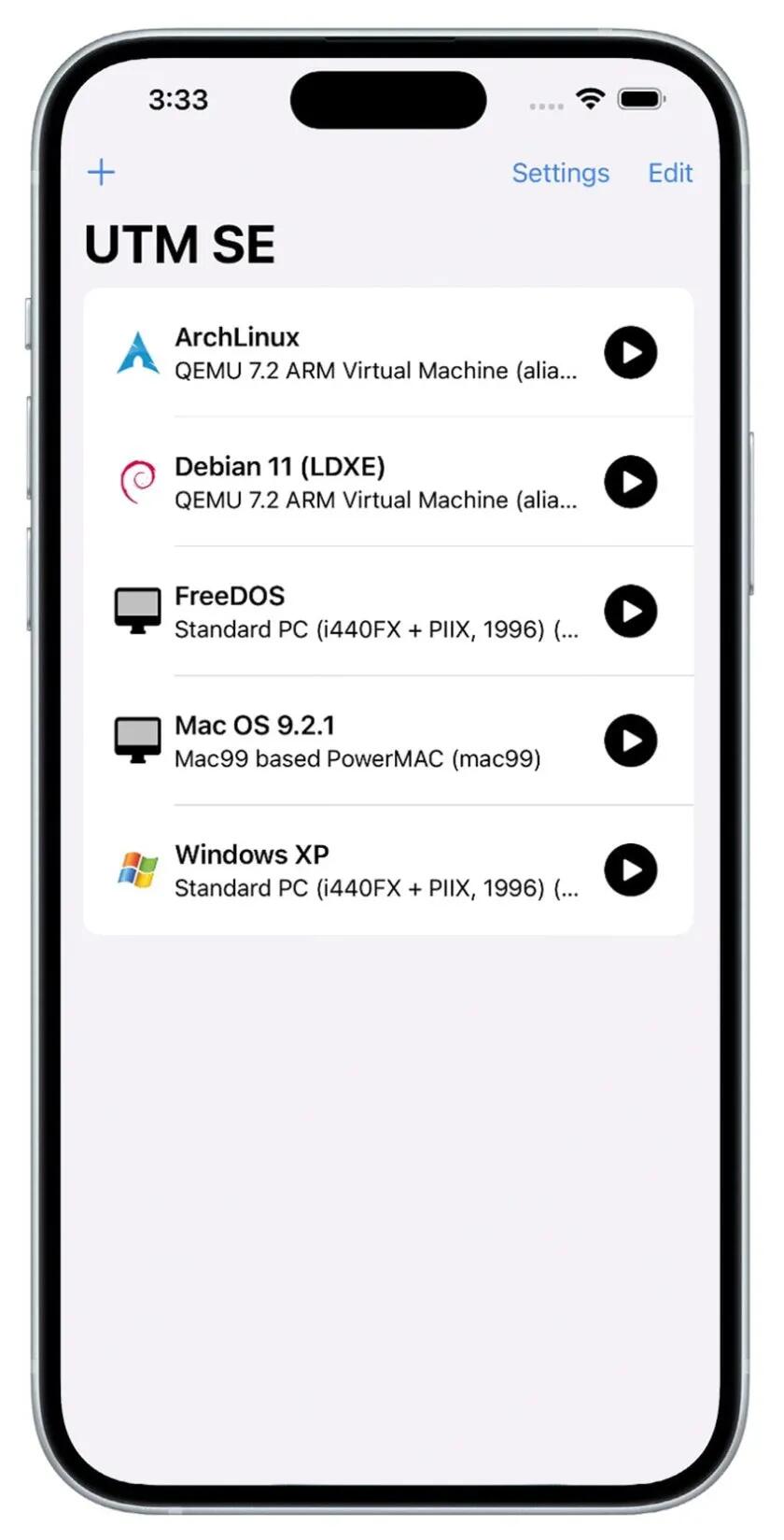
UTM SE can emulate a variety of desktop operating systems and system architectures, including MS-DOS, Windows XP, and (of course) many Linux distributions—all without workarounds, jailbreaks, or side-loading .ipa files through Xcode.
This really would not be news at all for ANY other platform, but for Apple it is a big deal when they release a single notch of control to users (remember the alternative EU App Store?).
This may not be very fast, and right now will probably be used mostly for retro games like Doom. It is because of how Apple allows something to run on its platform, and why it can't run as a proper VM. Also, it's called an emulator, not a virtual machine.
The QEMU-based UTM SE works with iPhones and iPads running iOS 14.0 or later. And no, it won't be running Steam games.
See https://www.omgubuntu.co.uk/2024/07/utm-se-qemu-pc-emulator-apple-app-store
#technology #iOS
11 Obsidian tips and tricks for boosting productivity with this Markdown editor and notes app
Obsidian is quite popular among writers, researchers, and students. When you create a long blog post, research paper, or project overview in Obsidian, navigating it using a keyboard and mouse can be cumbersome at times. Obsidian has a built-in feature to glance over page outlines and jump to relevant headings with a single click.
This is the 3rd article I've seen in two days about Obsidian tips and tricks. I have no idea why, but I have to admit even as a long time Obsidian user (I've done a video about it as well), I've actually picked up some new tips (because things change) so I suppose it is worth resharing something again about Obsidian.
New is a feature-rich Editing Toolbar at the top because the cMenu plugin I was using has not been updated for quite a while. This toolbar is more like the traditional toolbars you find on most word processors, and will be especially useful for new users.
I'd picked up on the Canvas plugin in an article yesterday, and it is quite a useful tool for mapping out thoughts and ideas for brainstorming, a bit like a mind map.
For me, apart from the rich ecosystem of plugins for Obsidian and the fact it saves in Markdown format, I make a lot of use of tagging and linking notes in Obsidian. I have hundreds of notes over the years, many of which were imported from when I used other Markdown editors.
See https://www.xda-developers.com/obsidian-tips-and-tricks-for-boosting-productivity/
#technology #notes #Obsidian


The article does say that it is primarily for IP based web services. There is no claim to it being any sort of magical privacy cloak at all. In fact, Wi-Fi and Bluetooth also leak identity and location if enabled. It is really suited for those types of examples they state.
How to fake the GPS location on your iPhone or Android phone
Perhaps you're trying out an app that searches for nearby stores or restaurants in another city, wanting to access services that are only available within a specific country or region, or playing a location-based game. Whatever the reason, sometimes it's useful to be somewhere else as far as your smartphone is concerned. The good news is that with the right tools, it's not difficult to spoof your GPS location.
But of course that process is a LOT easier when using an Android phone.
It's important to keep in mind that this process isn't foolproof, and can have unintended side effects. For example, while you're running an app that fakes your GPS location, it will affect built-in services like Find My iPhone and Find My Android because the location of any nearby AirTags will be misreported, and your phone will possibly even supply an incorrect location to emergency services like 911.
See https://www.digitaltrends.com/mobile/how-to-fake-the-gps-location-on-your-iphone-or-android-phone/
#technology #location