
Oasis Security Research Team Discovers Microsoft Azure MFA Bypass: We Expect More From An Enterprise Provider Though
Oasis Security's research team uncovered a critical vulnerability in Microsoft's Multi-Factor Authentication (MFA) implementation, allowing attackers to bypass it and gain unauthorized access to the user’s account, including Outlook emails, OneDrive files, Teams chats, Azure Cloud, and more. Microsoft has more than 400 million paid Office 365 seats, making the consequences of this vulnerability far-reaching.
The bypass was simple: it took around an hour to execute, required no user interaction, and did not generate any notification or provide the account holder with any indication of trouble.
The news surfaced now in the last week, so Microsoft has addressed the issue already. For me, though, the real news is that a global enterprise level IT company should not have had such basic guardrails missing. It appears really that Microsoft had knowingly relaxed some measures around its 2FA to allow for convenience. But surely a lack of attack rate limiting is just unforgivable. One of the basics I always employ on my servers and blog, is attack rate limiting with lengthy blocks in place. If anyone has to guess a password or 2FA more than 3 times, there is something wrong.
Microsoft has had so many security fumbles over time that it is quite amazing that their monopoly in the workplace goes unchallenged. It seems Microsoft has very little care about their customers, as long as the money is rolling in, and if that eases, they just change the licensing parameters a bit. The recent Microsoft Recall feature was just another example of completely not appreciating their customers' privacy, and that was also only addressed after a major outcry.
Microsoft probably has too much inertia, but actually there are some pretty good alternatives around if one takes a little trouble to rise out of the deep rut. The combination of pretty admin tools, AI, and cloud services has unfortunately made many admins way too lazy today. I think the quality of our admins on the edge, is a lot weaker than it used to be two decades back. All this usually means an even greater reliance on Microsoft where it is used in a corporate environment.
Security is about keeping it simple, and having a reasonable depth of knowledge about what is being managed.
#technology #security #2FA #vulnerability

Thanks to Whiskey, You Will Be Gaming on Your Mac More Than Ever
Whiskey is a free app that you can download right now, and use to play Windows games on your Mac. It brings together the WINE compatibility layer as well as Apple's own Game Porting Kit, while removing all the nerdy setup and hassle involved with both.
So it seems that Whiskey is stronger than WINE!
It seems to be a bit like the Bottles app on Linux. In my own case, Steam on Linux is playing most games that I want to play, but if you want to play games that are not on Steam, then I suppose Whiskey and similar apps would be the way to go.
See https://www.howtogeek.com/thanks-to-whiskey-ill-be-gaming-on-my-mac-more-than-ever
#technology #gaming #macOS



Makes me grateful my country switched wholly over to metric decades ago. Must say human height seemed to make more sense in feet and inches to me, but seeing everything today has to be input in cm for height I'm gradually becoming accustomed to that too.
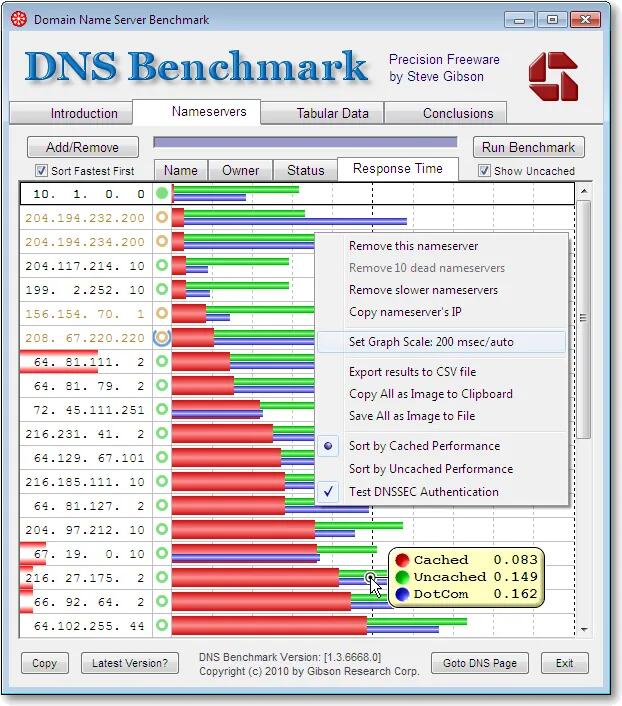
GRC's DNS Benchmark software is getting a new version after 15 years
Seems that v1, which is now 15 years old and nearly 10 million downloads, still gets downloaded over 1,000 times daily. But it has needed a fresh for a while now. IPv6 is here as well as encrypted DoH, DoT, DoQ, etc.
There is a roadmap published at the link below outlining what the planned new features look like. There will still be a free version with some new features, but there are also Plus and Pro versions that have a once-off fee, but do include all future updates.
Although it was (and still will e) written to work on Windows OS, it will be fully compatible to run under WINE on Linux.
So hopefully this will be available sometime later in 2025.
See https://www.grc.com/dns/benchmark.htm
#technology #DNS
HamClock provides real time space weather, radio propagation models, and other info useful to radio amateurs
This is a highly customisable application that draws in all sorts of technical information that can help radio amateurs. Each pane can be changed to show relevant information.
What I really like is the frequency / band projections to any specific DX location. One really has to read the manual, though, to get full use out of the app. For non-hams though, it is still a very interesting app, being able to show time and distance to any location, as well as weather conditions at those locations.
The app runs on Linux (your desktop, a Raspberry Pi, etc) and is accessed via your web browser (any OS). If it does not start properly, especially on a desktop, just make sure nothing else has already got that network port in use, e.g. in my case SyncThing was hogging it, and I moved SyncThing to port 8083. You can also start HamClock with a '-w port' to specify what web port it should use.
To exit the app, or look at diagnostics, etc, you can long-click for 3 seconds on the padlock symbol to get a pop-up actions menu.
See https://www.clearskyinstitute.com/ham/HamClock
#technology #hamradio #amateurradio

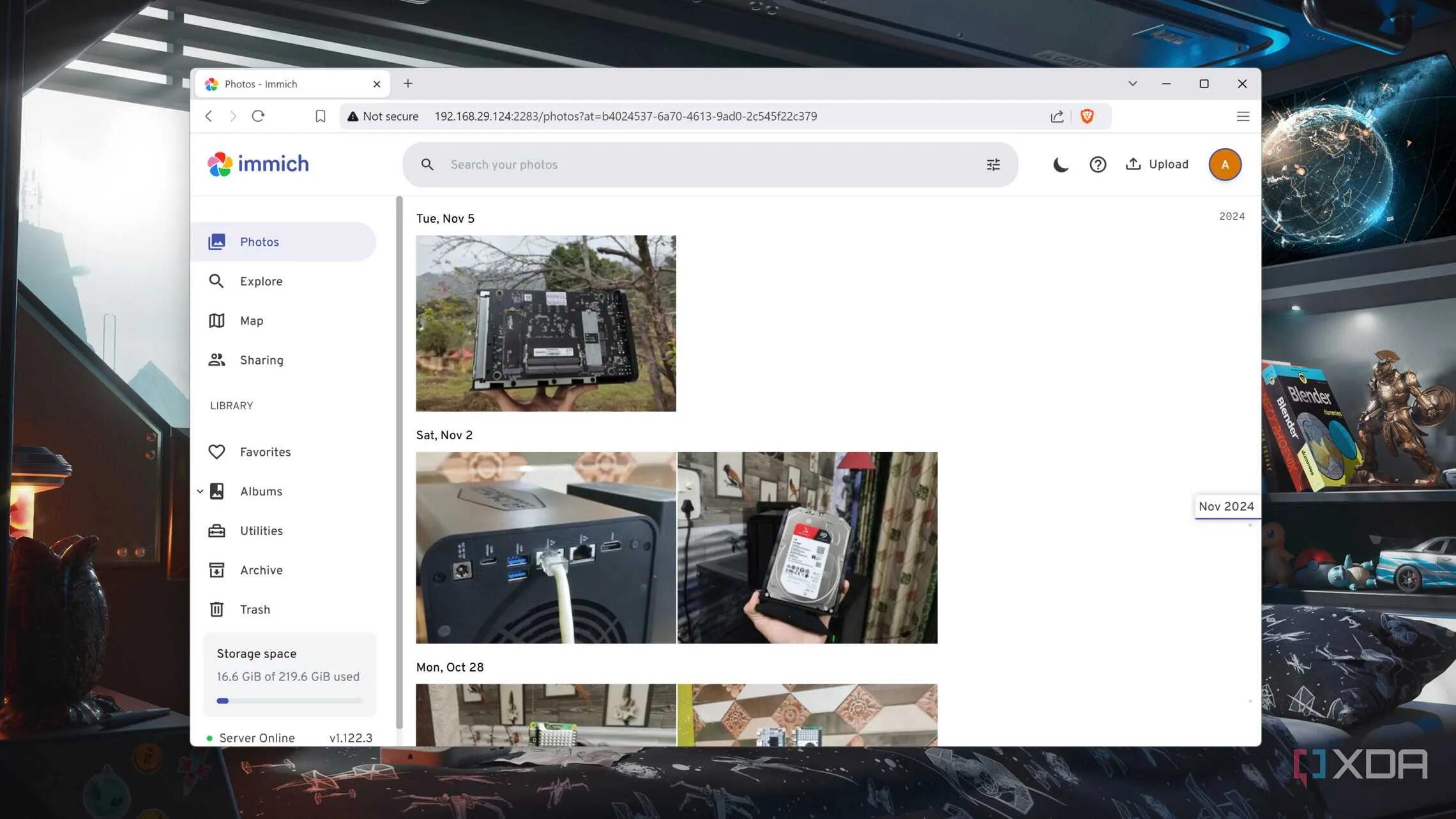
Here's how you can replace Google Photos with a self-hosted Immich server
Immich is really very good - I did a video about myself a few months ago, which shows what you can expect from it and what it looks like to use.
As the article mentions, it looks very much like Google Photos (the closest look alike I've seen), and it can even work from a Raspberry Pi on the home network (with an external drive connected).
Immich is certainly not some clunky looking out of date app. It is really well-designed and does much of what Google Photos does. Have a quick look at my video if you are in any doubt.
See https://www.xda-developers.com/heres-how-you-can-replace-google-photos-with-a-self-hosted-immich-server and my video about Immich at https://www.youtube.com/watch?v=dQqrVzgnf2E
#technology #selfhosted #opensource #photos
How to Install Arch Linux: A Beginner’s Practical Guide
Installing Arch Linux has always been a little more daunting for newer users. This is partly because it offers a little less wizard guidance, and also partly because you want to be super careful especially around what partitions to use or format, or which not to format.
I know this because the first few times I even installed Ubuntu, back in the day, my biggest concern always was which partition is which, and am I going to install over something I don't want to lose. I learnt later on to separate my home folder onto a different partition, and to use GParted or KParted to carefully note down exactly which partition was which, before I started.
But of course since I installed Manjaro Linux, I've never had to do another fresh installation again (basically one of the benefits that Arch Linux will give you too).
This guide actually shows you how to install Arch Linux in a virtual machine, which is probably an excellent way to try the installation out first, and will give confidence for the live installation later.
Remember too, with Arch Linux, you'll probably never be doing this ever again, so some effort and time is really worth it. Linux is not Windows, and I've even ported my existing drives across into a brand-new motherboard, and it has worked fine (remember to map your drives using their UUID's as that makes them pretty portable).
So why not Manjaro Linux or one of the other Arch Linux derivatives? They are friendlier and easier to install, they are intended to run on their stable editions. So if you are in the habit of wanting to run some more bleeding edge git versions from the AUR, you may find things break with those packages as they often don't find some dependencies they require. Arch typically runs most of those more bleeding edge packages, so dependencies are not such an issue.
Still, even if you install Arch Linux in a VM, it will make a great festive season project to play with! For some (many?) Linux users, becoming a full-time Arch Linux user is the pinnacle they want to reach.
You'll tell these users apart from others, as they may express crude disdain for Manjaro Linux and other Arch derivatives in the forums ;-). But even if you use Arch Linux, they may also state you should not be using it as a new user… That said, forums are all getting a lot more friendly and helpful today, and there are also lots of Arch Linux users from all experience levels. This is really not such an issue today as it was maybe 5 plus years ago. I'm just mentioning it as those stereotypes do still crop up, but there are really tons of assistance and posts online about solving all sorts of Arch Linux issues. I know, because I use them to solve any issues I encounter on Manjaro Linux too.
See https://linuxiac.com/arch-linux-install
#technology #opensource #linux

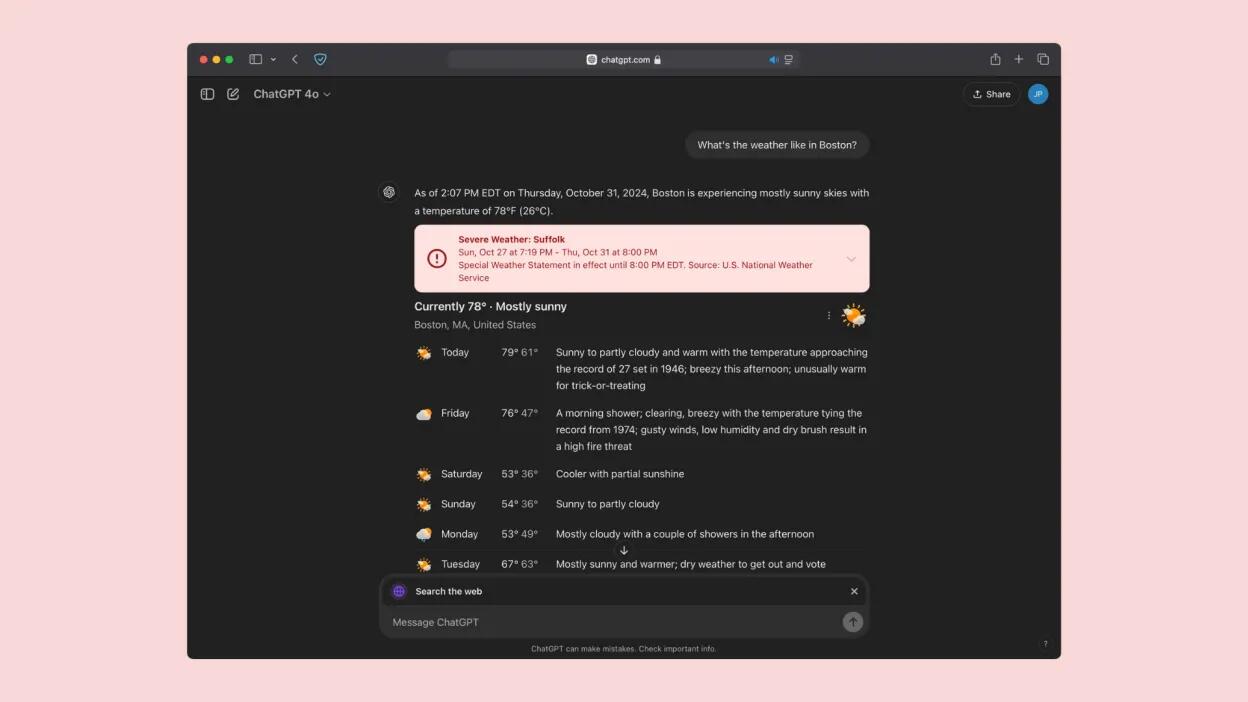
You Can Now Search the Internet With ChatGPT
ChatGPT search has been out now for about a month and a half, following a Halloween announcement from OpenAI. With this new feature, the company finally rolled out an official competitor to AI search engines like Perplexity, Google's AI Overviews, and Microsoft Bing (powered by Copilot).
OpenAI originally announced its search plans back in July, with a service called SearchGPT. While SearchGPT was a prototype and launched with a waitlist to try it, ChatGPT search took its place, with OpenAI rolling SearchGPT's main features into its new search feature. The feature originally launched to paid subscribers only, but now, all users can access it.
We all know that AI can hallucinate, so it is good to now have another good AI search tool that can be used for comparative purposes. Also, for those you actively avoided Google's tool, this will offer a more neutral alternative option.
See https://lifehacker.com/tech/openai-chatgpt-web-search-now-available and the web address for SearchGPT is https://chatgpt.com
#technology #search #AI
LOL yes it's a messy world today but one thing is for sure - you really can't trust anyone, not even one's own government any more.
Europe’s Starlink competitor is a go
290 IRIS² satellites by 2030 to provide secure connectivity to governmental users as well as private companies and European citizens. IRIS² is an acronym for Infrastructure for Resilience, Interconnectivity and Security by Satellite.
The bonuses will be that the service should be fully GDPR compliance, and the German Chancellor should not be spied upon again (https://www.reuters.com/world/europe/us-security-agency-spied-merkel-other-top-european-officials-through-danish-2021-05-30/).
In September, FCC chair Jessica Rosenworcel said she wanted to see more competition to Elon Musk’s Starlink, which has already launched some 7,000 satellites since 2018. “Our economy doesn’t benefit from monopolies... every communications market that has competition is strong, we see lower prices and more innovation, and honestly, space should be no exception.”
So, yes it is more than just about data sovereignty, it is quite true that more competition usually will also bring better pricing and services.
See https://www.theverge.com/2024/12/16/24322358/iris2-starlink-rival-europe-date-cost
#technology #satellites

Some Tips on How to Check if a Screenshot Has Been Photoshopped
Well, maybe they should not have given away how to easily fake a screenshot yourself, but still some useful tips to keep in mind. It helps to know what to zoom in on to look at.
I did not know about the Forensically app, which is a web based app that can analyse any image in depth and create heatmaps of stuff that’s been edited in.
See https://www.howtogeek.com/how-to-check-if-a-screenshot-has-been-photoshopped
#technology #scams #forensics

Usually though, Big Brother likes a closed standard? Remember how hard the US NSA fought to keep encryption in their hands, that was so they were the only Big Brother watching. But I understand this is an open standard, so anyone is free to make their own devices - the way it should be.
You're thinking of Israel's walkie-talkies I think? As far as I know, Israel is not involved in this. Just China and possibly Japan. But any other country could also make a remote control to comply to the standard. But if India and China were to have adopted it, that is like 75% of the world then.
Star Flash is a universal remote control standard because we have too many proprietary remote controls
Too often you have a TV or device where the remote has been lost or broken and there is no easy replacement, or you end up having 5 or 6 different remote controls on the sitting room table. Why, when we have been standardising on USB chargers for many years now?
This is not about having a universal remote control like Harmony used to make (see it is an old problem), but rather having a standard work across the devices that need to be controlled by a single universal remote control.
The standard requires remote controls to allow voice control, and to use one of three means of wireless comms: Bluetooth, infra-red, and Star Flash. This standard reportedly detects which device a user wants to control, makes the connection, and eases the chore of directing a stream from a set-top box to a display.
Device-makers have been told that televisions and set-top boxes must support the standard, and they've quickly complied: local media report that Chinese consumer electronics outfit Konka has already delivered the first Smart TV capable of handling the universal remote.
Sometimes a simple idea can make a massive difference to consumers, and this one has been needed a long time ago already.
See https://www.theregister.com/2024/12/16/china_starflash_universal_remotes_standard
#technology #openstandards #remotecontrol

Seafile is an enterprise-ready free and open source alternative to DropBox or NextCloud for file syncing and sharing
Seafile provides very fast file syncing. Tens of thousands of small files can be synced in a minute. It does what it does very well, without including an entire kitchen sync of extras. Seafile's built-in collaborative document, SeaDoc, make it easy for collaborative writing and publishing documents.
Seafile keeps versions for files and snapshots for folders. Users can restore a file or folder to an old version easily. Snapshot for folders is a handy way to protect files against ransomware. Using de-duplication technology, file versions are kept in an efficient way with reduced storage occupation.
Seafile supports online editing and co-authoring for office files (including docx/pptx/xlsx) with integrating with Microsoft Office Online Server, OnlyOffice, or Collabora Online server. Seafile also has a built-in preview for videos, audios, PDFs, images and text files.
Seafile supports client-side end-to-end encryption to protect your data, which is a unique feature that you can rarely find in other solutions.
Seafile WebDAV interface can be used to integrate Seafile with many mobile apps, like Documents, GoodReader, allowing them to access files.
This performance is also partly due to its file system not storing plain text format files. Which is one reason why it is much faster than NextCloud.
It is fully cross-platform for Windows, Linux, Mac, Android, and iOS clients. On the server side, it will run on Linux or Raspberry Pi.
The Community Edition is fully open source. There is also a paid Enterprise addition that has some additional functionality, but the good news is that for up to 3 users the Professional Edition is actually free of charge (requires registration though).
#technology #opensource #selfhosting #filesync


Your brain can grow from reading and learning - e-books offer the same benefit as paper books
The number of people who read for fun appears to be steadily dropping. Fifty percent of UK adults say they don’t read regularly (up from 42 percent in 2015) and almost one in four young people aged 16 to 24 say they’ve never been readers, according to research by The Reading Agency.
Two regions in the left hemisphere of the brain, which are crucial for language, are different in people who are good at reading and are likely to be shaped by the habit.
Clearly, brain structure can tell us a lot about reading skills. Importantly, though, the brain is malleable—it changes when we learn a new skill or practice an already acquired one. Reading is likely to shape the structure of the left Heschl’s gyrus and temporal pole. So, if you want to keep your Heschl’s thick and thriving, pick up a good book and start reading.
Reading is the same whether you read an e-book or a paper book. The big difference is e-books are generally a lot more accessible, are cheaper, take up less space, and usually have some form of dictionary for quick word lookups.
There is really no excuse not to read: Books are freely available in libraries, many classics are in the public domain, and there are very diverse topics to cover ever possible interest type. Time though is typically the excuse most give, but this is also not very true, if you consider carefully what a 24-hour day looks like. I set aside 30 mins, when going to bed at night, to read. It also has the added bonus of relaxing the mind and readying it for sleep.
See https://www.wired.com/story/good-at-reading-your-brain-may-be-structured-differently
#technology #ebooks #reading #health

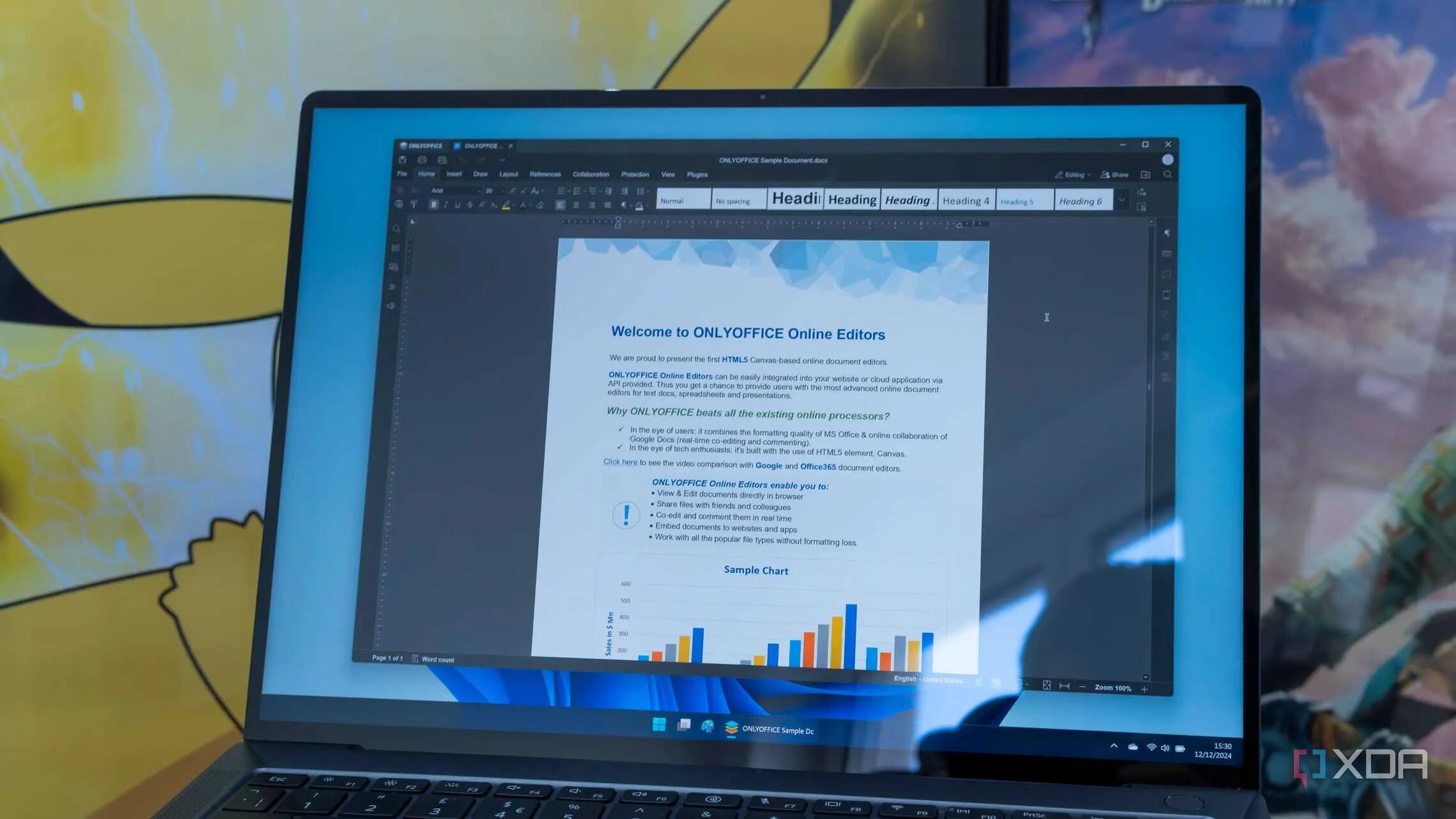
6 reasons why OnlyOffice is a great Microsoft Office alternative
OnlyOffice is a suite that is available as a paid enterprise version for broad deployments, but also works completely for free on desktop and mobile operating systems. It is fully cross-platform including Linux.
While it's not exactly the same, the OnlyOffice UI is very close to what Microsoft offers with its own Office suite. There's a ribbon-style UI and all the tabs are very similar, with the same options generally being available in each tab and presented in a very similar way, too.
Another great thing about OnlyOffice is that it includes some PDF tools that you can use for free, too. Essentially, this allows you to create easily fillable PDF forms, which you can send to people when you need to collect some kind of information from them.
There is also online collaboration and an OnlyOffice account is available for free with 2GB of cloud storage.
What I do like about the cross-platform support is that you can use and be familiar with one tool across all your operating systems.
Another plus is, apart from full Microsoft DOCX compatibility and some other formats as well, it also supports the open standards ODF format.
It is free to use for non-enterprise users, but is not open source.
See https://www.xda-developers.com/reasons-onlyoffice-great-microsoft-office-alternative
#technology #alternativesto #officesuite #crossplatform
Why a Chest Strap Is the Best Way to Track Your Heart Rate During Exercise
I knew that a chest strap was going to be more accurate than any watch based tracker, but I was not aware that a Coospo H808S chest strap heart rate monitor (quite a bit cheaper than the Polar H10 chest strap I'm using) can also connect to various third-party fitness apps like Polar, Wahoo, Endomondo, UA Run, Garmin, Peloton and more (seemingly via its own CoospoRide app).
This chest strap does basically what the H10 does, and is also waterproof, and has Wireless HRM Dual Mode Connection like the H10.
I'm very happy with the Polar H10, but I'm due to replace the strap soon, and they are not exactly cheap (in South Africa anyway). For me, it looks the Polar strap will need replacing every 14 or 15 months.
See https://lifehacker.com/why-a-chest-strap-in-the-best-way-to-track-heart-rate-while-exercising
#technology #health #hheartrate


Yes I see under my tips at https://gadgeteer.co.za/hamradio/meshtastic-in-south-africa/#htoc-general-tips it mentions another one was for WiFi (on the Lite model anyway). Lifecycle for those PIX connectors is about 30 cycles only.