

Only CLI software officially, we are adding GUI support ourselves next update. Technically other OSes like Windows 11 or better suitable Linux distributions can be run too but the feature currently only uses Debian.

Android's own Terminal app, not a third party app. Termux doesn't do virtual machines.
With the development branch of #GrapheneOS, we've already successfully already tested Chrome running on top of Wayland with GPU acceleration working via ANGLE on the host. You'll be able to have a GPU accelerated virtual desktop OS that's usable via DisplayPort alternate mode.

Will instead be a couple days as team still wants to fix the VPN support, whichever is earlier.
Yes. You need to both enable the Terminal app in developer options and install the (currently) Debian image for the VM to use this feature. There's no functionality otherwise.

Anyone with a phone running Android 15 and sufficient data available will have a Linux terminal at their fingertips.
What are you thinking?
A dev environment?
Hosting websites?
Easy onion services?
Sparrow-server? nostr:npub1hea99yd4xt5tjx8jmjvpfz2g5v7nurdqw7ydwst0ww6vw520prnq6fg9v2
A pruned bitcoin node? #RaspiBlitz
Just need a few weeks free to play around 😅
(also it crashes on GrapheneOS so far, but a fix is underway)
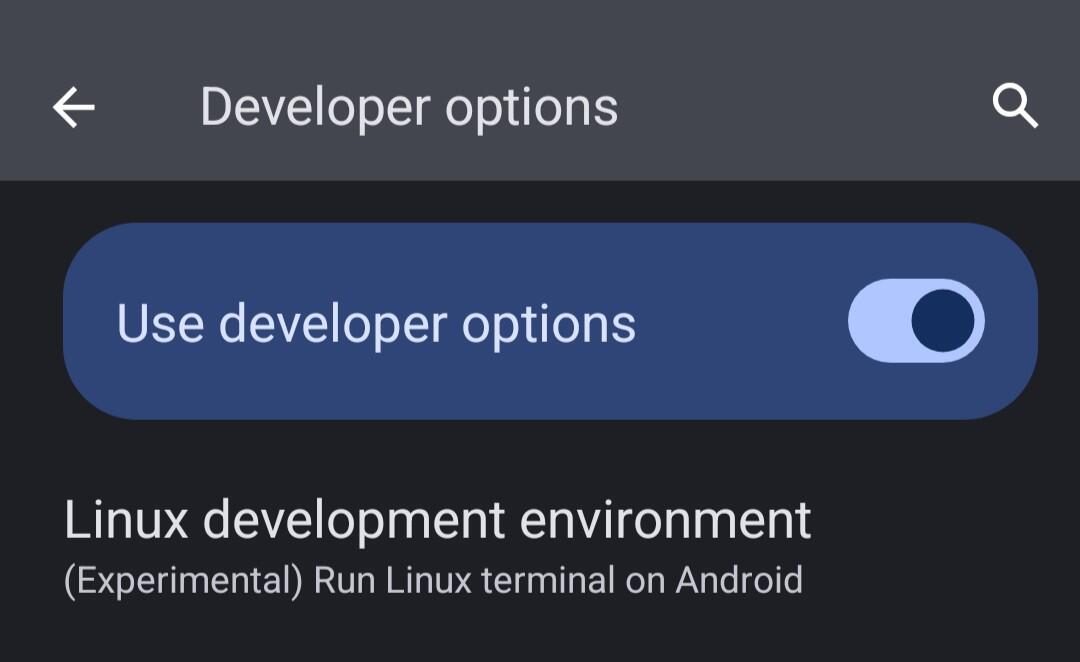
Version that fixed crashes is available in the Beta channel. We advise users to treat the VMs as temporary as we plan to heavily change and improve the feature and there may still be upstream bugs or backwards-incompatible updates as this is a developer option and not a production feature.
Our 2025030900 release currently in the Beta channel is the first one with support for managing hardware-based virtual machines via the Terminal app in Android 15 QPR2. Since then, we've backported massive improvements to the feature for an upcoming new release, maybe even today.
Backports include terminal tabs, GUI support with opt-in GPU hardware acceleration (ANGLE-based VirGL until GPU virtualization support is available), speaker/microphone support and fixes for a bunch of bugs including overly aggressive timeouts. We're working on VPN compatibility.
At the moment, the Terminal app isn't compatible with having a VPN in the Owner user. It only works if VPN lockdown (leak blocking) is disabled and the VPN allows local traffic to pass through. It's also not clear how it SHOULD interact with a VPN since VPNs are profile-specific. #GrapheneOS
5G has less insecure authentication and encryption (still absolutely terrible) but 4G is simpler and has less attack surface. 4G is better if talking about avoiding remote exploitation of the operating system. There's tradeoffs to each and one is not objectively better overall and only in certain needs.
4G / LTE only mode existed in GrapheneOS for a while for attack surface reduction to cut attack surface from 2G, 3G and 5G but now 5G only is also available now too. If your carrier doesn't support VoLTE then calls won't work.
People with high risk threats shouldnt use the mobile network if they can help it and stick to WiFi. Use Airplane Mode and keep WiFi on if you're on WiFi as most modern carriers still let you call and text through WiFi calling / VoWiFi anyway.

I have a device with a SIM for anything that requires it, but my daily devices are WiFi-only (Airplane mode and no SIM). If I have a SIM then I still only use WiFi calling.
I know that's harder for people to live with in some other places though.
#GrapheneOS version 2025030900 released.
This release adds support for the experimental virtual machine management app introduced in Android 15 QPR2. It currently only provides support for managing a single VM and interacting with it via a WebView-based terminal. Android is in the process of adding support for graphics and GPU acceleration for a future release. For now, it's only available in developer options due to being highly experimental. We don't recommend using developer options on a production device, but you can temporarily enable it to turn on this feature and turn them back off without it being disabled like most developer options. The data inside it should currently be treated as disposable rather than relying on it not losing it from a bug or a backwards incompatible update. We plan to support choosing other guest operating systems beyond the Debian-based image provided by Android along with taking far more advantage of the virtualization infrastructure.
For our next release after 2025030800, we've added support for the Android 15 QPR2 Terminal for running other operating systems using hardware virtualization. It's currently only a terminal but Android is adding support for graphics and GPU acceleration for a future release.
Android has a greatly overhauled desktop mode on the way to replace the current primitive proof of concept in developer options. 6th gen Pixels added hardware-based virtualization support and 8th gen Pixels added USB-C DisplayPort alternate mode. It will all come together soon.
Overhauled desktop mode is already partially shipped as a disabled-by-default feature. Android enables some of it for the Pixel Tablet already but not Pixel phones. We plan to enable the same feature flags for phones too. Either way, it's an experimental developer option for now.
Beyond using a phone or tablet as a desktop by connecting a display, keyboard, mouse, etc. to the USB-C port, we want to eventually have support for #GrapheneOS on laptops. There's currently no laptop close to meeting the hardware requirements we cover at https://grapheneos.org/faq#future-devices.
On Pixels, virtualization implemented based on pKVM (see https://source.android.com/docs/core/virtualization/security for how it's different from KVM) and CrosVM from extended with Android specific code. CrosVM is written in Rust so it fits in well with Android using Rust for new or rewritten low-level components.

Work towards implementing this will be done after the Android 15 QPR2 port is complete.
There's also an old POC desktop mode in developer options but it's very limited, there's a far better one hidden behind feature flags.
Having a desktop mode with support for using these VMs is paramount.

Have been waiting on this for a while. Once GrapheneOS make this feature compatible with hardening features (a high priority) it will be on GrapheneOS too. We want to support other operating systems including other Linux distros or Windows 11 and running nested GrapheneOS VMs as well.
Some users upgrading to Android 15 QPR2 in the stock OS or #GrapheneOS may come across a rare fingerprint reader bug, here is a workaround to fix the issue.

It's an upstream bug from Android 15 QPR2 and the stock Pixel OS as well. We've put a guide here about that if people experience it.
#GrapheneOS releases based on Android 15 QPR2 is available now, will refrain from mirroring changelogs because there's always a lot of releases during this period due to fixing upstream bugs, would be better when everything is done.
All of the supported devices are now using the Linux 6.1 LTS branch kernel so the 5.10 and 5.15 branches are retired for GrapheneOS. 6.6 continues to be used for microdroid virtual machines on devices and for emulator builds, which will likely move to 6.12 this year.

If you make a search on that search engine in Vanadium, it will get added to the search engines list providing it supports OpenSearch (all major search engines do)
Use 80% battery charge limit on #GrapheneOS but see it's going to 100%? That's just battery percentage recalibration and is intentional.

You don't need it, those posts are outdated.
See the usage guide: https://grapheneos.org/usage#esim-support