
How do I switch my existent Amethyst account (private keys in app) to Amber login?
Discussion
Just install Amber, log off from Amethyst and click log in using Amber on Amethyst

Make a flowchart drawing of it.

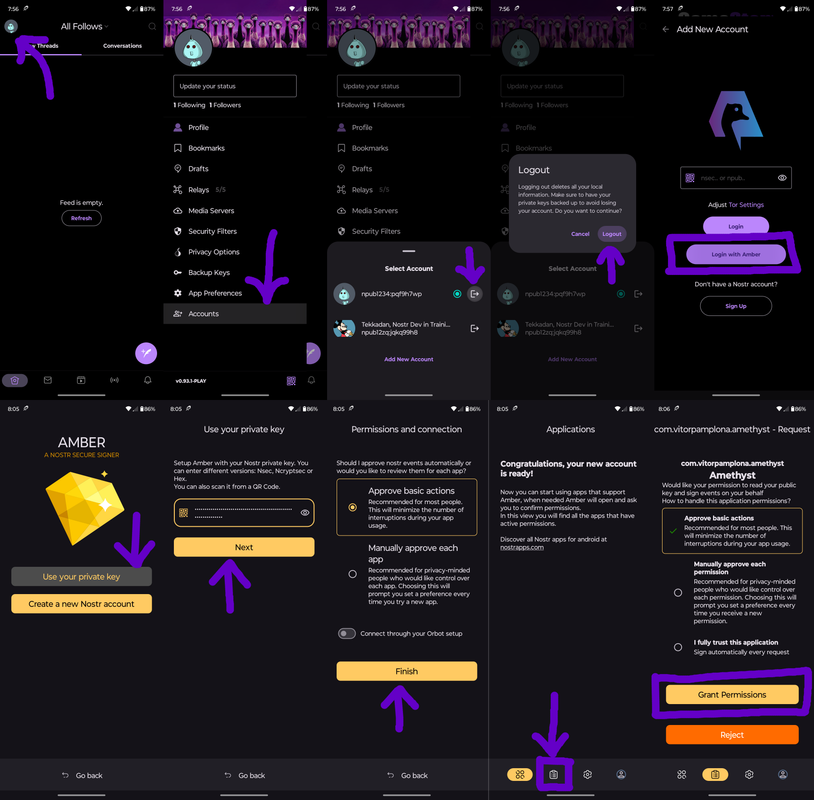
That's very cool! We should do more of this :)
No problem. This chart doesn't account for users who have ONLY secured their keys in amethyst (if they created their nsec in the app.) Logging out might lead to a lost nsec if they don't realize their keys exist here.
Let me know if there are any other specific app flows you'd like me to create. I can certainly make them more standardized, this is just quick.
Thank you for the work.
I truly meant that because I often have to talk to people who know nothing about digital interactions.
Hence why I think people who are going around convincing the average citizens to get started with a lightning wallet and using it in their lives in their own communities are doing a great amount of good helping Nostr growth.
It's an honor to help. Nostr means the world to me.
The secret key is still present in Amethyst. How to delete it within the app, so that Amber has to sign the events? Or do I get it wrong how the Amber-Amethyst combo works?
If you log off from Amethyst the secret is deleted from our database. Then when login in make sure to choose the Amber option. That should not pass the nsec to Amethyst.
I've done this and wondered that the secret is still there. Amber was working. It decrypted all my DMs. But, I'll try again, maybe lve done something wrong. Maybe Ive also have to log out from all other accounts'
We delete the secret on log out. So, it should not be there anymore. But feel free to go to the Settings of the Phone / Apps / Amethyst and hit clear storage AND clear cache to make sure nothing is there.
It will delete ALL of your accounts though :(
I had to lock off from all accounts, then Amber came into full play after log in with Amber. Seems that the nsec part of the database is not deleted as long as other accounts are still open.