1. Make sure that SQLite is installed on the remote VM, and that the database file is accessible (e.g., in a shared directory).
2. Ensure that the VM is configured to allow incoming connections on the appropriate port (default is 1234).
3. Launch DBvear and create a new SQLite connection.
4. In the general tab, enter a name and specify the database file location in the "Database" field. If the database file is located on the remote VM, you'll need to provide the full path to the file on the VM.
5. In the "Driver properties" tab, specify the JDBC driver for SQLite.
6. In the connection setting tab, enter the IP address or hostname of the remote VM in tje "Host" field. If the database is accessible over a specific port, enter the port number. Also, enter the username and password for the VM if required.
7. Save and test ;)
ok let me check tonight once i'm back and I'll let you know if it works! thanks for coming back with a suggestion.. I'll check the port connection as well..
Thread collapsed
I just can't see the same creen you are referring to for points 4 onwards..
If I click in connection details I also don't go to what point 6 refers to
Any idea?
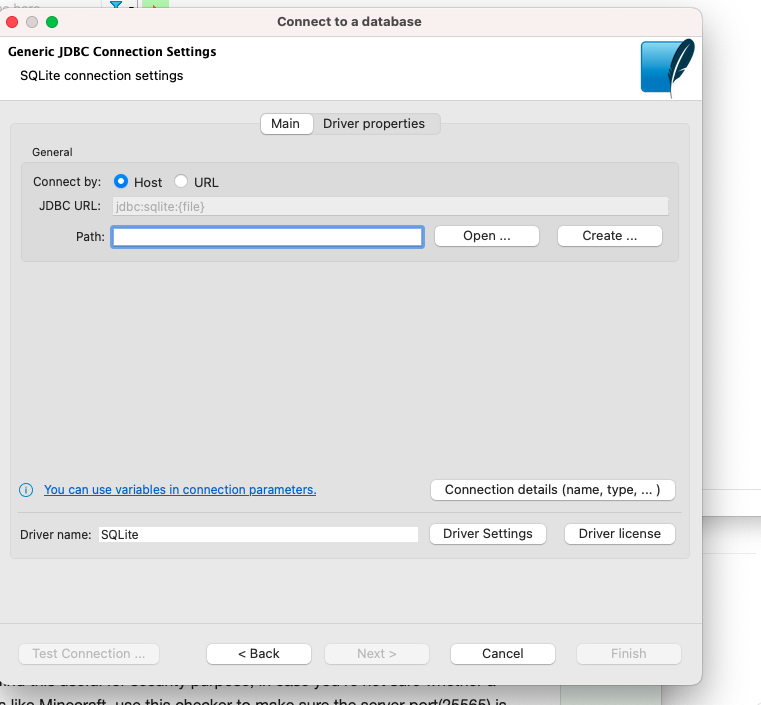
I think you can continue from point 6 on image
Thread collapsed
Thread collapsed

