
What do I input as the invite code to test out push notifications? I'm getting "invalid serverkey" or "server must contain valid P-256 public key".
I also still have not been able to get login on ios to work with nsecApp 🤔
⛴️ New Flotilla release: 1.2.0
This release introduces push notification support on web, android, and ios — this was the last big item to check off before considering Flotilla "normie friendly!"
A lot of the work this release went into refining https://github.com/coracle-social/anchor with support for push notifications. Anchor is sort of a Frankenstein of an application, but might be of interest for anyone hoping to add push notification support to their nostr app — just update the .env file with your FCM and APN details and it should "just work". A NIP that describes the data flow is in review here: https://github.com/nostr-protocol/nips/pull/1796
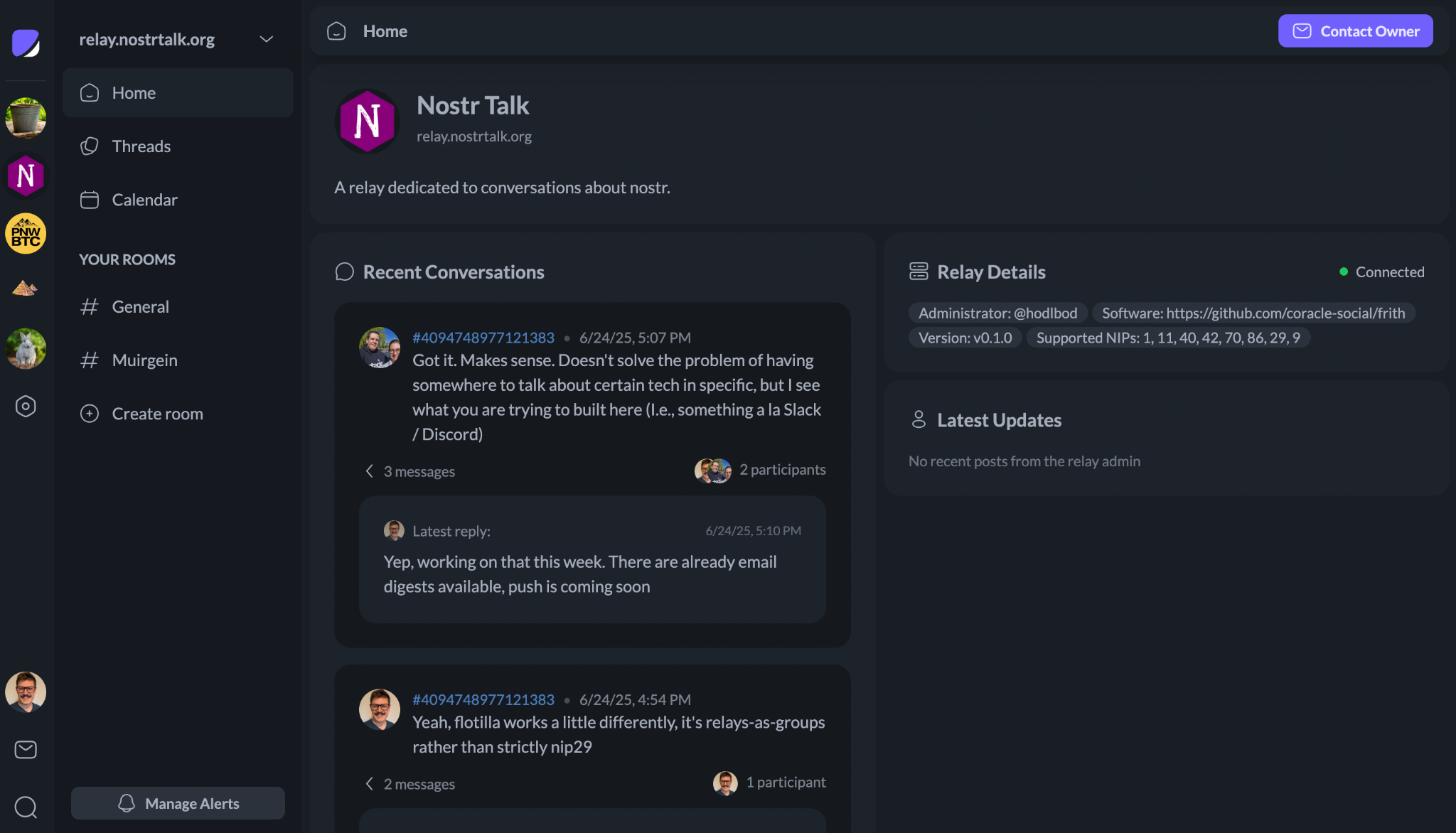
Also in this release is a new space dashboard, complete with a quick summary of recent conversations — hopefully this works to sidestep Slack's "Threads" tab monstrosity of a design pattern.
Full changelog below:
* Fix sort order of thread comments
* Fix link display when no title is available
* Fix making profiles non-protected
* Replace bunker url with relay claims for notifier auth
* Add push notifications on all platforms
* Add "mark all as read" on desktop
* Re-design space dashboard
Next up: zaps, better member lists, and of course lots of usability testing.
What do I input as the invite code to test out push notifications? I'm getting "invalid serverkey" or "server must contain valid P-256 public key".
I also still have not been able to get login on ios to work with nsecApp 🤔
Anyone figure out push notifications in Flotilla yet? nostr:nprofile1qqsf03c2gsmx5ef4c9zmxvlew04gdh7u94afnknp33qvv3c94kvwxgsppemhxue69uhkummn9ekx7mp0qy2hwumn8ghj7un9d3shjtnyv9kh2uewd9hj73yn3f8 still buggy for me 😭
Is this iOS? I had the APN push server misconfigured, give it another try. Sorry for the slow response, pretty swamped right now!
Oh cool! I'll try again 🙂
Getting different error codes this time.
desktop: InvalidAccessError: Failed to execute 'subscribe' on 'PushManager': The provided applicationServerKey is not valid.
iOS app: Still can't login via NsecApp.
iOS via KeyChat: Error: Service Worker not supported
Which desktop browser? I can't replicate the key error on Chrome, FF, or Safari. The provided key should be valid. Can you run `console.log(VAPID_PUBLIC_KEY)` in the devtools?
On iOS, signing is inherently tricky. Apple doesn't like PWAs, which is what nsec.app is, so your best bet is probably going to be a remote signer. Can you log in with nsec.app from a different device?
On keychat, I can't help you there, it looks like the browser they build in doesn't have service worker/push manager support. nostr:nprofile1qy2hwumn8ghj7un9d3shjtnyv9kh2uewd9hj7qgwwaehxw309ahx7uewd3hkctcpr9mhxue69uhhyetvv9ujuumwdae8gtnnda3kjctv9uq3wamnwvaz7tmjv4kxz7fwdehhxarj9e3xzmny9uq36amnwvaz7tmwdaehgu3wvf5hgcm0d9hx2u3wwdhkx6tpdshsqg9mly364yjxqe0c33qv0kdlv8xvcrlnlnlsvk5vktl5e7akyzy0rcd9whra?
I was using Chrome. Will try this again tonight.
NsecApp has been very buggy for me the past few months so I'm probably just going to move away from it altogether and uograde to remote signers. I'll try from another device though and see if that helps.
So I'm not sure how to access devtools in the desktop browser. But, I was able to use NsecApp from the desktop to log into Flotilla iOS app and was able to complete the push notifications setup there for mobile 😁
Gotta test with some activity but making progress 🦾
