
Fork Smarter, Not Harder: CKB's Forking Philosophy Explained
1/ In most blockchains, hardforks often imply discontinuity, where:
😕 Users risk losing access to assets.
🤨 Developers are forced to upgrade—like it or not.
CKB takes a different approach: it decouples upgradeability from forced consensus.
🔐 Assets remain safe during upgrades.
⛓️ Users aren't forced to adopt new protocols.
Here's how it works:
2/ Protocol-Level Flexibility: Fork Without Split
CKB is built on the UTXO Cell model, where each user's assets are stored in the discrete Cells—each with its own versioned Lock Script.
After a hardfork, each Cell continues to use the VM version it was deployed with, where:
- Existing Cells remain on the old VM version.
- Users are not forced to upgrade the Scripts.
- They opt in new features — if and when they want to.
This is made possible by introducing multiple hash_type variants (type, data, data1, data2, ...), each pointing to a different version of the code.
🤝 Multiple versions of Scripts and VMs coexist on the same chain.
⛓️ Upgrades won't split the network.
🔐 Users keep full control over both the assets, and the rules that govern them as well.
3/ Why It Matters 💡
Most chains treat a hardfork as a reset — override old logic and force everyone to upgrade.
CKB avoids this.
Multiple versions run side by side on the same chain. This eliminates the tension between network evolution and asset preservation.
4/ Script-Level Upgrade Workflow: Type ID + Lock Script
CKB provides Type ID + Lock Script model for managing script upgrades:
1️⃣ Initial Deployment: A Script developer deploys Scripts with upgrade plans in mind: Using Type ID to assign a stable identity but allows future updates.
2️⃣ Iterative Upgrade: Fix bugs, add new features, and change rules—the deployed code may undergo several upgrades using Type ID.
3️⃣ Code Freezing: At any point, one can freeze the code by modifying the Lock Script to be immutable.
5/ Script Developer & dApp Developer: Separate Roles
CKB separates two responsibilities:
- Script Developers: Deploy the Script and decide if it is upgradeable, via Type ID + Lock Script.
- dApp Developers: Choose how to reference a Script in their applications—fixed or upgradable.
Their options:
🔹Reference by type hash → Auto-follow the latest upgrades
🔹Reference by data / data1 / data2 hash → Stay fixed to the trusted version, ignoring the new one
Either way, dApp devs don't need to fear upstream changes breaking their logic or being kicked out of the network.
6/
This separation enables:
- Reusable Scripts across multiple dApps
- Opt-in upgrades — no forced coordination
- Long-term stability where needed, flexibility where desired
7/ Example: UDT Script Upgrade
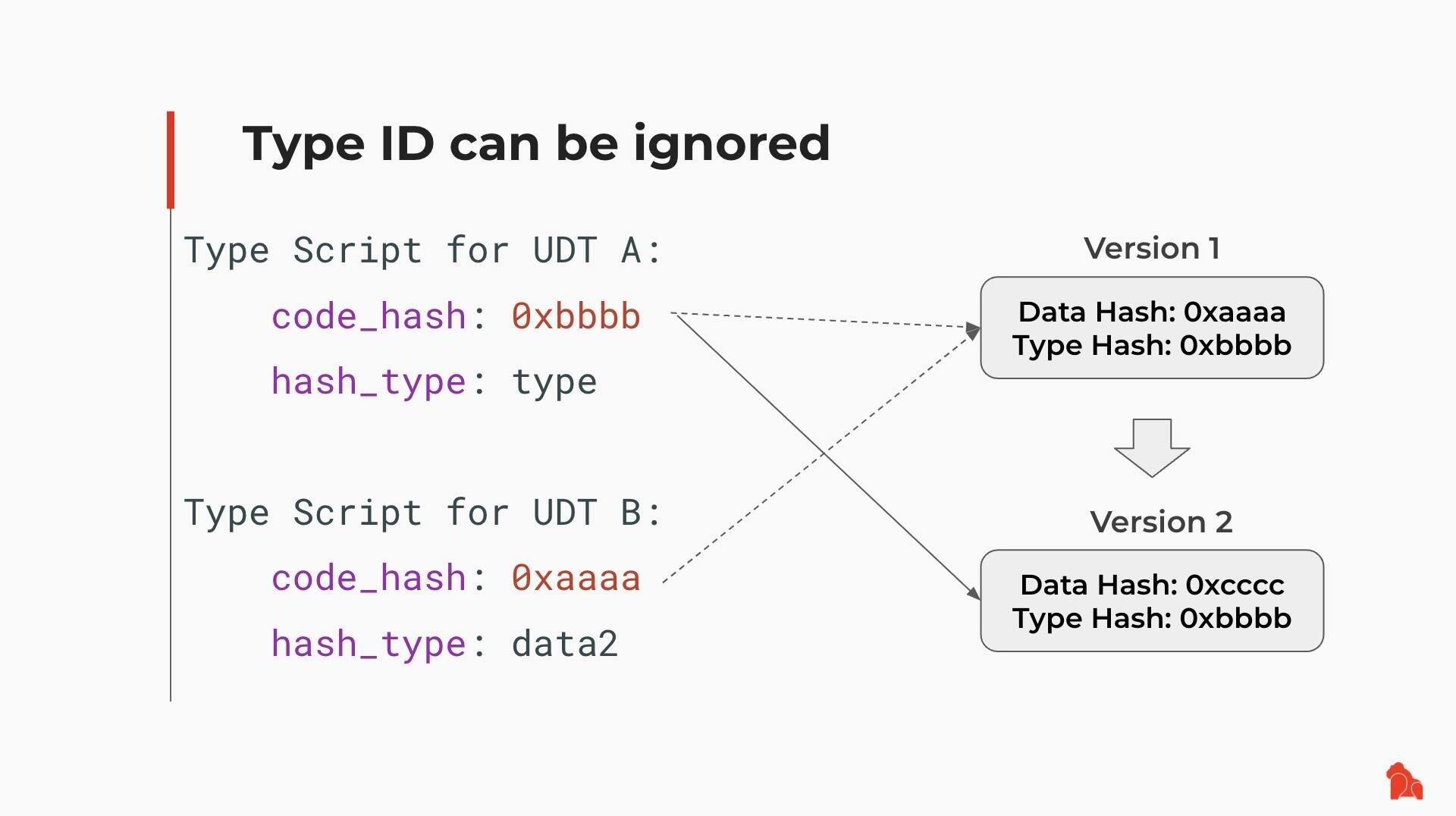
Suppose someone deployed a UDT (User-Defined Token) Script using Type ID and created two tokens:
- UDT A uses type as hash_type
- UDT B uses data2 as hash_type
Later, the UDT Script is upgraded from Version 1 to Version 2:
- UDT A automatically adopts Version 2
- UDT B keeps running on Version 1
8/
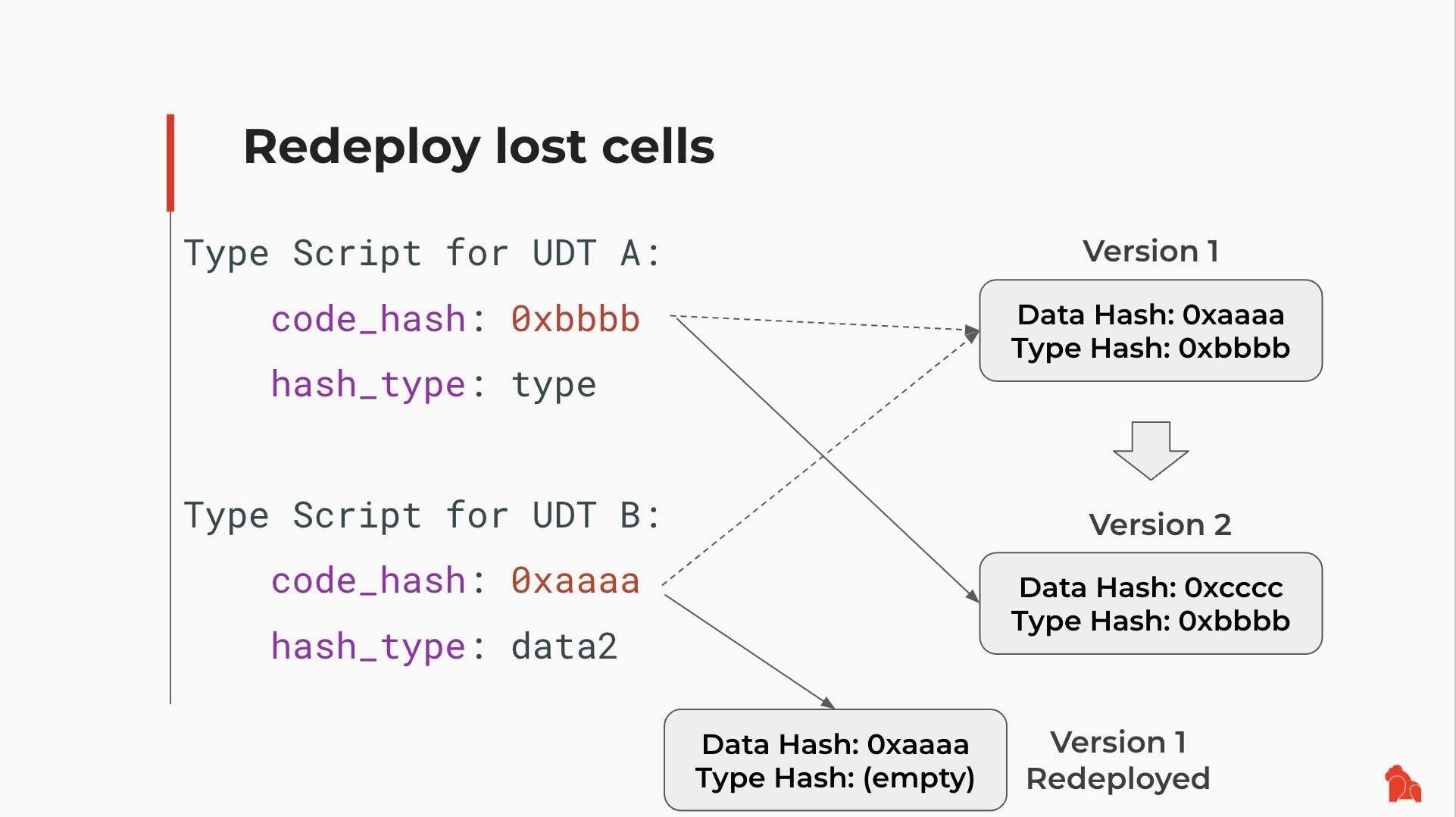
Even if Version 1 is no longer present in a live Cell, it's not lost.
You can retrieve it from chain history, redeploy it, and use it again.
Old logic remains accessible—by design.
9/ A Better Forking Philosophy
CKB doesn't follow the rigid "hard vs. soft forks" binary. Instead, it offers:
✅ User autonomy
✅ Developer control
Assets stay protected.
Scripts remain stable—or upgradeable.
No one is forced to choose between safety and progress.
It's a better way to fork. And it works.
10/ Reference Links
Rethinking Forks: The Philosophy Behind CKB's Network Upgrade Design: https://docs.nervos.org/docs/history-and-hard-forks/rethinking-forks
Recommended Workflow for Script Upgrades: https://docs.nervos.org/docs/script/script-upgrade-workflow
How CKB Turns User Defined Cryptos Into First-Class Assets: https://blog.cryptape.com/how-ckb-turns-user-defined-cryptos-into-first-class-assets
CKB, Version Control and Blockchain Evolution: https://talk.nervos.org/t/ckb-version-control-and-blockchain-evolution/4819
CKB VM Version Selection: https://github.com/nervosnetwork/rfcs/blob/master/rfcs/0032-ckb-vm-version-selection/0032-ckb-vm-version-selection.md