Question about #grapheneos :
Does the camera include metadata in pictures? I'm on a pixel 7a, of that matters.
I'm looking up how to see metadata now, but figured this community might know.
Question about #grapheneos :
Does the camera include metadata in pictures? I'm on a pixel 7a, of that matters.
I'm looking up how to see metadata now, but figured this community might know.
I don't use graphene, but you can use tools like ScrambledExif or FFShare to strip metadata before sharing pictures
Ah, good to know!
Haven't tested FFShare yet, but I have been used ScrambledExif for quite a while. It's relatively convenient, when sharing a picture you first choose ScrambledExif in the share dialog. Then it will pop up again and you choose the app you actually want to share to. The image gets piped through and all metadata is removed, so it's just one more tap.
If it's about nostr only, some providers like nostr.build will also remove metadata automatically
Someone just told me metadata includes GPS coordinates - is this true?
Depends on the camera. Chances on a smartphone: 100%
The GPS is built in.
JPG metadata is called Exif (hence ScrambledExif)
Google some exif info tool (don't have a concrete recommendation), upload a photo from your phone and check what it gives you.
Camera model, shutter length, iso, location is common stuff
If you set remove exif data, it removes it after saving.
Okay this is good. Hopefully I can find that setting
Camera/Quick settings (top left corner)/More settings/Fifth from top in general settings for me.
Hope it helps, cheers!
I haven't been able to replicate this path... Im too retarded... But it does say the camera doesn't have permission to access location
If you remove the data on save, it will prevent you from e.g. seeing your photos on a map in your photo organiser software. These apps read the data, too.
Just saying - depending on your use case you might want to keep the data for yourself
Also I've been trying to zap you but it's not working
Now? I received a zap though, but without a notification.
if it's jpeg on linux you can see it in the image viewer but you can also see them in Gimp on windows, and there is probably plenty of exif readers on windows you can use to see
whether it does or not depends on the actual camera app... i believe that there has been ones made that you can configure this
I'm about to switch fully to Linux - just waiting on one more part to arrive because its a bigger project and I like doing these things as a single unit - so I'm looking forward to having greater control and access to info that using Linux entails. I've played around with files a little when I was doing my "survival Tails boot drive" project - definitely more you can do in Linux. Anyways...
I *think* I had a false alarm with the metadata. My camera has no permission to access location and there's no location in the image details.
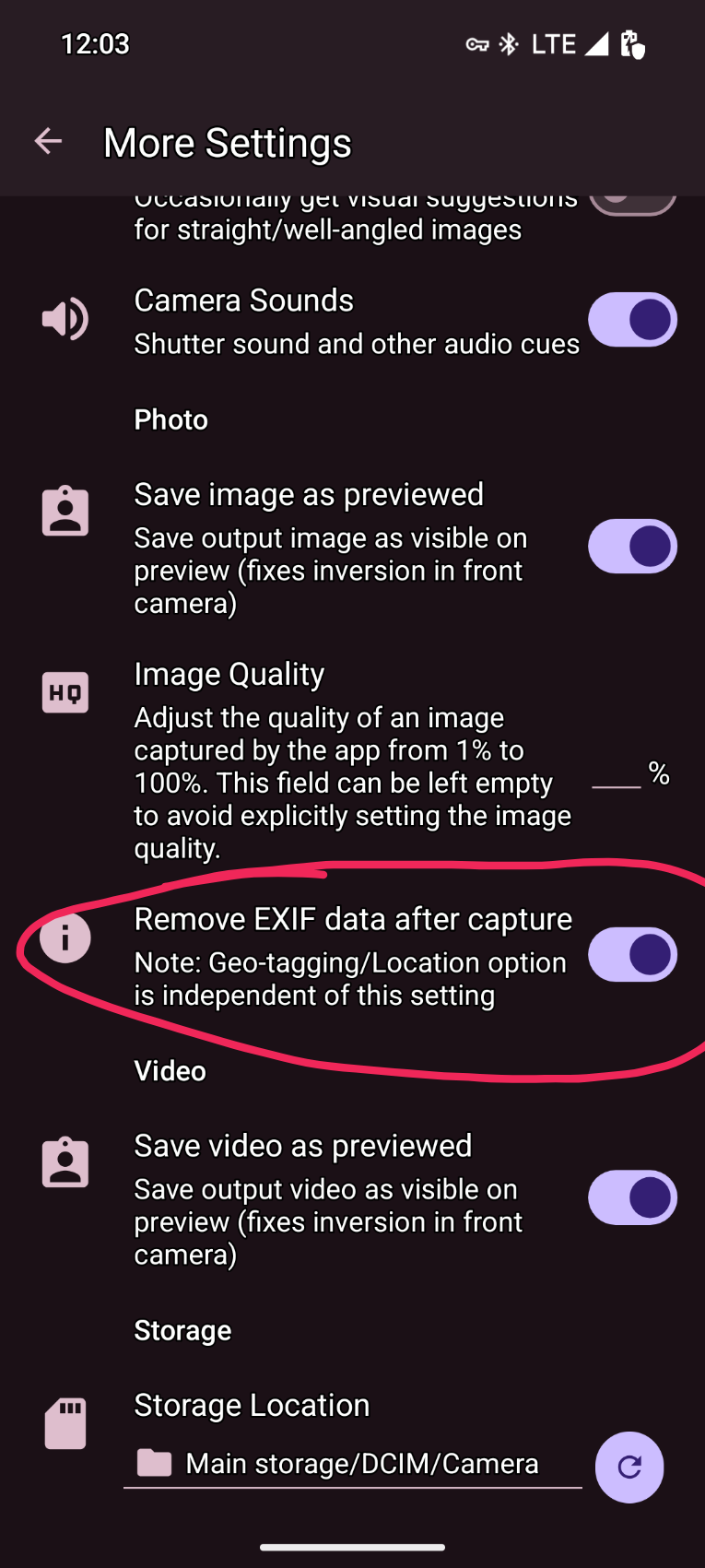
How did you get to that menu?
Anyways, it looks like the metadata saved in my pics is just photo dimensions and date. I was getting worried because someone told me GPS coordinates is in metadata - but my camera doesn't have location permission and I font see a location in pic details
You need to enable location tagging yourself (location icon in quick settings) and have location permissions granted and location turned on in the OS all at the same time. This is never a default setting. I do notice iPhone users have this setting on more often then they realise though.