
It used to be easy to make Multiboot USB Linux devices. It has since become a mess. I found a great tool that simplifies this process and it here here:
https://www.ventoy.net/en/index.html

What's really nice is that once you have the usb flash drive prepped you can drag and drop your live iso linux into the usb drive directory (folder for Windows people).
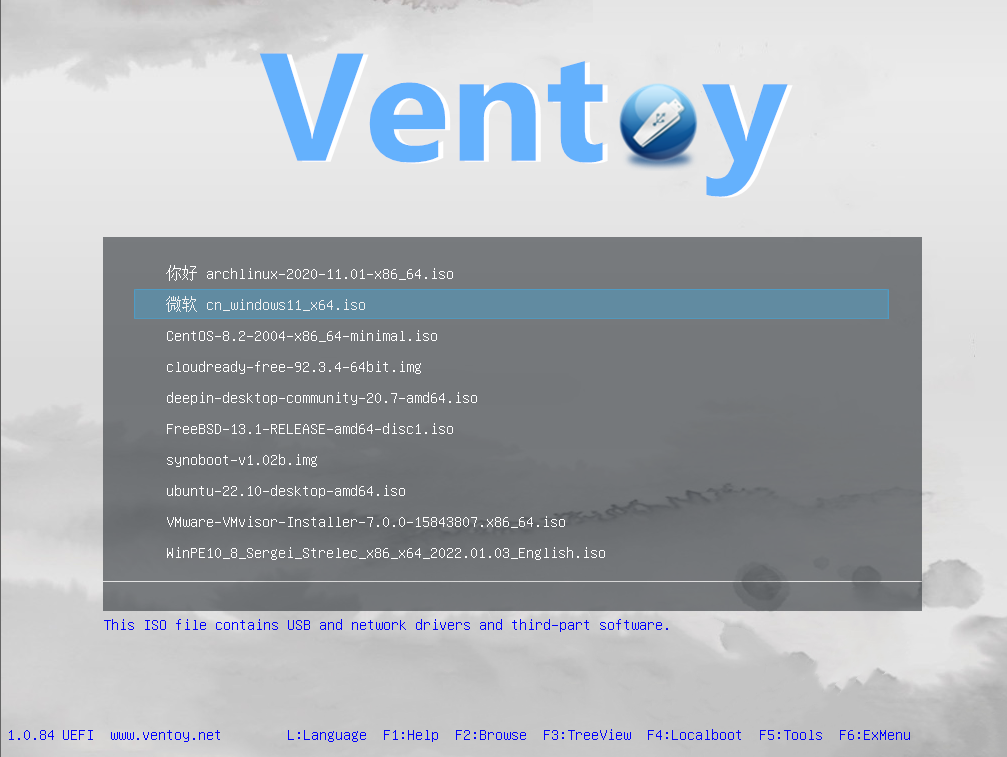
" What is Ventoy?
Ventoy is an open source tool to create bootable USB drive for ISO/WIM/IMG/VHD(x)/EFI files.
With ventoy, you don't need to format the disk over and over, you just need to copy the ISO/WIM/IMG/VHD(x)/EFI files to the USB drive and boot them directly.
You can copy many files at a time and ventoy will give you a boot menu to select them (screenshot).
You can also browse ISO/WIM/IMG/VHD(x)/EFI files in local disks and boot them.
x86 Legacy BIOS, IA32 UEFI, x86_64 UEFI, ARM64 UEFI and MIPS64EL UEFI are supported in the same way.
Most types of OS supported (Windows/WinPE/Linux/ChromeOS/Unix/VMware/Xen...) "
--From the ventoy.net site.
Say for instance I have a 32 GB USB drive. I can have all of these iso files:
$ tree -v -A -h
[ 32K] .
├── [776M] BookwormPup64_10.0.9.iso
├── [ 18M] Core-15.0.iso
├── [249M] CorePlus-15.0.iso
├── [ 24M] TinyCore-15.0.iso
├── [632M] debian-12.9.0-amd64-netinst.iso
├── [562M] gparted-live-1.7.0-1-amd64.iso
├── [2.8G] linuxmint-22.1-cinnamon-64bit.iso
├── [2.8G] linuxmint-22.1-mate-64bit.iso
├── [2.7G] linuxmint-22.1-xfce-64bit.iso
├── [2.5G] lmde-6-cinnamon-64bit.iso
├── [3.1G] lubuntu-24.04.1-desktop-amd64.iso
├── [ 54M] slitaz-rolling.iso
├── [944M] systemrescue-11.03-amd64.iso
├── [1.4G] tails-amd64-6.12.iso
├── [803M] ubcd539.iso
└── [2.5G] xubuntu-24.04.1-minimal-amd64.iso
For system administration or support you can definitely make some good tools for data recovery, disk copy and malware removal. It's also a great way to test if the system is broken with a hard drive, video card or other things that can happen. Many people know this but sometimes we forget. Like you can boot into telinit 1 with linux on site and give root or other users a new password!
Have fun! As always check you signatures and hashes.
#multiboot
#usb
#sysadmin
#linux