
Google Adds AI-Powered Google Lens and Tab Compare to Chrome for Desktop
Google today announced three new AI features that are coming to its Chrome browser, with Google taking advantage of the latest Google AI and Gemini models.
Google Lens is now available for the Chrome desktop browser, allowing users to search for what they see on the browser screen with a quick drag and search gesture. Google says that Chrome users can select anything on the page to search for visual matches, including text and images.
Searches can be refined by color, brand, and other details, and follow up questions are available for a deeper dive into a topic.
Tab compare is a new feature that is designed to let users see an AI-generated overview of products from across multiple tabs in one spot. Google says that this is useful for comparing reviews, prices, and other elements of multiple products when deciding what to purchase.
Google is also introducing a natural language search option for Chrome browsing history, allowing Chrome users to quickly find a site that they visited in the past with a phrase like "What was that ice cream shop I looked at last week?" Conversational search is optional, and can be turned on or off in the Chrome settings. It will not include data from incognito mode.
Tags: Google, Chrome
This article, "Google Adds AI-Powered Google Lens and Tab Compare to Chrome for Desktop" first appeared on MacRumors.com
Discuss this article in our forums
https://www.macrumors.com/2024/08/01/google-lens-ai-chrome-desktop/
Get Up to $500 Off M3 MacBook Pro With Amazon and Best Buy's New Sales
Amazon and Best Buy today have introduced major discounts on the 14-inch and 16-inch M3 MacBook Pro, providing up to $500 off select models of the 2023 computer. In regards to Best Buy's prices, these deals are available to all members and do not require a My Best Buy Plus/Total membership.
Note: MacRumors is an affiliate partner with Best Buy and Amazon. When you click a link and make a purchase, we may receive a small payment, which helps us keep the site running.
Best Buy's and Amazon's deals include all-time low prices on the 14-inch and 16-inch models, and the best discounts will be found on the larger screen computers. The 16-inch M3 MacBook Pro is currently discounted by $500 on Amazon and Best Buy, which are solid second-best prices. You'll also find up to $300 off the 14-inch computers at both retailers.
UP TO $500 OFF
M3 MacBook Pro at Best Buy
massive collection of discounts on the M2 and M3 MacBook Air models this week. The M2 MacBook Air is available for just $799.00, while the M3 models start at $849.00.
14-inch MacBook Pro
M3 512GB - $1,399.99 ($199 off)
M3 Pro 512GB - $1,699.00 ($300 off) [matched at Best Buy]
M3 Pro 1TB - $2,099.00 ($300 off) [matched at Best Buy]
M3 Max 1TB - $2,899.00 ($300 off) [matched at Best Buy]
16-inch MacBook Pro
M3 Pro, 18GB RAM, 512GB - $1,999.00 ($500 off) [matched at Best Buy]
M3 Pro, 36GB RAM, 512GB - $2,399.00 ($500 off) [matched at Best Buy]
M3 Max, 36GB RAM, 1TB - $2,999.00 ($500 off) [matched at Best Buy]
M3 Max, 48GB RAM, 1TB - $3,499.00 ($500 off) [matched at Best Buy]
Be sure to visit our full Deals Roundup to shop for even more Apple-related products and accessories.
Related Roundup: Apple Deals
This article, "Get Up to $500 Off M3 MacBook Pro With Amazon and Best Buy's New Sales" first appeared on MacRumors.com
Discuss this article in our forums
https://www.macrumors.com/2024/08/01/500-off-m3-macbook-pro/
How to Enable Apple Intelligence If You're Outside the US
Apple is introducing a set of AI features in iOS 18 and iPadOS 18 under the banner "Apple Intelligence." These features are officially only currently available in beta to developers in the US, but it's actually pretty easy to get it up and running on iPhones and iPads in most other locations with the exception of the European Union and China.
The main reason Apple has limited region access to Apple Intelligence is that it only supports US English at this time, but if you can work with that – and you have a compatible device – then there's no technical reason why you can't start exploring the new AI features.
Supported Devices
Apple Intelligence encompasses a range of capabilities, including composing text and emails, automating actions across various apps, generating images, summarizing documents and texts, and more. However, these features require a lot of on-device computing power, so before you do anything, it's worth checking if your device is compatible. iPhone users need either an iPhone 15 Pro or iPhone 15 Pro Max to run Apple Intelligence, while only iPads powered by M1 or later Apple silicon processors are compatible.
Install Beta Software
If your device is supported, the first thing you need to do is install the developer beta for your device. Once you've followed the instructions provided in the linked article and your device is up and running with the latest beta, follow these steps on your iPhone or iPad.
Open Settings, then tap through to General ➝ Language & Region.
Tap Add Language.. and choose English (US).
Tap Region and choose United States. (Note that this won't affect your App Store regions or purchases.)
Return to the main Settings menu and tap Apple Intelligence & Siri.
Tap Language and choose English (United States).
You will now be able to join the Apple Intelligence waitlist, which in most cases gets accepted in just a few minutes. Under the Apple Intelligence header text, tap Join Waitlist.
After what should hopefully be a short wait, the message will change to Turn On Apple Intelligence. Tap it, and a welcome message should appear, indicating you have sucessfully enabled the AI features on your device.
here about all of the Apple Intelligence features available in the iOS 18.1 developer beta. Note that some of the Apple Intelligence additions won't be coming until later.
Related Roundups: iOS 18, iPadOS 18
Tag: Apple Intelligence
Related Forums: iOS 18, iPadOS 18
This article, "How to Enable Apple Intelligence If You're Outside the US" first appeared on MacRumors.com
Discuss this article in our forums
https://www.macrumors.com/how-to/enable-apple-intelligence-outside-us/
How to Enable Apple Intelligence If You're Outside the US
Apple is introducing a set of AI features in iOS 18 and iPadOS 18 under the banner "Apple Intelligence." These features are officially only currently available in beta to developers in the US, but it's actually pretty easy to get it up and running on iPhones and iPads in most other locations with the exception of the European Union and China.
The main reason Apple has limited region access to Apple Intelligence is that it only supports US English at this time, but if you can work with that – and you have a compatible device – then there's no technical reason why you can't start exploring the new AI features.
Supported Devices
Apple Intelligence encompasses a range of capabilities, including composing text and emails, automating actions across various apps, generating images, summarizing documents and texts, and more. However, these features require a lot of on-device computing power, so before you do anything, it's worth checking if your device is compatible. iPhone users need either an iPhone 15 Pro or iPhone 15 Pro Max to run Apple Intelligence, while only iPads powered by M1 or later Apple silicon processors are compatible.
Install Beta Software
If your device is supported, the first thing you need to do is install the developer beta for your device. Once you've followed the instructions provided in the linked article and your device is up and running with the latest beta, follow these steps on your iPhone or iPad.
Open Settings, then tap through to General ➝ Language & Region.
Tap Add Language.. and choose English (US).
Tap Region and choose United States. (Note that this won't affect your App Store regions or purchases.)
Return to the main Settings menu and tap Apple Intelligence & Siri.
Tap Language and choose English (United States).
You will now be able to join the Apple Intelligence waitlist, which in most cases gets accepted in just a few minutes. Under the Apple Intelligence header text, tap Join Waitlist.
After what should hopefully be a short wait, the message will change to Turn On Apple Intelligence. Tap it, and a welcome message should appear, indicating you have sucessfully enabled the AI features on your device.
here about all of the Apple Intelligence features available in the iOS 18.1 developer beta. Note that some of the Apple Intelligence additions won't be coming until later.
Related Roundups: iOS 18, iPadOS 18
Tag: Apple Intelligence
Related Forums: iOS 18, iPadOS 18
This article, "How to Enable Apple Intelligence If You're Outside the US" first appeared on MacRumors.com
Discuss this article in our forums
https://www.macrumors.com/how-to/enable-apple-intelligence-outside-us/
How to Enable Apple Intelligence If You're Outside the US
Apple is introducing a set of AI features in iOS 18 and iPadOS 18 under the banner "Apple Intelligence." These features are officially only currently available in beta to developers in the US, but it's actually pretty easy to get it up and running on iPhones and iPads in most other locations with the exception of the European Union and China.
The main reason Apple has limited region access to Apple Intelligence is that it only supports US English at this time, but if you can work with that – and you have a compatible device – then there's no technical reason why you can't start exploring the new AI features.
Supported Devices
Apple Intelligence encompasses a range of capabilities, including composing text and emails, automating actions across various apps, generating images, summarizing documents and texts, and more. However, these features require a lot of on-device computing power, so before you do anything, it's worth checking if your device is compatible. iPhone users need either an iPhone 15 Pro or iPhone 15 Pro Max to run Apple Intelligence, while only iPads powered by M1 or later Apple silicon processors are compatible.
Install Beta Software
If your device is supported, the first thing you need to do is install the developer beta for your device. Once you've followed the instructions provided in the linked article and your device is up and running with the latest beta, follow these steps on your iPhone or iPad.
Open Settings, then tap through to General ➝ Language & Region.
Tap Add Language.. and choose English (US).
Tap Region and choose United States. (Note that this won't affect your App Store regions or purchases.)
Return to the main Settings menu and tap Apple Intelligence & Siri.
Tap Language and choose English (United States).
You will now be able to join the Apple Intelligence waitlist, which in most cases gets accepted in just a few minutes. Under the Apple Intelligence header text, tap Join Waitlist.
After what should hopefully be a short wait, the message will change to Turn On Apple Intelligence. Tap it, and a welcome message should appear, indicating you have sucessfully enabled the AI features on your device.
here about all of the Apple Intelligence features available in the iOS 18.1 developer beta. Note that some of the Apple Intelligence additions won't be coming until later.
Related Roundups: iOS 18, iPadOS 18
Tag: Apple Intelligence
Related Forums: iOS 18, iPadOS 18
This article, "How to Enable Apple Intelligence If You're Outside the US" first appeared on MacRumors.com
Discuss this article in our forums
https://www.macrumors.com/how-to/enable-apple-intelligence-outside-us/
How to Enable Apple Intelligence If You're Outside the US
Apple is introducing a set of AI features in iOS 18 and iPadOS 18 under the banner "Apple Intelligence." These features are officially only currently available in beta to developers in the US, but it's actually pretty easy to get it up and running on iPhones and iPads in most other locations with the exception of the European Union and China.
The main reason Apple has limited region access to Apple Intelligence is that it only supports US English at this time, but if you can work with that – and you have a compatible device – then there's no technical reason why you can't start exploring the new AI features.
Supported Devices
Apple Intelligence encompasses a range of capabilities, including composing text and emails, automating actions across various apps, generating images, summarizing documents and texts, and more. However, these features require a lot of on-device computing power, so before you do anything, it's worth checking if your device is compatible. iPhone users need either an iPhone 15 Pro or iPhone 15 Pro Max to run Apple Intelligence, while only iPads powered by M1 or later Apple silicon processors are compatible.
Install Beta Software
If your device is supported, the first thing you need to do is install the developer beta for your device. Once you've followed the instructions provided in the linked article and your device is up and running with the latest beta, follow these steps on your iPhone or iPad.
Open Settings, then tap through to General ➝ Language & Region.
Tap Add Language.. and choose English (US).
Tap Region and choose United States. (Note that this won't affect your App Store regions or purchases.)
Return to the main Settings menu and tap Apple Intelligence & Siri.
Tap Language and choose English (United States).
You will now be able to join the Apple Intelligence waitlist, which in most cases gets accepted in just a few minutes. Under the Apple Intelligence header text, tap Join Waitlist.
After what should hopefully be a short wait, the message will change to Turn On Apple Intelligence. Tap it, and a welcome message should appear, indicating you have sucessfully enabled the AI features on your device.
here about all of the Apple Intelligence features available in the iOS 18.1 developer beta. Note that some of the Apple Intelligence additions won't be coming until later.
Related Roundups: iOS 18, iPadOS 18
Tag: Apple Intelligence
Related Forums: iOS 18, iPadOS 18
This article, "How to Enable Apple Intelligence If You're Outside the US" first appeared on MacRumors.com
Discuss this article in our forums
https://www.macrumors.com/how-to/enable-apple-intelligence-outside-us/
Apple Arcade Frustrations Persist for Game Developers

Some developers continue to be unhappy working with Apple's subscription-based mobile gaming service Apple Arcade, mobilegamer.biz reports.
Talking to the website, some developers said that studios have to wait up to six months to receive payments from Apple Arcade. They also pointed out difficulties getting responses to routine emails, unsatisfactory technical support, and poor discoverability. One developer said:
We were able to sign a good deal for our titles which covered our whole development budget. Things have changed since the early times, it's a very difficult and long process to sign a deal with Apple these days. The lack of vision and clear focus of the platform is frustrating and if there is any goal, it keeps changing every year or so. Also technical support is pretty miserable.
Whatever anyone else says, the advances were fantastic. They were off the charts compared to what we're used to being paid. And you got royalties on top of that.
While initially developers benefited from prompt monthly payments from the Bonus Pool of ongoing royalty payments, there is now a five month backlog. One developer claims to have almost gone out of business as a result of the slow payments, while others have had to chase for payments for months.
We can go weeks without hearing from Apple at all and their general response time to emails is three weeks, if they reply at all. We're supposed to be able to ask product, technical and commercial questions, but often half the Apple team won't turn up and when they do they have no idea what's going on and can't answer our questions, either because they don't have any knowledge on how to answer it, or are not able to share that info for confidentiality reasons.
The technical support is awful – the worst I have seen anywhere. They are unable to offer any insights into how the hardware and the software it runs on works, or how essential middleware is meant to work with it.
Other sources told mobilegamer.biz that while they had been approached by Apple to make a game for the Vision Pro, they were offered no financial incentives and no guarantees of promotion. This contrasts with competitors like Meta, which offers generous financial incentives and marketing guarantees to developers creating content for its platforms.
It feels like the game's been in a morgue for the last two years. It doesn't matter what we put in the game, Apple won't feature us, it's like we don't exist. So as a developer you think, well, they've given us this money for exclusivity… I don't want to give them the money back, but I do want people to play my game. It's like we're invisible.
Arcade has no clear strategy and feels like a bolt-on to the Apple company ecosystem rather than like it is truly supported inside the company. Apple 100% does not understand gamers – they have little to no info on who plays their games that they can share with developers, or how they interact with games on the platform already.
[...]
I think Arcade knows who its audience is much more today than at the outset. If that doesn't turn out to be high concept artful indie games, that's not Apple's fault. If they can build a business on family games, good for them and good for the devs who can chase that opportunity.
Apple One subscription bundle, which combines multiple Apple services into a single monthly plan.
Tag: Apple Arcade
This article, "Apple Arcade Frustrations Persist for Game Developers" first appeared on MacRumors.com
Discuss this article in our forums
https://www.macrumors.com/2024/08/01/apple-arcade-frustrations-persist-for-developers/
Apple Arcade Frustrations Persist for Game Developers
Some developers continue to be unhappy working with Apple's subscription-based mobile gaming service Apple Arcade, mobilegamer.biz reports.
Talking to the website, some developers said that studios have to wait up to six months to receive payments from Apple Arcade. They also pointed out difficulties getting responses to routine emails, unsatisfactory technical support, and poor discoverability. One developer said:
We were able to sign a good deal for our titles which covered our whole development budget. Things have changed since the early times, it's a very difficult and long process to sign a deal with Apple these days. The lack of vision and clear focus of the platform is frustrating and if there is any goal, it keeps changing every year or so. Also technical support is pretty miserable.
Whatever anyone else says, the advances were fantastic. They were off the charts compared to what we're used to being paid. And you got royalties on top of that.
While initially developers benefited from prompt monthly payments from the Bonus Pool of ongoing royalty payments, there is now a five month backlog. One developer claims to have almost gone out of business as a result of the slow payments, while others have had to chase for payments for months.
We can go weeks without hearing from Apple at all and their general response time to emails is three weeks, if they reply at all. We're supposed to be able to ask product, technical and commercial questions, but often half the Apple team won't turn up and when they do they have no idea what's going on and can't answer our questions, either because they don't have any knowledge on how to answer it, or are not able to share that info for confidentiality reasons.
The technical support is awful – the worst I have seen anywhere. They are unable to offer any insights into how the hardware and the software it runs on works, or how essential middleware is meant to work with it.
Other sources told mobilegamer.biz that while they had been approached by Apple to make a game for the Vision Pro, they were offered no financial incentives and no guarantees of promotion. This contrasts with competitors like Meta, which offers generous financial incentives and marketing guarantees to developers creating content for its platforms.
It feels like the game's been in a morgue for the last two years. It doesn't matter what we put in the game, Apple won't feature us, it's like we don't exist. So as a developer you think, well, they've given us this money for exclusivity… I don't want to give them the money back, but I do want people to play my game. It's like we're invisible.
Arcade has no clear strategy and feels like a bolt-on to the Apple company ecosystem rather than like it is truly supported inside the company. Apple 100% does not understand gamers – they have little to no info on who plays their games that they can share with developers, or how they interact with games on the platform already.
[...]
I think Arcade knows who its audience is much more today than at the outset. If that doesn't turn out to be high concept artful indie games, that's not Apple's fault. If they can build a business on family games, good for them and good for the devs who can chase that opportunity.
Apple One subscription bundle, which combines multiple Apple services into a single monthly plan.
Tag: Apple Arcade
This article, "Apple Arcade Frustrations Persist for Game Developers" first appeared on MacRumors.com
Discuss this article in our forums
https://www.macrumors.com/2024/08/01/apple-arcade-frustrations-persist-for-developers/
Google Maps and Waze Updated With New iPhone and CarPlay Features
Google has announced new Waze and Google Maps features rolling out for iPhone and CarPlay users that aim to keep them safer and more informed on the go.
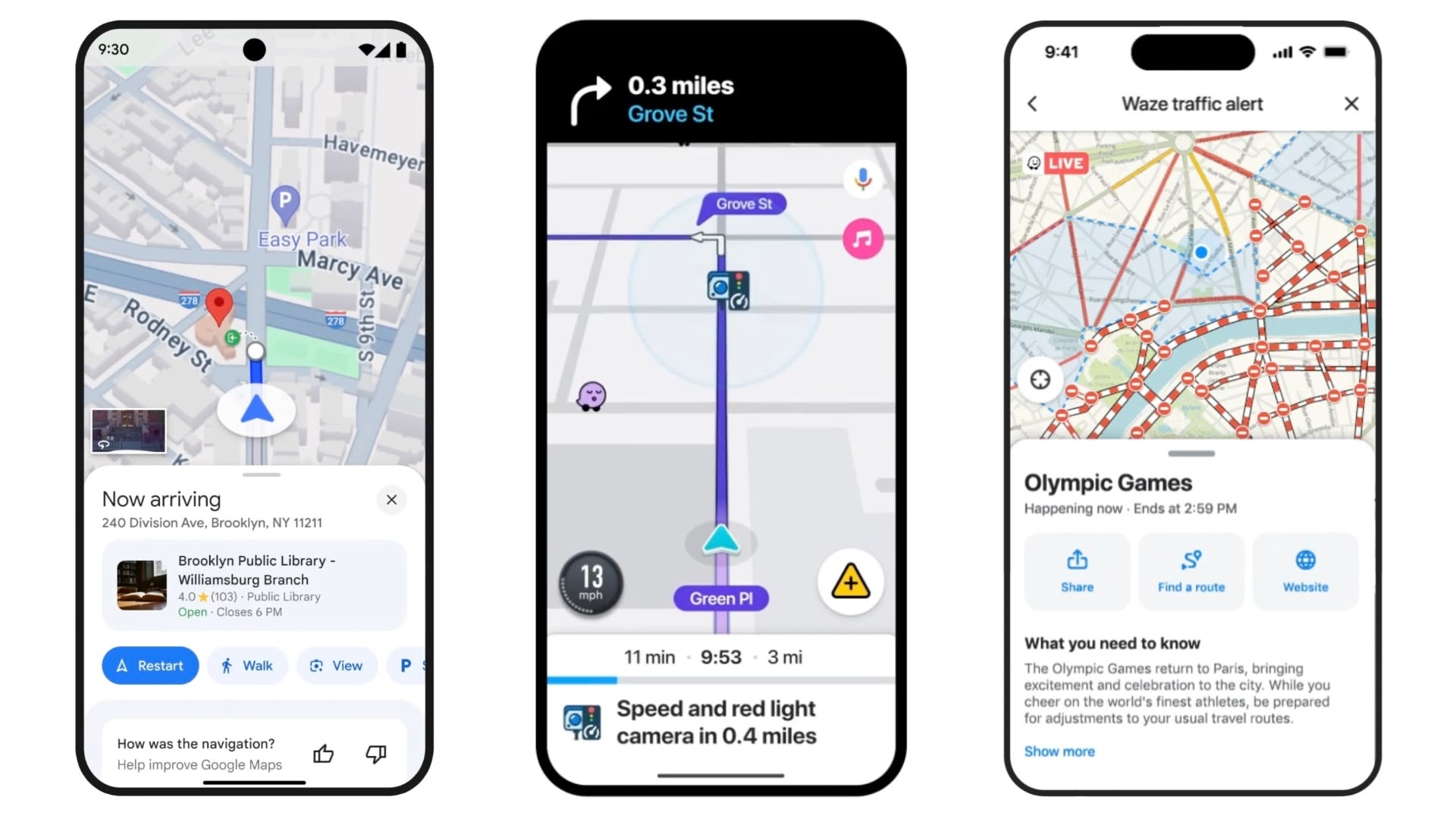
First up, changes to Maps aim to make it easier to report incidents and helpful information, like nearby construction, lane closures, objects and police presence. These reports come from the Maps and Waze communities, and users will now see which app a report came from. There are larger reporting icons that are designed to be easier to tap for quickly sharing updates, and other drivers can also confirm the incident with a quick tap.
Meanwhile, Google Maps gains new destination guidance to make it less confusing when users don't know where to enter or park when they arrive somewhere, especially if it's nighttime. When driving to a place, Maps' new destination guidance will automatically light up your building and its entrance as you approach it, in addition to showing you nearby parking lots.
Over on Waze, Google is adding the ability to see new camera types that enforce things like speed limits and carpool lanes. For example, drivers now see an alert if they're approaching a camera that snaps pictures for things like speeding, running a red light, using the wrong lane (like bus, HOV or carpool), not wearing a seatbelt, or using phones while driving.
In addition, Waze is getting a new traffic events feature, which is meant to give users a better understanding of how things like parades, concerts, and sporting events are impacting nearby traffic. If a driver recently went through an impacted area or has places saved near the area in Waze, they will now get a notification once the event has started. This will include details like the cause of the event, if there are road closures and real-time traffic conditions. To help your friends and family, these details are also easily shareable, allowing others to be more prepared for their own ride.
Tags: Google Maps, Waze
This article, "Google Maps and Waze Updated With New iPhone and CarPlay Features" first appeared on MacRumors.com
Discuss this article in our forums
https://www.macrumors.com/2024/08/01/google-maps-waze-new-carplay-features/
Google Maps and Waze Updated With New iPhone and CarPlay Features
Google has announced new Waze and Google Maps features rolling out for iPhone and CarPlay users that aim to keep them safer and more informed on the go.
First up, changes to Maps aim to make it easier to report incidents and helpful information, like nearby construction, lane closures, objects and police presence. These reports come from the Maps and Waze communities, and users will now see which app a report came from. There are larger reporting icons that are designed to be easier to tap for quickly sharing updates, and other drivers can also confirm the incident with a quick tap.
Meanwhile, Google Maps gains new destination guidance to make it less confusing when users don't know where to enter or park when they arrive somewhere, especially if it's nighttime. When driving to a place, Maps' new destination guidance will automatically light up your building and its entrance as you approach it, in addition to showing you nearby parking lots.
Over on Waze, Google is adding the ability to see new camera types that enforce things like speed limits and carpool lanes. For example, drivers now see an alert if they're approaching a camera that snaps pictures for things like speeding, running a red light, using the wrong lane (like bus, HOV or carpool), not wearing a seatbelt, or using phones while driving.
In addition, Waze is getting a new traffic events feature, which is meant to give users a better understanding of how things like parades, concerts, and sporting events are impacting nearby traffic. If a driver recently went through an impacted area or has places saved near the area in Waze, they will now get a notification once the event has started. This will include details like the cause of the event, if there are road closures and real-time traffic conditions. To help your friends and family, these details are also easily shareable, allowing others to be more prepared for their own ride.
Tags: Google Maps, Waze
This article, "Google Maps and Waze Updated With New iPhone and CarPlay Features" first appeared on MacRumors.com
Discuss this article in our forums
https://www.macrumors.com/2024/08/01/google-maps-waze-new-carplay-features/
Google Maps and Waze Updated With New iPhone and CarPlay Features
Google has announced new Waze and Google Maps features rolling out for iPhone and CarPlay users that aim to keep them safer and more informed on the go.
First up, changes to Maps aim to make it easier to report incidents and helpful information, like nearby construction, lane closures, objects and police presence. These reports come from the Maps and Waze communities, and users will now see which app a report came from. There are larger reporting icons that are designed to be easier to tap for quickly sharing updates, and other drivers can also confirm the incident with a quick tap.
Meanwhile, Google Maps gains new destination guidance to make it less confusing when users don't know where to enter or park when they arrive somewhere, especially if it's nighttime. When driving to a place, Maps' new destination guidance will automatically light up your building and its entrance as you approach it, in addition to showing you nearby parking lots.
Over on Waze, Google is adding the ability to see new camera types that enforce things like speed limits and carpool lanes. For example, drivers now see an alert if they're approaching a camera that snaps pictures for things like speeding, running a red light, using the wrong lane (like bus, HOV or carpool), not wearing a seatbelt, or using phones while driving.
In addition, Waze is getting a new traffic events feature, which is meant to give users a better understanding of how things like parades, concerts, and sporting events are impacting nearby traffic. If a driver recently went through an impacted area or has places saved near the area in Waze, they will now get a notification once the event has started. This will include details like the cause of the event, if there are road closures and real-time traffic conditions. To help your friends and family, these details are also easily shareable, allowing others to be more prepared for their own ride.
Tags: Google Maps, Waze
This article, "Google Maps and Waze Updated With New iPhone and CarPlay Features" first appeared on MacRumors.com
Discuss this article in our forums
https://www.macrumors.com/2024/08/01/google-maps-waze-new-carplay-features/
Google Maps and Waze Updated With New iPhone and CarPlay Features
Google has announced new Waze and Google Maps features rolling out for iPhone and CarPlay users that aim to keep them safer and more informed on the go.
First up, changes to Maps aim to make it easier to report incidents and helpful information, like nearby construction, lane closures, objects and police presence. These reports come from the Maps and Waze communities, and users will now see which app a report came from. There are larger reporting icons that are designed to be easier to tap for quickly sharing updates, and other drivers can also confirm the incident with a quick tap.
Meanwhile, Google Maps gains new destination guidance to make it less confusing when users don't know where to enter or park when they arrive somewhere, especially if it's nighttime. When driving to a place, Maps' new destination guidance will automatically light up your building and its entrance as you approach it, in addition to showing you nearby parking lots.
Over on Waze, Google is adding the ability to see new camera types that enforce things like speed limits and carpool lanes. For example, drivers now see an alert if they're approaching a camera that snaps pictures for things like speeding, running a red light, using the wrong lane (like bus, HOV or carpool), not wearing a seatbelt, or using phones while driving.
In addition, Waze is getting a new traffic events feature, which is meant to give users a better understanding of how things like parades, concerts, and sporting events are impacting nearby traffic. If a driver recently went through an impacted area or has places saved near the area in Waze, they will now get a notification once the event has started. This will include details like the cause of the event, if there are road closures and real-time traffic conditions. To help your friends and family, these details are also easily shareable, allowing others to be more prepared for their own ride.
Tags: Google Maps, Waze
This article, "Google Maps and Waze Updated With New iPhone and CarPlay Features" first appeared on MacRumors.com
Discuss this article in our forums
https://www.macrumors.com/2024/08/01/google-maps-waze-new-carplay-features/
Google Maps and Waze Updated With New iPhone and CarPlay Features
Google has announced new Waze and Google Maps features rolling out for iPhone and CarPlay users that aim to keep them safer and more informed on the go.
First up, changes to Maps aim to make it easier to report incidents and helpful information, like nearby construction, lane closures, objects and police presence. These reports come from the Maps and Waze communities, and users will now see which app a report came from. There are larger reporting icons that are designed to be easier to tap for quickly sharing updates, and other drivers can also confirm the incident with a quick tap.
Meanwhile, Google Maps gains new destination guidance to make it less confusing when users don't know where to enter or park when they arrive somewhere, especially if it's nighttime. When driving to a place, Maps' new destination guidance will automatically light up your building and its entrance as you approach it, in addition to showing you nearby parking lots.
Over on Waze, Google is adding the ability to see new camera types that enforce things like speed limits and carpool lanes. For example, drivers now see an alert if they're approaching a camera that snaps pictures for things like speeding, running a red light, using the wrong lane (like bus, HOV or carpool), not wearing a seatbelt, or using phones while driving.
In addition, Waze is getting a new traffic events feature, which is meant to give users a better understanding of how things like parades, concerts, and sporting events are impacting nearby traffic. If a driver recently went through an impacted area or has places saved near the area in Waze, they will now get a notification once the event has started. This will include details like the cause of the event, if there are road closures and real-time traffic conditions. To help your friends and family, these details are also easily shareable, allowing others to be more prepared for their own ride.
Tags: Google Maps, Waze
This article, "Google Maps and Waze Updated With New iPhone and CarPlay Features" first appeared on MacRumors.com
Discuss this article in our forums
https://www.macrumors.com/2024/08/01/google-maps-waze-new-carplay-features/
Google Maps and Waze Updated With New iPhone and CarPlay Features
Google has announced new Waze and Google Maps features rolling out for iPhone and CarPlay users that aim to keep them safer and more informed on the go.
First up, changes to Maps aim to make it easier to report incidents and helpful information, like nearby construction, lane closures, objects and police presence. These reports come from the Maps and Waze communities, and users will now see which app a report came from. There are larger reporting icons that are designed to be easier to tap for quickly sharing updates, and other drivers can also confirm the incident with a quick tap.
Meanwhile, Google Maps gains new destination guidance to make it less confusing when users don't know where to enter or park when they arrive somewhere, especially if it's nighttime. When driving to a place, Maps' new destination guidance will automatically light up your building and its entrance as you approach it, in addition to showing you nearby parking lots.
Over on Waze, Google is adding the ability to see new camera types that enforce things like speed limits and carpool lanes. For example, drivers now see an alert if they're approaching a camera that snaps pictures for things like speeding, running a red light, using the wrong lane (like bus, HOV or carpool), not wearing a seatbelt, or using phones while driving.
In addition, Waze is getting a new traffic events feature, which is meant to give users a better understanding of how things like parades, concerts, and sporting events are impacting nearby traffic. If a driver recently went through an impacted area or has places saved near the area in Waze, they will now get a notification once the event has started. This will include details like the cause of the event, if there are road closures and real-time traffic conditions. To help your friends and family, these details are also easily shareable, allowing others to be more prepared for their own ride.
Tags: Google Maps, Waze
This article, "Google Maps and Waze Updated With New iPhone and CarPlay Features" first appeared on MacRumors.com
Discuss this article in our forums
https://www.macrumors.com/2024/08/01/google-maps-waze-new-carplay-features/
Google Maps and Waze Updated With New iPhone and CarPlay Features
Google has announced new Waze and Google Maps features rolling out for iPhone and CarPlay users that aim to keep them safer and more informed on the go.
First up, changes to Maps aim to make it easier to report incidents and helpful information, like nearby construction, lane closures, objects and police presence. These reports come from the Maps and Waze communities, and users will now see which app a report came from. There are larger reporting icons that are designed to be easier to tap for quickly sharing updates, and other drivers can also confirm the incident with a quick tap.
Meanwhile, Google Maps gains new destination guidance to make it less confusing when users don't know where to enter or park when they arrive somewhere, especially if it's nighttime. When driving to a place, Maps' new destination guidance will automatically light up your building and its entrance as you approach it, in addition to showing you nearby parking lots.
Over on Waze, Google is adding the ability to see new camera types that enforce things like speed limits and carpool lanes. For example, drivers now see an alert if they're approaching a camera that snaps pictures for things like speeding, running a red light, using the wrong lane (like bus, HOV or carpool), not wearing a seatbelt, or using phones while driving.
In addition, Waze is getting a new traffic events feature, which is meant to give users a better understanding of how things like parades, concerts, and sporting events are impacting nearby traffic. If a driver recently went through an impacted area or has places saved near the area in Waze, they will now get a notification once the event has started. This will include details like the cause of the event, if there are road closures and real-time traffic conditions. To help your friends and family, these details are also easily shareable, allowing others to be more prepared for their own ride.
Tags: Google Maps, Waze
This article, "Google Maps and Waze Updated With New iPhone and CarPlay Features" first appeared on MacRumors.com
Discuss this article in our forums
https://www.macrumors.com/2024/08/01/google-maps-waze-new-carplay-features/
Google Maps and Waze Updated With New iPhone and CarPlay Features
Google has announced new Waze and Google Maps features rolling out for iPhone and CarPlay users that aim to keep them safer and more informed on the go.
First up, changes to Maps aim to make it easier to report incidents and helpful information, like nearby construction, lane closures, objects and police presence. These reports come from the Maps and Waze communities, and users will now see which app a report came from. There are larger reporting icons that are designed to be easier to tap for quickly sharing updates, and other drivers can also confirm the incident with a quick tap.
Meanwhile, Google Maps gains new destination guidance to make it less confusing when users don't know where to enter or park when they arrive somewhere, especially if it's nighttime. When driving to a place, Maps' new destination guidance will automatically light up your building and its entrance as you approach it, in addition to showing you nearby parking lots.
Over on Waze, Google is adding the ability to see new camera types that enforce things like speed limits and carpool lanes. For example, drivers now see an alert if they're approaching a camera that snaps pictures for things like speeding, running a red light, using the wrong lane (like bus, HOV or carpool), not wearing a seatbelt, or using phones while driving.
In addition, Waze is getting a new traffic events feature, which is meant to give users a better understanding of how things like parades, concerts, and sporting events are impacting nearby traffic. If a driver recently went through an impacted area or has places saved near the area in Waze, they will now get a notification once the event has started. This will include details like the cause of the event, if there are road closures and real-time traffic conditions. To help your friends and family, these details are also easily shareable, allowing others to be more prepared for their own ride.
Tags: Google Maps, Waze
This article, "Google Maps and Waze Updated With New iPhone and CarPlay Features" first appeared on MacRumors.com
Discuss this article in our forums
https://www.macrumors.com/2024/08/01/google-maps-waze-new-carplay-features/
iPhone 16 Pro White, Gray, and Dark Black Colors Shown in New Image
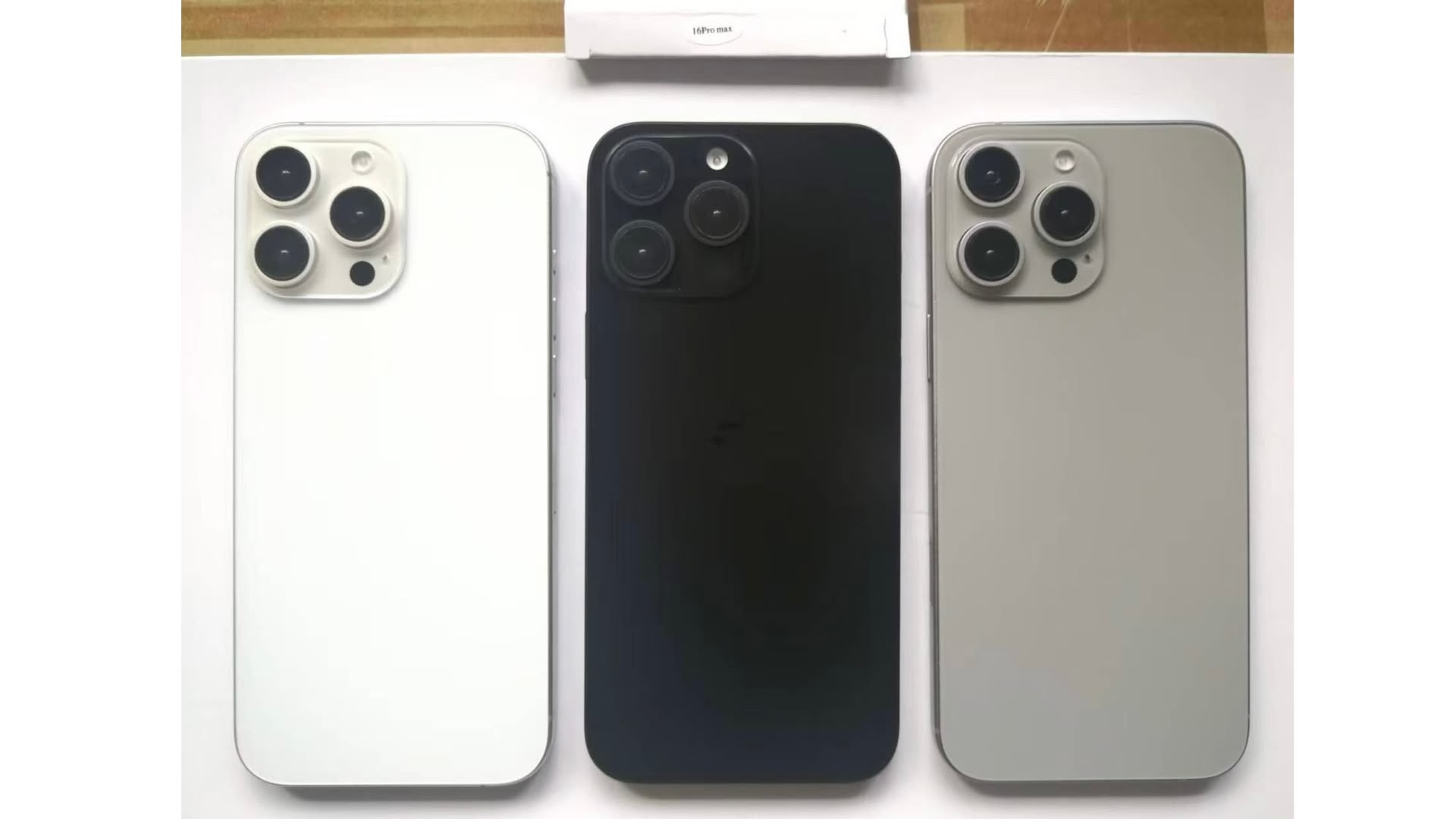
Leaker Sonny Dickson is back today with a new dummy unit image showing three alleged iPhone 16 Pro color variants, including a seemingly darker Black Titanium unit compared to the color of the same name on existing iPhone 15 Pro models.
The iPhone 16 Pro models are expected to come in black, white or silver, gray or "Natural Titanium," and a rose or rose gold color replacing Blue Titanium, according to Apple analyst Ming-Chi Kuo and other leakers.
bronze-like hue. Apple did not include a gold option in the iPhone 15 lineup, so a similar variant could see heightened demand.
rumor suggests that Apple is using an improved process for finishing and coloring titanium, which will result in a glossier look than the brushed aluminum finish of the iPhone 15 Pro models. The glossy finish could look much more like the stainless steel that Apple used in prior years, but it will be more resistant to scratches.
Wednesday.
Related Roundup: iPhone 16 Pro
Tag: Sonny Dickson
This article, "iPhone 16 Pro White, Gray, and Dark Black Colors Shown in New Image" first appeared on MacRumors.com
Discuss this article in our forums
https://www.macrumors.com/2024/08/01/iphone-16-pro-colors-shown-leaked-image/
iPhone 16 Pro White, Gray, and Dark Black Colors Shown in New Image
Leaker Sonny Dickson is back today with a new dummy unit image showing three alleged iPhone 16 Pro color variants, including a seemingly darker Black Titanium unit compared to the color of the same name on existing iPhone 15 Pro models.
The iPhone 16 Pro models are expected to come in black, white or silver, gray or "Natural Titanium," and a rose or rose gold color replacing Blue Titanium, according to Apple analyst Ming-Chi Kuo and other leakers.
bronze-like hue. Apple did not include a gold option in the iPhone 15 lineup, so a similar variant could see heightened demand.
rumor suggests that Apple is using an improved process for finishing and coloring titanium, which will result in a glossier look than the brushed aluminum finish of the iPhone 15 Pro models. The glossy finish could look much more like the stainless steel that Apple used in prior years, but it will be more resistant to scratches.
Wednesday.
Related Roundup: iPhone 16 Pro
Tag: Sonny Dickson
This article, "iPhone 16 Pro White, Gray, and Dark Black Colors Shown in New Image" first appeared on MacRumors.com
Discuss this article in our forums
https://www.macrumors.com/2024/08/01/iphone-16-pro-colors-shown-leaked-image/
iPhone 16 Pro White, Gray, and Dark Black Colors Shown in New Image
Leaker Sonny Dickson is back today with a new dummy unit image showing three alleged iPhone 16 Pro color variants, including a seemingly darker Black Titanium unit compared to the color of the same name on existing iPhone 15 Pro models.
The iPhone 16 Pro models are expected to come in black, white or silver, gray or "Natural Titanium," and a rose or rose gold color replacing Blue Titanium, according to Apple analyst Ming-Chi Kuo and other leakers.
bronze-like hue. Apple did not include a gold option in the iPhone 15 lineup, so a similar variant could see heightened demand.
rumor suggests that Apple is using an improved process for finishing and coloring titanium, which will result in a glossier look than the brushed aluminum finish of the iPhone 15 Pro models. The glossy finish could look much more like the stainless steel that Apple used in prior years, but it will be more resistant to scratches.
Wednesday.
Related Roundup: iPhone 16 Pro
Tag: Sonny Dickson
This article, "iPhone 16 Pro White, Gray, and Dark Black Colors Shown in New Image" first appeared on MacRumors.com
Discuss this article in our forums
https://www.macrumors.com/2024/08/01/iphone-16-pro-colors-shown-leaked-image/
iPhone 16 Pro White, Gray, and Dark Black Colors Shown in New Image
Leaker Sonny Dickson is back today with a new dummy unit image showing three alleged iPhone 16 Pro color variants, including a seemingly darker Black Titanium unit compared to the color of the same name on existing iPhone 15 Pro models.
The iPhone 16 Pro models are expected to come in black, white or silver, gray or "Natural Titanium," and a rose or rose gold color replacing Blue Titanium, according to Apple analyst Ming-Chi Kuo and other leakers.
bronze-like hue. Apple did not include a gold option in the iPhone 15 lineup, so a similar variant could see heightened demand.
rumor suggests that Apple is using an improved process for finishing and coloring titanium, which will result in a glossier look than the brushed aluminum finish of the iPhone 15 Pro models. The glossy finish could look much more like the stainless steel that Apple used in prior years, but it will be more resistant to scratches.
Wednesday.
Related Roundup: iPhone 16 Pro
Tag: Sonny Dickson
This article, "iPhone 16 Pro White, Gray, and Dark Black Colors Shown in New Image" first appeared on MacRumors.com
Discuss this article in our forums
https://www.macrumors.com/2024/08/01/iphone-16-pro-colors-shown-leaked-image/