
Apple Seeds Fourth Developer Betas of iOS 18.1, iPadOS 18.1 and macOS Sequoia 15.1 With Apple Intelligence
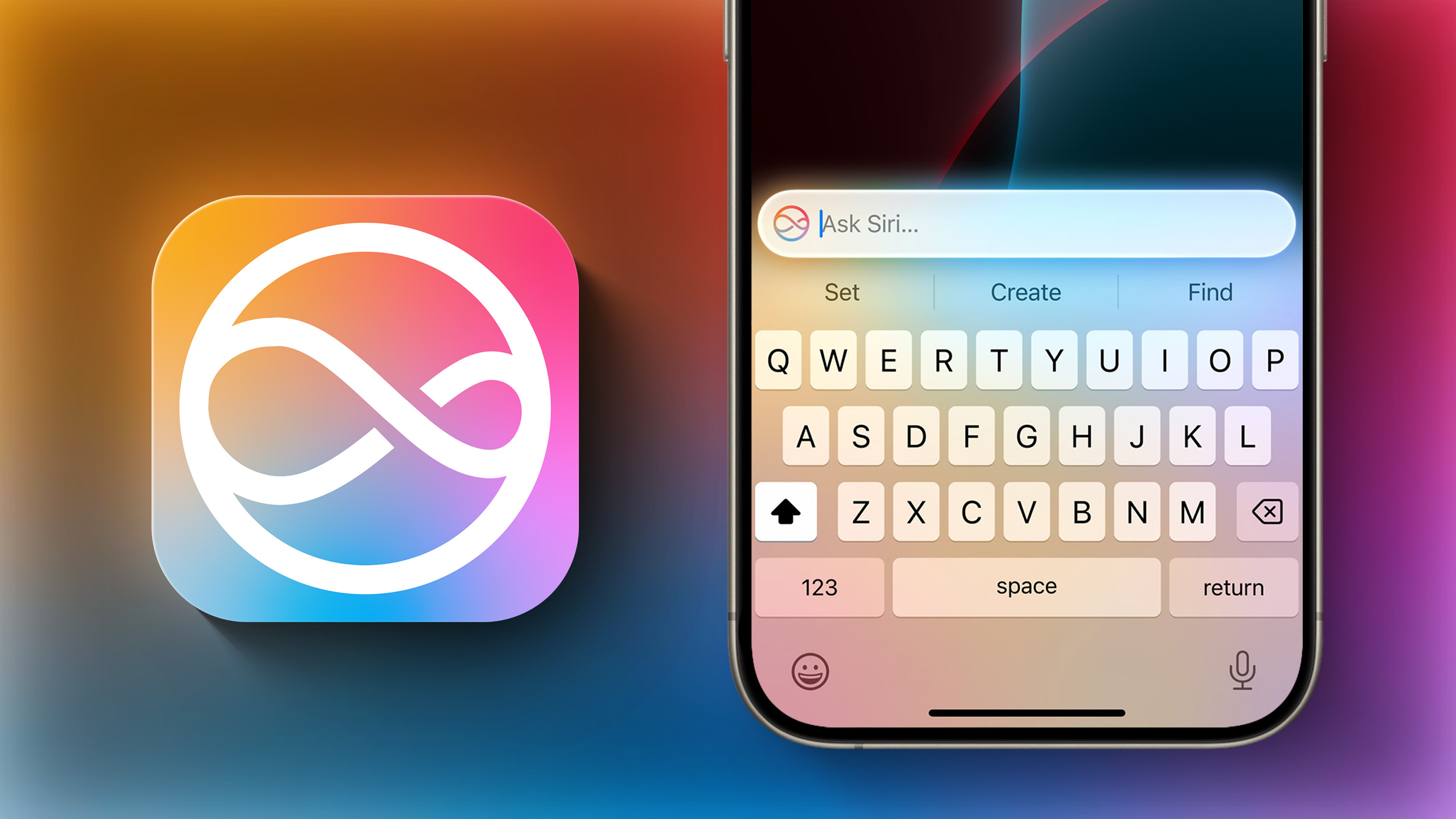
Apple today provided developers with the fourth betas of iOS 18.1, iPadOS 18.1, and macOS Sequoia 15.1 to continue testing Apple Intelligence features. The third betas come two weeks after Apple seeded the third iOS 18.1, iPadOS 18.1, and macOS Sequoia 15.1 betas. Apple has also seeded the first betas of upcoming watchOS 11.1 and tvOS 18.1 updates to developers.
A device capable of supporting Apple Intelligence is required to download the updates, which includes the iPhone 15 Pro and Pro Max, Apple silicon iPads, and Apple silicon Macs. The updates can be downloaded from the Settings app on a compatible device.
Apple Intelligence includes Writing Tools that are available wherever text can be selected and edited, and it can be used for spell checking, fixing grammar, rewriting with a new tone, and summarizing text.
Siri has a new design with a subtle glow around the display, and there is a Type to Siri feature so you don't have to speak to Siri. Siri can follow along if you stumble over your words, and can maintain context between requests. Safari can summarize articles, and there's a new Reduce Interruptions Focus Mode.
Photos has a Memory Movie feature for creating slideshows based on text descriptions, and you can record, transcribe, and summarize phone calls. Transcription and summarization are also available for any audio recording.
found in our Apple Intelligence guide. Image Playground, Genmoji, and other new Siri features have not yet been implemented.
iOS 18, iPadOS 18, and macOS Sequoia. Apple Intelligence will be available to the public later in October after a developer testing period.
Related Roundups: iOS 18, iPadOS 18, macOS Sequoia
Related Forums: iOS 18, iPadOS 18, macOS Sequoia
This article, "Apple Seeds Fourth Developer Betas of iOS 18.1, iPadOS 18.1 and macOS Sequoia 15.1 With Apple Intelligence" first appeared on MacRumors.com
Discuss this article in our forums
https://www.macrumors.com/2024/09/17/apple-fourth-beta-ios-18-1/
Apple Talking With JPMorgan Chase About Potential Apple Card Partnership
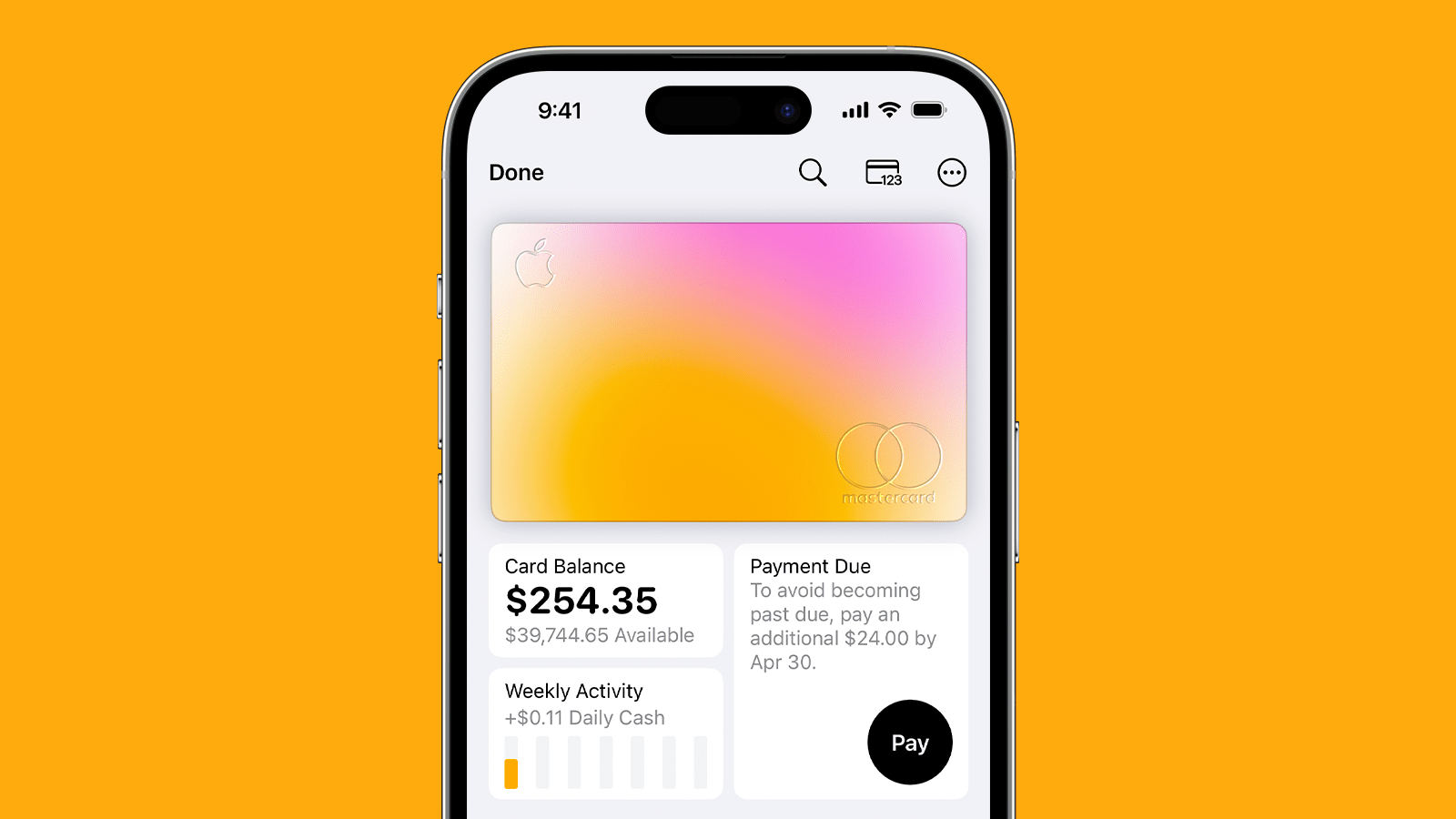
Amid long-running reports that Apple and Goldman Sachs are working toward ending their Apple Card partnership, JPMorgan Chase is now in talks with Apple about taking over the credit card program, reports The Wall Street Journal.
A deal could still be months away, according to the report, but talks have accelerated in recent weeks as the two sides negotiate details of a potential agreement.
Apple Card holders and doing away with the synchronized Apple Card billing cycles that match the calendar months but have created customer service issues.
Goldman Sachs spoke with American Express last year as the two current partners on Apple Card have been exploring how to end their partnership, but it appears Chase is the current leader.
Tag: Apple Card
This article, "Apple Talking With JPMorgan Chase About Potential Apple Card Partnership" first appeared on MacRumors.com
Discuss this article in our forums
https://www.macrumors.com/2024/09/17/jpmorgan-chase-apple-card-talks/
Apple Updates iWork Apps With iOS 18, watchOS 11, and macOS Sequoia Features
Apple today updated its iWork apps Keynote, Numbers, and Pages for the iPhone and iPad with some new features that require iOS 18 or watchOS 11.
The latest versions of each app are rolling out on the App Store now for the iPhone and iPad. Apple's release notes for each update follow.
Keynote:
• Advance your slides hands-free with the double tap gesture on supported Apple Watch models. (Requires watchOS 11)
• See HDR images and movies in greater dynamic range on supported devices. (Requires iOS 18 or iPadOS 18)
• Squeeze Apple Pencil Pro to quickly switch tools, line weights, and colors.
• Use the new document browser to easily create a new presentation or find a recent one. (Requires iOS 18 or iPadOS 18)
Numbers:
• Squeeze Apple Pencil Pro to quickly switch tools, line weights, and colors.
• Use the new document browser to easily create a new spreadsheet or find a recent one. (Requires iOS 18 or iPadOS 18)
Pages:
• Squeeze Apple Pencil Pro to quickly switch tools, line weights, and colors.
• Use the new document browser to easily create a new document or find a recent one. (Requires iOS 18 or iPadOS 18)
Keynote for the Mac with a few new features that require macOS Sequoia.
• See HDR images and movies in greater dynamic range on supported displays. (Requires macOS Sequoia)
• Play your slideshow during a FaceTime call or video conference to automatically start sharing your presentation window. (Requires macOS Sequoia)
Numbers and Pages for Mac only received bug fixes and performance improvements.
Tags: iWork, Keynote, Numbers, Pages
This article, "Apple Updates iWork Apps With iOS 18, watchOS 11, and macOS Sequoia Features" first appeared on MacRumors.com
Discuss this article in our forums
https://www.macrumors.com/2024/09/17/iwork-updates-with-ios-18-watchos-11-features/
Apple Says These tvOS 18 Features Aren't Coming Until Later This Year
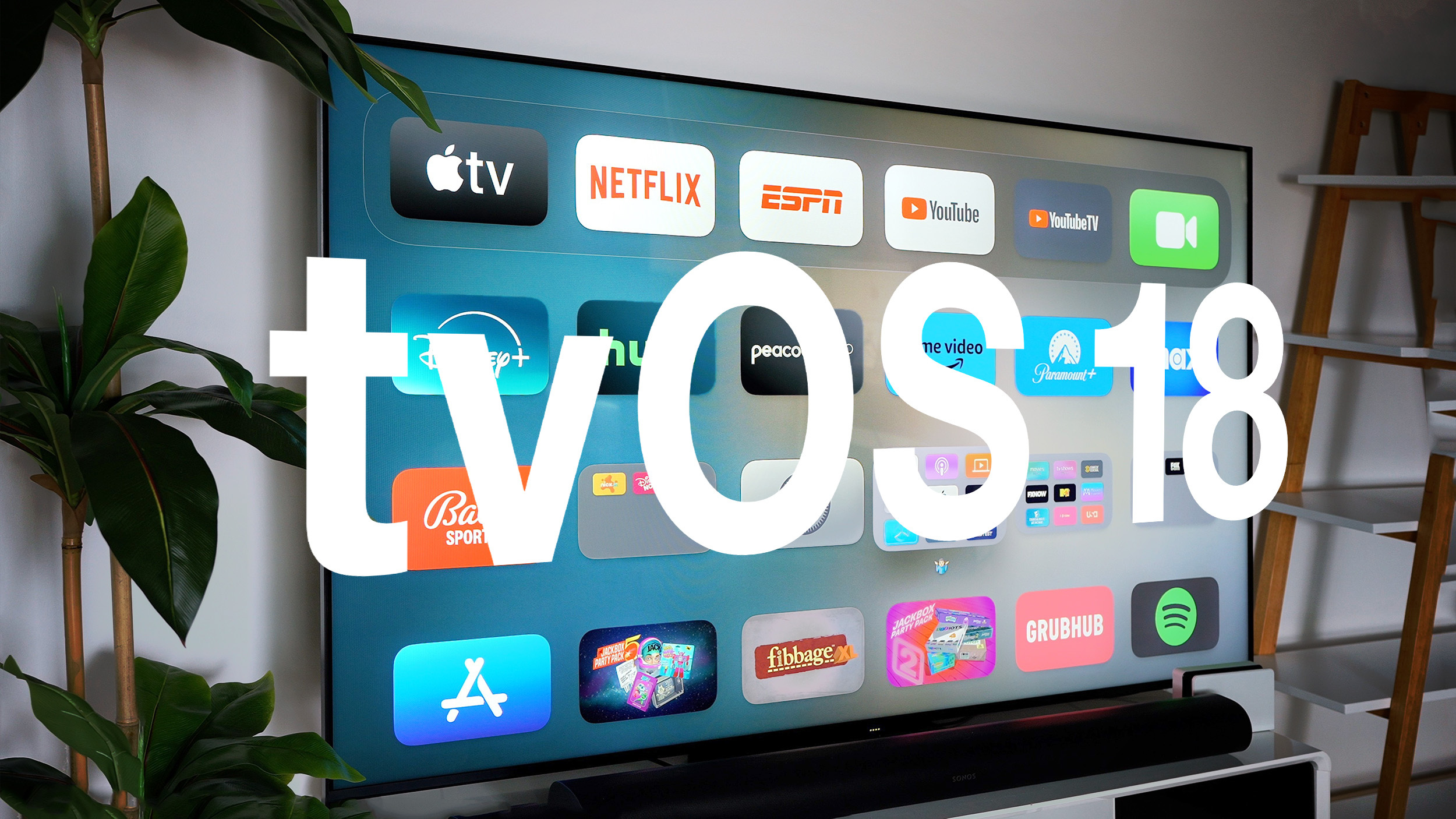
Apple released tvOS 18 on Monday following over three months of beta testing, but not all of the new features for the Apple TV are available right away.
In a press release, Apple said the following tvOS 18 features are coming later this year:
21:9 projector support
Robot vacuum cleaner support in the Home app
Some new Apple Originals screen savers, including one for Snoopy
These features should be added in tvOS 18.1 or tvOS 18.2.
earlier coverage of the update, which is compatible with all Apple TV 4K and Apple TV HD models.
Related Roundup: Apple TV
Buyer's Guide: Apple TV (Don't Buy)
Related Forum: Apple TV and Home Theater
This article, "Apple Says These tvOS 18 Features Aren't Coming Until Later This Year" first appeared on MacRumors.com
Discuss this article in our forums
https://www.macrumors.com/2024/09/17/tvos-18-features-coming-later-this-year/
Amazon Reveals Dates for October Prime Day With Early Deals Available Now

Amazon today announced its second Prime Day event of the year, called "Prime Big Deal Days" and running October 8-9. Amazon has been hosting two Prime Day events every year (typically in July and October) for a few years now, and the October event is always presented as your first access to the best discounts of the upcoming holiday season.
Note: MacRumors is an affiliate partner with Amazon. When you click a link and make a purchase, we may receive a small payment, which helps us keep the site running.
Shoppers can expect massive discounts on an array of products, including Apple devices. Some deals will last the entire run of the sale, but there will also be lightning deals that drop every 30 minutes and last for select periods, or until they sell out.
EARLY DEALS
Amazon Prime Big Deal Days
join Prime to participate in this year's Prime Big Deal Days. Once your initial free trial is over, Prime membership will run for $14.99/month or $139/year. For students, that's $7.49/month or $69/year, with a six month free trial for new students.
early Prime Big Deal Days savings that you can shop now, weeks ahead of the event. For now, this mainly includes Amazon devices like Kindles, Echo Dot, Fire TVs, and other Amazon branded products.
Once the event kicks off, Amazon's website will be filled with lightning deals on everything from tech products to home appliances, clothing, toys, and much more. We'll be covering all of the best deals you can get throughout Prime Day, particularly on all of the Apple products that appear, so be sure to keep an eye on the MacRumors front page starting October 8.
Prime Big Deal Days 2024 begins October 8 for Prime members in Australia, Austria, Belgium, Brazil, Canada, France, Germany, Italy, Luxembourg, the Netherlands, Poland, Portugal, Singapore, Spain, Sweden, the United Kingdom, the United States, and for the first time, Turkey. Prime members in Japan will be able to shop Prime Big Deal Days at some time later in October.
Deals Roundup to get caught up with all of the latest deals and discounts that we've been tracking over the past week.
Related Roundup: Apple Deals
This article, "Amazon Reveals Dates for October Prime Day With Early Deals Available Now" first appeared on MacRumors.com
Discuss this article in our forums
https://www.macrumors.com/2024/09/17/amazon-october-prime-day-2024/
First iPhone 16 Pro Unboxing Video Shared Online
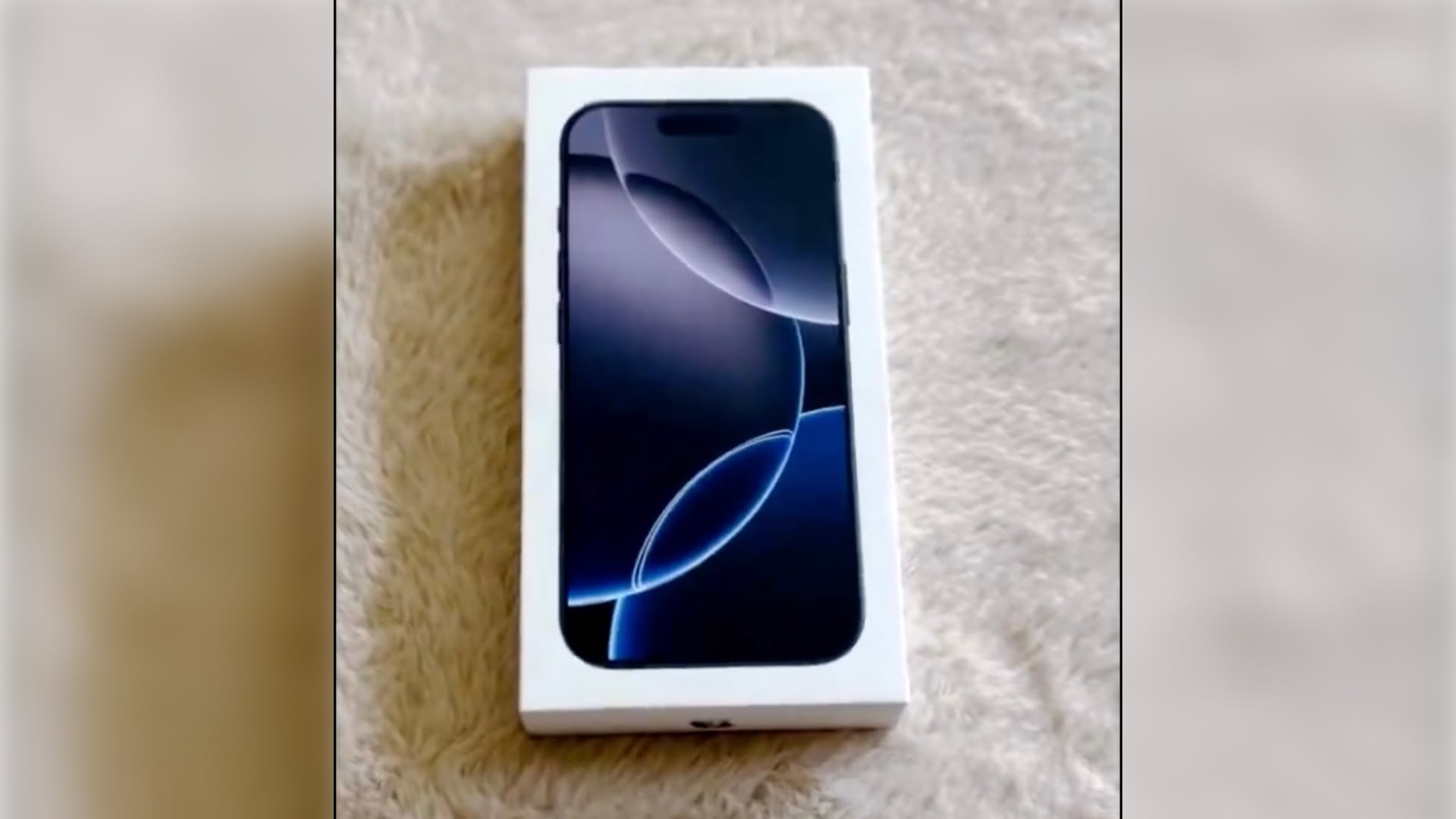
The first iPhone 16 Pro unboxing video has been shared on Weibo (via AppleShrimpPro), revealing Apple's new packaging design for its latest flagship smartphone.
With Apple keen to promote its environmental sustainability credentials, there hasn't been much to the unboxing experience with recent iPhone models, and that looks to be the case even more so this year. Assuming the packaging isn't region specific, Apple appears to have done away with the little booklet containing SIM card and other basic instructions.
no Apple stickers included in the box. All you get is the iPhone 16 and a braided USB-C cable. It's not too surprising – Apple previously announced that it aimed to achieve plastic-free packaging by 2025.
iPhone 16 Pro models have several new features, including larger 6.3-inch and 6.9-inch displays with thinner bezels, longer battery life, a new Camera Control button for quick access to camera functions, a 48-megapixel Ultra Wide camera, a faster A18 Pro chip, Wi-Fi 7 support, faster 5G, faster charging, and more.
iPhone 16 Pro Unboxing pic.twitter.com/oiUtk5F928
— Majin Bu (@MajinBuOfficial) September 16, 2024
Pre-orders for iPhone 16 models began at the end of last week, and shipping estimates for the iPhone 16 Pro and Pro Max on Apple's online store in the U.S. have since slipped into October for many configurations. Many of the lower-end iPhone 16 and iPhone 16 Plus models are delayed from between 7 days and 2-3 weeks after launch-day delivery on Friday, September 20.
Related Roundup: iPhone 16 Pro
Tag: ShrimpApplePro
Buyer's Guide: iPhone 16 Pro (Buy Now)
This article, "First iPhone 16 Pro Unboxing Video Shared Online" first appeared on MacRumors.com
Discuss this article in our forums
https://www.macrumors.com/2024/09/17/first-iphone-16-pro-unboxing-video-shared-online/
Here Are the New iPhone Charging Limit Options in iOS 18
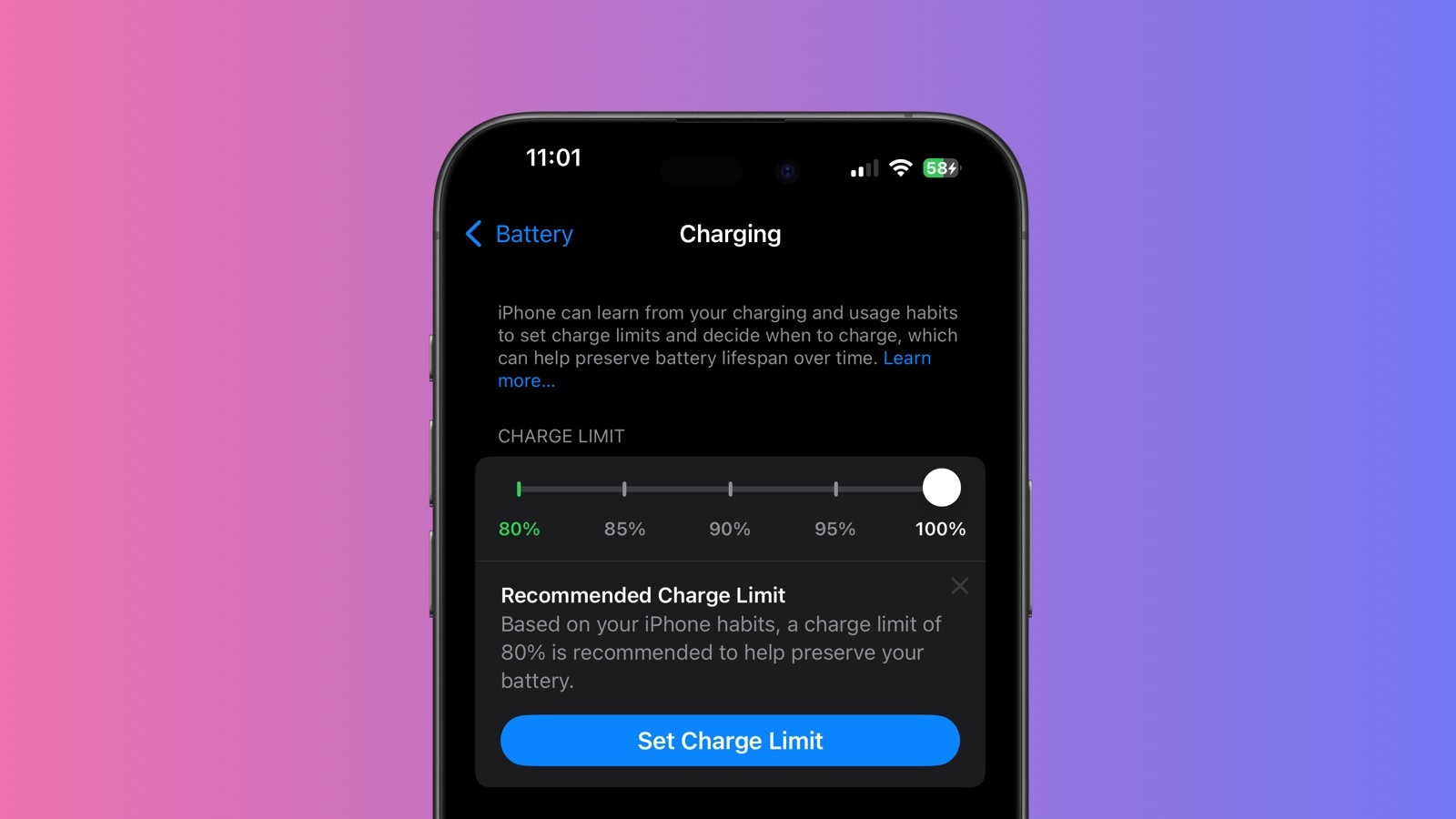
Apple has introduced expanded charging limit options for iPhone 15 and iPhone 16 models in iOS 18, offering users more control over their device's battery health. This feature, which previously capped charging at 80%, now includes new 85%, 90%, and 95% options.
The system Apple has applied aims to improve battery longevity by reducing the time your iPhone spends fully charged. Apple says the feature can be particularly beneficial for users who frequently keep their devices plugged in for extended periods.
Here's how to use these new settings to potentially extend your iPhone's battery lifespan.
Open the Settings app on your iPhone.
Tap Battery.
Select Charging.
Choose your preferred charging limit from the available options: 80%, 85%, 90%, and 95%.
When deciding on a charging limit, consider your daily usage patterns. If you often have access to charging throughout the day, a lower limit like 80% or 85% might suffice. For those who need more battery life between charges, the 90% or 95% options could be more suitable.
Remember, you can always adjust these settings as your needs change. If you're planning a long day away from power sources, you might temporarily disable the limit to get a full charge.
Charging Recommendations
In addition, iOS 18 takes this feature a step further by proactively recommending a specific charging limit based on your usage habits. If you have an iPhone 15 or iPhone 16, expect to receive a notification after a while suggesting an optimal charging limit for your device. The recommendation will also appear in the Settings app under Battery → Charging.
It's worth noting that this iOS 18 feature remains exclusive to the iPhone 15 lineup and the upcoming iPhone 16 lineup. Users of iPhone 14 Pro or older models will not find these options in their settings.
Related Roundups: iOS 18, iPadOS 18, iPhone 15, iPhone 15 Pro, iPhone 16, iPhone 16 Pro
Buyer's Guide: iPhone 16 (Buy Now), iPhone 16 Pro (Buy Now)
Related Forums: iOS 18, iPadOS 18, iPhone
This article, "Here Are the New iPhone Charging Limit Options in iOS 18" first appeared on MacRumors.com
Discuss this article in our forums
https://www.macrumors.com/how-to/use-new-iphone-charging-limit-options-ios-18/
Here Are the macOS Sequoia Features Intel Macs Don't Support
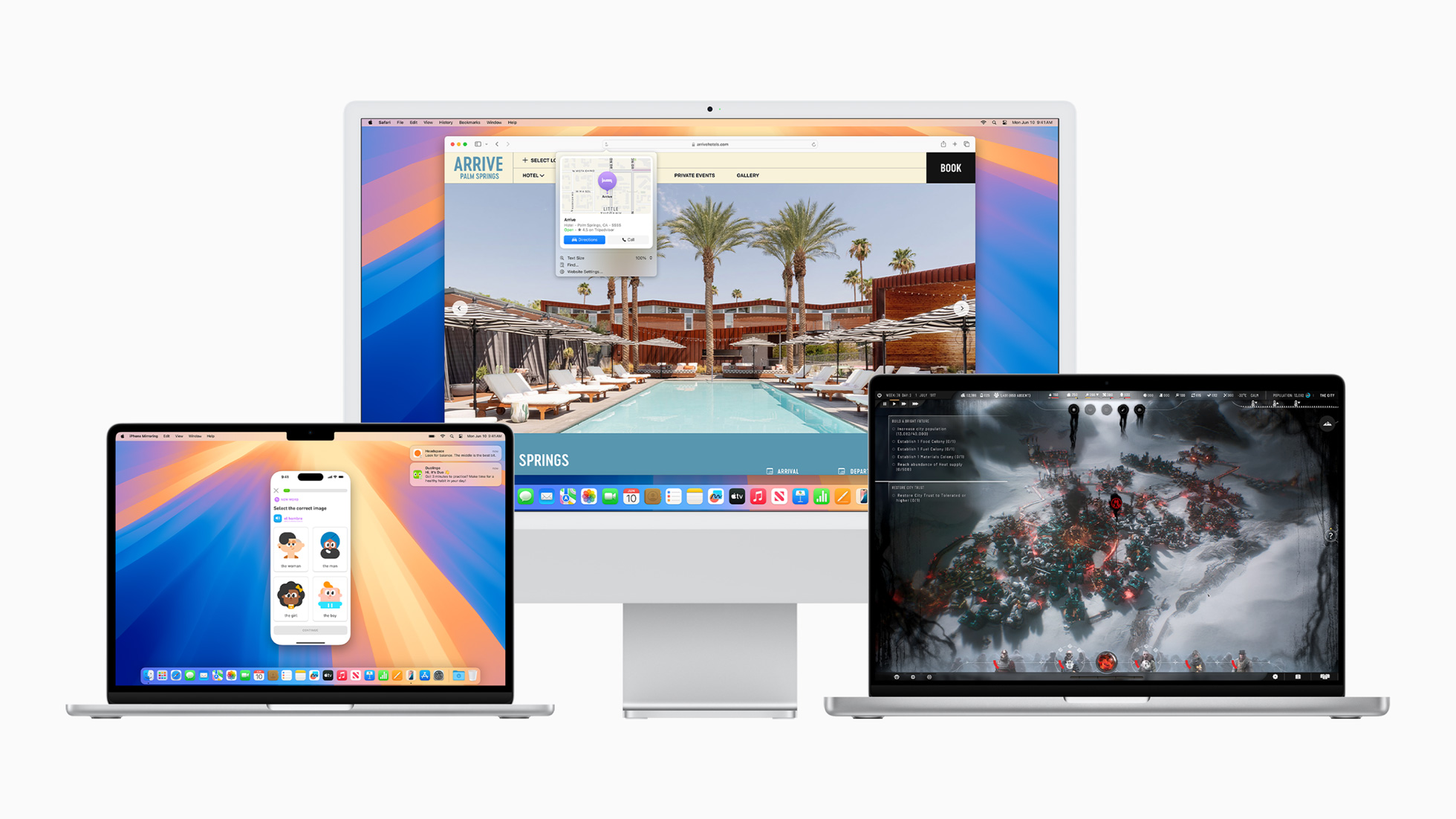
When Apple released macOS Monterey in 2021, some key features required a Mac with Apple silicon. The same scenario played out with macOS Ventura in 2022, and then again the following year with the release of macOS Sonoma. With macOS Sequoia now released, there are again new features that aren't available to Intel Mac owners.
Apple says that macOS Sequoia is compatible with the same Macs as macOS Sonoma other than the 2018 and 2019 MacBook Air, but Apple's fine print reveals that certain new features won't work on Intel machines that are otherwise compatible with macOS Sequoia. If you're still on an Intel Mac, here's what you won't have access to.
Apple Intelligence
Apple Intelligence, a deeply integrated, personalized AI feature set for Apple devices that uses cutting-edge generative artificial intelligence to enhance the user experience, won't be available on Intel Macs. Apple says the advanced features require its M1 chip or later, so if your Mac was released before November 2020, you're out of luck. Apple is expected to begin adding Apple Intelligence features to macOS Sequoia in a macOS 15.1 update that should arrive sometime in October.
Live Audio Transcription
Live audio transcription lets you record audio sessions within notes in Apple Notes, and generate live audio transcriptions that can be searched through or combined with other documents, checklists, or documents. According to Apple, support for live audio transcription in the Notes app is limited to machines powered by Apple silicon.
What Else?
Surprisingly, nothing! Apple is not withholding any other new features in macOS Sequoia, meaning users with supported Intel Macs will be able to enjoy things like the ability to schedule messages to send later, Reminder integration with Calendars, a new standalone Passwords app, window tiling, and more. Even Apple's latest continuity feature, iPhone Mirroring, works on Intel-based Mac computers that have a T2 Security Chip. For all the details, be sure to check out our macOS 15 roundup.
Related Roundup: macOS Sequoia
Related Forum: macOS Sequoia
This article, "Here Are the macOS Sequoia Features Intel Macs Don't Support" first appeared on MacRumors.com
Discuss this article in our forums
https://www.macrumors.com/2024/09/17/macos-sequoia-features-intel-macs-wont-support/
Setapp Mobile Launches in Open Beta as Alternative App Store in EU
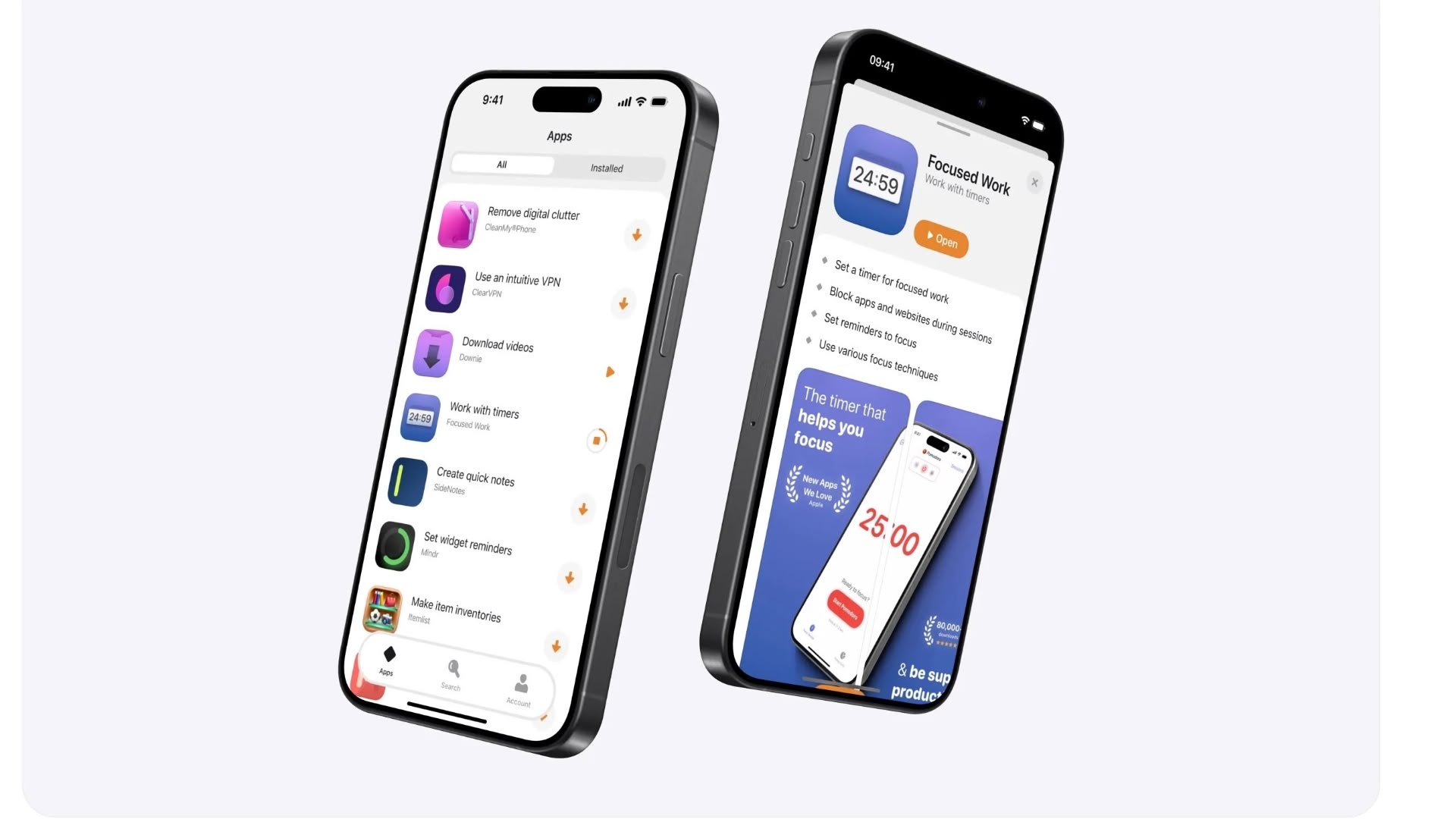
Ukraine-based developer MacPaw has announced the open beta release of Setapp Mobile, its alternative app store for iOS devices in the European Union. This launch comes in the wake of the Digital Markets Act (DMA), which mandates support for third-party app marketplaces on iOS in the EU.
Setapp Mobile, which has been in closed beta testing for several months, is now available to all EU users running iOS 17.4 or later. The platform offers a curated selection of over 50 apps across various categories, including productivity, finance, creativity, and utilities.
existing Mac-based service, which has gained popularity for its all-in-one app access approach.
App Store.
TechCrunch, Yaroslav Stepanenko, director of marketing at MacPaw, emphasized the company's focus on user experience and app curation. "We think there is demand for the alternative app store, so we decided to launch it and tune our business model based on the feedback from users," Stepanenko said.
MacPaw is not alone in trying its hand in the EU market for alternative app stores. Aptoide, a veteran third-party store from the Android ecosystem, recently introduced a dedicated game store for iOS. There's also AltStore PAL, featuring the game emulator Delta and various Patreon-supported apps.
Core Technology Fee and competing with its established App Store ecosystem.
Tags: European Union, Setapp
This article, "Setapp Mobile Launches in Open Beta as Alternative App Store in EU" first appeared on MacRumors.com
Discuss this article in our forums
https://www.macrumors.com/2024/09/17/macpaw-launches-setapp-mobile-eu/
iOS 18 Features: The Ultimate Mega Guide
During the iOS 18 beta testing process that took place from June to September, we here at MacRumors put together a series of in-depth feature guides and how tos that walk you through all of the new features in the latest update.
This comprehensive guide includes all of our coverage, and it is a great resource for iPhone and iPad users who haven't had a chance to test out iOS 18 and those who might not remember all of the new features. Everything is organized by app or feature to make it easy to find what you're looking for, and we'll be adding to it over time as we publish new guides and how tos.
Home Screen Updates
Apple overhauled the Home Screen, introducing new options for personalization and customization. You can put icons where you want, change their size, change colors, and even hide apps.
Every new feature for the iOS 18 Home Screen and Lock Screen
How to Lock and Hide iPhone Apps
How to Hide App Names on Your iPhone Home Screen
Arrange Icons Around Your iPhone Wallpaper
Switch Out Camera and Flashlight Buttons on Your Lock Screen
Make Your iPhone Home Screen Icons Dark
Add a Tint to Your iPhone Home Screen Icons
Control Center
The Control Center can be rearranged to put your most used controls front and center, plus you can set up multiple pages for improved organization. Third-party app developers can create Control Center controls for the first time, and as part of the Control Center tweaks, you can swap out the Flashlight and Camera icons on the Lock Screen with other quick access buttons.
10+ Changes to the iOS 18 Control Center
How to Reorder, Resize, and Remove Buttons in Control Center
How to Use the Controls Gallery to Customize Control Center
How to Add Multiple Pages to Control Center
Passwords App
Apple added a dedicated Passwords app in iOS 18, where logins and passwords stored in iCloud Keychain can be accessed. It's essentially the Passwords section that used to be located in the Settings app, but in a dedicated app that makes it easier to find your stored login information.
iOS 18 Passwords App: All the Features
How to Share Wi-Fi Passwords With a QR Code
Safari
Safari adds a Highlights feature that surfaces the information you most want to know on a website, such as driving directions and hours.
Every iOS 18 Safari Feature
How to Use the Redesigned Reader Mode in Safari
How to Get Rid of Website Distractions in Safari
Messages
The iOS 18 Messages app has a long list of new features, from Send Later for scheduling messages to support for using any emoji when you send a Tapback response. There's RCS support that improves texts with Android users, and support for sending messages via satellite when you don't have a Wi-Fi or Cellular connection.
Everything new in the iOS 18 Messages App
How to Schedule Messages to Send Later
How to Use Emoji as Tapback Reactions in Messages
How to Use New Text Effects in Messages
How to Use the New Text Formatting Options in Messages
Perform Calculations and Conversions in Messages
Phone
You can record, transcribe, and summarize phone calls for the first time (with consent from everyone on the line), plus there are some other useful changes in Apple's Phone app.
Five New Features in the iOS 18 Phone App
Photos
Apple redesigned the Photos app and gave it a unified design that gets rid of all of the navigation tabs. There's a new focus on Collections, plus improved search, new utility albums, and more.
iOS 18 Photos App: All the New Features and Design Updates
Navigating the Redesigned Photos App in iOS 18
How to Customize and Reorder the Photos App Interface in iOS 18
Notes
Along with the aforementioned Math Notes feature, the Notes app has support for transcribing and summarizing any audio recording (Apple Intelligence required for that last part), and there are several other quality of life improvements worth checking out.
iOS 18 Notes App: All the New Features
How to Record Audio With Transcripts in Apple Notes
Calculator
Apple overhauled the Calculator app in iOS 18, adding a new Math Notes feature that's useful for solving equations and making conversions in Notes, the Calculator app itself, and across the operating system. There are also a few other notable changes.
iOS 18: All the New Calculator App Features
Maps
Maps on the iPhone has support for detailed topographic maps, including maps that cover all of the U.S. national parks, plus support for custom routes.
iOS 18: What's New With the Maps App
Using the New 'Search Here' Feature in Apple Maps
Camera
There are some minor new features in the Camera app, the most notable of which is an option to continue having music playing while recording video.
What's New With the Camera App in iOS 18
AirPods Pro
If you have the AirPods Pro 2, you're in luck because there are a handful of new AirPods Pro features in iOS 18 like head gestures for controlling Siri.
Six New Features iOS 18 Brings to the AirPods Pro
Accessibility
Every iOS update adds new Accessibility options, and iOS 18 is no exception. There's an Eye Tracking feature for navigating with just your eyes, a Motion Sickness reduction tool, and Vocal Shortcuts that let you change the wake word for activating Siri. You can also set up all kinds of special phrases that can activate iPhone features.
Prevent Motion Sickness With Vehicle Motion Cues
Read More
We have a complete overview of all of the new features in iOS 18 in one handy place in our iOS 18 roundup, which is also well worth checking out for all of the little details that didn't make it into our guides and how tos.
Related Roundups: iOS 18, iPadOS 18
Related Forums: iOS 18, iPadOS 18
This article, "iOS 18 Features: The Ultimate Mega Guide" first appeared on MacRumors.com
Discuss this article in our forums
Third-Party Apps Updated With iOS 18 Features
iOS 18 and iPadOS 18 add several new features for third-party apps, such as the option to create Control Center shortcuts that can be used in the Control Center, added to the Lock Screen, or activated with the Action Button. We've rounded up a list of third-party apps that have added support for iOS 18 features.
Halide
Popular camera app Halide can be accessed and launched from the Lock Screen, just like Apple's Camera app. You can even take images using Halide while the iPhone is locked.
Halide can be added to Control Center, and it supports Dark Mode and Tinted icons.
CARROT Weather
Carrot Weather supports Control Center widgets. You can add shortcuts to Control Center to launch the app to the Weather or Maps tab, plus there is support for dark and tinted app icons on the Home Screen with more than 50 alternate app icons to choose from.
On the Apple Watch, CARROT Weather now supports Live Activities so you can monitor when rain will start or stop right from your wrist. Also new is a history section that lets you see the temperature and precipitation data for the past 30 days.
Things
To-do app Things has two new controls for both the Control Center and the Lock Screen. You can create a new to-do or jump into a list. Things also supports dark and tinted app icons and widgets.
The new update lays the groundwork for Apple Intelligence, adding support for four actions when talking to Siri and integrating Writing Tools into the app.
Obscura
Camera app Obscura supports the new Lock Screen camera extension, so it can be accessed from the Lock Screen in place of Apple's default Camera app.
Tripsy
Travel app Tripsy has an updated design and integration with several iOS 18 features. There are Control Center widgets that open a list or your next trip, as well as support for Dark Mode and color tinted icons. The app also supports new MapKit categories on points of interest.
Waterllama
Water tracking app Waterllama supports Control Center widgets, but with a twist. The icons are animated, and make it simple to log liquid consumption.
Weather Up
Weather Up, known for its interactive widgets, now supports tinted widgets and light, dark, and tinted Home Screen icons, all of which feature unique designs. You can use this link to try Weather Up for 7 days without agreeing to an auto-renewing subscription.
Karo
Karo, a new app for assigning tasks to people, now offers Control Center and Lock Screen widgets, along with on-device translation in the app and app intents that work with Spotlight and Apple Intelligence. There are also new Dark Mode and tinted app icons.
Crouton
Recipe management app Crouton supports several iOS 18 features including translations for recipes and Dark Mode and tinted icons. On Apple Watch, Live Activities can be used for tracking timers and more, plus there's an option to move through recipe steps with Double Tap.
Focus
Productivity app Focus supports Control Center widgets, customizable app icons, and App Shortcuts. The watchOS 11 version of the app supports Live Activities, Interactive Widgets, and Double Tap gestures.
Slopes
Winter sports app Slopes has been redesigned for iOS 18 with a new focus on interactive maps and personal activity stats. Apple Intelligence support is included, and there are new Siri Shortcuts for controlling recording via voice or Control Center, along with support for Dark Mode and tinted icons.
On Apple Watch, Slopes supports Smart Stack interactive widgets and Double Tap gestures.
More Apps with Control Center Integration
Todoist
Mercury Weather
Yoink
Access
Book Tracker
Please Don't Rain
Peak 4
Capture
MusicHarbor
Saturn for Mastodon
MeterStats
Mango Baby
Lion's Eye for MTG
TV Remote
GameBuddy
Bills to Budget
NowPlaying
Zenitizer
Apps With Dark Mode and Tinted Icon Support
Mango Baby
Games
Liftin'
Please Don't Rain
Book Tracker
Peak 4
Winston
CardPointers 6
GameBuddy
MusicHarbor
Capture
EmailMe
Control Mark
Mercury Weather
24me
Zenitizer
Apps With Apple Watch Live Activities
Liftin'
Mango Baby
TV Remote
CardPointers 6
NowPlaying
Related Roundups: iOS 18, iPadOS 18
Related Forums: iOS 18, iPadOS 18
This article, "Third-Party Apps Updated With iOS 18 Features" first appeared on MacRumors.com
Discuss this article in our forums
https://www.macrumors.com/2024/09/16/ios-18-third-party-apps/
Apple Watch's Sleep Apnea Detection Feature Now Available in More Than 150 Countries
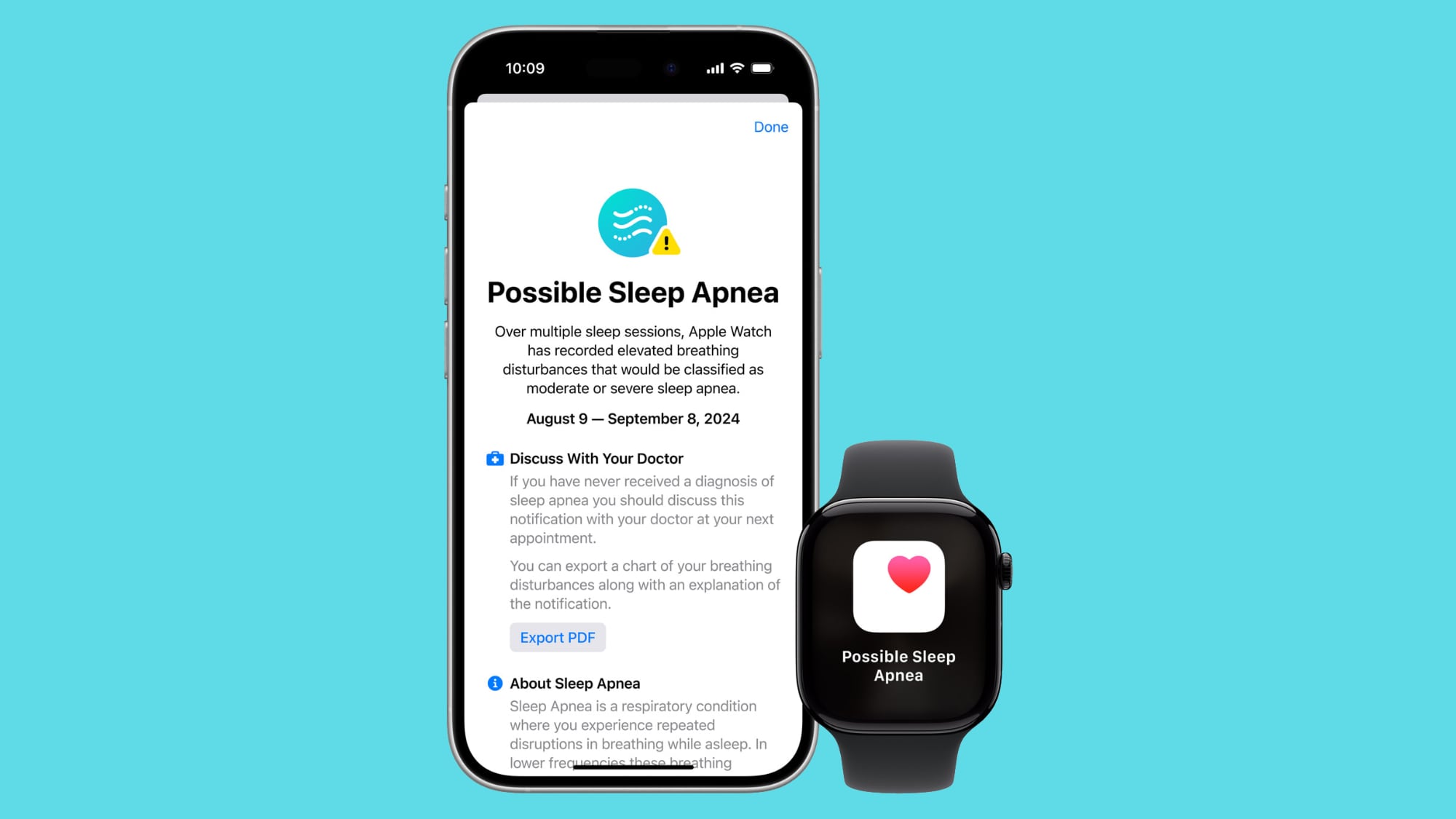
Apple released watchOS 11 today following months of beta testing. A key new health-related feature included in the software update is sleep apnea detection, which is available starting today on the Apple Watch Series 10, Apple Watch Series 9, and Apple Watch Ultra 2 in more than 150 countries and regions, according to Apple.
The list of countries includes the U.S., U.K., France, Germany, Italy, Spain, Japan, New Zealand, Singapore, and many others, with a full list available on Apple's website. A few English-speaking countries where the feature is not yet available are Australia and Canada, as Apple is still seeking regulatory clearance for the feature in some regions.
Sleep apnea is a potentially serious disorder in which a person's breathing repeatedly stops and starts while they sleep. The detection feature uses the Apple Watch's accelerometer to "monitor small movements at the wrist that are associated with interruptions in normal respiratory patterns," according to Apple. If these disturbances occur frequently over multiple nights, they may be associated with sleep apnea, according to Apple.
Apple Watch users can view their nightly Breathing Disturbances in the Health app on the iPhone, with disturbances classified as "elevated" or "not elevated."
Apple says the feature was developed using "advanced machine learning" and an "extensive data set of clinical-grade sleep apnea tests," and then validated in a "clinical study." Apple's fine print says the feature is intended to detect signs of moderate to severe sleep apnea for people 18 years old or older who have not already been diagnosed with sleep apnea.
received FDA clearance for the feature in the U.S., and the company shared a document describing the development and validation of the feature.
Related Roundups: Apple Watch 10, Apple Watch Ultra 2
Buyer's Guide: Apple Watch (Buy Now), Apple Watch Ultra (Buy Now)
Related Forum: Apple Watch
This article, "Apple Watch's Sleep Apnea Detection Feature Now Available in More Than 150 Countries" first appeared on MacRumors.com
Discuss this article in our forums
https://www.macrumors.com/2024/09/16/apple-watch-sleep-apnea-feature-150-countries/
Just Install iOS 18? Here Are 10 Things to Do First
The long-awaited iOS 18 update is now available for everyone to download, and there are hundreds of new features and changes for you to learn about. Some of the additions require a little bit of setup to get up and running, so we've created this guide that walks you through the features you should check out first after updating to iOS 18.
Set Up Your Home Screen
The Home Screen has several design changes that allow for more customization and personalization. You can put icons where you want, change their size and change their colors.
can go anywhere on the grid, with empty spaces permitted.
After you've rearranged icons, long press on the Home Screen, tap Edit, and then choose Customize. From this interface, you can make app icons bigger by removing the app names, toggle on Dark Mode icons, or even change the tint of icons to match your wallpaper.
take a look at our full Home Screen guide to get details on everything you can do.
Set Up Control Center
The Control Center interface is much more customizable, and you can reorder your controls, put them on different pages, and even access them from the Lock Screen and Action Button. There's a whole Controls Gallery, complete with support for controls for third-party apps.
To set up your Control Center, swipe down from the upper right corner of your iPhone and long press on any empty space until the grid shows up, or tap on the "+" button at the upper left of the display.
From there, grab an icon and move it to where you want it to be. You can move it on the same page, or drag it to a new page. Like the Home Screen, you can have empty spaces. You can have a different page for related controls like music and home, or mix them all up. Drag on the corner of an icon to change its size.
In this same editing interface, tap on "Add a Control" to get to the Controls Gallery, where you'll see all your Control Center options organized by category.
check out our guide.
Hide and Lock Apps
If you have to hand over your unlocked iPhone to a partner, child, or friend, you can now do so knowing that apps can be locked and hidden, requiring Face ID to access.
To lock or hide an app on the Home Screen, long press on the app icon, tap "Require Face ID," and then choose either Require Face ID or Hide and Require Face ID.
Adding the Require Face ID option only locks an app and you'll need to enter a passcode or scan your face when trying to open it. Opting in to hiding an app as well removes it from the Lock Screen and all other places on the iPhone, and it will only be accessible from a locked Hidden Apps folder in the App Library.
How to Lock and Hide iPhone Apps
Change Your Lock Screen Buttons
You know the Camera and Flashlight icons that have been on the Lock Screen forever? You can now swap them out or even remove them.
From the Lock Screen, long press, tap on Customize, select Lock Screen, and then tap the "-" buttons on the Camera and Flashlight to remove them. You can stop there, or tap on the "+" button to add other Control Center buttons, like turning on Dark Mode or starting a Voice Memo.
You can even add third-party controls here.
Organize the Photos App
There are no more tabs in the Photos app because Apple introduced a new unified design. To get to different sections like Memories and albums, you just scroll down in the app.
The Photos app is now organized into "Collections," and you can customize which collections you see and where they're located in the Photos app interface. To organize your collections, scroll down to the bottom of the Photos app, and tap on Customize and Reorder.
You can also pin content that you want to add to Collections. Scroll down to Pinned Collections and tap on "Modify" to make changes.
have a Photos guide that walks through all of the changes.
Check Out the Passwords App
Apple added a new Passwords app to the iPhone, iPad, and Mac to make it easier to get to your stored iCloud Keychain logins and passwords. It basically offers the same functionality as the Passwords section of the Settings app, but it's been moved into a separate app.
Passwords are automatically added to the app when you save a login or password when logging into a website, and it will already feature all of your logins and passwords if you use iCloud Keychain.
There are warnings for weak passwords, reused passwords, and compromised passwords, along with support for passkeys and sharing passwords.
in our dedicated guide.
Try Safari Distraction Control
Distraction Control is a new Safari feature that cuts down on distracting elements on webpages like sign-in windows, cookie preference popups, GDPR notices, and newsletter signup banners. It cannot be used to remove ads, but it can block a lot of annoyances.
To use it, navigate to any webpage. Go to the Page Menu and select Hide Distracting Items. From there, tap on any element on the page that you want to hide. You can hide anything that's static. To unhide something, just go back to the Page Menu and tap Show Hidden Items.
Note: If you don't see the Hide Distracting Items option, tap on the three dots at the bottom of the menu then tap Edit to add it to the Page Menu.
check out our Safari 18 guide.
Test Out Math Notes
iOS 18 has an interesting integration between the Calculator app and the Notes app called Math Notes. Math Notes solves equations automatically, so you can do things like add up your monthly budget, calculate what people owe you for a group trip, or split a restaurant bill.
You can use Math Notes in the Notes app or in the Math Notes section of the Calculator app, plus it also works in apps like Messages. Any equation that you type in is automatically solved when you add an equals sign, and you can even use variables.
If you write dinner = $42, movies = $24, and dessert = $18 in the Notes app or in the Math Notes section of Calculator, you can then type in dinner + movies + dessert and add an equals sign to get the total. Variables can be used in equations and graphs (with a relevant equation) and adjusted later to change the results.
Math Notes supports unit conversions too, and it can solve all of the same functions as the scientific calculator.
Schedule a Message
Send Later is new in iOS 18, and you can use it to schedule a text up to two weeks in advance of when it's sent. If you know someone's birthday is coming up, for example, you can schedule a happy birthday text ahead of time so it's ready to go.
You can use Send Later in a conversation with any other iMessage user, and it works for both individual and group chats. To use it, open up a conversation, tap on the "+" button, tap on More, and then choose Send Later.
From there, type your message and then tap the blue bubble that defaults to Tomorrow 9:00 a.m. to use the slider to change the date and time. Tap the blue arrow to schedule your completed message.
You'll see the scheduled messages that you've created at the bottom of the conversation. If you want to change or delete something you've scheduled, just tap on the "Edit" button.
check out our full Messages guide if you're interested.
Use iPhone Mirroring
iPhone Mirroring is a new iOS 18 feature that works when you also have a Mac running macOS Sequoia. There's a new iPhone Mirroring app on the Mac, and if you click it, you can access your iPhone from your Mac.
You'll need to authenticate the first time you use it, but from there, you can opt in to have it access your iPhone automatically when you use the iPhone Mirroring app on your Mac. You can use iPhone Mirroring even with your iPhone locked and tucked away, or positioned in StandBy mode.
iPhone Mirroring lets you access all of the apps and content on your iPhone from your Mac, including your iPhone notifications. Later, Apple even plans to let you drag and drop files from your iPhone to your Mac and vice versa with iPhone Mirroring, but that's not implemented yet.
Note that you need to start iPhone Mirroring from your Mac's iPhone Mirroring app, and it can't be initiated from the iPhone.
A Note About Apple Intelligence
At WWDC, Apple introduced a new set of Apple Intelligence features like Writing Tools, Genmoji, and Image Playground. Apple Intelligence is not in the launch version of iOS 18.
The first Apple Intelligence features will come in the iOS 18.1 beta that Apple is testing. iOS 18.1 includes Writing Tools, Siri's new design, Smart Replies in Messages and Mail, Memory Maker and Clean Up in Photos, and new ways for minimizing distractions with focus modes and notification summaries.
It will take Apple until next year to fully roll out the Apple Intelligence features that it showed off at WWDC, but you'll get to try some of them when iOS 18.1 launches. We expect to see iOS 18.1 debut in October.
Read More About iOS 18
For more on the new features that have been introduced in iOS 18, we have a comprehensive iOS 18 roundup.
Related Roundups: iOS 18, iPadOS 18
Related Forums: iOS 18, iPadOS 18
This article, "Just Install iOS 18? Here Are 10 Things to Do First" first appeared on MacRumors.com
Discuss this article in our forums
Apple Leaks New Mac Mini With 5 USB-C Ports
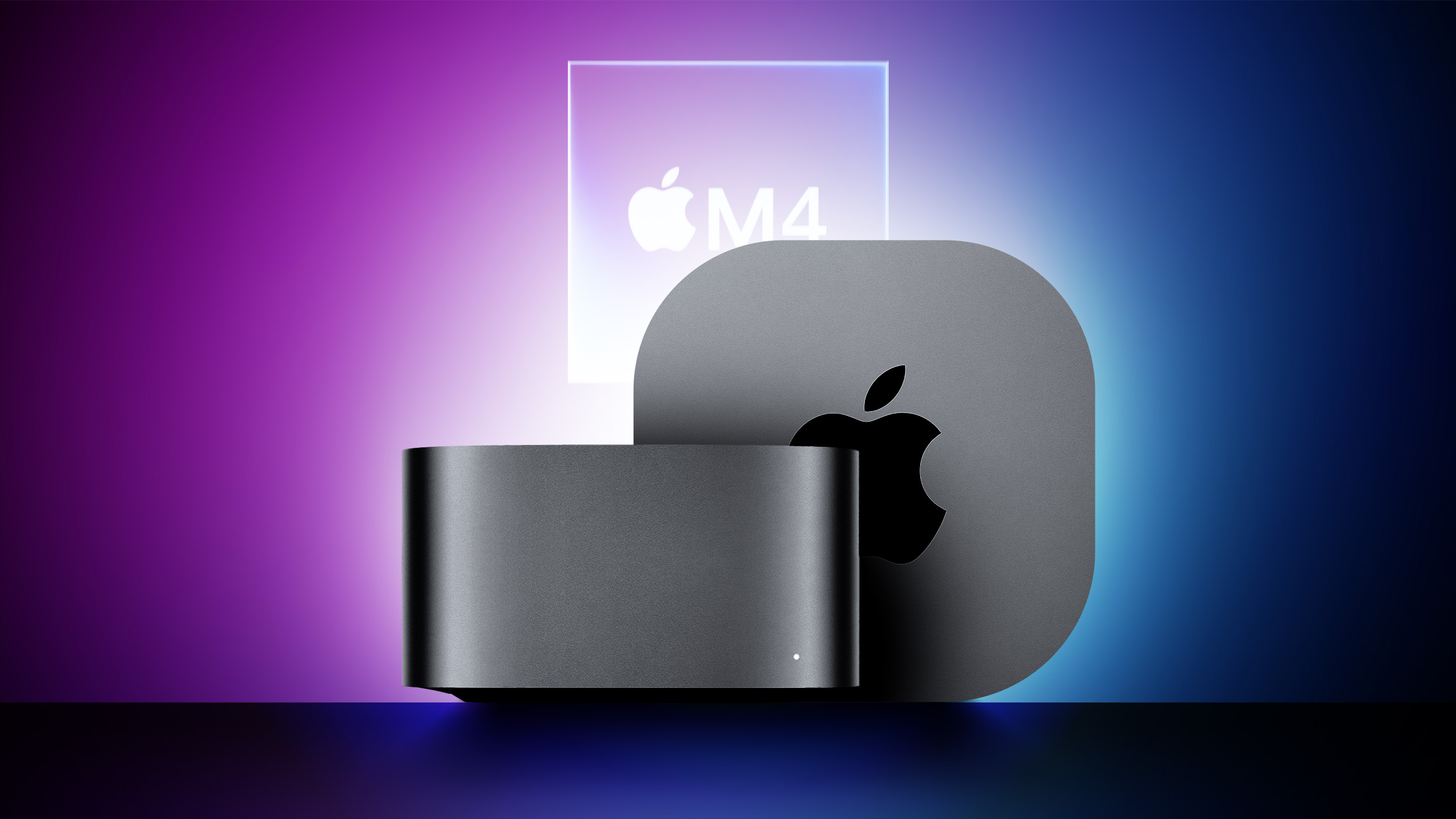
Apple has seemingly leaked the rumored next-generation Mac mini with five USB-C ports, according to a code change within Apple software that was discovered today by MacRumors contributor Aaron Perris.
The code refers to an unreleased Mac mini model with an Apple silicon chip and five ports, which lines up with a previous report from Bloomberg's Mark Gurman that said the next Mac mini will be equipped with five USB-C ports. Technically speaking, at least some of these ports will likely be Thunderbolt 4 ports, which use the USB-C connector design.
The exact string is "Apple silicon Mac mini (5 Port)."
nearly as small as an Apple TV, feature M4 and M4 Pro chip options, and lack the USB-A ports included on previous models. The current Mac mini was released in January 2023 and has four Thunderbolt 4 ports and two USB-A ports, along with an HDMI port, Gigabit Ethernet port, and a headphone jack.
rumored to be announced at Apple's next event in October, alongside some other M4 Macs and a new iPad mini.
Related Roundup: Mac mini
Buyer's Guide: Mac Mini (Don't Buy)
Related Forum: Mac mini
This article, "Apple Leaks New Mac Mini With 5 USB-C Ports" first appeared on MacRumors.com
Discuss this article in our forums
https://www.macrumors.com/2024/09/16/mac-mini-5-usb-c-ports-leak/
iOS 18 Now Offers Financing via Affirm After 'Apple Pay Later' Discontinued
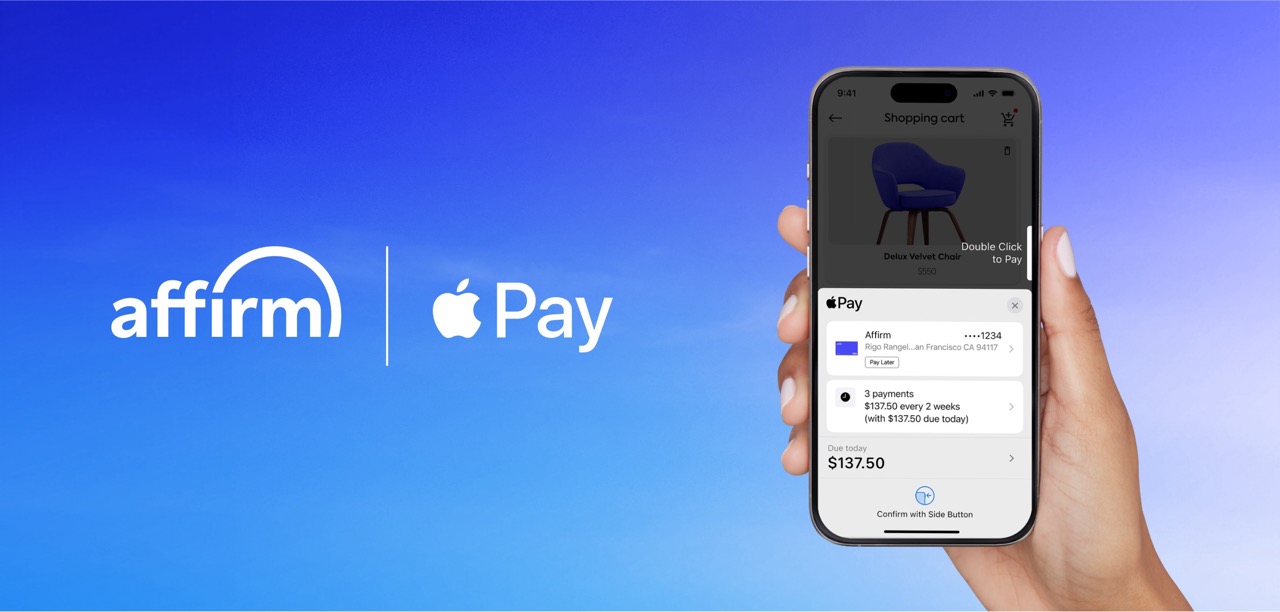
In June, Apple discontinued its year-old buy-now, pay-later service called Apple Pay Later, which let qualifying customers split a purchase made with Apple Pay into four equal payments over six weeks, with no interest or fees. Instead, Apple said customers in the U.S. would be able to apply for loans from buy-now, pay-later company Affirm when they check out with Apple Pay, starting with iOS 18 and iPadOS 18.
Alongside the release of iOS 18 and iPadOS 18 today, Affirm has officially announced its financing partnership with Apple and shared more details. Starting today, qualifying Apple Pay users in the U.S. can use Affirm to split eligible purchases into biweekly or monthly payments "for as low as 0% APR," according to the press release.
iOS 18 and iPadOS 18 users can select "Other Cards & Pay Later Options" when checking out with Apple Pay, choose Affirm, and complete an eligibility check with no credit score impact. Approved customers can then choose a payment plan.
Via: 9to5Mac
Related Roundups: Apple Pay, iOS 18, iPadOS 18
Tag: Affirm
Related Forums: Apple Music, Apple Pay/Card, iCloud, Fitness+, iOS 18, iPadOS 18
This article, "iOS 18 Now Offers Financing via Affirm After 'Apple Pay Later' Discontinued" first appeared on MacRumors.com
Discuss this article in our forums
https://www.macrumors.com/2024/09/16/apple-pay-affirm-partnership/
Apple Releases iOS 18 and iPadOS 18 With Home Screen Customization, App Locking, Passwords App, Messages Updates and More
Apple today released iOS 18 and iPadOS 18, the new operating system updates for the iPhone and iPad. As with all of Apple's software updates, iOS 18 and iPadOS 18 are available for free.
Subscribe to the MacRumors YouTube channel for more videos.
Apple's new software can be downloaded on eligible iPhones and iPads over-the-air by going to Settings > General > Software Update. Note that it can take a few minutes for the updates to propagate to all users due to high demand.
iOS 17, you can download iOS 18. It is available on the iPhone XR, iPhone XS, iPhone SE 2, and newer. As for the iPad, iPadOS 18 runs on the third-generation 12.9-inch iPad Pro and later, all 11-inch iPad Pro models, the third-generation iPad Air and later, the seventh-generation iPad and later, and the fifth-generation iPad mini and later. Apple has also released an iOS 17.7 update for those still running iOS 17.
iOS 18 roundup and our iPadOS 18 roundup, both of which go into depth on all of the new features that are included.
Home Screen, with the option to arrange apps and widgets with open spaces and add new tints to app icons. Control Center has been entirely overhauled with support for multiple pages, third-party controls, and the option to put controls on the Lock Screen and activate them with the Action Button.
RCS makes for a much better messaging experience.
Apple added an all-new Passwords app for login management, and Phone calls can be recorded to the Notes app with a new call recording feature. Notes can also do transcriptions of audio recordings.
Photos app has been overhauled with a unified look and new customization options through Collections, and the Maps app has support for topographic maps, trail networks, and creating custom walking and hiking routes.
Face ID or Touch ID, and hide them too. Tap to Cash provides an easier way to send money to other iPhone users in person, and there are several new features for the AirPods Pro. Many of these features are also available on the iPad, plus there are some iPad-specific additions like new tab bars for apps and automatic handwriting improvements.
Home Screen
- Flexible arrangement to place app icons and widgets in any open position on the Home Screen, such as along the bottom or off to the side, to create the ideal layout for each page
- Dark icons give your Home Screen look a darker aesthetic, and can automatically adjust when your iPhone enters Dark Mode, or always appear dark
- Color tinting lets you apply any color to app icons and widgets or have iOS suggest a color that complements your wallpaper
- Larger icons allow you to make all the app icons and widgets on your screen appear larger, removing the name underneath
Photos
- Photos app redesign features the biggest update ever with a simplified layout that puts everything into a single view
- Collections automatically organize your library by helpful topics that you can browse in a collage, grid, as a memory, or on a map
- Customization options let you reorder, add, and remove Collections rows, and add just the items you want to Pinned Collections to keep within easy reach
- Groups in People and Pets include photos of your favorite people or pets who frequently appear together
- Trips automatically organizes your travels into collections so you can relive each trip
- Recent Days lets you view your recent photos organized by day without clutter like screenshots
- Filter button in the grid helps you reduce clutter by filtering to specific media types, your favorites, or by hiding screenshots from the view
- Video speed control lets you slow down high frame rate video content with in and out points
- Utilities includes additional helpful collections like Documents, Receipts, QR codes, and more, and items you've recently edited, viewed, and shared
- Recovered album in Utilities surfaces images that are on your device but were not previously visible due to database corruption in a locked album
Messages
- Messages via satellite lets you message friends and family when you are without cellular or Wi-Fi connection by connecting to a satellite in space (iPhone 14 and later)
- Text effects bring your conversations to life by visually amplifying any letter, word, phrase, or emoji in iMessage with dynamic, animated effects like explode, ripple, and nod
- Text formatting lets you add bold, underline, italics, and strikethrough to any letter, word, or phrase in iMessage
- Emoji and sticker Tapbacks allow you to react to a message using any emoji or sticker, giving you access to the Tapbacks you and your friends send the most with just a swipe
- Send Later enables you to compose a message now and schedule it to send later
- RCS messaging support includes delivery and read receipts, higher resolution photos and videos for messaging people without an iPhone and requires carrier support
Control Center
- Redesigned Control Center features convenient groups of controls, the ability to arrange controls just the way you want, and support for controls from third-party apps
- Groups of controls can be accessed by continuously swiping from the right edge, including your most used controls, Home controls, Media Playback and Connectivity, with the option to build out entirely new groups too
- Controls gallery displays the full set of available controls, including controls from third-party apps, that you can add right into the group you choose
- Resizable controls let you drag from the lower right of a control from within Control Center
Lock Screen
- Custom Lock Screen controls let you choose controls from the controls gallery from your favorite apps
- Action button can be customized with controls from the controls gallery (iPhone 15 Pro and iPhone 15 Pro Max)
- Font options allow you to customize the time with 12 numeral scripts in Arabic, Arabic Indic, Bangla, Devanagari, Gujarati, Gurmukhi, Kannada, Malayalam, Meitei, Odia, Ol Chiki, and Telugu
Safari
- Distraction Control helps you hide items on a webpage that you find disruptive to your browsing
- Highlights surface key information from the webpage you're visiting with summaries, locations, and more
- Redesigned Reader offers even more ways to enjoy articles with a streamlined view of the article you're reading, a summary, and a table of contents for longer articles
Passwords
- Passwords app lets you see all your credentials for websites and apps in one place, making it even easier to access your passwords, passkeys, Wi-Fi passwords, and verification codes
- Verification codes for two factor authentication can be set up right in Passwords so you can easily copy them or autofill them into Safari without opening an authenticator app
- Secure syncing ensures your accounts saved in Passwords sync seamlessly with iCloud with end-to-end encryption so you can access them on your other devices
- Windows support through the iCloud Passwords app so you can access your passwords on Windows devices
Maps
- Topographic maps display features like trails, contour lines, elevation, and points of interest
- Hikes are available across all U.S. national parks and can be saved to your device to access while offline
- Custom walking and hiking routes can be created with just a few taps for hikes in the park, regular exercise routines in your neighborhood, walking tours while on vacation, and more
- Places Library combines all your saved places, guides, and hiking routes into one location for easy access
Gaming
- Game Mode minimizes background activity to sustain the highest frame rates and dramatically improves responsiveness with wireless accessories like game controllers and AirPods
Wallet
- Tap to Cash lets you exchange Apple Cash quickly and privately, without sharing phone numbers or email addresses, just by holding your phones together
- New pass designs have a beautiful new look and great new features, including a new event guide with helpful information about the venue and smart recommendations from your favorite Apple apps
- New ways to pay with installments and rewards on supported credit and debit cards when you check out with Apple Pay online and in apps
Journal
- State of mind can be logged right from within Journal, and emotions or mood logged in the Health app are included in Journaling Suggestions
- Insights view shows your writing streaks, a calendar, and other fun stats that help you track your journaling goals
- Search lets you easily find past entries, and the ability to sort shows your entries in your preferred order
- Widgets for your Home Screen and Lock Screen show your current streak or writing prompts that change throughout the day, so you can reflect on what's going on in the moment
Phone
- Recent calls search helps you find previous calls, voicemails and contacts using phone numbers, names, or even a word transcribed from a voicemail
- Keypad search helps you quickly find and call existing contacts by typing in their number or name on the alphanumeric keypad
- Automatic mic mode picks the right mic mode for you, toggling between Voice Isolation, Wide Spectrum, and Standard mode depending on your environment
Privacy
- Locked apps let you protect your sensitive apps and the information inside them by requiring Face ID, Touch ID, or your passcode to open them and hiding the content from search, notifications, and other places across the system
- Hidden apps have the same protections as locked apps, plus they are placed in a new hidden apps folder that is locked, and you won't receive notifications or calls from the app
- Improved Contacts permission empower you to choose which contacts to share with an app
- Improved Bluetooth pairing lets developers offer a seamless pairing experience, while protecting your privacy
AirPods
- Hands-free Siri Interactions let you respond to Siri announcements with AirPods by simply nodding your head 'yes' or shaking your head 'no'
- Voice Isolation on AirPods Pro provides clearer call quality for those you are speaking with, even in windy conditions or places with loud background noise
- Personalized Spatial Audio for gaming with AirPods puts you in the middle of the action with sound that surrounds you combined with a new API for developers that makes it easier than ever to enable
Apple TV app
- InSight delivers real-time information for every live-action Apple TV+ movies and shows that complements what you're watching onscreen
- Enhance Dialogue enables you to hear what's being said onscreen more clearly, especially when loud effects or music is playing
- More dynamic Subtitles automatically appear at just the right times, like when the content language doesn't match your device language, when you mute the audio, or when you skip back while watching a program
Notes
- Audio recordings can be started right from inside a note, and kept with related comments, checklists, and documents
- Live transcriptions show as you record audio, and transcripts are fully searchable so you can always find what you need (iPhone 12 and later)
- Math in Notes let you enter expressions and equations in your note to have them solve instantly
- Collapsible sections help you simplify and hide text in long notes; just tap next to a section header to lighten up your most text-heavy notes
- Highlight text in your note with a choice of five colors allows you to make your text standout
Accessibility
- Eye Tracking makes it possible for people to control iPhone with just their eyes (iPhone 12 and later and iPhone SE (3rd generation))
- Music Haptics syncs the iPhone Taptic Engine with the rhythm of songs so those who are deaf or hard of hearing can enjoy the Apple Music catalog (iPhone 14 and later)
- Vocal Shortcuts help people with severe atypical speech record custom utterances that trigger specific actions
- Vehicle Motion Cues can help reduce motion sickness for passengers in moving vehicles by placing dots on the screen that move with the vehicle without interfering with content
This release also includes other features and improvements:
- Emergency SOS Live Video enables you to share streaming video and recorded media during emergency calls with participating US emergency operators (iPhone 14 and later)
- Math Notes in Calculator let you evaluate expressions, assign variables and even create graphs on iPhone
- Calendar lets you create, view, edit and complete reminders alongside with your events
- Recently Deleted list in Reminders lets you view and retrieve deleted reminders
- Screen sharing in SharePlay lets you tap and draw on someone's screen or ask for permission to remotely control their iPhone and take actions yourself
- Scenes in Freeform allow you to organize your content into sections, then save, label and order them as you like
- Redesigned Fitness+ makes it easy to find personalized recommendations, or search for something specific
- Guest access in Home app lets you provide visitors with date and time- based access to locks, garage doors, and alarm systems
- Electricity usage and rate plan information in Home app are displayed for eligible customers when connecting their utility account, starting with Pacific Gas and Electric Company in California
- Repair Assistant prompts you to configure the genuine Apple parts replaced on your device after a repair (iPhone 12 and later)
Some features may not be available for all regions or on all Apple devices. For more information, please visit this website:
https://www.apple.com/ios/ios-18
Some features may not be available for all regions or on all iPhone models. For information on the security content of Apple software updates, please visit this website:
https://support.apple.com/100100
More Information and Discussion
You can find a full list of what's new in iOS 18 and iPadOS 18 in our comprehensive feature roundups. You can also chat about all of the new features in our iOS 18 forum and our iPadOS 18 forum.
Related Roundups: iOS 18, iPadOS 18
Related Forums: iOS 18, iPadOS 18
This article, "Apple Releases iOS 18 and iPadOS 18 With Home Screen Customization, App Locking, Passwords App, Messages Updates and More" first appeared on MacRumors.com
Discuss this article in our forums
Apple Sports App Updated With Live Scores on iPhone's Lock Screen and More New Features
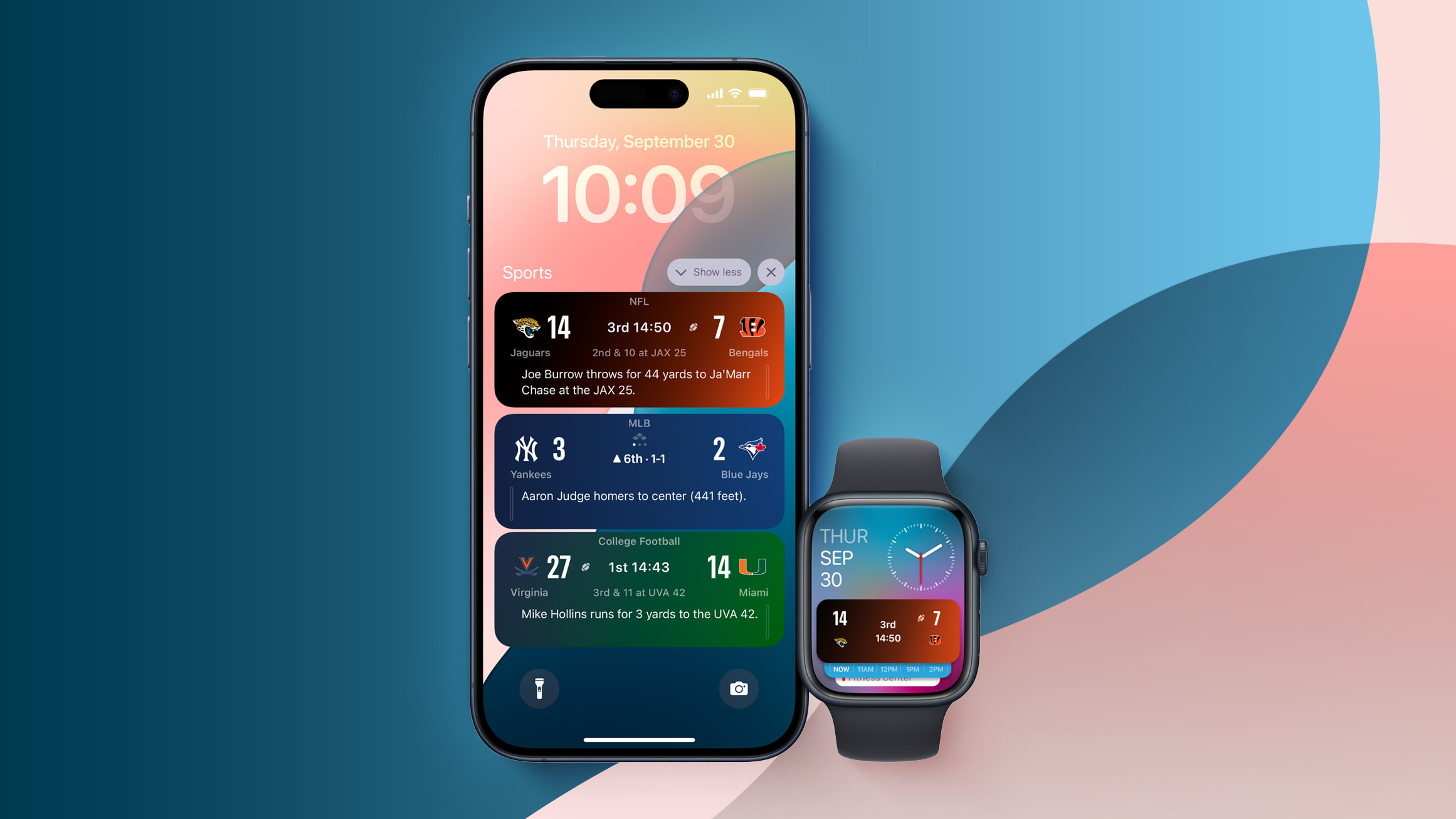
Apple today updated its free Sports app for the iPhone with several new features and changes, including Live Activities support.
The latest version of the Apple Sports app on iOS 18 and watchOS 11 introduces Live Activities support for all teams and leagues available within the app. Live Activities provides live scores and play-by-play information at a glance on the iPhone's Lock Screen and in the Dynamic Island on newer models, and on the Apple Watch starting with watchOS 11.
Apple previously said Live Activities are no longer available in the Apple TV app on iOS 18.
Apple Sports provides scores and more for the following leagues:
NFL
NCAAF
MLS
MLB
NBA
WNBA
NCAA basketball (men's and women's)
NHL
NWSL
Premier League
Bundesliga
LaLiga
Liga MX
Ligue 1
Serie A
• Added a new drop-down menu that makes it faster and easier to jump between your leagues and a new search page to browse the ones you want to check in on.
• With new optimizations for the WNBA and MLB playoffs, Apple Sports is the best place to stay up to speed all postseason.
Apple Sports is a free app available in the App Store.
Tag: Apple Sports
This article, "Apple Sports App Updated With Live Scores on iPhone's Lock Screen and More New Features" first appeared on MacRumors.com
Discuss this article in our forums
https://www.macrumors.com/2024/09/16/apple-sports-app-live-activities/
Anker Offers MacRumors Readers 20% Off Collection of Chargers, Hubs, Batteries, and More
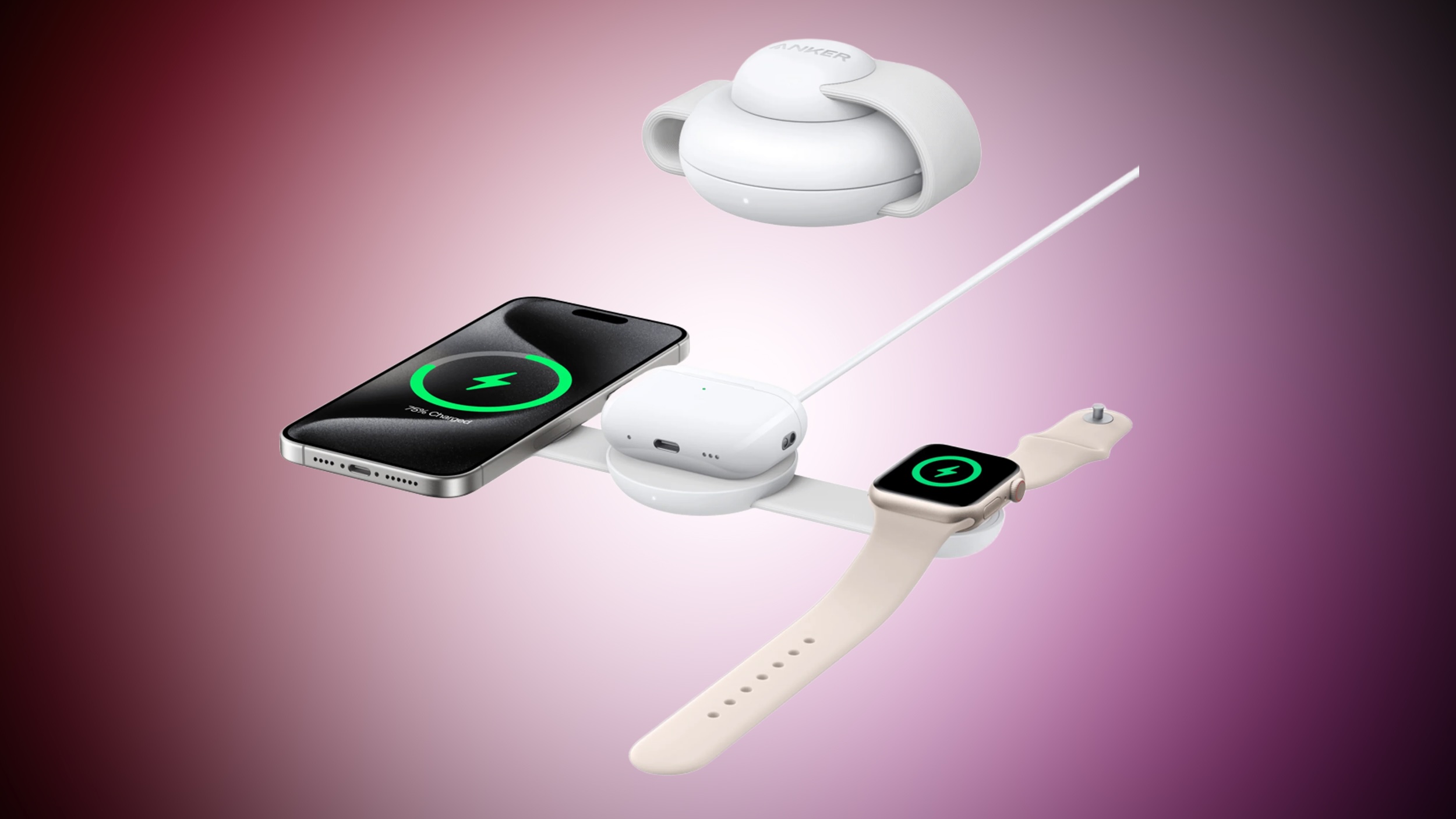
MacRumors readers have a chance to get 20 percent off a collection of Anker's best chargers, power banks, cables, hubs, and docks this week. In order to get this deal, head to Anker's website and add an accessory to your cart, then enter the code akmacrumors20ch at checkout to see the discount.
Note: MacRumors is an affiliate partner with Anker. When you click a link and make a purchase, we may receive a small payment, which helps us keep the site running.
buy two MagGo accessories and get 15 percent off your order, but if you enter our code at checkout you'll be able to override that discount and get a better deal.
EXCLUSIVE 20% OFF
Anker Sitewide Sale
We've collected all of the MagGo accessories compatible with our code below, but don't forget that the code works with even more devices sitewide on Anker's website. This also includes Anker's new brand of Prime chargers, which launched last month and include high-capacity portable batteries, USB-C charging stations, and more.
list of power stations on sale at Amazon from Jackery and Anker.
Prime Chargers
Prime USB-C to USB-C Cable - $28.00, down from $34.99
Prime Charger (200W, 6 Ports) - $64.00, down from $79.99
Prime Charger (100W, 3 Ports) - $68.00, down from $84.99
Prime Power Bank - $72.00, down from $89.99
Prime Charging Station (8-in-1) - $124.00, down from $164.99
Prime Power Bank 27,650 mAh - $136.00, down from $179.99
Prime Charging Docking Station (14-in-1) - $184.00, down from $249.99
Wireless Chargers
MagGo 3-in-1 Foldable Wireless Charging Station - $72.00, down from $89.99
MagGo Wireless Charger Stand - $28.80, down from $35.99
MagGo 2-in-1 Wireless Charger Stand - $40.00, down from $49.99
MagGo 2-in-1 Wireless Charger Dock Stand - $40.00, down from $49.99
Power Banks
MagGo Power Bank 10,000 mAh - $56.00, down from $69.99
MagGo Power Bank for Apple Watch - $64.00, down from $79.99
Accessories
MagGo Magnetic Case with Stand - $26.40, down from $32.99
MagGo USB-C Adapter - $28.00, down from $34.99
Easy Fit Screen Protector - $25.60, down from $31.99
Deals Roundup has more information on the latest Apple-related sales and bargains.
Related Roundup: Apple Deals
This article, "Anker Offers MacRumors Readers 20% Off Collection of Chargers, Hubs, Batteries, and More" first appeared on MacRumors.com
Discuss this article in our forums
https://www.macrumors.com/2024/09/16/anker-macrumors-20-off/
AirPods 4 Review Videos Show Hidden Pairing Button, Lack of MagSafe
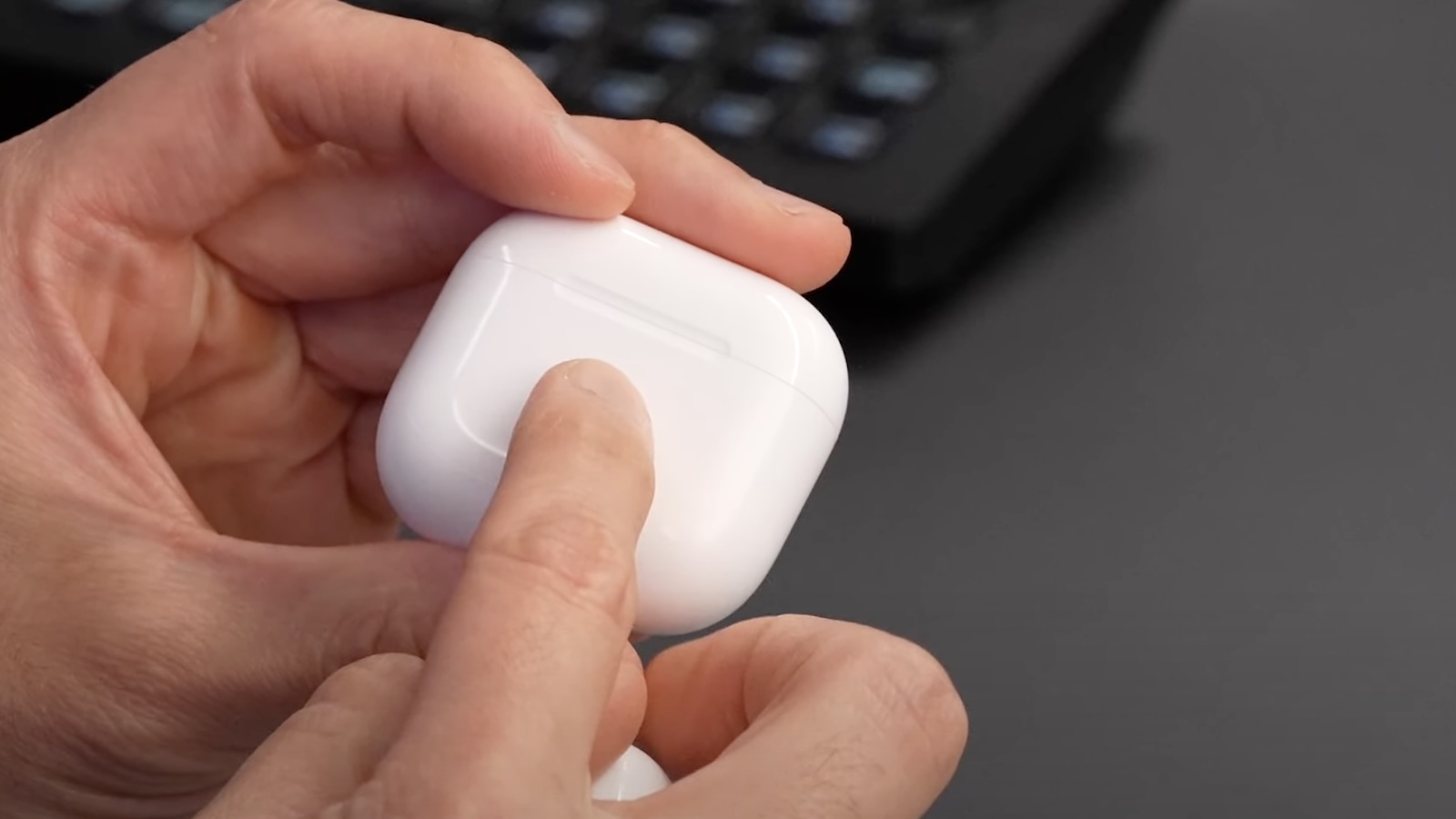
The first AirPods 4 reviews surfaced today, providing us with a closer look at Apple's latest earbuds before they launch on Friday.
There are two types of AirPods 4, including ones with active noise cancellation for $179 and those without active noise cancellation for $129. As discovered last week, the pairing button and charging status light are now hidden on both AirPods 4 charging cases, and some of the review videos offer a quick demonstration of these changes.
Marques Brownlee showed the new capacitive button starting at the 3:48 mark of his video:
Dave Lee touched on the button starting at the 3:20 mark of his video:
As noted in both reviews, both AirPods 4 charging cases no longer support MagSafe. This means that while the cases can be wirelessly charged, they lack magnets for a precise locked-in position or use with upright charging stands.
AirPods 4 review roundup to learn more about the earbuds.
Related Roundup: AirPods 4
Buyer's Guide: AirPods (Buy Now)
Related Forum: AirPods
This article, "AirPods 4 Review Videos Show Hidden Pairing Button, Lack of MagSafe" first appeared on MacRumors.com
Discuss this article in our forums
https://www.macrumors.com/2024/09/16/airpods-4-hidden-button-in-action/
Apple Watch's Sleep Apnea Detection Feature Receives FDA Approval
The U.S. Food and Drug Administration today published approval of the sleep apnea detection feature on newer Apple Watch models, as reported by TechCrunch.
More details to follow.
Related Roundups: Apple Watch 10, Apple Watch Ultra 2
Buyer's Guide: Apple Watch (Buy Now), Apple Watch Ultra (Buy Now)
Related Forum: Apple Watch
This article, "Apple Watch's Sleep Apnea Detection Feature Receives FDA Approval" first appeared on MacRumors.com
Discuss this article in our forums
https://www.macrumors.com/2024/09/16/apple-watch-sleep-apnea-detection-fda-approval/