
What to Expect From an Apple Event in October: iPad Mini 7, Redesigned Mac Mini, and More
Apple will likely hold another event in October this year to announce new Macs and iPads. If so, it would be the fourth time in the last five years that Apple has held an event in October. Last year, Apple held a virtual event on Monday, October 30 to announce new MacBook Pro and iMac models with the M3 series of chips.
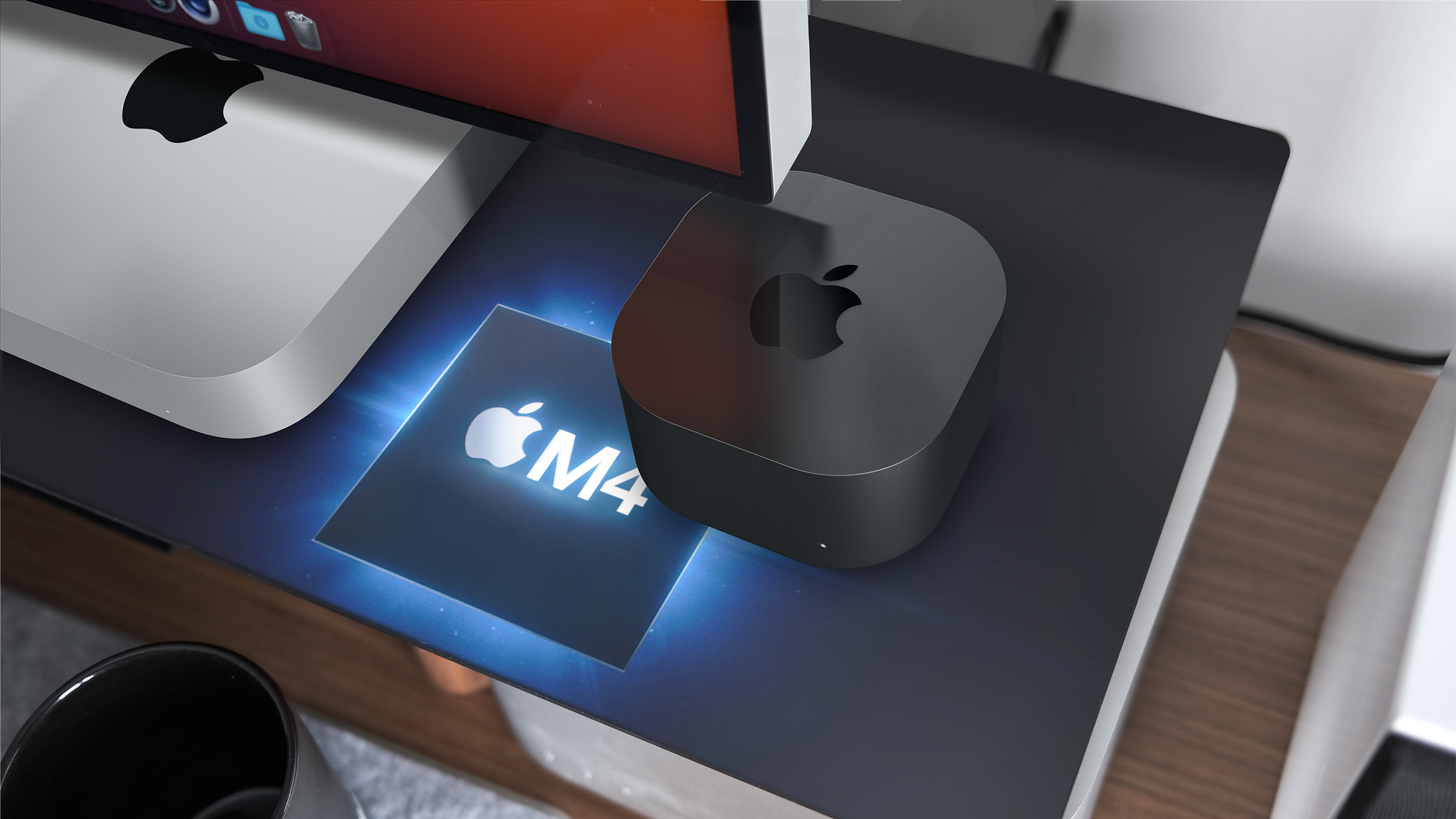
A concept of a smaller Mac mini
Below, we recap rumors about a potential Apple event in October, along with new products that are expected to be announced.
Apple Event in October
In his Power On newsletter earlier this month, Bloomberg's Mark Gurman said that Apple will hold an October event this year to announce new iPads, including an updated iPad mini, along with the first Macs with the M4 series of chips.
"There are also new iPads in the works, including an upgraded mini version," he wrote. "They're on deck for Apple's October event alongside the M4 Macs."
Apple has yet to announce an October event this year, so this remains a rumor for now.
New Products Expected
MacBook Pro
until 2026 at the earliest.
Apple last redesigned the 14-inch and 16-inch MacBook Pro in 2021, and the latest models with M3, M3 Pro, and M3 Max chips were released last October.
iMac
Apple also plans to update the iMac with the M4 chip in the coming weeks, according to Gurman. No design changes are expected for the desktop computer.
An unanswered question: Will the Magic Keyboard, Magic Mouse, and Magic Trackpad accessories for the iMac finally switch from Lightning to USB-C this year?
Mac mini
A concept of a smaller Mac mini
Gurman expects the Mac mini to be updated with M4 and M4 Pro chips in the coming weeks, and he said the desktop computer will be redesigned to become nearly as small as an Apple TV. The new Mac mini will apparently lack USB-A ports, and instead feature five USB-C ports, including two on the front of the computer.
This would be the Mac mini's first major redesign since 2010.
iPad mini
As mentioned, Gurman expects a seventh-generation iPad mini to be unveiled at the event.
Rumored features for the next iPad mini over the previous model include a faster chip, upgraded front and rear cameras, a fix for "jelly scrolling" screen tearing in portrait orientation, Wi-Fi 6E and Bluetooth 5.3 support, and new color options.
in the second half of 2024, so there is agreement from multiple credible sources about the device being updated later this year.
Apple released the current iPad mini in September 2021, with new features at the time including a larger 8.3-inch display, a USB-C port, a Touch ID power button, the A15 Bionic chip, 5G support on cellular models, a 12-megapixel rear camera with Center Stage support, compatibility with the second-generation Apple Pencil, and more.
not expected to begin until October, so the device could debut later.
Related Roundups: iMac, iPad mini, MacBook Pro 14 & 16" , Mac mini
Buyer's Guide: iMac (Neutral), iPad Mini (Don't Buy), 14" & 16" MacBook Pro (Don't Buy), Mac Mini (Don't Buy)
Related Forums: iMac, iPad, MacBook Pro, Mac mini
This article, "What to Expect From an Apple Event in October: iPad Mini 7, Redesigned Mac Mini, and More" first appeared on MacRumors.com
Discuss this article in our forums
https://www.macrumors.com/2024/09/27/apple-event-october-2024-preview/
What to Expect From an Apple Event in October: iPad Mini 7, Redesigned Mac Mini, and More
Apple will likely hold another event in October this year to announce new Macs and iPads. If so, it would be the fourth time in the last five years that Apple has held an event in October. Last year, Apple held a virtual event on Monday, October 30 to announce new MacBook Pro and iMac models with the M3 series of chips.
A concept of a smaller Mac mini
Below, we recap rumors about a potential Apple event in October, along with new products that are expected to be announced.
Apple Event in October
In his Power On newsletter earlier this month, Bloomberg's Mark Gurman said that Apple will hold an October event this year to announce new iPads, including an updated iPad mini, along with the first Macs with the M4 series of chips.
"There are also new iPads in the works, including an upgraded mini version," he wrote. "They're on deck for Apple's October event alongside the M4 Macs."
Apple has yet to announce an October event this year, so this remains a rumor for now.
New Products Expected
MacBook Pro
until 2026 at the earliest.
Apple last redesigned the 14-inch and 16-inch MacBook Pro in 2021, and the latest models with M3, M3 Pro, and M3 Max chips were released last October.
iMac
Apple also plans to update the iMac with the M4 chip in the coming weeks, according to Gurman. No design changes are expected for the desktop computer.
An unanswered question: Will the Magic Keyboard, Magic Mouse, and Magic Trackpad accessories for the iMac finally switch from Lightning to USB-C this year?
Mac mini
A concept of a smaller Mac mini
Gurman expects the Mac mini to be updated with M4 and M4 Pro chips in the coming weeks, and he said the desktop computer will be redesigned to become nearly as small as an Apple TV. The new Mac mini will apparently lack USB-A ports, and instead feature five USB-C ports, including two on the front of the computer.
This would be the Mac mini's first major redesign since 2010.
iPad mini
As mentioned, Gurman expects a seventh-generation iPad mini to be unveiled at the event.
Rumored features for the next iPad mini over the previous model include a faster chip, upgraded front and rear cameras, a fix for "jelly scrolling" screen tearing in portrait orientation, Wi-Fi 6E and Bluetooth 5.3 support, and new color options.
in the second half of 2024, so there is agreement from multiple credible sources about the device being updated later this year.
Apple released the current iPad mini in September 2021, with new features at the time including a larger 8.3-inch display, a USB-C port, a Touch ID power button, the A15 Bionic chip, 5G support on cellular models, a 12-megapixel rear camera with Center Stage support, compatibility with the second-generation Apple Pencil, and more.
not expected to begin until October, so the device could debut later.
Related Roundups: iMac, iPad mini, MacBook Pro 14 & 16" , Mac mini
Buyer's Guide: iMac (Neutral), iPad Mini (Don't Buy), 14" & 16" MacBook Pro (Don't Buy), Mac Mini (Don't Buy)
Related Forums: iMac, iPad, MacBook Pro, Mac mini
This article, "What to Expect From an Apple Event in October: iPad Mini 7, Redesigned Mac Mini, and More" first appeared on MacRumors.com
Discuss this article in our forums
https://www.macrumors.com/2024/09/27/apple-event-october-2024-preview/
iPhone 16 Pro Max: One Week Camera Review
It's been a full week since the new iPhone 16 models launched, and we've now had enough time to give the Camera Control button and the camera setup a more in-depth look. We tested the iPhone 16 Pro and Pro Max, which have triple-lens rear camera setups with 48-megapixel Fusion lens, 48-megapixel Ultra Wide lens, and 5x Telephoto lens.
Subscribe to the MacRumors YouTube channel for more videos.
The Camera Control button has turned out to be great for quickly launching the camera and snapping photos and videos, but the more in-depth adjustments that require light presses and swiping are harder to get used to.
It's still quicker to get to these controls in the Camera app itself by tapping on the display. Maybe that's a matter of getting used to the new setup, but it's also harder to use the button in portrait orientation than landscape mode, and a lot of people take photos in portrait orientation these days. On the iPhone 16 Pro Max especially, the button is just too low to be comfortable to use when holding the device vertically.
New this year is the 48-megapixel Ultra Wide lens, and it's a big improvement over the prior 12-megapixel Ultra Wide lens. Apple is using pixel binning to combine four pixels into one, ultimately providing a 12-megapixel finished image, but merging pixels allows for more detail and improved quality in low light.
The 5x Telephoto lenses haven't changed, but you can get 5x optical zoom on the 16 Pro in addition to the Pro Max, which is new this year. The "Fusion" camera is also basically identical to the "Main" camera from last year, and you still have the settings to choose between 24mm, 28mm, and 35mm lenses.
Photographic Styles are a great addition for tweaking the look of an image, and the pad for adjustments is useful to get a unique mood with minimal effort. Make sure to check out our video above to see it in action.
For videographers, the option to shoot in 4K 120 fps is super useful, especially because you can slow it down or speed it up in post production. The Audio Mix feature for changing the audio also really makes a difference for capturing video.
MacRumors to see those videos next week.
Related Roundup: iPhone 16 Pro
Buyer's Guide: iPhone 16 Pro (Buy Now)
This article, "iPhone 16 Pro Max: One Week Camera Review" first appeared on MacRumors.com
Discuss this article in our forums
https://www.macrumors.com/2024/09/27/iphone-16-pro-max-camera-review/
Best Apple Deals of the Week: First Discounts Hit AirPods 4 and Apple Watch Series 10

This week's best Apple deals include the first discounts ever on AirPods 4 and Apple Watch Series 10, plus ongoing steep markdowns on the M3 MacBook Pro. We're also still tracking a deal at Woot that has the best prices we've seen yet on iPhone 16 Silicone and Clear Cases.
Note: MacRumors is an affiliate partner with some of these vendors. When you click a link and make a purchase, we may receive a small payment, which helps us keep the site running.
AirPods 4
What's the deal? Take $10 off AirPods 4
Where can I get it? Amazon
Where can I find the original deal? Right here
$10 OFF
AirPods 4 without ANC for $119.00
$10 OFF
AirPods 4 with ANC for $169.00
Amazon this week introduced the first discounts on the AirPods 4, and these deals are still available at $10 off. You'll find both AirPods 4 models on sale right now, with and without Active Noise Cancellation, and only Amazon has the sale.
Apple Watch
What's the deal? Take up to $64 off Apple Watch Ultra 2 and Series 10
Where can I get it? Amazon
Where can I find the original deal? Right here
$30 OFF
Apple Watch Series 10 (42mm GPS) for $369.00
$30 OFF
Apple Watch Series 10 (46mm GPS) for $399.00
$64 OFF
Apple Watch Ultra 2 (Black) for $734.89
Similar to the AirPods 4, this week also saw the first notable discounts on the Apple Watch Series 10 and Ultra 2 in Black. You can get $30 off a few Apple Watch Series 10 models, and the Apple Watch Ultra 2 in Black has dropped to $734.89.
iPhone 16 Cases
What's the deal? Save on iPhone 16 cases and more
Where can I get it? Woot
Where can I find the original deal? Right here
Note: Use code APPLEFIVE to see the final deal price.
$19 OFF
iPhone 16 Cases at Woot
Woot kicked off a new tech sale earlier in the week, and it includes big savings on Apple's brand new iPhone 16 case lineup. You can get Silicone and Clear Cases for the iPhone 16, 16 Pro, and 16 Pro Max at the all-time low price of $29.99 when using the code APPLEFIVE, down from $49.00.
iPhone 16 Silicone/Clear Case - $29.99 with code APPLEFIVE, down from $49.00
iPhone 16 Pro Silicone/Clear Case - $29.99 with code APPLEFIVE, down from $49.00
iPhone 16 Pro Max Silicone/Clear Case - $29.99 with code APPLEFIVE, down from $49.00
Anker Nano 5,000 mAh Charger with Built-In USB-C, available for just $12.99 (1-Pack) or $22.99 (2-Pack).
M3 MacBook Pro
What's the deal? Take up to $500 off 14-inch M3 MacBook Pro
Where can I get it? Best Buy
Where can I find the original deal? Right here
Note: This deal is available only to My Best Buy Plus/Total members.
$400 OFF
M3 MacBook Pro (512GB) for $1,199.00
full list of discounts in our original post.
Deals Roundup has more information on the latest Apple-related sales and bargains.
Related Roundup: Apple Deals
This article, "Best Apple Deals of the Week: First Discounts Hit AirPods 4 and Apple Watch Series 10" first appeared on MacRumors.com
Discuss this article in our forums
https://www.macrumors.com/2024/09/27/best-apple-deals-of-the-week-9-27-24/
Apple Watch's New Sleep Apnea Detection Feature Approved in Canada
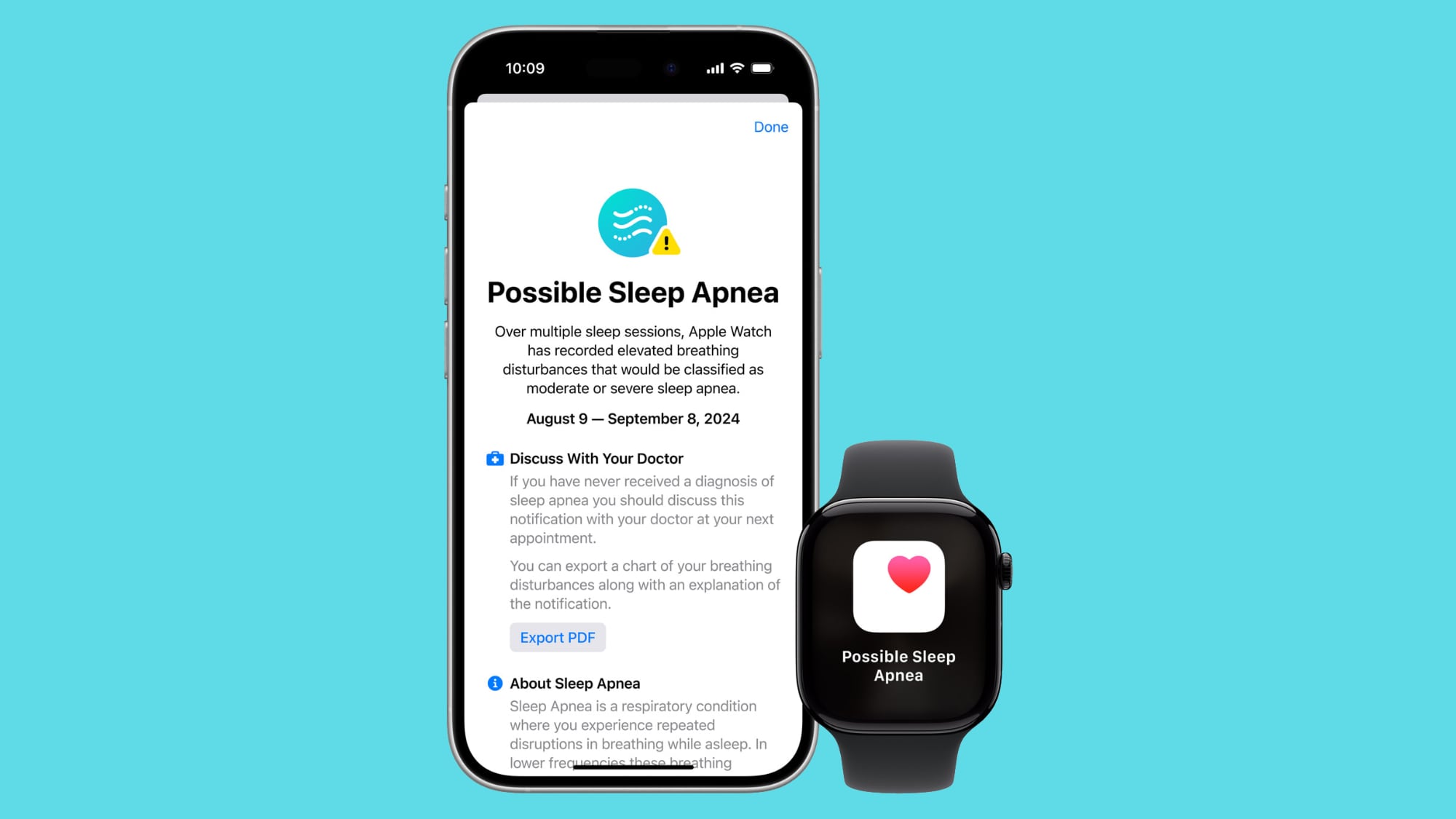
Health Canada this week published approval of watchOS 11's sleep apnea detection feature on the Apple Watch Series 10, Apple Watch Series 9, and Apple Watch Ultra 2. The feature launched in the U.S. and over 150 other countries and regions earlier this month, and Apple is now permitted to make the feature available in Canada.
It is unclear when Apple will expand the feature to Canada.
Sleep apnea is a potentially serious disorder in which a person's breathing repeatedly stops and starts while they sleep. The detection feature uses the Apple Watch's accelerometer to "monitor small movements at the wrist that are associated with interruptions in normal respiratory patterns." If these disturbances occur frequently over multiple nights, they may be associated with sleep apnea, according to Apple.
Apple says the feature was developed using "advanced machine learning" and an "extensive data set of clinical-grade sleep apnea tests," and then validated in a clinical study. The feature is intended to detect signs of moderate to severe sleep apnea in adults who have not already been diagnosed with the disorder, according to the company.
Apple Watch users can view their nightly Breathing Disturbances in the Health app on the iPhone, with disturbances classified as "elevated" or "not elevated."
Thanks, Jen Alexander!
Related Roundups: Apple Watch 10, Apple Watch Ultra 2
Buyer's Guide: Apple Watch (Buy Now), Apple Watch Ultra (Buy Now)
Related Forum: Apple Watch
This article, "Apple Watch's New Sleep Apnea Detection Feature Approved in Canada" first appeared on MacRumors.com
Discuss this article in our forums
https://www.macrumors.com/2024/09/27/apple-watch-sleep-apnea-feature-approved-in-canada/
The MacRumors Show: iPhone 16 Pro First Impressions
After some hands-on time with the iPhone 16 Pro, Apple Watch Series 10, and AirPods 4, on this week's episode of The MacRumors Show, we talk through our first impressions of the new devices.
Subscribe to The MacRumors Show YouTube channel for more videos
We consider some of the iPhone 16 Pro's most noticeable features and improvements, such as longer battery life, the 48-megapixel ultra wide camera, enhanced microphones, overhauled Photographic Styles, and the 5x telephoto camera. We also explore our mixed feelings about the all-new Camera Control button. We also discuss the revamped design of the Apple Watch Series 10, as well as the fit improvements and active noise cancellation capabilities of the AirPods 4. The MacRumors Show has its own YouTube channel, so make sure you're subscribed to keep up with new episodes and clips:
Subscribe to The MacRumors Show YouTube channel!
Apple Podcasts, Spotify, Overcast, or your preferred podcasts app. You can also copy our RSS feed directly into your podcast player.
If you haven't already listened to the previous episode of The MacRumors Show, catch up for our discussion about our favorite iOS 18 features.
MacRumors, often joined by interesting guests such as Luke Miani, Matthew Cassinelli, Brian Tong, Quinn Nelson, Kevin Nether, Jared Nelson, Eli Hodapp, Mike Bell, Sara Dietschy, iJustine, Jon Rettinger, Andru Edwards, Arnold Kim, Ben Sullins, Marcus Kane, Christopher Lawley, Frank McShan, David Lewis, Tyler Stalman, Jon Prosser, Sam Kohl, John Gruber, Federico Viticci, Thomas Frank, Jonathan Morrison, Ross Young, Ian Zelbo, and Rene Ritchie.
@MacRumorsShow, so be sure to give us a follow to keep up with the podcast. You can also head over to The MacRumors Show forum thread to engage with us directly. Remember to rate and review the podcast, and let us know what subjects and guests you would like to see in the future.
Tag: The MacRumors Show
This article, "The MacRumors Show: iPhone 16 Pro First Impressions" first appeared on MacRumors.com
Discuss this article in our forums
https://www.macrumors.com/2024/09/27/the-macrumors-show-iphone-16-pro-first-impressions/
The MacRumors Show: iPhone 16 Pro First Impressions
After some hands-on time with the iPhone 16 Pro, Apple Watch Series 10, and AirPods 4, on this week's episode of The MacRumors Show, we talk through our first impressions of the new devices.
Subscribe to The MacRumors Show YouTube channel for more videos
We consider some of the iPhone 16 Pro's most noticeable features and improvements, such as longer battery life, the 48-megapixel ultra wide camera, enhanced microphones, overhauled Photographic Styles, and the 5x telephoto camera. We also explore our mixed feelings about the all-new Camera Control button. We also discuss the revamped design of the Apple Watch Series 10, as well as the fit improvements and active noise cancellation capabilities of the AirPods 4. The MacRumors Show has its own YouTube channel, so make sure you're subscribed to keep up with new episodes and clips:
Subscribe to The MacRumors Show YouTube channel!
Apple Podcasts, Spotify, Overcast, or your preferred podcasts app. You can also copy our RSS feed directly into your podcast player.
If you haven't already listened to the previous episode of The MacRumors Show, catch up for our discussion about our favorite iOS 18 features.
MacRumors, often joined by interesting guests such as Luke Miani, Matthew Cassinelli, Brian Tong, Quinn Nelson, Kevin Nether, Jared Nelson, Eli Hodapp, Mike Bell, Sara Dietschy, iJustine, Jon Rettinger, Andru Edwards, Arnold Kim, Ben Sullins, Marcus Kane, Christopher Lawley, Frank McShan, David Lewis, Tyler Stalman, Jon Prosser, Sam Kohl, John Gruber, Federico Viticci, Thomas Frank, Jonathan Morrison, Ross Young, Ian Zelbo, and Rene Ritchie.
@MacRumorsShow, so be sure to give us a follow to keep up with the podcast. You can also head over to The MacRumors Show forum thread to engage with us directly. Remember to rate and review the podcast, and let us know what subjects and guests you would like to see in the future.
Tag: The MacRumors Show
This article, "The MacRumors Show: iPhone 16 Pro First Impressions" first appeared on MacRumors.com
Discuss this article in our forums
https://www.macrumors.com/2024/09/27/the-macrumors-show-iphone-16-pro-first-impressions/
The MacRumors Show: iPhone 16 Pro First Impressions
After some hands-on time with the iPhone 16 Pro, Apple Watch Series 10, and AirPods 4, on this week's episode of The MacRumors Show, we talk through our first impressions of the new devices.
Subscribe to The MacRumors Show YouTube channel for more videos
We consider some of the iPhone 16 Pro's most noticeable features and improvements, such as longer battery life, the 48-megapixel ultra wide camera, enhanced microphones, overhauled Photographic Styles, and the 5x telephoto camera. We also explore our mixed feelings about the all-new Camera Control button. We also discuss the revamped design of the Apple Watch Series 10, as well as the fit improvements and active noise cancellation capabilities of the AirPods 4. The MacRumors Show has its own YouTube channel, so make sure you're subscribed to keep up with new episodes and clips:
Subscribe to The MacRumors Show YouTube channel!
Apple Podcasts, Spotify, Overcast, or your preferred podcasts app. You can also copy our RSS feed directly into your podcast player.
If you haven't already listened to the previous episode of The MacRumors Show, catch up for our discussion about our favorite iOS 18 features.
MacRumors, often joined by interesting guests such as Luke Miani, Matthew Cassinelli, Brian Tong, Quinn Nelson, Kevin Nether, Jared Nelson, Eli Hodapp, Mike Bell, Sara Dietschy, iJustine, Jon Rettinger, Andru Edwards, Arnold Kim, Ben Sullins, Marcus Kane, Christopher Lawley, Frank McShan, David Lewis, Tyler Stalman, Jon Prosser, Sam Kohl, John Gruber, Federico Viticci, Thomas Frank, Jonathan Morrison, Ross Young, Ian Zelbo, and Rene Ritchie.
@MacRumorsShow, so be sure to give us a follow to keep up with the podcast. You can also head over to The MacRumors Show forum thread to engage with us directly. Remember to rate and review the podcast, and let us know what subjects and guests you would like to see in the future.
Tag: The MacRumors Show
This article, "The MacRumors Show: iPhone 16 Pro First Impressions" first appeared on MacRumors.com
Discuss this article in our forums
https://www.macrumors.com/2024/09/27/the-macrumors-show-iphone-16-pro-first-impressions/
The MacRumors Show: iPhone 16 Pro First Impressions
After some hands-on time with the iPhone 16 Pro, Apple Watch Series 10, and AirPods 4, on this week's episode of The MacRumors Show, we talk through our first impressions of the new devices.
Subscribe to The MacRumors Show YouTube channel for more videos
We consider some of the iPhone 16 Pro's most noticeable features and improvements, such as longer battery life, the 48-megapixel ultra wide camera, enhanced microphones, overhauled Photographic Styles, and the 5x telephoto camera. We also explore our mixed feelings about the all-new Camera Control button. We also discuss the revamped design of the Apple Watch Series 10, as well as the fit improvements and active noise cancellation capabilities of the AirPods 4. The MacRumors Show has its own YouTube channel, so make sure you're subscribed to keep up with new episodes and clips:
Subscribe to The MacRumors Show YouTube channel!
Apple Podcasts, Spotify, Overcast, or your preferred podcasts app. You can also copy our RSS feed directly into your podcast player.
If you haven't already listened to the previous episode of The MacRumors Show, catch up for our discussion about our favorite iOS 18 features.
MacRumors, often joined by interesting guests such as Luke Miani, Matthew Cassinelli, Brian Tong, Quinn Nelson, Kevin Nether, Jared Nelson, Eli Hodapp, Mike Bell, Sara Dietschy, iJustine, Jon Rettinger, Andru Edwards, Arnold Kim, Ben Sullins, Marcus Kane, Christopher Lawley, Frank McShan, David Lewis, Tyler Stalman, Jon Prosser, Sam Kohl, John Gruber, Federico Viticci, Thomas Frank, Jonathan Morrison, Ross Young, Ian Zelbo, and Rene Ritchie.
@MacRumorsShow, so be sure to give us a follow to keep up with the podcast. You can also head over to The MacRumors Show forum thread to engage with us directly. Remember to rate and review the podcast, and let us know what subjects and guests you would like to see in the future.
Tag: The MacRumors Show
This article, "The MacRumors Show: iPhone 16 Pro First Impressions" first appeared on MacRumors.com
Discuss this article in our forums
https://www.macrumors.com/2024/09/27/the-macrumors-show-iphone-16-pro-first-impressions/
Apple's Back to School Promotion Ending Soon: Here's What You Can Get
In June, Apple launched its annual Back to School promotion for college students in the U.S. and select other countries. Students can get a free Apple gift card with the purchase of an eligible Mac or iPad from Apple, along with 20% off AppleCare+ plans.
In the U.S. and Canada, the promotion ends on September 30, so time is running out to take advantage of the offer if you are a student. There is still more time in the U.K. and select other European countries, where the promotion ends October 21.
A free $150 Apple gift card with any new MacBook Air, MacBook Pro, or iMac
A free $100 Apple gift card with any new iPad Pro with an M4 chip, iPad Air with an M2 chip, or Mac mini
The gift card can be used towards purchases of Apple products and accessories, App Store apps, subscriptions to services like Apple Music, iCloud+ storage, and more.
Tag: Back to School Promotion
This article, "Apple's Back to School Promotion Ending Soon: Here's What You Can Get" first appeared on MacRumors.com
Discuss this article in our forums
https://www.macrumors.com/2024/09/27/apples-2024-back-to-school-offer-ends-soon/
Apple's Back to School Promotion Ending Soon: Here's What You Can Get
In June, Apple launched its annual Back to School promotion for college students in the U.S. and select other countries. Students can get a free Apple gift card with the purchase of an eligible Mac or iPad from Apple, along with 20% off AppleCare+ plans.
In the U.S. and Canada, the promotion ends on September 30, so time is running out to take advantage of the offer if you are a student. There is still more time in the U.K. and select other European countries, where the promotion ends October 21.
A free $150 Apple gift card with any new MacBook Air, MacBook Pro, or iMac
A free $100 Apple gift card with any new iPad Pro with an M4 chip, iPad Air with an M2 chip, or Mac mini
The gift card can be used towards purchases of Apple products and accessories, App Store apps, subscriptions to services like Apple Music, iCloud+ storage, and more.
Tag: Back to School Promotion
This article, "Apple's Back to School Promotion Ending Soon: Here's What You Can Get" first appeared on MacRumors.com
Discuss this article in our forums
https://www.macrumors.com/2024/09/27/apples-2024-back-to-school-offer-ends-soon/
Apple's Back to School Promotion Ending Soon: Here's What You Can Get
In June, Apple launched its annual Back to School promotion for college students in the U.S. and select other countries. Students can get a free Apple gift card with the purchase of an eligible Mac or iPad from Apple, along with 20% off AppleCare+ plans.
In the U.S. and Canada, the promotion ends on September 30, so time is running out to take advantage of the offer if you are a student. There is still more time in the U.K. and select other European countries, where the promotion ends October 21.
A free $150 Apple gift card with any new MacBook Air, MacBook Pro, or iMac
A free $100 Apple gift card with any new iPad Pro with an M4 chip, iPad Air with an M2 chip, or Mac mini
The gift card can be used towards purchases of Apple products and accessories, App Store apps, subscriptions to services like Apple Music, iCloud+ storage, and more.
Tag: Back to School Promotion
This article, "Apple's Back to School Promotion Ending Soon: Here's What You Can Get" first appeared on MacRumors.com
Discuss this article in our forums
https://www.macrumors.com/2024/09/27/apples-2024-back-to-school-offer-ends-soon/
15 New Things Your iPhone Can Do in iOS 18.1
Apple is set to release iOS 18.1 in October, bringing the first set of Apple Intelligence features to iPhone 15 Pro and iPhone 16 models. This update marks a significant step forward in Apple's AI integration, offering a new Siri contextually-aware experience and a range of additional capabilities powered by on-device machine learning and large language models. There are a couple of handy new feature controls coming, too.
While not all Apple Intelligence features will be available immediately, iOS 18.1 introduces several enhancements that aim to make your iPhone smarter and more intuitive. Below, we've listed 15 new things your iPhone will be able to do when the update rolls out next month.
Reset Your Control Center
With iOS 18, Apple made the Control Center thoroughly customizable, but there's no way to roll back your changes if things get messy. Fortunately, iOS 18.1 introduces a simple way to start fresh. In Settings ➝ Control Center, you'll find a new option to reset your Control Center to its default layout. This feature is perfect if you've made too many customizations and want to return to a clean slate without manually rearranging everything.
Take Selfies With Camera Control
Camera Control gets a selfie upgrade in iOS 18.1. Now, you can switch to the front-facing camera without touching your screen. Simply open the Camera app with a press of the Camera Control button, then swipe on the button to cycle through lens options. Look for the person icon at the top to activate the selfie camera, making it easier to capture that perfect self-portrait.
Proofread Your Text
Embarrassing typos could be a thing of the past. iOS 18.1's new Writing Tools feature includes a powerful proofreading function. It not only checks for spelling and grammar errors but also suggests improvements in word choice and sentence structure. You can accept all suggestions with a single tap or review them one by one, complete with explanations.
Rewrite Your Text
Need to change the tone of your message? The new Rewrite tool is capable of doing just that. Whether you want your text to sound more friendly, professional, or concise, this feature can adjust your writing style without altering the core content. It's like having a personal editor at your fingertips, helping you communicate more effectively in any situation.
Summarize Long Emails
If you frequently suffer from inbox overload, this should be a welcome feature. When you receive a lengthy email, you'll now see a "Summarize" button that lets Apple Intelligence create a concise overview. Choose from options like a brief paragraph, key points, or even a bulleted list. This tool makes it easier to quickly grasp the essence of important messages without reading every word. Plus, your inbox now displays a brief AI-generated summary instead of the first few lines of each email, helping you prioritize your responses more efficiently.
Answer Apple Product Questions
Your iPhone becomes a knowledgeable Apple expert with iOS 18.1. Siri can now tap into a vast database of product information, helping you understand device features, locate settings, and even provide tutorials on how to complete tasks. It's like having Apple Support built right into your device, available whenever you need it.
Offer Smart Replies to Emails and Messages
Communication gets a boost with Smart Reply in iOS 18.1. When you receive an email or message, your iPhone will analyze the content and suggest contextually relevant responses. These quick-tap options make it easy to reply promptly and appropriately, saving you time and effort in your daily correspondence.
Summarize Multiple Message Notifications
Catching up on group chats is set to get a lot easier. iOS 18.1 can summarize multiple message notifications on your Lock Screen, giving you a quick overview without the need to open the app. This feature helps you stay on top of conversations without getting overwhelmed by notification overload.
Create Memory Movies From a Short Description
Relive your favorite moments with ease using the new Memory Movie feature. Simply provide a description like "My cat in 2024" or "Orlando in the summer," and your iPhone will automatically select relevant photos and choose appropriate music. You can further customize the mood and add specific scenes, turning your memories into beautiful short films with minimal effort.
Remove Unwanted Objects From Photos
Perfect your photos with the new Clean Up tool. This feature allows you to easily remove unwanted objects from your images. Whether it's a photobomber or a distracting element in the background, you can now tap, circle, or brush over the object to make it disappear. The tool is smart enough to preserve important elements, ensuring your main subjects remain intact.
Summarize Your Audio Transcripts
Turn long recordings into digestible content with the new transcription feature. When you record audio in apps like Notes, your iPhone can now provide a transcript along with a summary. This is particularly useful for capturing and distilling information from lectures, meetings, or interviews, making it easier to review and share key points.
Reduce Your Interruptions
Take control of your notifications with the new Reduce Interruptions Focus Mode. This intelligent feature filters your alerts, showing you only the most important notifications that require immediate attention. It should come in handy for when you need to concentrate but don't want to miss crucial information.
Record Your Phone Calls
iOS 18.1 introduces Phone call recording. During a call, you'll see a record button in the upper left corner of the display. Tap it, and after notifying all participants, the call will be recorded. These recordings are stored in the Notes app, where you can access transcripts and AI-generated summaries, making it easy to review important conversations.
Summarize Web Articles
Reading long articles is about to get easier with this Safari improvement. When using Reader Mode, you can now tap a button to have Apple Intelligence summarize the article for you. This feature quickly distills the main points, allowing you to grasp the essence of the content without reading every word.
Generate Apple Intelligence Reports
Tag: Apple Intelligence
This article, "15 New Things Your iPhone Can Do in iOS 18.1" first appeared on MacRumors.com
Discuss this article in our forums
https://www.macrumors.com/2024/09/27/new-things-your-iphone-will-do-ios-18-1/
15 New Things Your iPhone Can Do in iOS 18.1
Apple is set to release iOS 18.1 in October, bringing the first set of Apple Intelligence features to iPhone 15 Pro and iPhone 16 models. This update marks a significant step forward in Apple's AI integration, offering a new Siri contextually-aware experience and a range of additional capabilities powered by on-device machine learning and large language models. There are a couple of handy new feature controls coming, too.
While not all Apple Intelligence features will be available immediately, iOS 18.1 introduces several enhancements that aim to make your iPhone smarter and more intuitive. Below, we've listed 15 new things your iPhone will be able to do when the update rolls out next month.
Reset Your Control Center
With iOS 18, Apple made the Control Center thoroughly customizable, but there's no way to roll back your changes if things get messy. Fortunately, iOS 18.1 introduces a simple way to start fresh. In Settings ➝ Control Center, you'll find a new option to reset your Control Center to its default layout. This feature is perfect if you've made too many customizations and want to return to a clean slate without manually rearranging everything.
Take Selfies With Camera Control
Camera Control gets a selfie upgrade in iOS 18.1. Now, you can switch to the front-facing camera without touching your screen. Simply open the Camera app with a press of the Camera Control button, then swipe on the button to cycle through lens options. Look for the person icon at the top to activate the selfie camera, making it easier to capture that perfect self-portrait.
Proofread Your Text
Embarrassing typos could be a thing of the past. iOS 18.1's new Writing Tools feature includes a powerful proofreading function. It not only checks for spelling and grammar errors but also suggests improvements in word choice and sentence structure. You can accept all suggestions with a single tap or review them one by one, complete with explanations.
Rewrite Your Text
Need to change the tone of your message? The new Rewrite tool is capable of doing just that. Whether you want your text to sound more friendly, professional, or concise, this feature can adjust your writing style without altering the core content. It's like having a personal editor at your fingertips, helping you communicate more effectively in any situation.
Summarize Long Emails
If you frequently suffer from inbox overload, this should be a welcome feature. When you receive a lengthy email, you'll now see a "Summarize" button that lets Apple Intelligence create a concise overview. Choose from options like a brief paragraph, key points, or even a bulleted list. This tool makes it easier to quickly grasp the essence of important messages without reading every word. Plus, your inbox now displays a brief AI-generated summary instead of the first few lines of each email, helping you prioritize your responses more efficiently.
Answer Apple Product Questions
Your iPhone becomes a knowledgeable Apple expert with iOS 18.1. Siri can now tap into a vast database of product information, helping you understand device features, locate settings, and even provide tutorials on how to complete tasks. It's like having Apple Support built right into your device, available whenever you need it.
Offer Smart Replies to Emails and Messages
Communication gets a boost with Smart Reply in iOS 18.1. When you receive an email or message, your iPhone will analyze the content and suggest contextually relevant responses. These quick-tap options make it easy to reply promptly and appropriately, saving you time and effort in your daily correspondence.
Summarize Multiple Message Notifications
Catching up on group chats is set to get a lot easier. iOS 18.1 can summarize multiple message notifications on your Lock Screen, giving you a quick overview without the need to open the app. This feature helps you stay on top of conversations without getting overwhelmed by notification overload.
Create Memory Movies From a Short Description
Relive your favorite moments with ease using the new Memory Movie feature. Simply provide a description like "My cat in 2024" or "Orlando in the summer," and your iPhone will automatically select relevant photos and choose appropriate music. You can further customize the mood and add specific scenes, turning your memories into beautiful short films with minimal effort.
Remove Unwanted Objects From Photos
Perfect your photos with the new Clean Up tool. This feature allows you to easily remove unwanted objects from your images. Whether it's a photobomber or a distracting element in the background, you can now tap, circle, or brush over the object to make it disappear. The tool is smart enough to preserve important elements, ensuring your main subjects remain intact.
Summarize Your Audio Transcripts
Turn long recordings into digestible content with the new transcription feature. When you record audio in apps like Notes, your iPhone can now provide a transcript along with a summary. This is particularly useful for capturing and distilling information from lectures, meetings, or interviews, making it easier to review and share key points.
Reduce Your Interruptions
Take control of your notifications with the new Reduce Interruptions Focus Mode. This intelligent feature filters your alerts, showing you only the most important notifications that require immediate attention. It should come in handy for when you need to concentrate but don't want to miss crucial information.
Record Your Phone Calls
iOS 18.1 introduces Phone call recording. During a call, you'll see a record button in the upper left corner of the display. Tap it, and after notifying all participants, the call will be recorded. These recordings are stored in the Notes app, where you can access transcripts and AI-generated summaries, making it easy to review important conversations.
Summarize Web Articles
Reading long articles is about to get easier with this Safari improvement. When using Reader Mode, you can now tap a button to have Apple Intelligence summarize the article for you. This feature quickly distills the main points, allowing you to grasp the essence of the content without reading every word.
Generate Apple Intelligence Reports
Tag: Apple Intelligence
This article, "15 New Things Your iPhone Can Do in iOS 18.1" first appeared on MacRumors.com
Discuss this article in our forums
https://www.macrumors.com/2024/09/27/new-things-your-iphone-will-do-ios-18-1/
USB-C Apple Pencil Now Available Refurbished in Three More Countries
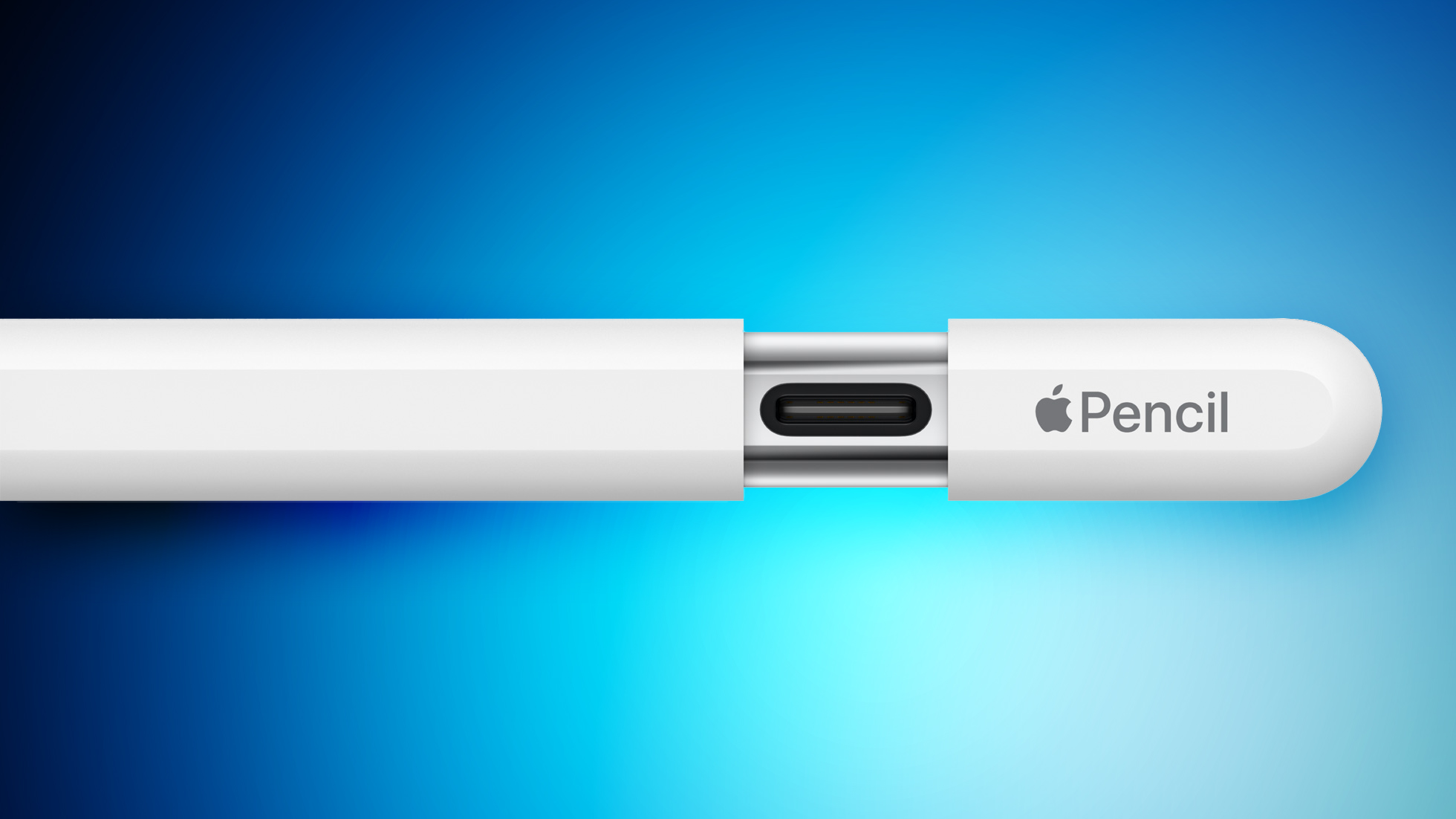
Apple today added the lower-cost Apple Pencil with a USB-C port to its online refurbished store for the first time in three more countries: Australia, Japan, and Singapore. Availability first began in the U.S., Canada, and some European countries in July.
The refurbished model is discounted by around 15% in each country. For example, pricing is set at $119 in Australia, down from $139 brand new.
in November 2023, the lower-cost Apple Pencil has a similar design as the Apple Pencil 2 and Apple Pencil Pro, but with a USB-C port hidden under a sliding cap for charging and pairing with a USB-C cable. It attaches magnetically to any iPad with a USB-C port, but it does not support wireless charging or wireless pairing. It also lacks pressure sensitivity and a double-tap gesture for switching between drawing tools.
Tags: Apple Pencil, Apple Refurbished Products
Related Forum: iPad Accessories
This article, "USB-C Apple Pencil Now Available Refurbished in Three More Countries" first appeared on MacRumors.com
Discuss this article in our forums
https://www.macrumors.com/2024/09/27/refurbished-usb-c-apple-pencil-in-more-countries/
New Film 'Wolfs' Starring Brad Pitt and George Clooney on Apple TV+

Apple action-comedy film "Wolfs," featuring Hollywood stars Brad Pitt and George Clooney, premiered today exclusively on Apple TV+. The movie was originally slated for a wide theatrical release, but premiered on the streaming service today following a limited theatrical run last week.
Directed by Jon Watts, known for the recent Spider-Man trilogy, "Wolfs" follows two professional fixers played by Pitt and Clooney who must work together to cover up a high-profile crime. The star-studded cast also includes Amy Ryan, Austin Abrams, and Richard Kind.
Despite positive reception from critics, Apple made the unexpected decision to pull "Wolfs" from wide theatrical release last month. The company has not publicly explained its reasoning for the change in strategy, although industry speculation suggests it may be related to the underwhelming box office performance of some recent Apple Original films.
Apple's shift in approach for "Wolfs" reflects a broader reconsideration of its theatrical release plans. Another upcoming film, "Blitz," is also set for a limited theatrical run before streaming. Currently, Apple has only one movie, the Formula One drama "F1" (also starring Brad Pitt), scheduled for a wide theatrical release in June 2025.
recently described "Wolfs" as a "big event movie" and announced that a sequel is already in development.
now streaming for all Apple TV+ subscribers.
Tags: Apple TV Plus, Apple TV Shows
This article, "New Film 'Wolfs' Starring Brad Pitt and George Clooney on Apple TV+" first appeared on MacRumors.com
Discuss this article in our forums
https://www.macrumors.com/2024/09/27/wolfs-george-clooney-brad-pitt-apple-tv/
Make Calls Faster With This New iOS 18 Feature
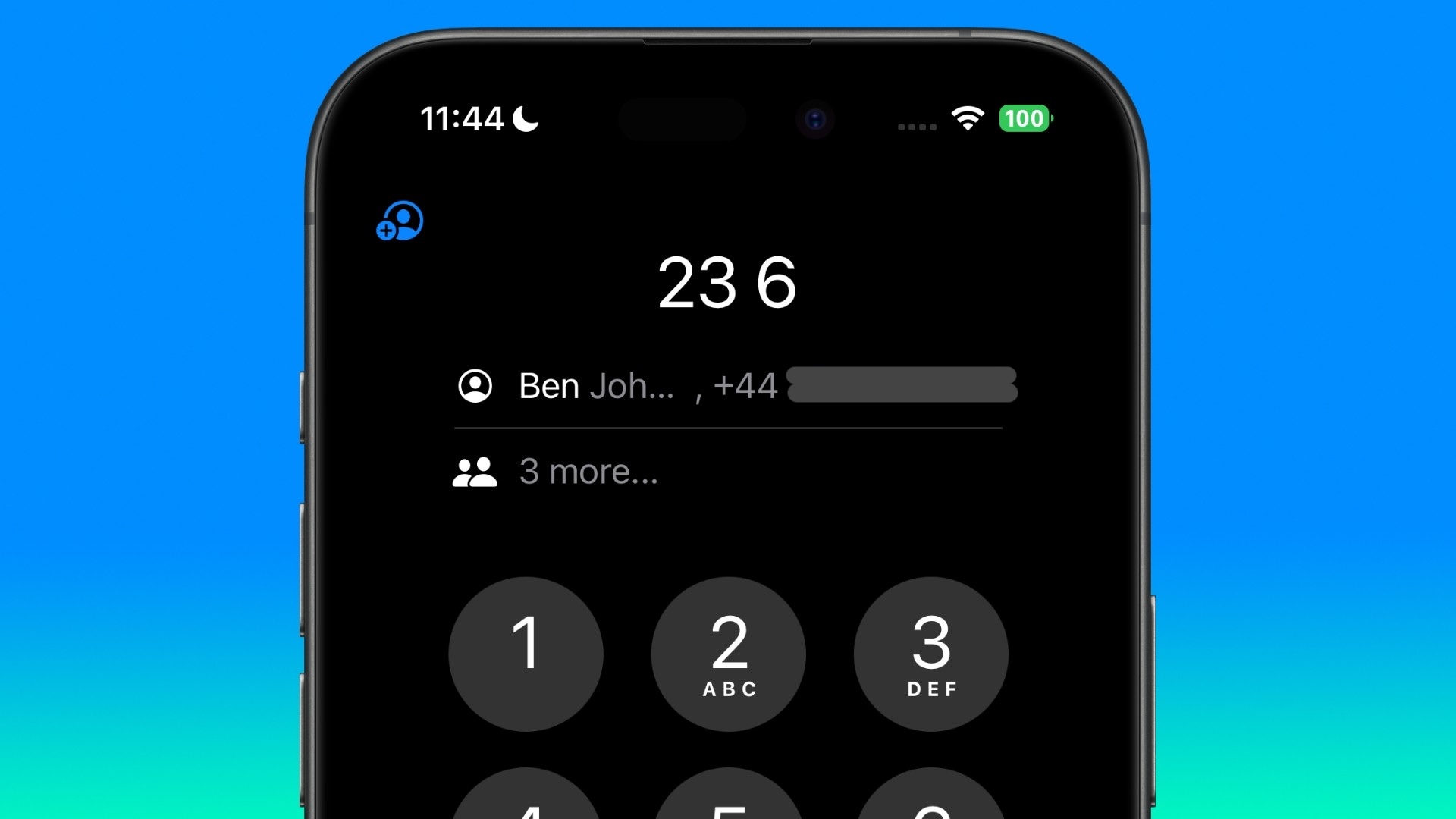
Apple has finally brought T9 dialing support to the iPhone with iOS 18, a feature long available on Android devices. This addition to the Phone app allows users to quickly find and call contacts using the number pad, which can streamline the process of making calls if you've used the feature before.
T9 dialing, or Text on 9 keys, is a predictive text technology that emerged in the late 90s to make it easier to type text messages on devices with limited input options, such as traditional mobile phones with numeric keypads. Each number key (2-9) on a T9 keypad is mapped to a set of letters. For example, the key "2" corresponds to "ABC," "3" to "DEF," and so on.
T9 dialing, or Text on 9 keys, is a predictive text technology that emerged in the late 90s to make it easier to type text messages on devices with limited input options, such as traditional mobile phones with numeric keypads. Each number key (2-9) on a T9 keypad is mapped to a set of letters. For example, the key "2" corresponds to "ABC," "3" to "DEF," and so on.
The best match appears first above the keypad, and tapping the person's name will call them. If there are several possible matches in your contacts, they can be revealed as a list by tapping "X more..." below the first match. Taken together, the new options should enable faster calling.
Here's how to use T9 dialing in iOS 18:
Open the Phone app and tap the keypad tab.
Type the contact's name using the number keys (e.g., for "Dad," press 3-2-3).
Above the keypad, tap the matching contact to call, or "X more..." to see additional matches.
This feature aims to speed up the calling process, especially for users who prefer the number pad or have difficulty navigating contact lists. It's particularly useful for one-handed operation or when quick dialing is necessary.
Add Contacts From the Keypad
iOS 18 also introduces new options for adding numbers to contacts directly from the keypad. When entering a new number:
After entering a new number, tap the new button in the top-left corner of the keypad screen.
Choose "Create New Contact" or "Add to Existing Contact" as needed.
This article, "Make Calls Faster With This New iOS 18 Feature" first appeared on MacRumors.com
Discuss this article in our forums
https://www.macrumors.com/how-to/use-t9-dialing-ios-phone-app/
Kuo: 2025 Apple Vision Pro to Get M5 Chip and Apple Intelligence
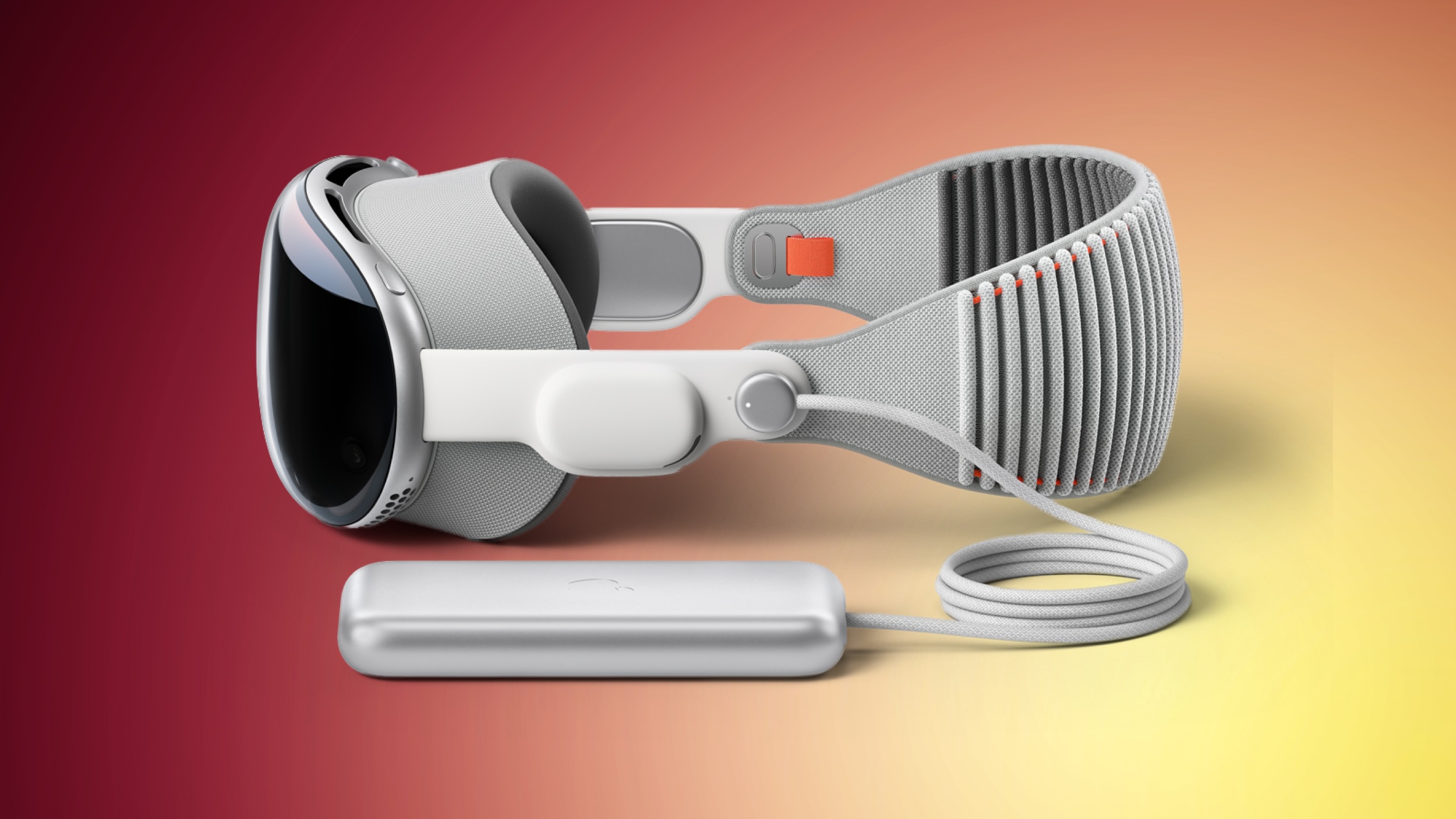
Apple is developing a new version of its Vision Pro headset that is set to enter mass production in the second half of 2025, according to Apple analyst Ming-Chi Kuo.
Kuo claims the most significant change in the new model will be the inclusion of Apple's M5 chip, a substantial upgrade from the M2 chip found in the current Vision Pro. The processor boost is expected to significantly improve device's computing power, with a particular emphasis on integrated Apple Intelligence features.
Despite the upgraded internals, Kuo reports that other hardware specifications and the overall design of the Vision Pro will remain largely unchanged. This approach could help Apple manage production costs, although the price point is expected to stay close to the current $3,499 starting price of the first-generation model.
Kuo emphasized that if this new version creates compelling use cases, it could push Apple's spatial computing platform closer to mainstream adoption. He also speculates on the potential integration of advanced AI models, such as text-to-video capabilities similar to OpenAI's Sora, which could dramatically enhance the Vision Pro experience.
Bloomberg's Mark Gurman reports that Apple plans to introduce Apple Intelligence features to the Vision Pro headset in the future. While the device is capable of running on-device AI functions such as writing tools, notification summaries, and an upgraded Siri, these features are not expected to arrive in 2024. Instead, Apple may be reserving the Apple Intelligence integration for visionOS 3, potentially launching in 2025.
Related Roundup: Apple Vision Pro
Tag: Ming-Chi Kuo
Buyer's Guide: Vision Pro (Buy Now)
Related Forum: Apple Vision Pro
This article, "Kuo: 2025 Apple Vision Pro to Get M5 Chip and Apple Intelligence" first appeared on MacRumors.com
Discuss this article in our forums
https://www.macrumors.com/2024/09/27/kuo-apple-vision-pro-m5-chip-apple-intelligence/
iFixit Teardown Provides Look Inside iPhone 16 Pro and iPhone 16 Pro Max
Earlier this week, repair site iFixit took apart the iPhone 16 and iPhone 16 Plus to demonstrate the new battery removal process that uses electricity for adhesive removal, and today, iFixit is back with a teardown of the iPhone 16 Pro and iPhone 16 Pro Max.
Apple's iPhone 16 Pro models do not have the same simplified battery removal process as the iPhone 16, with Apple instead using traditional stretch release adhesive for its pricier iPhones. It's still easier to get inside, though, because you can do so through the back of the iPhone rather than the display, which can be easily damaged.
Apple encased the iPhone 16 Pro battery in metal like the iPhone 16 models, but the iPhone 16 Pro Max does not have the metal casing around its battery, and it's not clear why. iFixit called the decision to use the metal-encased battery in just the 16 Pro and not the 16 Pro Max "perplexing."
The LiDAR Scanner is more accessible, which makes it easier to access for repairs. In prior Pro iPhone models, it was under the main camera assembly. The camera modules are almost identical, but not quite interchangeable due to a different cable length and a screw positioned in two separate locations inside each model.
Apple moved the mmWave antenna to make room for the Camera Control button, and in the 16 Pro models, it's in a hollowed out space near the top of the device. iFixit says that mmWave signal could still suffer due to the titanium frame of the iPhone 16 Pro models.
USB-C port removal is "massively" simplified, but iFixit points out that Apple does not sell replacement USB-C ports. The logic board can also be pulled out with only the removal of the upper speaker assembly, which is a major improvement to the design.
iPhone 15 Pro models. Rumors had suggested the Pro models would include the Qualcomm X75 modem, which doesn't appear to be the case.
Related Roundup: iPhone 16 Pro
Buyer's Guide: iPhone 16 Pro (Buy Now)
This article, "iFixit Teardown Provides Look Inside iPhone 16 Pro and iPhone 16 Pro Max" first appeared on MacRumors.com
Discuss this article in our forums
https://www.macrumors.com/2024/09/26/iphone-16-pro-teardown-ifixit/
iPad 11: What's Next for Apple's Most Affordable Tablet
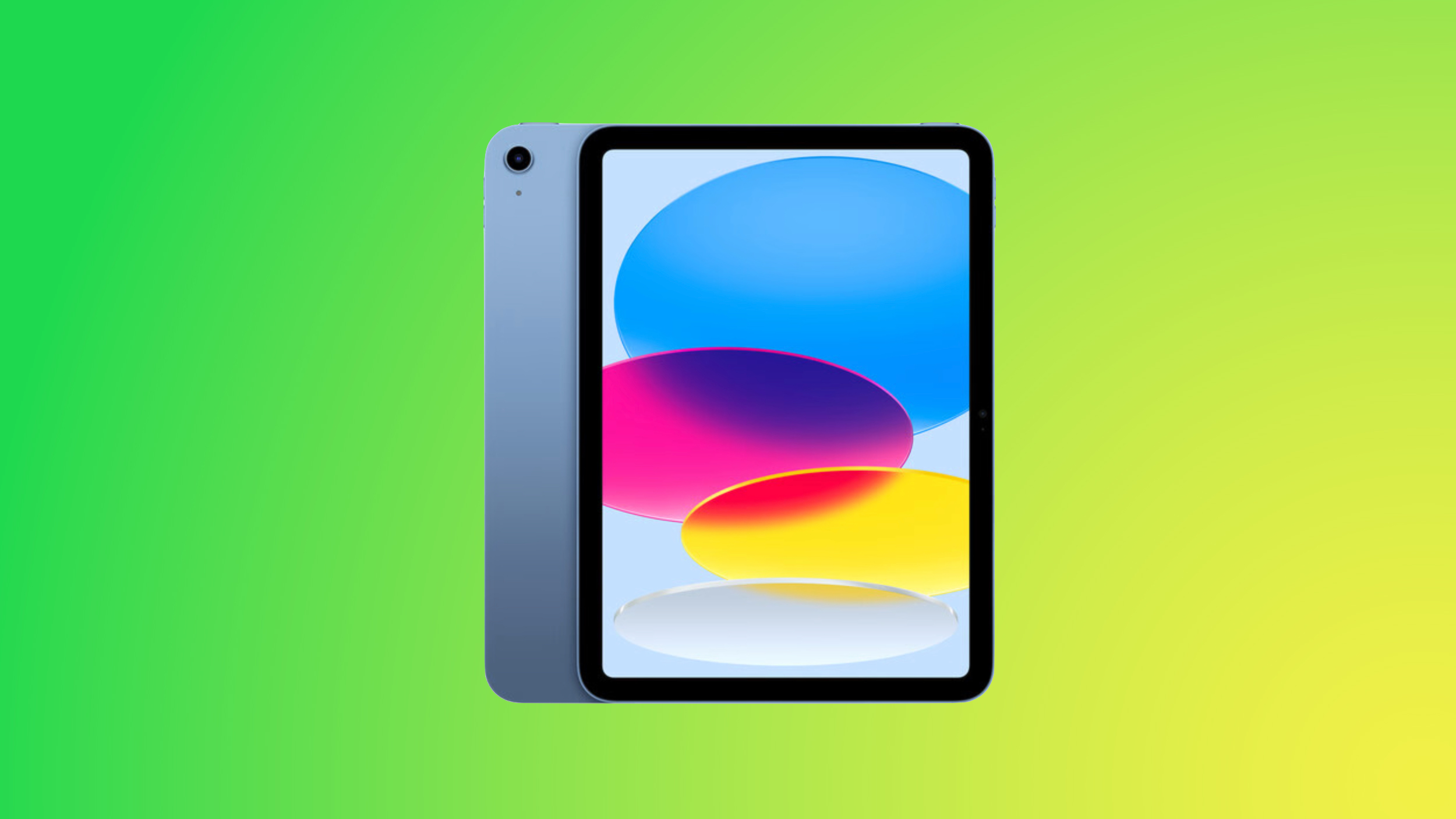
Apple is working on an update for the low-cost iPad, which hasn't been refreshed since 2022. As an entry-level product, the iPad doesn't get a lot of attention and it's not often the focus of rumors, but we've heard a little bit about what might be coming to the iPad 11.
Design
Apple overhauled the look of the iPad in 2022, introducing a 10.9-inch all-display design and a Touch ID power button, so we're not expecting any further design changes at this point in time.
Apple will likely stick with the 10.9-inch display and iPad Air-like design, but we could get new colors. Current colors include silver, yellow, pink, and blue. The iPad already has a USB-C port, which will stick around, and it will continue to support the USB-C Apple Pencil.
A-Series Chip
The current 10th-generation iPad has an A14 chip that was first used in the iPhone 12 lineup, and it's getting outdated. The logical choice for the next iPad is the A16 that was used in the iPhone 15 models, but if Apple wants to make Apple Intelligence as accessible as possible, an A17 Pro chip or A18 chip isn't out of the question.
Of course, adding Apple Intelligence support would also necessitate much more memory, and the iPad is currently limited to 4GB, so it might just be too expensive for Apple to give it that functionality while also keeping the price affordable.
Either way, the A16 will be a major improvement even if it doesn't support Apple Intelligence. It'll be faster and more efficient, so battery life could potentially be improved.
Other Updates
Apple has been updating most of its products with Wi-Fi 6E or better, so we can expect Wi-Fi 6E support for the low-cost iPad. The current model supports Wi-Fi 6, so it is not compatible with the faster 6GHz band that's available with Wi-Fi 6E routers.
Cost
We haven't heard rumors of any kind of cost increase for the iPad 11, so we're still expecting pricing to start at $349 for 64GB of storage. Apple has been bumping some minimum storage options in recent years, so there's a chance we could see a boost to 128GB of storage without a cost increase, but nothing has been rumored.
Apple only sells the iPad in 64GB and 256GB configurations right now.
Release Date
Apple is rumored to be holding an event in October to unveil new M4 Macs and a new iPad mini 7, so it's possible we'll see the iPad then.
wouldn't start until October, which is late for an October debut and actually more appropriate for a 2025 launch.
Bloomberg's Mark Gurman has said Apple is working on a new Magic Keyboard accessory for the low-cost iPad and/or the iPad Air which is expected to come out by the middle of 2025. It may not make sense to release the iPad 11 until that accessory is ready, as Apple doesn't typically split up accessory and device launches.
Of course, if it's actually an accessory solely for the iPad Air, the keyboard might not have an impact on the iPad 11 launch date at all.
Buying Advice
If you're planning to get a low-cost iPad and you can wait, we recommend holding off for the new model. The current version is two years old at this point, and the chip inside is even older. You'll get the most out of your money if you wait for an update.
Related Roundup: iPad
Buyer's Guide: iPad (Caution)
Related Forum: iPad
This article, "iPad 11: What's Next for Apple's Most Affordable Tablet" first appeared on MacRumors.com
Discuss this article in our forums