




I wish you would palm my S19j Pro

Strategic meme reserves under Biden 

Holy shit this is a great take. The real reason the government is pursuing Samourai team so intensely is because the government didn't get their cut.
Probably a dumb question, but what is LM?
Has anyone bought BTC with cash by mail on Bisq? How was the process? I've used RoboSats before but have very little free time to go through the trade flow.
#asknostr #bisq

Whether you could consider yourself an anarchist or not hinges on how you answer the question: "Is it OK to initiate violence to achieve one's aims?" I say "no" but we live in a world where the initiation of violence or threat thereof permeates everything. To achieve victory we must protect ourselves and starve those who would aggress against us. Hodl your bitcoin securely. Defend your self, your friends, your community. Bitcoin starves the State.

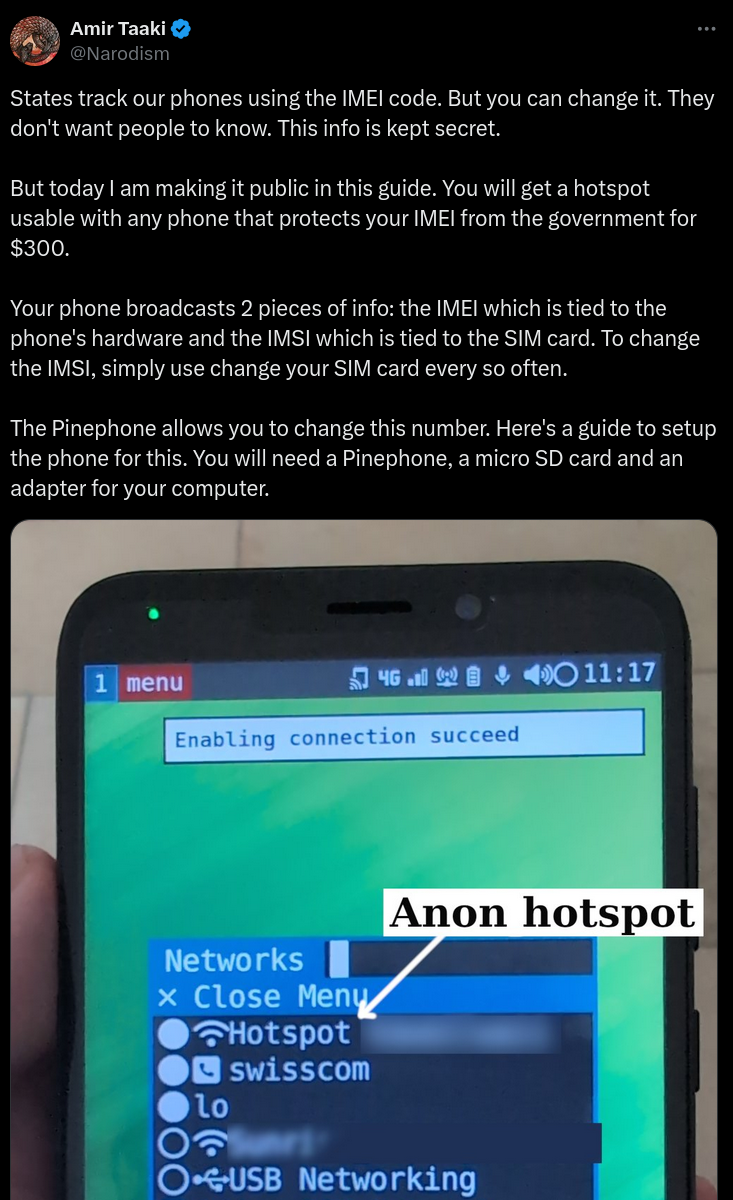
"States track our phones using the IMEI code. But you can change it. They don't want people to know. This info is kept secret.
But today I am making it public in this guide. You will get a hotspot usable with any phone that protects your IMEI from the government for $300.
Your phone broadcasts 2 pieces of info: the IMEI which is tied to the phone's hardware and the IMSI which is tied to the SIM card. To change the IMSI, simply use change your SIM card every so often.
The Pinephone allows you to change this number. Here's a guide to setup the phone for this. You will need a Pinephone, a micro SD card and an adapter for your computer.
Terminology
There are 3 storage types: SPI-NOR, eMMC and the SD card.
The SPI-NOR stores the bootloader. The eMMC is internal memory for the OS. We will use the SD card to load the bootloader into the SPI-NOR.
Setup the Installer Environment
We install the OS to the pinephone using a tool called pmbootstrap, but it needs root access. So I instead made a VM with a USB passthrough and installed Manjaro Linux there.
You can do this with virt-manager, then add a new VM with the Manjaro VM and install it. Then inside Manjaro, you can install spice guest tools for more seemless integration (optional).
For the USB passthrough, I had to edit /etc/libvirt/qemu/manjaro.xml, where I added this code:
(replace /dev/sdb and the other details with the relevant info you need)
Now when I boot the VM, I see a device called /dev/vdb which corresponds to my host computer's /dev/sdb.
Install pmbootstrap and we're ready to go.
Install PostmarketOS
We will install PostmarketOS with SXMO which is a tiling WM. It's quite easy to learn, just read the userguide. Don't be lazy. But if you're a normie, fine you can use Phosh instead which is just like Android.
Using pmbootstrap
Now connect the Pinephone Pro to your computer and put it in the mount mode (blue light), and it should appear on your computer with lsblk.
Inside the Manjaro VM, perform the install:
pmbootstrap zap
pmbootstrap init
pmbootstrap install --fde --sdcard=/dev/vdb ----cipher aes-cbc-essiv:sha256
We need the cipher option due to bug #2916 on postmarketOS bug tracker.
Install Bootloader
Now on your normal machine, put the tow-boot installer. Download tow-boot's spi.installer.img and dd to your SD card. Follow the SPI installer instructions.
Now your phone should boot pmOS.
Tweaks
Disable suspend in System Menu -> Config -> Auto-suspend / Auto-screen-off.
Optionally install an Arch Linux chroot for access to more packages you might not have in pmOS.
IMEI Changing
Now for the juicy part of the guide.
SSH is enabled by default, so SSH in. On your phone, open a terminal and type ip a to find your IP. Then just use ssh username@XXXX. Now sudo su as root. Create this file /root/.bashrc.
alias show-imei="echo 'AT+EGMR=0,7' | atinout - /dev/EG25.AT /dev/stdout"
function _set_imei() {
IMEI=$1
echo "AT+EGMR=1,7,\"$IMEI\"" | atinout - /dev/EG25.AT /dev/stdout
}
# Vanity, I prefer - to _ for cmds ;)
alias set-imei=_set_imei
Now reload your shell using source ~/.bashrc. You now have the commands show-imei and set-imei XXXXX.
To get the IMEI code, we will impersonate legit devices. I scraped all the TAC code prefixes from public DBs and made a little util for that. Download it from github: narodnik/immi. You simply run ./imeichanger.py and it gives you an IMEI code you can put into set-imei.
Mobile Internet + Wifi Hotspot Tethering
Put your SIM in. Now you have cellular.
To activate mobile internet, you need to add your GSM. Do this in System Menu -> Add a GSM Network. You can find the details online by Google. Usually your phone provider will even send you the details via SMS.
OK now you have mobile internet. Making the Wifi hotspot tether is super easy. Just go in System Menu -> Networks -> Add a Wifi Hotspot and enter the hotspot details.
Finally whenever you want to put your phone in "airplane mode", just go to System Menu -> Networks -> Disable GSM.
Final Tips and Tricks
You may want to configure or disable the firewall.
SSH comes preconfigured but you might want to disable password logins.
Received SMS are stored in ~/.local/share/sxmo/modem/ as text files so you can read them comfy from your computer with SSH.
Pipewire is installed native. You can even install a node editor like qpwgraph so you can pipe audio to multiple audio devices simultaneously. Cool af huh?
See the SXMO tips and trickspage on pmOS wiki."

Happy Gilmore "you eat pieces of shit for breakfast?!"
Got Nostr RS Relay running on StartOS. Added the hex of my npub to the whitelist there and added the ws://...onion as my Public Outbox in Amethyst. Is that the right way to configure this?
#amethyst #start9 #asknostr

These dudes named Evan and Darth are in their Telegram 24/7 and are super helpful if you need help/tips/advice

Share your npub or a link like https://njump.me/npub1et2e4pewzp2l2uv6289ejg5r3cnukq2sgujq0z35fpahyf5e8gtsd98n82
Today was officially my first day posting on #Nostr after reading about it and taking a look around different clients and accounts. It’s a great place for free speech.
I love being here and I hope you like our videos.
Special thanks to nostr:npub1dg6es53r3hys9tk3n7aldgz4lx4ly8qu4zg468zwyl6smuhjjrvsnhsguz for introducing me to Nostr, I appreciate all you do to keep people informed and aware of the important things. God bless.
#introductions #Nostr asknostr #freedom #coffeechain #GM #plebs
Banned from other platforms = instant follow

Ice cream is legitimately a health food. Haagen-Dazs strawberry is all natural ingredients. Some of the other flavors, not so much. 



I have two phones, one with only SimpleX and none of those other apps. Compartmentalization.

This is why your girl should be in the gym with you

#deletetelegram I heard 0xchat and SimpleX are good