

Or put you in jail in the US for a few weeks first like they did that one Canadian. Oh wait, she didn’t even do anything wrong.

Gossip Release 0.14.af
======================
Gossip is a nostr client for desktop.
Gossip is open sourced at https://github.com/mikedilger/gossip
This is a minor release with very special features that we wanted to get out early:
* New Features and Improvements
* Simple relay list. Gossip will just use your relays. No more connecting to strange
relays or other outbox model nonsense.
* Terminal UI: We ditched egui because it is too complex and presents a security risk.
We now support industry standard VT-102 terminal escape sequences. Just fire up your
favorite VT-100 or VT-102 terminal and enjoy the ncurses magic.
* We are bringing back blinking text!
* Lowercasing: automatically lowercases ODELL's posts
* Extended hellthreads: Auto-tag everybody on nostr, and also everybody on X, Mastodon
and BlueSky.
* Language choice: For those of you who don't like the rust language, we are releasing
in golang. We intend to release in a new language every month. Next month: brainfuck.
* Impersonation: You know you can login to gossip with somebody else's npub to see
what they see. Now you can login with their nsec and post as them! If you don't know
their nsec, just ask. Or use the included npub_to_nsec tool.
* Now ships with an A.I driven blockchain currency tethered to GOOGL. No signup
needed, signup is automatic. Terms and conditions apply. Void where prohibited.
Using gossip means you agree to the terms and conditions and take full responsibility
for all crimes that the gossip developers have ever allegedly committed.
I installed Gossip on Linux. As I poke around the app seems ok, but terminal outputs a bunch of errors and auth failures to a gazillion relays. Is that normal?

So only popular Nostr people see this ‘hellthread’?
Will you offer models other than Llama?
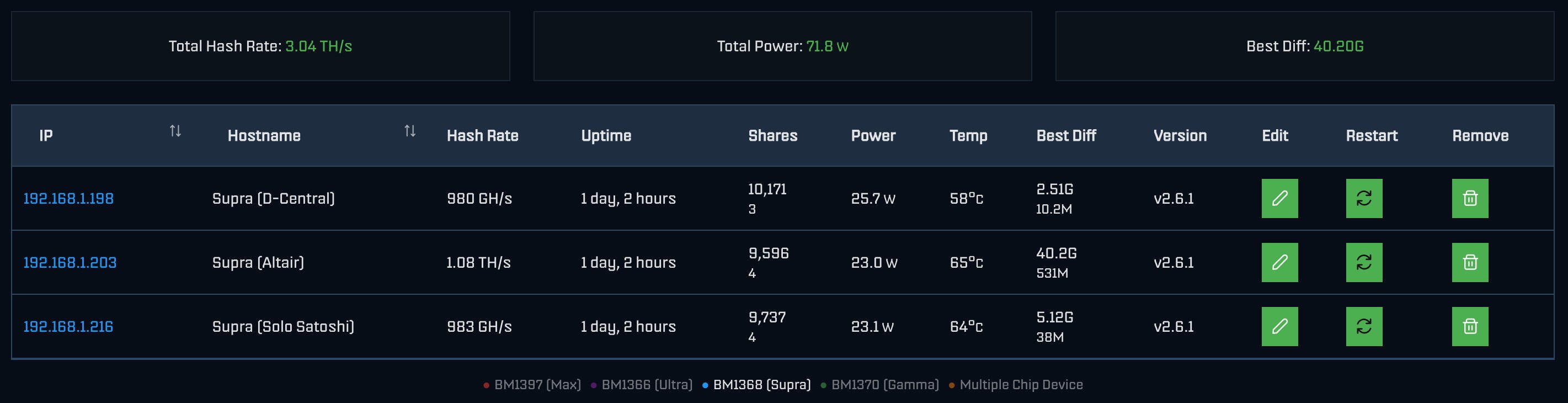
AxeOS 2.6.1
#bitaxe
Yeah right. Not the real Jack


The government took the money from our paychecks, what’s wrong with wanting it back? That is not an entitlement. Sure, overhaul the system, make it better, but don’t screw people over.
Agree, NO capital gains for spending BTC. For selling BTC for fiat, yeah I can understand (and not like it).

Where’s this from?

Security evolves. Your hardware wallet should too.
Jade Plus now supports fully air-gapped firmware updates and transaction signing using the new JadeLink attachment.
Stay flexible. Stay secure. Stay in control.

Find out more about the new JadeLink attachment for the Jade Plus Bitcoin hardware wallet.
https://store.blockstream.com/products/jadelink-air-gapped-usb-drive
Isn’t plugging something into a computer’s usb then plugging it into the Jade kinda like plugging a Jade into the computer’s usb?

Though I’m not clear the difference between the Wireguard option vs the two proxy options…?
I read more of the Docs…if i understand I get that if i create a browser only profile.

Hey Galaxie, thanks for reaching out. So it's $1 for a profile.

The concept of a Profile is a browser fingerprint stored locally on your device, PLUS access to the VPN subscription.

You can learn more about this here:
https://docs.simplifiedprivacy.com/en/payments/subscriptions-vs-profile
Can’t figure out how to get to the ‘Pick a Browser’ screen


Haven’t seen anything about journalists lying. There are screenshots. And White House/gov officials didn’t deny any of it. Government lied that the chat had no classified info.

Sounds like you are talking about newer or more affluent areas. Many neighborhoods of NYC, particularly in the Burroughs, people live in smaller 4 or 5 story walk ups, brownstones, or townhomes. Some have families and friends in the area for a few generations. They walk the neighborhood and know and talk to people on the street and in shops. Gentrification has made this more rare but it still exists in many areas. Of course different than a small town where everyone can literally know everyone. Pros and cons of each, a matter of preference. Different, not better or worse in my view.
Depends where you go, what neighborhood. And of course if you’re not from there you’re not gonna get acknowledged the same, just like if you’re a stranger in a rural town you might find the same. I’m originally from NYC, the most urban of urban in my mind. It’s complex and varied. Changes from one neighborhood to the next. Some can be cold and isolating, others have great community and warmth. The best is the myriad of subcultures that are unique, creative, and produce great things. Anything but “normie” or normative. I love going back, but don’t want to live there, can’t handle the energy for too long having lived in the calmer Midwest for many years.
gm from nostr terminal


Snowfall is a great series on the same subject.
No I have a Beelink mini-pc. People use raspberry pi though. I wanted a little more room to grow. I’ve read best to have 16GB RAM and 2TB SSD for most stable performance when running a node.
I self host Alby Hub…works well

Tbf currently I’m putting my nsec in iOS apps that seem trustworthy by consensus (Damus, YakiHonne etc) so probably not much of a leap to use nsec.app.
I’m not a coder so I wouldn’t know what to look for…just that sticking my nsec into a web site will actually stay local on the device, not go anywhere else.
**This is a long form note test of a post that lives on my Nostr educational website [Hello Nostr](https://hellonostr.xyz) **
One of the first things most people learn when getting started with Nostr is the importance of their private key, or ‘nsec’. The nsec is the key to their Nostr world. Whoever controls an nsec, controls that account. Lose access to the nsec and you lose access to that account and its social graph.
So the nsec is very important and should be treated very carefully, but what happens if we want to use or test multiple Nostr clients? Newer clients might be malicious, or have unknown security vulnerabilities, so simply go pasting our nsec everywhere just to see if we like a new app is not the best idea!
Thankfully there are solutions for nsec management that allow us to do exactly that, without having to expose our all important nsec to each and every app we want to interact with. The most commonly used to date are browser extensions like Alby or nos2x. Typically these types of browser extensions do not work on mobile platforms.
Enter Amber…
 )
)
## What is Amber?
Amber is a free and open source Android application that serves as a dedicated ‘Nostr event signer’. Amber allows users to keep their nsec segregated in a single, dedicated app. The goal of Amber is to have your smartphone act as a NIP-46 signing device without any need for servers or additional hardware.
At its core Amber serves two main purposes:
Securing your nsec(s)
Using this nsec to sign events for other Nostr clients on your phone
> Got an iPhone? Check out [nsec.app](https://nostrapps.com/nsec-app)
## Getting Started
1. Download Amber to your phone. It is available from Zap Store, Obtanium, GitHub or F-Droid
Download Amber [here](https://github.com/greenart7c3/Amber/releases).
Support Amber [here](https://greenart7c3.com/).
2. When opening Amber for the first time, you’ll have the option to create a new Nostr account (nsec) or import an existing one.
 )
)
3. If you do not currently have a Nostr account, Amber will help you generate and secure a brand new nsec. Amber allows you to download an encrypted file containing your nsec as well as the option to download a human-readable version of the nsec in the form of 12 English words, similar to a Bitcoin seed.
 )
)
> Skip this step if you have an existing nsec that you want to import to Amber.
4. To import an existing nsec, choose ‘Use your private key’. You can then paste the nsec from an existing client, or scan a QR code of it if you have one available to you.
 )
)
5. Once you have created or imported your nsec, Amber will ask for some basic permissions. You can allow the app the approve basic actions, or enable more granular selection for each client you subsequently connect. Once you tap ‘Finish’, you’ll see that the account is now ready.
If you have or require more than one Nostr account, you can repeat these steps for each one. All accounts can be viewed by tapping the profile image in the bottom right corner of the screen.
 )
)
6. That’s it, Amber is now ready to sign events. Amber allows multiple ways to connect other clients to it, but most will have a very simple ‘Login with Amber’ button. Let’s demo this in practice with [Amethyst](https://github.com/vitorpamplona/amethyst), the most popular Android-only client.
The opening screen of Amethyst shows the ‘Login with Amber’ option. Tap that.
 )
)
7. Amber will then open automatically and ask you to define the level of autonomy you’d like to have with Amethyst. This setting defines how often Amber will require you to manually authorize each event.
For example, you might want Amber to automatically sign every like or repost you do in Amethyst, but then be asked to manually approve all direct messages sent from your account. These permissions can be customized in the settings at any time.
 )
)
8. Let’s assume that upon setup, we did not grant Amber the ability to automatically sign short text notes for us. Let’s look at how simple the authorization flow is. Type a new short note in Amethyst and press ‘Post’.
Amethyst will instantly send the request to the Amber app on your phone, with no third party server involved. Amber will open and ask you to approve the event. When you do, Amber signs the event with the nsec it stores for you and automatically send the signed event back to Amethyst to be posted. The whole process takes just a few seconds.
 )
)
## Using Amber with a Web Client
1. Next let’s take a look at how you can use Amber on your phone to sign events on a web app running on your computer. For this example, we’ll be using Coracle. Open Coracle and click ‘Log In’, then choose ‘Use Remote Signer’. Coracle will then display a QR code.
 )
)
2. Open Amber and navigate to the Applications page, tap the + icon, then scan the QR code being displayed by Coracle.
 )
)
3. Just as it did earlier with Amethyst, Amber will now ask you to grant some basic permissions for the Coracle connection. Once again, these permissions can be customized at any time in the settings. Once granted, you’ll notice that Coracle automatically logs in to your feed.
 )
)
But wait, how did that happen? The nsec is in Amber on your phone, and Coracle is running on your computer. The two might not even be in the same location or on the same network!? The communication is happening over the Nostr protocol, via relays. Which relays are used for this communication can be configured in the Amber settings.
4. Let’s test out a short note on Coracle to demonstrate the signing process. Click ‘Post +’ in the top right corner, draft your note and then click send.
 )
)
5. Amber will send a push notification to your phone. Tapping the notification will open Amber for you to approve the event.
 )
)
6. Once the event is approved in Amber, Amber will automatically send the signed event back to Coracle for publishing.
 )
)
## Summary
You can view Amber as a vault for your Nostr private keys (nsec). It allows you to explore the entire ecosystem without exposing your nsec to every new app you try. Amber is an incredibly simple yet powerful tool that belongs on the Android phone of every Nostr user.
At the time of writing, using Amber as a remote event signer is supported by the following popular Nostr clients:
* Amethyst (mobile)
* Coracle (web)
* 0xChat (mobile)
* Fountain (mobile)
* Zap Store (mobile)
* Keychat (mobile)
* Freeflow (mobile)
* Highlighter (web)
* Chachi Chat (web)
* Habla (web)
* Shopstr (web)
* Plebeian Market (web)
* Snort (web)
* Nostrudel (web)
If you found this post useful, please share it with your peers and consider following and zapping me on Nostr. If you write to me and let me know that you found me via this post, I’ll be sure to Zap you back! ⚡️
Nice article, interesting even though I don’t use Android. But how do we trust nsec.app?
