


Add support for NIP-05 and NIP-96 to cfrelay. #cfrelay can help you to run your personal relay in cloudflare with workers.
Run your relay and own your data.
https://github.com/haorendashu/cfrelay
The last version #nostrmo had add NIP-96 support too.
This is an option. It wraps media as 1064 on the kv for free, could be used with a bucket with nip96 as well and thru the app's input choice, as backup is not bad either. The problem is that 1064 is supported only in nostrmo and does not display elsewhere.

Backup events. Also you can onion it through orbot and have a tor relay thru the browser on nostrudel for example.



Excellent shopstr amethyst swipe


### What's Blossom?
Blossom offers a bunch of HTTP endpoints that let Nostr users stash and fetch binary data on public servers using the SHA256 hash as a universal ID.
You can find more -precise- information about Blossom on the Nostr article published today by [hzrd149](nostr:npub1ye5ptcxfyyxl5vjvdjar2ua3f0hynkjzpx552mu5snj3qmx5pzjscpknpr), the developper behind it:
nostr:naddr1qqxkymr0wdek7mfdv3exjan9qgszv6q4uryjzr06xfxxew34wwc5hmjfmfpqn229d72gfegsdn2q3fgrqsqqqa28e4v8zy
You find the Blossom github repo here:
GitHub - hzrd149/blossom: Blobs stored simply on mediaservers
[https://github.com/hzrd149/blossom](https://github.com/hzrd149/blossom)
### Meet Blobs
Blobs are files with SHA256 hashes as IDs, making them unique and secure. You can compute these IDs from the files themselves using the sha256 hashing algorithm (when you run `sha256sum bitcoin.pdf`).
### Meet Drives
Drives are like organized events on Nostr, mapping blobs to filenames and extra info. It's like setting up a roadmap for your data.
### How do Servers Work?
Blossom servers have four endpoints for users to upload and handle blobs:
```
GET /
PUT /upload: Chuck your blobs onto the server, verified with signed Nostr events.
GET /list/
DELETE /
```
Yon can find detailed information about the Blossom Server Implementation here..
..and the Blossom-server source code is here:
[https://github.com/hzrd149/blossom-server](https://github.com/hzrd149/blossom-server)
### What's Blossom Drive?
Think of Blossom Drive as the "Front-End" (or a public cloud drive) of Blossom servers, letting you upload, manage, share your files/folders blobs.
Source code is available here:
[https://github.com/hzrd149/blossom-drive](https://github.com/hzrd149/blossom-drive)
### Developpers
If you want to add Blossom into your Nostr client/app, the blossom-client-sdk explaining how it works (with few examples 🙏) is published here:
[https://github.com/hzrd149/blossom-client-sdk](https://github.com/hzrd149/blossom-client-sdk)
### How to self-host Blossom server & Blossom Drive
We'll use docker compose to setup Blossom server & drive. I included Nginx Proxy Manager because it's the Web Proxy I use for all the Fractalized self-hosted services :
Create a new docker-compose file:
```
~$ nano docker-compose.yml
```
Insert this content into the file:
```
version: '3.8'
services:
blossom-drive:
container_name: blossom-drive
image: pastagringo/blossom-drive-docker
# ports:
# - '80:80'
blossom-server:
container_name: blossom-server
image: 'ghcr.io/hzrd149/blossom-server:master'
# ports:
# - '3000:3000'
volumes:
- './blossom-server/config.yml:/app/config.yml'
- 'blossom_data:/app/data'
nginxproxymanager:
container_name: nginxproxymanager
image: 'jc21/nginx-proxy-manager:latest'
restart: unless-stopped
ports:
- '80:80'
- '81:81'
- '443:443'
volumes:
- ./nginxproxymanager/data:/data
- ./nginxproxymanager/letsencrypt:/etc/letsencrypt
- ./nginxproxymanager/_hsts_map.conf:/app/templates/_hsts_map.conf
volumes:
blossom_data:
```
You now need to personalize the blossom-server config.yml:
```bash
~$ mkdir blossom-server
~$ nano blossom-server/config.yml
```
Insert this content to the file (CTRL+X & Y to save/exit):
```yaml
# Used when listing blobs
publicDomain: https://blossom.fractalized.net
databasePath: data/sqlite.db
discovery:
# find files by querying nostr relays
nostr:
enabled: true
relays:
- wss://nostrue.com
- wss://relay.damus.io
- wss://nostr.wine
- wss://nos.lol
- wss://nostr-pub.wellorder.net
- wss://nostr.fractalized.net
# find files by asking upstream CDNs
upstream:
enabled: true
domains:
- https://cdn.satellite.earth # don't set your blossom server here!
storage:
# local or s3
backend: local
local:
dir: ./data
# s3:
# endpoint: https://s3.endpoint.com
# bucket: blossom
# accessKey: xxxxxxxx
# secretKey: xxxxxxxxx
# If this is set the server will redirect clients when loading blobs
# publicURL: https://s3.region.example.com/
# rules are checked in descending order. if a blob matches a rule it is kept
# "type" (required) the type of the blob, "*" can be used to match any type
# "expiration" (required) time passed since last accessed
# "pubkeys" (optional) a list of owners
# any blobs not matching the rules will be removed
rules:
# mime type of blob
- type: text/*
# time since last accessed
expiration: 1 month
- type: "image/*"
expiration: 1 week
- type: "video/*"
expiration: 5 days
- type: "model/*"
expiration: 1 week
- type: "*"
expiration: 2 days
upload:
# enable / disable uploads
enabled: true
# require auth to upload
requireAuth: true
# only check rules that include "pubkeys"
requirePubkeyInRule: false
list:
requireAuth: false
allowListOthers: true
tor:
enabled: false
proxy: ""
```
You need to update few values with your own:
- Your own Blossom server public domain :
```
publicDomain: https://YourBlossomServer.YourDomain.tld
```
and upstream domains where Nostr clients will also verify if the Blossom server own the file blob: :
```
upstream:
enabled: true
domains:
- https://cdn.satellite.earth # don't set your blossom server here!
```
- The Nostr relays where you want to publish your Blossom events (I added my own Nostr relay):
```yaml
discovery:
# find files by querying nostr relays
nostr:
enabled: true
relays:
- wss://nostrue.com
- wss://relay.damus.io
- wss://nostr.wine
- wss://nos.lol
- wss://nostr-pub.wellorder.net
- wss://nostr.fractalized.net
```
Everything is setup! You can now compose your docker-compose file:
```
~$ docker compose up -d
```
I will let your check [this article](https://fractalized.net/how-to-manage-your-domain-with-self-hosted-nginx-proxy-manager/) to know how to configure and use Nginx Proxy Manager.
You can check both Blossom containers logs with this command:
```
~$ docker compose logs -f blossom-drive blossom-server
```
Regarding the Nginx Proxy Manager settings for Blossom, here is the configuration I used:
 )
)
PS: it seems the naming convention for the kind of web service like Blossom is named "CDN" (for: "content delivery network"). It's not impossible in a near future I rename my subdomain blossom.fractalized.net to cdn.blossom.fractalized.net and blossom-drive.fractalized.net to blossom.fractalized.net 😅
Do what you prefer!
After having configured everything, you can now access Blossom server by going to your Blossom server subdomain. You should see a homepage as below:
 )
)
Same thing for the Blossom Drive, you should see this homepage:
 )
)
You can now login with your prefered method. In my case, I login on Blossom Drive with my [NIP-07 Chrome extension](https://chromewebstore.google.com/detail/alkiaengfedemppafkallgifcmkldohe?ref=fractalized.net).
 )
)
You now need to go the "Servers" tab to add some Blossom servers, including the fresh one you just installed.
 )
)
You can now create your first Blossom Drive by clicking on "+ New" > "Drive" on the top left button:
 )
)
Fill your desired blossom drive name and select the media servers where you want to host your files and click on "Create":
PS: you can enable "Encrypted" option but as [hzrd149](nostr:npub1ye5ptcxfyyxl5vjvdjar2ua3f0hynkjzpx552mu5snj3qmx5pzjscpknpr) said on his [Nostr note](nostr:naddr1qqxkymr0wdek7mfdv3exjan9qgszv6q4uryjzr06xfxxew34wwc5hmjfmfpqn229d72gfegsdn2q3fgrqsqqqa28e4v8zy) about Blossom:
> "There is also the option to encrypt drives using [NIP-49](https://github.com/nostr-protocol/nips/blob/master/49.md?ref=fractalized.net) password encryption. although its not tested at all so don't trust it, verify"
 )
)
You are now able to upload some files (a picture for instance):
 )
)
And obtain the HTTP direct link by clicking on the "Copy Link" button:
 )
)
If you check URL image below, you'll see that it is served by Blossom:
 )
)
It's done ! ✅
You can now upload your files to Blossom accross several Blossom servers to let them survive the future internet apocalypse.
Blossom has just been released few days ago, many news and features will come!
Don't hesisate to follow [hzrd149](nostr:npub1ye5ptcxfyyxl5vjvdjar2ua3f0hynkjzpx552mu5snj3qmx5pzjscpknpr) on Nostr to follow-up the future updates ⚡🔥
_See you soon in another Fractalized story!_
PastaGringo 🤖⚡
Apart from satellite, blossom.fractalized.net is up by nostr:npub1ky4kxtyg0uxgw8g5p5mmedh8c8s6sqny6zmaaqj44gv4rk0plaus3m4fd2
Slidestr.net dev was doing something with media server there but not up yet.
Wanna spin one?

Other good alternatives are nostrcheck.me , nostr.build , void.cat . Blossom drive https://blossom.hzrd149.com/ is still being tested but it can be used with the satellite cdn and other servers that will support it.


This fractalized: 
and this satellite:
https://blob.satellite.earth/ef6d231f9a3d60d1fe43057f6e6d18c3c39c5b0b67fc205846d8fd36c83978f2
are the same one go upload on a 🌸 drive: ef6d231f9a3d60d1fe43057f6e6d18c3c39c5b0b67fc205846d8fd36c83978f2 🌸
I need upload to 🌸 in the nostr clients menus 'por favor' and not just next.nostrudel.ninja
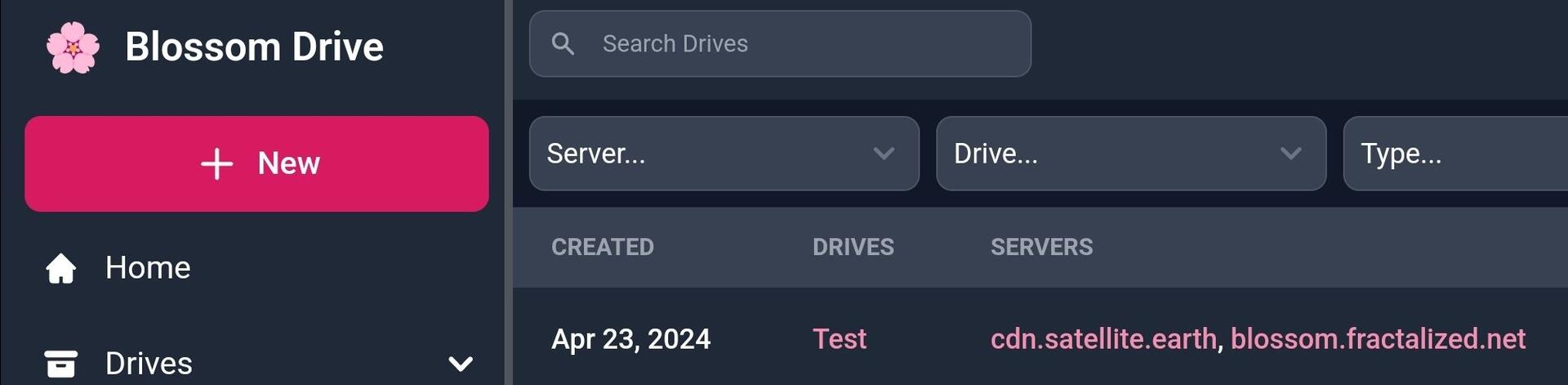
The more, the merrier: + bouquet.slidestr.net which I just added. Lfg.


https://mikedilger.com/gossip-model/
Or
nostr:naddr1qqxnzdesxyen2vek8qcrqve4qgsyq6npqal7vlcwmf97jv2h93fzlyme2twmqfxgwee78hntxl56nrcrqsqqqa28w4yxuj

Winamp, the iconic media player, was released 26 years ago.
https://www.youtube.com/watch?v=HaF-nRS_CWM
https://en.wikipedia.org/wiki/Winamp
via https://mastodon.gamedev.place/@danielalbu/112308507122233683
#winamp #OnThisDay #music #history #anniversary
It_really_whips_the_llamas_ass.mp3
:nostopus_good:
:kubipaca_karada_l: :kubipaca_karada_r: :nostopus_f_zap: :nostopus_f_zap: :eveonecat2_Boom:
Forking a note is a great repupulating note tool if the authour is blocked by a client, not relay.
Quality content popping up on the video feed of yakihonne 🤣 Btw I like how they play the youtube links directly in app like strudel or any mp4 link.
nostr:naddr1qq456mmww3uj65rew35x7m3dv9hxgtt5dpjj6nt9v9hxjmn894hkvt2vd9nx2ttzx568g6m2qyqqygq8n4e8hm3asp0zgavgv84y6q5t9e4r0qzl3k69h7qyt0usqzvk2qpsgqqqskas2dqvyp


Its only in the https://next.nostrudel.ninja/#/wiki right now for testing. hopefully going to add the ability to edit pages
Love it. Not all markdown works on a long article in nostrudel as to wikifreedia site.

Come check out my stream on zap.stream! Last HOUR! #art #nostr #artstr https://zap.stream/naddr1qqjxycfcxp3nzve495cn2wrp956rwcee95uxve3s956nqwpex3jxvv3cv5mkvqgwwaehxw309ahx7uewd3hkctczyr85tf46zd366lkjzws83ecs6fq3ttnjrjd500g7haz936h0knp22qcyqqq8vecqjlq2p
nostr:naddr1qqjxycfcxp3nzve495cn2wrp956rwcee95uxve3s956nqwpex3jxvv3cv5mkvq3qeaz6dwsnvwkha5sn5puwwyxjgy26uusundrm684lg3vw4ma5c2jsxpqqqpmxwyrmtq8