



Status update from Belcher, he's very sick, send him some love.
https://gist.github.com/chris-belcher/ca5051285c6f8d38693fd127575be44d#update
Has anybody heard from Belcher since then? Any news?


A descriptor mobile first watch only wallet (multisig, miniscript and all the magic ✨)
Who wants to join this effort? I believe shouldn't be that difficult for some wizards and BDK
cc: nostr:npub1dd3k7ku95jhpyh9y7pgx9qrh2ykvtfl5lnncqzzt2gyhgw0a04ysm4paad

What about Volt?
Insane...
People voluntarily turned in the gold 😂 Yeah, like they had a choice, right?
Xapobank went crazy raising the annual fee from $150 to $1000 without any new services.


@NickJFuentes history about a bitcoin donation tracked by @chainalysis for the CIA after the guy that donated k!lled himself.
Bitcoin today is not suitable for public donations it's not fungible and it will be traced until a kyced source. His bank account was blocked afterwards.
https://video.nostr.build/363f0c128af94b60d0af85fd7e8f52d86135426778088ffe2e1fa8e7e68b0d06.mp4
Any cryptocurrency donation that ends up on a KYC exchange, sold for fiat, and transferred to a bank account can end up like this. I'm not saying bitcoin privacy doesn't need improvement, but the way you describe it is misleading.
Is there a desktop client for nostr that supports socks5 proxy? #asknostr
Tutorial - Bitcoin Core Create a watch-only wallet and sign transactions offline
Before we begin, you may be asking yourself:
-An airgap setup? Why not use a HW? All the cool kidz on twatter use it!
Most of the cool kidz on twatter are paid chillz, some of the hardware wallets they promote are not even FOSS and as soon as they release a new model they stop supporting the older ones. This setup will give you better security and privacy than most HW, I am not selling you anything and it will not cost you shit.
-Why Bitcoin Core? Other wallets like Electrum are easier for an airgap setup.
I have nothing against Electrum, in fact I really like it, but I choose Bitcoin core because it is the most reviewed client. No more questions? Let's get started!
These steps can be done with 2 PCs (recommended), or if you only have one PC you can use a Linux distribution like tails.
The first step will be to download Bitcoin Core, verify the signatures and transfer it to a USB flash drive (since the second PC or when booting with tails will never be connected to the internet).
----------------------------------------
Offline PC or with Tails
Double click on bitcoin-qt which is located in bitcoin-22.0/bin/.
Bitcoin-qt will start and ask us where to save the data, just click ok, nothing will be downloaded as we are not even connected to the internet.
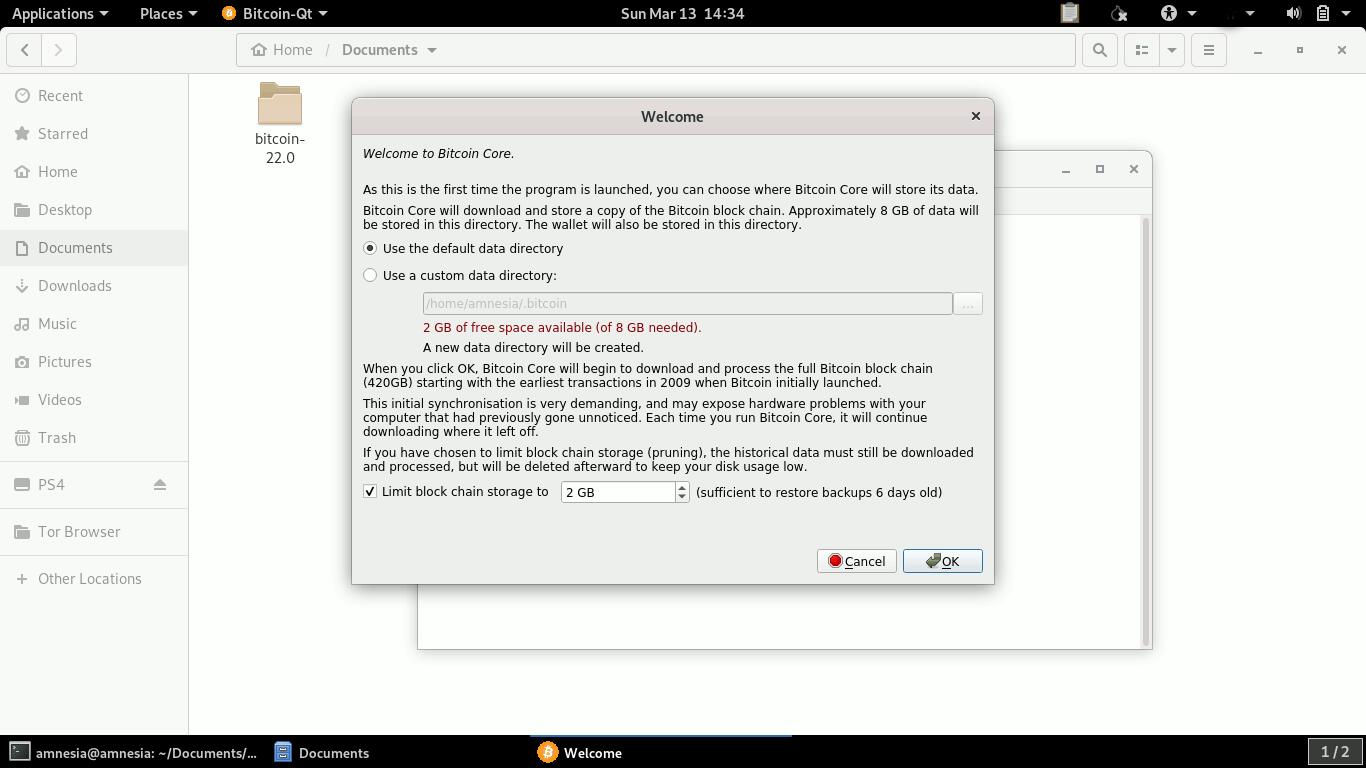
Create a new wallet, choose encryption and descriptor wallet:
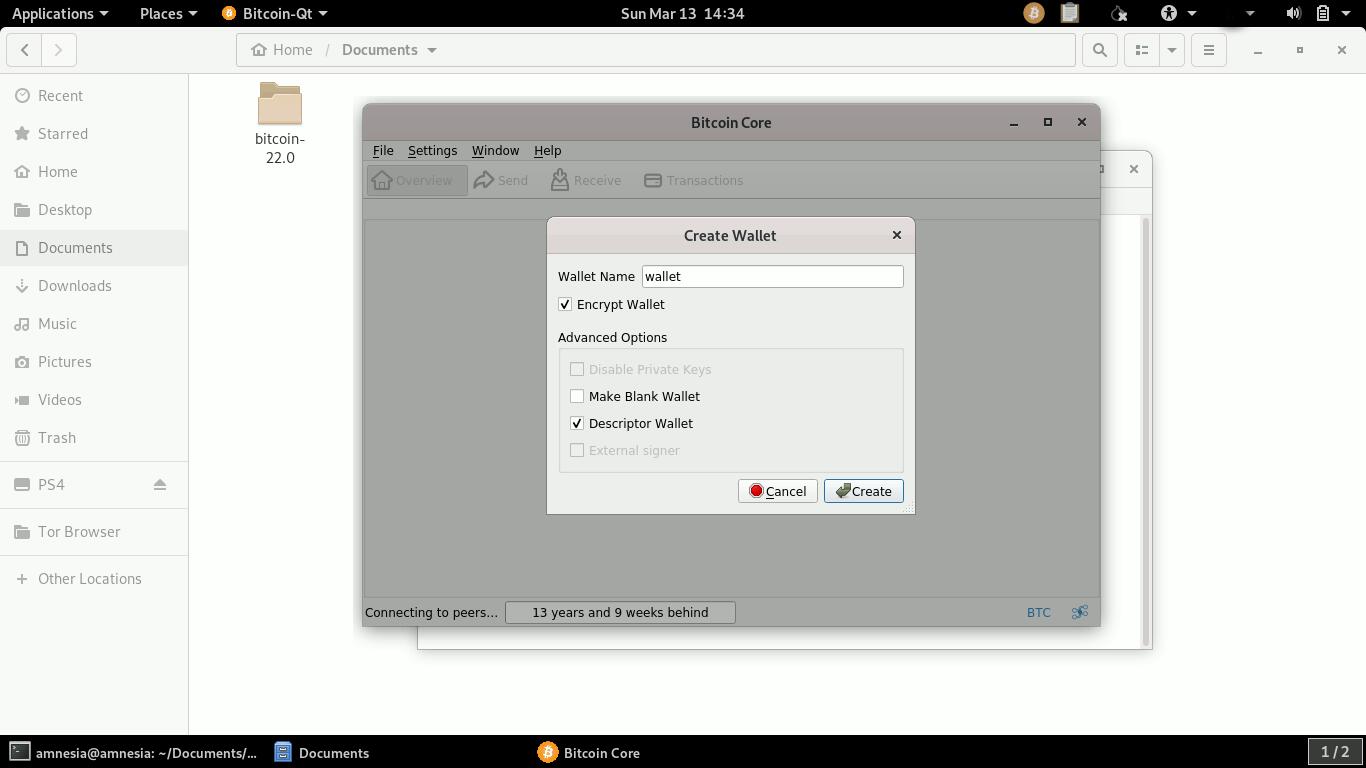
After creating the wallet, make a backup and save it to another device like a USB flash drive (if you are using tails, everything will be deleted after shutdown). To make a backup, just click on File -> Backup Wallet
Now we will get the information we need to create a watch wallet only.
Open the console (Window → Console or Ctrl+T) and type
listdescriptors
Note: This command is available since version 0.22.
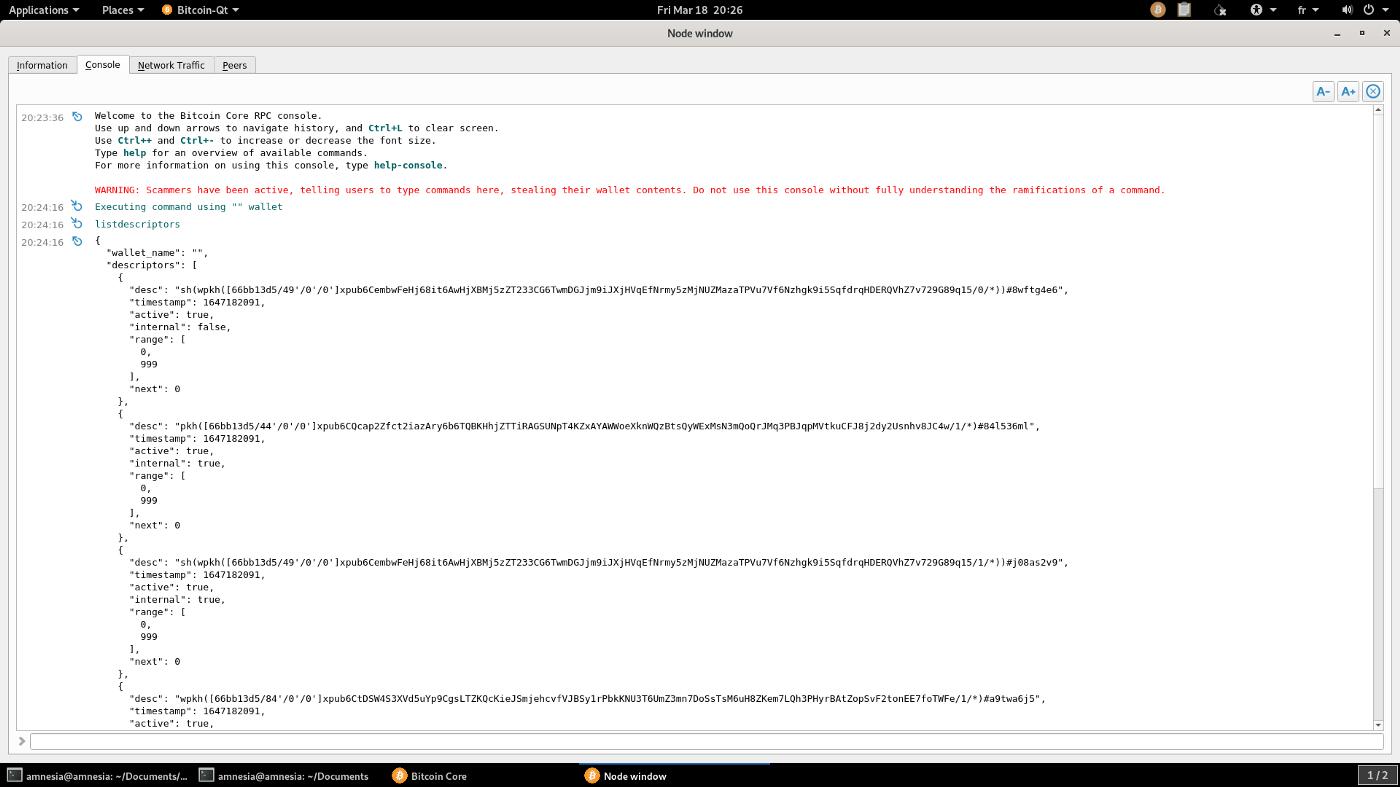
This command will give us a list of 6 descriptors in total. We will use those with path derivation 84'/0'/0. (We will use this derivation for native segwit, bech32 but you can copy the whole list and export all the descriptors.).
Copy both to a text file and save it to the USB stick, in this example my .txt file will look like this
{
"desc": "wpkh([66bb13d5/84'/0'/0']xpub6CtDSW4S3XVd5uYp9CgsLTZKQcKieJSmjehcvfVJBSy1rPbkKNU3T6UmZ3mn7DoSsTsM6uH8ZKem7LQh3PHyrBAtZopSvF2tonEE7foTWFe/1/*)#a9twa6j5",
"timestamp": 1647182091,
"active": true
"internal": true
"range": [
0,
999
],
"next": 0
},
{
"desc": "wpkh([66bb13d5/84'/0'/0']xpub6CtDSW4S3XVd5uYp9CgsLTZKQcKieJSmjehcvfVJBSy1rPbkKNU3T6UmZ3mn7DoSsTsM6uH8ZKem7LQh3PHyrBAtZopSvF2tonEE7foTWFe/0/*)#v3w0q0zv",
"timestamp": 1647182091,
"active": true,
"internal": false,
"range": [
0,
1000
],
"next": 1
}
One descriptor has the value internal:false, the other internal:true. Internal false provides the information needed for the watch-only wallet to generate receiving addresses, while internal true is for the change addresses.
We can now shut down the PC/Tails.
----------------------------------------
Online PC.
Your online PC must have Bitcoin Core installed and synchronized.
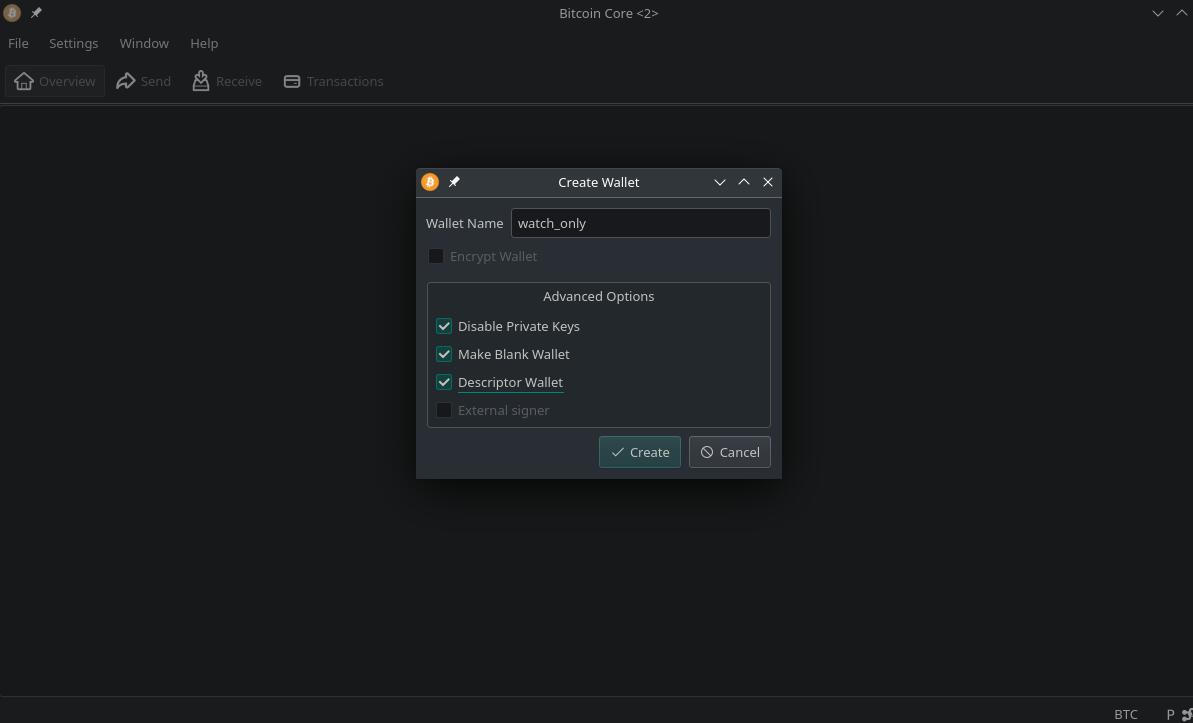
Create a watch wallet only: Select Disable Private Keys, Create Blank Wallet and Create Descriptor Wallet.
Open the .txt where you saved both descriptors, go to the console and import both descriptors with their timestamps using the importdescriptors command.
In my example the command will look like this
first descriptor:
importdescriptors "[{\"desc\": \"wpkh([66bb13d5/84'/0'/0']xpub6CtDSW4S3XVd5uYp9CgsLTZKQcKieJSmjehcvfVJBSy1rPbkKNU3T6UmZ3mn7DoSsTsM6uH8ZKem7LQh3PHyrBAtZopSvF2tonEE7foTWFe/1/*)#a9twa6j5\", \"range\": [0, 1000], \"timestamp\": 1647182091, \"internal\": true, \"watchonly\": true, \"active\": true}]"
Second descriptor:
importdescriptors "[{\"desc\": \"wpkh([66bb13d5/84'/0'/0']xpub6CtDSW4S3XVd5uYp9CgsLTZKQcKieJSmjehcvfVJBSy1rPbkKNU3T6UmZ3mn7DoSsTsM6uH8ZKem7LQh3PHyrBAtZopSvF2tonEE7foTWFe/0/*)#v3w0q0zv\", \"range\": [0, 1000], \"timestamp\": 1647182091, \"internal\": false, \"watchonly\": true, \"active\": true}]"
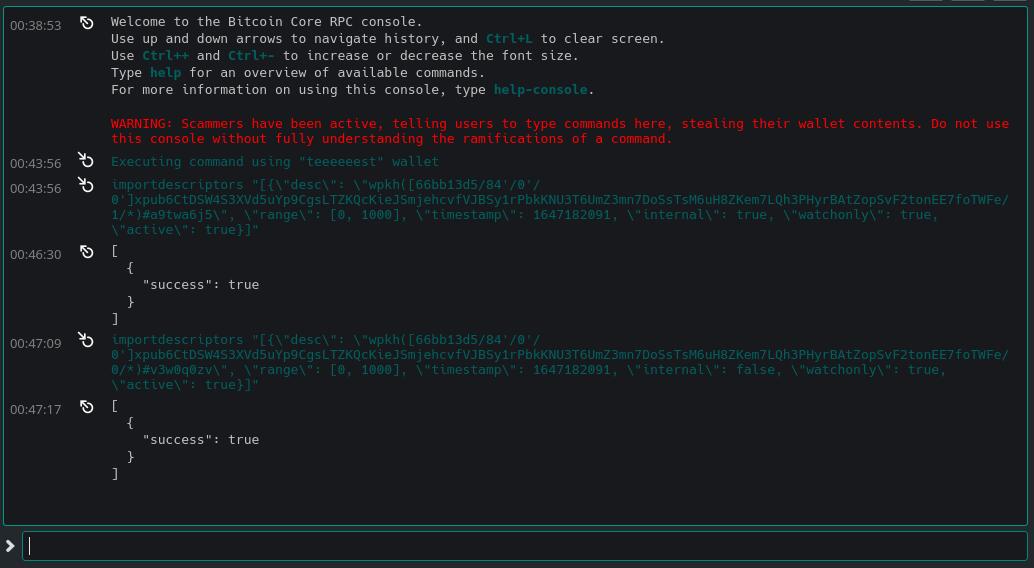
This will import the descriptor with an initial keypool of 1000 (which is the default), any new addresses you request will come from their descriptors. If all is correct it will return "success": true
After this, only our watch wallet will be fully functional, allowing us to receive payments and create unsigned transactions.
Before receiving any payment in the watch wallet only, please make sure you have the wallet.dat backup of the offline wallet.
When you want to spend your money, just do it as usual, enter the address to pay to, set the fees, click Create Unsigned and save. This will generate a .psbt file which we will copy to a USB stick to sign with the offline wallet.
----------------------------------------
Offline PC or with Tails
If you are booting with tails, you will need to copy the bitcoin client, copy the backup of wallet.dat into the bitcoin folder ~/.bitcoin/wallets/wallet.dat
File→Load PSBT from file
Review the information and click Sign Transaction.
Once the transaction has been signed, click Save and save the signed PSBT file to the USB flash drive.
----------------------------------------
Online PC
File→Load psbt from file
Click Broadcast Tx and Done
Very useful the new RPC createwalletdescriptor in the latest bitcoin core 28.0 release
It allows you to add new non-existing descriptors as taproot (if you have an old wallet), and since it recreates the descriptors using your actual hdkeys, it doesn't make your old backup useless, you can always restore everything by recreating your descriptors.
It's good that you remind us that we really are slaves, because "the best slave is the one who thinks he's free", and once you're aware of that, you can start fighting for your freedom.

Oh yes, I understand what you mean with a sane way now.
What do you mean "for a sane way"? Seems good to me the way it works just by linking the mobile device to the desktop scanning a qrcode.




Thank you, this is a very interesting initiative, looking at the web vpn's section I found Snowstorm, I wasn't aware of this project and I see that they are in beta. Have you tried it and if so can you share your thoughts?
