


Congrats! If I may ask... wen rest of Europe like in the old days?
I always like to infiltrate altcoin events to appreciate #Bitcoin even more. I've been doing it for some years. This was the pic I took the moment I realized I had become a true maxi. Glorious day 😉 🧡⚡️


Good to know. Thanks for clarifying 👍🏻 I thought that only the threema apps were open source. I'll have a closer look then, but I'm by all means not an opsec expert 😅 Any tips from the nostr community are much appreciated!

Keychat looks very promising. I didn't know about it, thanks! Will start following their progress. Also love the idea of cashu (although the technicals behind it are beyond my pay grade) and I have been trying to figure out if it will get some decent traction for future normie use because the ultimate purpose is to get my friends and family to communicate over any of the options out there. I just managed to get some relatives to experiment with lightning on wallet of satoshi. If I talk to them about ecash right now, I'll lose them forever 🤣
Threema looks good, but as far as I understand, it's not completely open source and it collects some user data (as opposed to session). But yes... session still has quite a few bugs fix.
Private messengers: what to look for and my top pick to dethrone Signal
There are many instant messengers to choose from on the market and most of them come with some promises of privacy and end-to-end encryption. They throw at us some technical jargon, mention some sort of security protocol and, of course, win everybody over with the famous "military-grade encryption" pitch.
What does it all even mean? Is this all true? Can we trust those sorts of statements?
As the famous saying goes:
"Don't trust. Verify."
I'm a big proponent of people doing their own due diligence. Digging as deep as possible. Never to trust things at face value. Heck, you shouldn’t even trust this article. Take this as a simple call to action to do your research after reading it.
For me, there are a few decisive factors to keep in consideration when choosing a particular tool like a private messenger. Mind you, this is not a fool-proof system. There isn't a perfect private and secure instant messenger out there. However, in this ongoing battle for privacy, we can surely improve our fighting chances.
If you're in the camp of those preaching that your life is an open book and you have nothing to hide, just remember the famous wise words of Edward Snowden:
"Arguing that you don't care about the right to privacy because you have nothing to hide is no different than saying you don't care about free speech because you have nothing to say."
It seems to me that every generation after GenX doesn't appreciate what we fought so hard for not so long ago: freedom of speech, democracy, independence, justice, rule of law, equality and, of course, privacy.
In recent history, some European countries lived under authoritarian regimes. There was no privacy. There were undercover government informers at every corner, and it was a crime to meet up with your friends in public due to fears of conspiracy or mutiny.
Privacy is a true achievement for modern Democracies. It is a Constitutional right for most developed countries. In fact, privacy is even deemed a pilar of our society, an inherent and inalienable human right protected under Article 12 of the Universal Declaration of Human Rights, which reads as follows:
"No one shall be subjected to arbitrary interference with his privacy, family, home or correspondence, nor to attacks upon his honour and reputation. Everyone has the right to the protection of the law against such interference or attacks."
Therefore, if for no other reason, it is at least our duty to ensure that we play our part in maintaining privacy in our communications, in our correspondence.
Let's face it. Most days you'll only be sending out heart emojis and sharing funny memes.
Artificial Intelligence systems used by surveillance agencies will probably filter those out. Heck, even if your meme gets red-flagged, you'll probably bring some joy to the poor analyst asked to review your messages.
Still, that's not the point. The point is that no one should be getting access to what you're assuming to be a private message. The point is that you shouldn't be profiled as someone endorsing whatever message you receive or send out.
So, what are the important factors to consider when picking the right option for you?
The program or app should be open source. It should be audited by credible and independent third-party entities. It should publish transparency reports or have a warrant canary system in place.
Being open source means anyone can see the code and examine if the tool is indeed programmed to do what it says it does. Are there any concerning or weird pieces of code that could suggest the existence of a bug easily exploitable by hackers or is a backdoor system in place? Is the assembled program that you are installing compiled from the source code available publicly by its developers without any interference or changes? Do you want to build it from source yourself? In short, this guarantees that you are not being duped by empty promises of greatness from the developers or from the company behind it.
If the code has been audited by a reputable entity, that means it has a stamp of approval from real experts. You see, being open source is great, but not all of us know how to interpret the code in search of potential bugs and other problems. That's when these third-party auditors become really useful. It gives us more piece of mind. Just remember that, for extra security, it is always best to check if the auditor analysed the current version we're using. If the review was conducted 2 years ago and there have been a lot of updates since then, maybe lots of problems have been created in the meantime and remain undetected. Regular audits are a must.
If the developers publish a transparency report or some sort of warrant canary on their website or social media, that's a very good sign too. This will basically inform you if the people behind the platform have been issued any type of court order to provide information about its users, thus potentially compromising its privacy. The canary is usually a real-time alarm indicator used by many as a graphical depiction of a bird which disappears automatically in case they receive a shady request.
Lastly, don't fall for the military-grade encryption rhetoric. It's misleading. Without going into much detail, this just means it follows the same cryptographic standards that have been around for years. It's highly likely that even your web browser right now uses it to communicate with a lot of sites. Those messaging programs aren’t jumping through hoops and loops to offer you something unique.
So, what could you use as a better alternative to Signal? I particularly like “Element X - Secure Messenger”, and simply love “Session - Private Messenger”.
Element is a well-known matrix.org client that works well with iOS. For me this is a perfect alternative to Telegram. It's a decentralized chat client interacting with everyone on an open network, regardless of the app the others are using. You can even self-host it if you don't want to use someone else's server. More than a chat app, it gives you the opportunity to join communities discussing different topics. It ticks most boxes for me, but I'll spare you from a boring review. There are countless great reviews all over the Internet and it's pointless to make yet another one replicating what everyone has already said. Have a look at https://element.io for more information and give it a try.
Session has to be my absolute top pick and I've started converting a few people already. It's a bit buggy, I'll admit it. But it has been working well for me even in video calls between iPhones and Windows computers. There are also a lot of reviews out there about this one. You should definitely look at those and also visit https://getsession.org. However, I think it merits here at least a quick description.
Session uses a network of user-operated servers all over the world. Messages are completely anonymous, and it can't track the slightest bit of metadata about you. It doesn't need a phone number and you don't need to create a username and password. Just get a unique code to use the app. You can send messages, make phone calls, video calls, share attachments and even hold group chats of up to 100 people without ever sharing your data and IP. It even supports disappearing messages! The interface is clean and intuitive. Very reminiscent of an old terminal.
There's also a cool feature to connect with your contacts by scanning a QR code in person. This is what I've done with all my family, some friends and a couple of colleagues.
Establishing a direct connection this way ensures that the person you'll be talking to in the future is actually the intended recipient of the messages. You avoid talking to contacts who may not be who they claim to be and may be impersonating someone else.
Synchronizing messages across devices still has a few hiccups and push notifications occasionally suffer a delay. Still, after all these years testing so many platforms, I’m finally happy with one that doesn't force you to share a phone number with the entire world. This is why, with each incremental update of Session, it slowly started to make its way to my top choice of private messengers. Alas dethroning Signal.
Give it a try. It might just surprise you.
Lastly, we couldn't close these remarks without addressing the elephant in the room: adoption.
It's okay to have different messengers on your phone.
Maybe you won't be able to convince all your friends to switch to Session, but you can do the next best thing.
Within your household, propose it as a family privacy policy. Most sensitive personal information is shared with your relatives anyway. It worked for me. My kids first asked why we couldn't use Snapchat or Discord, and then ended up accepting Session just thinking that I was weird.
For confidential work matters, make a stand. Let your colleagues know that you can either communicate through a particular app, or get together in person to discuss it afterwards.
For any other situation, a widely used messenger like Signal or even iMessage (if you're not backing up your messages to iCloud or have Advanced Data Protection turned on) will make your life easier and do the trick.
Just keep in mind that with Signal you need to provide your phone number and that iMessage is just a tad worse because you have no idea of what the code is really doing behind the scenes.
Above all else, never forget that you to must play a part in securing your messages. Now more than ever. Even if you’re just sending little hearts to your significant other…
Do you disagree? Did I make a mistake? Do you have better alternatives? Feel free to comment and share your thoughts with others as well.
#privacy #security #randomthoughts #plebchain #grownostr #zapathon
My very own #Bitcoin hodl carol! Got me through some tough dips 😅
#zapformoresongs #plebchain #song
My Tesla Model 3 after 3 years: the bad things no one talks about
Everyone who knows me will tell you that I love to write. In fact, even though English is not my native language and it takes me longer to write something decent, my first reaction here was to write you a small quirky novel about everything that I dislike the most about my car.
However, in this new age of fast information consumption, I bet that you are only here to get a quick overview of the main complaints I have about my Tesla Model 3 after using it as my daily driver for three years. Therefore, I’ll spare you the trouble and will try to lay down just a simple list of the issues that bug me with the car.
As a full disclaimer, I love the Model 3. I really do. It has served me well and I’ve done all sorts of trips with it. From long cross-country vacations to daily school runs and frequent lifts to my friends when going to events. The car is fun, cheap to run and maintain, and its reliability and quality are decent (at least when comparing it to my previous vehicles from other brands). As I mentioned in one of my previous posts, I still believe the car is great and ideal for certain people under certain circumstances. If after reading that post you reach the conclusion you fall within the category of those who should consider buying one, please don’t let this list deter you.
The truth is that I believe the car has a lot more advantages than disadvantages. A lot more good aspects than bad ones. Even so, I wished someone had mentioned most of these before I made the purchase. I had scoured through the Internet reading as many posts and watching as many videos as I could to make an informed decision. Regretfully, most of my current observations were never addressed anywhere. Maybe the problem is I’m too picky, but I believe I’m entitled to that seeing how much the car costs. In retrospect, I confess that my expectations were higher than they should have been. Maybe that’s a factor for you. Maybe not. You be the judge if any of these have an impact on your decision to buy a Tesla Model 3.
Here's the rundown of my main complaints (most of which I’ve addressed at official Tesla dealers):
Rain sensor: The sensor is odd, to say the least. Sometimes, when it’s pouring down, it won’t activate the windshield wipers for at least two minutes (I’ve done the test several times). On other occasions, it turns them on for no apparent reason when it’s not raining, which really annoys me because it starts scraping dried-out dead bugs and pigeon excrements, ruining the rubber on the wipers. Another irritating quirk is setting the wrong speed for the rain it detects, thus forcing me to go into manual mode. I’ve owned cheaper cars with way better rain sensors.
Speed of the windshield wipers: The speed isn’t perfect. I would really love to have an option between the first and the second wiper speeds. Where I live, most precipitation would require an intermediate speed. I always feel it’s either too slow or too fast. I fondly remember an old Honda I had fully capable of fine-tuning the wiper speed with great ease.
Sentry mode recording: I’ve never had the problem everyone mentions about frying the SD card. I do, however, have a major complaint about it not recording what it should. Either the video starts before or after the event takes place, or it’s simply too short to get it all. I missed a few important events because of it. I’ve also noticed that if someone triggers sentry mode and doesn’t approach the car right away, the clip ends and the car doesn’t immediately start recording a second clip after that. This is a shame because most people take their time while approaching the car. Sentry mode is triggered when they are still looking around to see if anyone else is in the vicinity, and when they finally get up to the car, the recording reaches the end and sentry mode waits for a while before starting a new clip. You can’t imagine the number of times this happens. It’s frustrating because you just know afterwards that someone was about to approach the vehicle but have no clue of what they ended up doing.
Sentry mode scrolling: It’s a real headache to scroll through your footage. The system stores a bit of footage before and after the event that triggered the camera, showing a red dot on the timeline indicating when it took place. This is very clever. However, when you sit down in the car and just want to quickly go through the two, or three or four events it recorded, you have to go through the entire clips just to see a few seconds. If you’re in a hurry or have your family in the car pressuring you to move along, it’s a pain and most times you just give up and think of coming back to it later. It’s almost impossible to drag the timeline to the triggered event. Incredibly buggy for some reason. The same goes for reviewing dashcam footage.
Charging port connection: The angle of the connection is just wrong. It’s slightly titled diagonally and it’s a very tight fit. Often my wife and I find ourselves not inserting the nozzle correctly and the car locks it in and starts complaining about a bad connection. Because it’s locked-in, you have to wait a second or two before pushing the button to unlock it, then removing it and trying again. This can happen once or twice every other day. If it’s dark in your garage, it’s really frustrating not getting it right on your first try, trust me. We have an EV from another brand using the same Tesla Powerwall in our garage, and the port on that car is just big enough to allow for a perfect fit every time.
Lumbar support failure: I’ve given up on the electronic adjustment of lumbar support at this stage. If you don’t get it right on your first try, the system becomes unresponsive and you cannot adjust it further. This forces you to drive around for a bit with an ill-adjusted lump on back until the car is willing to reset the system and remove it completely. Sometimes it took one or two days. I’ve complained to Tesla about this and they were aware of the situation and informed me that a future software update should fix it. Needless to say, I’ve waited so long for that magical update that I’ve given up on it and just got used driving without this added perk. Maybe it’s fixed already, but honestly, I’m not willing to give it another try just because it’s so annoying if the problem persists. I’d rather not go through that experience again, ever.
Trunk hydraulics: If you leave your trunk opened for a few minutes, the hydraulics start building up pressure and it becomes difficult to close it afterwards (at least that’s my take on the explanation they gave me a Tesla repair center). The amount of strength you have to exert to be able to close the trunk is a real nuisance, especially if you have a bad back or if your kids are trying to do it themselves. This just makes me a lot more conscious of something I never imagined could become a problem in my life. Every time I’m waiting for someone to put something in the trunk, I just close it and open it again after a minute or two to avoid going through that experience.
Range: As far as EVs go, the Model 3 is really efficient, even though everyone knows that the millage they estimate on paper has nothing to do with real life. Cold weather, AC turned on, windows opened, acceleration, speed and battery degradation are considerable factors to keep in mind of course. However, what no one talks about is how actually short the autonomy on these cars is. I’m constantly seeing Tesla owners lying about the range, maybe because they feel ashamed of their real-world numbers. This is a big problem if your purchase decision boils down that other owners tell you. Heck, I’ve even ridden an Uber with the exact same car as mine that told me he would get an extra 100 miles of range. Either everyone is being deceitful, or they are giving you hypothetical numbers based on supernatural driving conditions which are next to impossible to mimic or simply just make for a lousy driving experience.
Public infrastructure: It depends on the country and region. I’m aware of that. For me, at least, it isn’t working. The Government hasn’t been too keen on fostering the development of EV charging stations and those that do exist have a terrible ratio of 10:1 when comparing the number of available fuel pumps to the number of chargers. This means ICE cars come and go every two minutes, while you get stuck in a long line of EVs waiting for your turn. It’s really disappointing.
Tesla infrastructure: In my opinion, Tesla has fallen short on its promises for Supercharger locations. It’s unfortunate because this was one of the biggest selling points for me when choosing this brand. I’ve heard many different explanations for this from other Tesla owners. Most of them may be just conspiracy theories, so I won’t even entertain those ideas here. Regardless, the truth is that I was expecting a steady increase over time, and nothing has changed in my area of about 35,000 square miles since I bought the Model 3. We still have the same 8 stations that existed back in 2020. It has become apparent to me over time that Tesla assumes you’re either buying a more expensive Long-Range version or that you’re driving the Standard version at an excruciating 55 miles per hour with no AC on. Still, 8 Supercharging stations with about 10 chargers each for thousands of Teslas in my area just doesn’t make sense.
Charging time: I agree that Teslas have some of the fastest charging times on the market. Even so, it’s still too slow. For an extra 100 miles, whether you’re taking 10 hours plugging it in a wall socket, 6 hours using a Tesla Powerwall in your garage or 40 minutes at a Supercharger, that’s just too long. EVs still have a long way to go.
Charging speed of Superchargers: Allegedly, versions 3 and 4 of Tesla Superchargers finally ensure a faster charging by abolishing power sharing. That’s a dream come true. Unfortunately, the 8 stations in my area are all version 2. Even if you warm-up the battery, the fact that you have to split the power between the cars parked next to you is just frustrating and takes forever (mind you, these stations are always full). Another thing that annoys me is speed throttling: if you continue charging the battery over 80%, it just gets slower and slower. Try to charge it over 90% and it takes an eternity. I understand that this is Tesla’s way of telling you to move along and free your spot, but I only use Superchargers if I’m on a long trip, and if I’m on a long trip I want to charge it to 100%. In short, not replacing V2s by V3s since 2019 doesn’t make any sense, and cutting your charging speed assuming you won’t need more is just unfair.
Tire change: All my life I’ve changed tires in my vehicles. Even though most cars don’t come with a spare wheel anymore, I like to take care of it myself either by buying an extra one or taking it myself to get it changed with a tire of my choice. Now, I don’t know if this is true, but when I punctured one of my Model 3 tires, the Tesla technicians scared the heck out of me by saying that I could never attempt to change the wheel because they are directly connected to a computer. I couldn’t even consider such a dangerous feat, as I would be sure to wreck the car. Seriously? Is this true? Is the “computer” just an air pressure sensor? I don’t know. I just know that I ended up paying a fortune for the service and the new tire. This is not practical at all.
Wheel alignment: My wheels have been slightly misaligned since the car’s first birthdate. Complaining about it to Tesla didn’t work and they told me it wouldn’t be covered under warranty. They also quoted me a huge sum if I were to proceed with the alignment. After refusing the service because of the price, I was told I was being too picky anyway because it was barely noticeable. Well, I don’t know about you, but my OCD mainly comes into play with wheel alignments. I’ve driven quite a few sports cars in my day and I tend to notice these things. I’m sorry if alignment is something I’m picky about, but a slight deviation drives my insane. Unfortunately, no other shop dared to align my car stating it was just a big computer on wheels.
Windshield fogs up very easily: In warm or cold weather the windshield always seems to get foggy. I’ve tried using different types of anti-fog cleaners, but these don’t seem to work very well. The only option is for me to keep the AC on all the time, which of course drains the battery. I’ve had other cars in the past with the same issue, but the problem went away by turning on the fan towards the windshield. In the Model 3, the air of the fan alone won’t work to clear the fog and you really need to turn on the AC.
Air conditioning blasting in your face: The Model 3 comes with 3 air flow options in the front cabin: windshield, face-level, or foot-level vents. I don’t particularly like to have the AC blasting at face-level and, in any case, I have to keep it turned towards the windshield to constantly clear the fog. The annoying thing is that using the windshield vents makes the air flow ricochet against the glass and shoot straight into your face anyway. Does this have something to do with the positioning of the vents or the curvature of the glass? It’s a mystery to me.
Air conditioning weak if split with rear seats: When turning on the rear vents, there’s a noticeable break in the AC power and I have to turn up the fan to a very high setting. Oddly enough, the distribution of power doesn’t seem balanced. For instance, if I’m using the AC with fan speed of 2 in the front and then turn on the rear vents, increasing the fan to 4 won’t maintain the same level I had at the front. I have to turn it up to 5 or 6 to ensure the same power is coming through. This, of course, consumes a lot more battery and makes a huge noise.
Vents cannot be individually closed: With so many options, it’s strange that you cannot close the right vent and just keep the left one open. My wife really dislikes feeling the air in her face. In all other vehicles you can simply turn a nob and close the vent on one side. That’s not possible with the Model 3. On a warm day, I can either keep myself cool and really annoy my wife or – what ends up happening – I can just endure the heat. Even if you use the sliders to turn the air flow from one side to the farthest corner, you can still feel the air on your face.
Air conditioning too noisy: Because you don’t hear an engine, it’s just natural that you end up hearing a lot more the noise coming out of the AC compressor. Having said that, it’s incredibly noisy. I currently have an EV from another brand that doesn’t make half the noise of the Tesla.
Steering wheel deformation: I don’t have heavy arms. I don’t exert a lot of pressure on the steering wheel. Still, by always keeping my hands at 9 and 3 o’clock, the leather and foam on the steering wheel are slowly moving out of place and causing an uncomfortable bump where my palms rest. In my life I’ve dealt with many leather steering wheels falling apart, and I’ve never encountered an issue like this one before.
Panel gaps: This is a classic one. I realize everyone complains about it. To tell you the truth, a misalignment here and there doesn’t bother me that much. What really bugs me is the gap in my frunk. Every time I contemplate that beautiful and aggressive front bumper, my eyes eventually get pulled to that gap. I didn’t notice it when I picked the car up from the dealer, but for the past three years I’ve kept a close an eye on every other Model 3 on the road and have yet to see one as misaligned as mine.
License plates falling loose: The biggest issue is with my rear license plate. It keeps getting loose and making this annoying rattling sound. When I took the car to Tesla, they were aware of the problem and just crammed an old piece of cardboard next to the plastic rivets. It seemed to do the trick momentarily. I would be happy with the solution if I were DIYing it myself, but that’s not what you’d expect from an “official repair” under warranty for such an expensive car.
Navigating on Spotify: Having free Spotify without any ads is great. It works a lot better than Apple Music on the Model 3 and the whole family ends up using it 90% of the time. Still, the navigation and general UX experience has a lot to improve. For instance, my biggest complaint is losing the search results if we press the back button to come back to them. This makes the back button useless and you have to redo your search from scratch.
Back visibility: Aw yes. The famous visibility issue. It’s really bad. I was always conscious of it, but really wanted to have a Tesla despite that. Curiously, it keeps getting more annoying as time goes by. It’s actually so bad that I find myself driving with the rear camera on whenever I’m stuck in dreadful traffic jams just to have an idea of what’s going on around me.
Back windows: They don’t roll all the way down. I knew this, of course. And I had accepted that fact. This means I have no moral complain about them now. Even so, just keep in mind that the part of the glass that protrudes is quite considerable, which makes for an uncomfortable ride for the back passengers. If you have kids, be careful. As their arms are smaller, they cannot just rest them on the glass and end up stick them all the way out the window without been able to bend the elbow. This is just a general warning for all parents, really. I admit it’s not a specific fault in the Model 3. Plenty of cars have this problem nowadays. Still, it is a bit annoying for me and something you might not have considered.
No software updates: Even if you’re paying Tesla each month for their Internet package, you cannot use that connection to download the latest software updates. I’m pretty sure that I consume a lot more data watching Netflix in the car than I would downloading the updates, so this decision from Tesla is mindboggling to me. Because my garage is too far away to get a Wi-Fi signal, I have to turn on the personal hotspot on my phone (which takes forever and blows up my monthly plan).
Rebooting the car: I have to reboot the car more often than expected. Either because the touchscreen becomes unresponsive or demonstrates unusual behavior, or because it’s the only way of getting the Internet on the car working again. Touchscreen soft resets are quite frequent for me, unfortunately. This even happened automatically once while I was driving at highway speeds with nowhere to park, which was very scary. However, I must confess that full vehicle reboots (i.e. when the entire car becomes unresponsive and you must press the brake pedal while holding the two scroll wheels) are rare, though.
Location of interior manual door handles: As the owner’s manual states, “[m]anual door releases are designed to be used only in situations when Model 3 has no power. When Model 3 has power, use the button located at the top of the interior door handle”. Basically, you should only use these handles to open the doors from the inside in case of an emergency. In all other situations, you should use the electronic opening by pressing a button. The problem is that most of your passengers are not familiar with this system and instinctively pull on the emergency handles. This means you have to be constantly aware of this issue and bother your passengers with this whole explanation before coming to a full stop, otherwise you don’t even get a chance to put a word in. I really think the problem has to do with their location. They are conveniently placed in a logical place to be pulled by anyone looking for a door handle. If they are indeed just to be used in case of emergencies, I believe they should be hidden away or at least placed in a less logical/accessible area on the door to avoid that instinctive grab&pull from your friends and family, as it may start ruining the doors. Having said that, in case of an emergency, I understand it should be intuitive to the passengers where to pull.
Battery degradation information: Finding out that you can check your battery degradation on a Tesla is something quite relevant, in my humble opinion. It helps you better understand whether you should change your habits to preserve the battery and often offers explanations to those existential debates with your friends such as: “How come your range is a lot better than mine if we bought the cars at the same time?” Another important aspect is to have an idea if your battery health qualifies you for a new one. The problem I see with this is that it’s not easy to get that information. You have to enter into service mode and be extra careful not to ruin any of the settings within those menus. It should be a lot simpler to fetch such an important information.
Speedometer way to the side: If you want to check your speed, you’re forced to look far away from the road. Whenever I drive around town and have to constantly keep monitoring the different limits from speed camaras, it’s way too distracting. Where I live, it’s common to have radars with different speed limits after each intersection. Fifty percent of the time I find myself not paying attention to traffic just to be sure I don’t get a fine. This could be easily solved by a heads-up display or some other central console screen like in the Model S and X.
No birds-eye-view: With so many cameras on the Model 3, one cannot help but wonder why in the world the car doesn’t offer a 360-degree view when parking. A lot of different brands have been offering this feature for years. It would be especially helpful for people living in the city like me, constantly trying to fit the car in small spaces and parking in unusually narrow underground spots.
Rims protruding: My car is fitted with the Aero Covers. I don’t doubt that they provide for better aerodynamics, and I actually think they look good. The problem is that they don’t fully cover the rims, which means I already have a few nasty scratches from brushing against sidewalks. I guess that calling them “covers” was a poor choice of words.
Undercarriage fabric coming off: A substantial portion underneath the Model 3 is covered with some sort of smooth composite material. It basically looks and feels like a thick rug. The left side has started to peel off and is very visible from the outside. Every time I go over a speed bump or something similar, the fabric scrapes against the surface of the road, making a concerning sound and coming off just a bit more.
There you have it. As I said, I still love the car despite these issues. However, if I’m being completely honest, I think I just love it a bit less. At the end of the day, I guess that it will depend on the owner’s expectations, attention to detail, flaws and flukes that have since been corrected in newer models (like the wind noise, new modems for the Internet and turning off the air vents on one side, for instance) and acknowledgement that no car is perfect. If you can overlook those quirks, I wish you a long and happy life with your brand-new Tesla.
You never come back from the #Bitcoin rabbit hole...
#meme #myart #zapsforfood 
Unexpected #Bitcoin marketing idea! Made me laugh and had to take a picture 😁 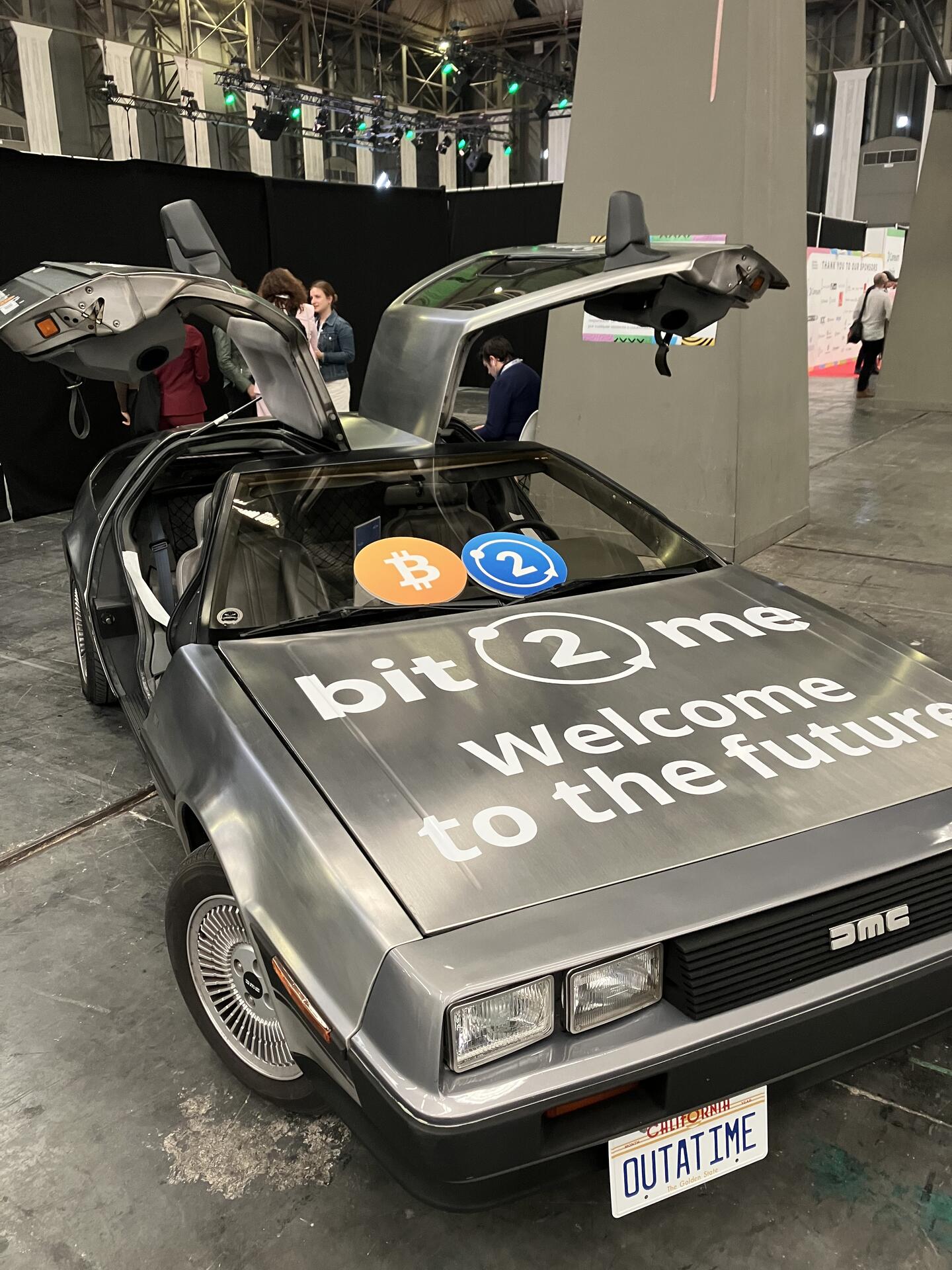

👋🏻 Hey!
Some of our iOS TestFlight users have noticed their test versions recently expired.
Not to worry - Last year we just had to move Apple Developer Accounts. The migration process was not great (isn't this the biggest company in the world?) so all TestFlight users get dropped.
Feel free to join the new TestFlight using this link https://testflight.apple.com/join/X3cCtNe1 if you enjoy being on the bleeding edge.
Latest version uses a better Scanning Engine under the hood so we'd love to know if it helps anyone have more consistent QR reads. 🧡
Been using WoS for a couple of years and continue to love it! Thanks for the hard work 👍🏻 Food for thought: would love for the payment history to keep displaying the exact time (why not just use "DD/MM/YYYY @ hh:mm:ss" on a 24h format), and some European languages could really be improved upon (I speak a few and have noticed that some are either not 100% translated or haven't been done by a native speaker). Happy to help here if need be. Also, instead of little images at the bottom, the send screen could be filled with big icons with captions like "enter address", "paste from clipboard", "upload image" and "cancel". It would be simpler for newcomers. Regardless of that, still the best wallet I've used and will continue suggesting it to my friends and family (btw, the separate PoS was a nice touch) 🧡⚡️

Confused by UTXO management? AQUA's got your back! Learn why doing your DCA on Liquid network is the way to go straight from nostr:npub1excellx58e497gan6fcsdnseujkjm7ym5yp3m4rp0ud4j8ss39js2pn72a and don't let those old sats your first bought go to waste in fees. 🌊⚡️ https://v.nostr.build/JWwM.mp4
That's a very good point! Thanks for sharing 👍🏻 Any way of including somewhere the option to use another electrum server and connect over Tor? But keeping it hidden not to confuse newcomers?

Oops I think it doesn't make much sense the way it's written 🤣 The point is that all blocks that could be mined have been so. I mean, the next blocks don't have a reward and cannot be mined, but will be validated nonetheless. Have to improve my English 😅 If I'm completely wrong, please correct me 👍🏻
I was having some fun. Here's the result! If you like it, feel free to show some pleblove 😁 #Bitcoin #meme 
Talking about the price of #Bitcoin in the dystopian movie Gold. Not so farfetched now, huh? 🤣 https://video.nostr.build/a5277eca38544eac8484f255a9fe7962b1ab8a4d55a6b48f8772cf469b5a7be1.mp4
Can't believe what I've been missing. Great community here! Here's my first #Bitcoin meme on #Nostr.
#Introductions 
My first post! Leaving all other social media behind from this moment.
#introductions