
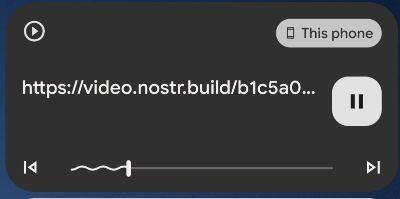
#Amethyst anomaly or function? I get this notification on phone which also plays through Android Auto when I connect to car. Never any audio, but appears after using the app. This one is a 30 second event.

#asknostr nostr:npub1gcxzte5zlkncx26j68ez60fzkvtkm9e0vrwdcvsjakxf9mu9qewqlfnj5z
Reply to this note

Please Login to reply.

Discussion

Every video or audio in the feed will also show up in the notification tray. Sometimes it's hidden in the next post that is not visible yet, but as soon as you close the app it should go away.

Should it be removed when app loses focus instead of stopping the app?

Ideally yes, unless the user has enabled the background mode.

It does not go away, I have the same problem and need to force close the app multiple times

That'll happen if you were watching a silent video...

Some "GIFs" are video files.

It happens with normal videos aswell, keeps running in the background

When you kill the app, does it disappear?

For my situation, It does not go away. Just retested. Opened amethyst, scrolled through until an MP4 started. Checked the media badge was present. Killed app. Media badge remains.

I have an issue where the content is unavailable and the media badge appears to be trying to load, but is unresponsive to a "kill" swipe (i.e. swipe right/left)

Kill the app via force close in settings

I have a media badge stuck now. Amethyst was not running. Swiping did not kill it. Long press in badge and an android control popped asking to "remove this notification from Amethyst". Pressed yes and it went away, however, I feel something is hanging after media plays and remains after app is killed.

Humm... I will investigate this further. You can always go to Settings/Apps/Amethyst and force close. That gets rid of anything running.

Same here