Beef up your online bitcoin security by using a private home network πŸ₯·

Self custody is important, now ensure you can always interact & transact without censorship ⚑️

Below is the hardware and software I chose for my simple private home #bitcoin network 🧢

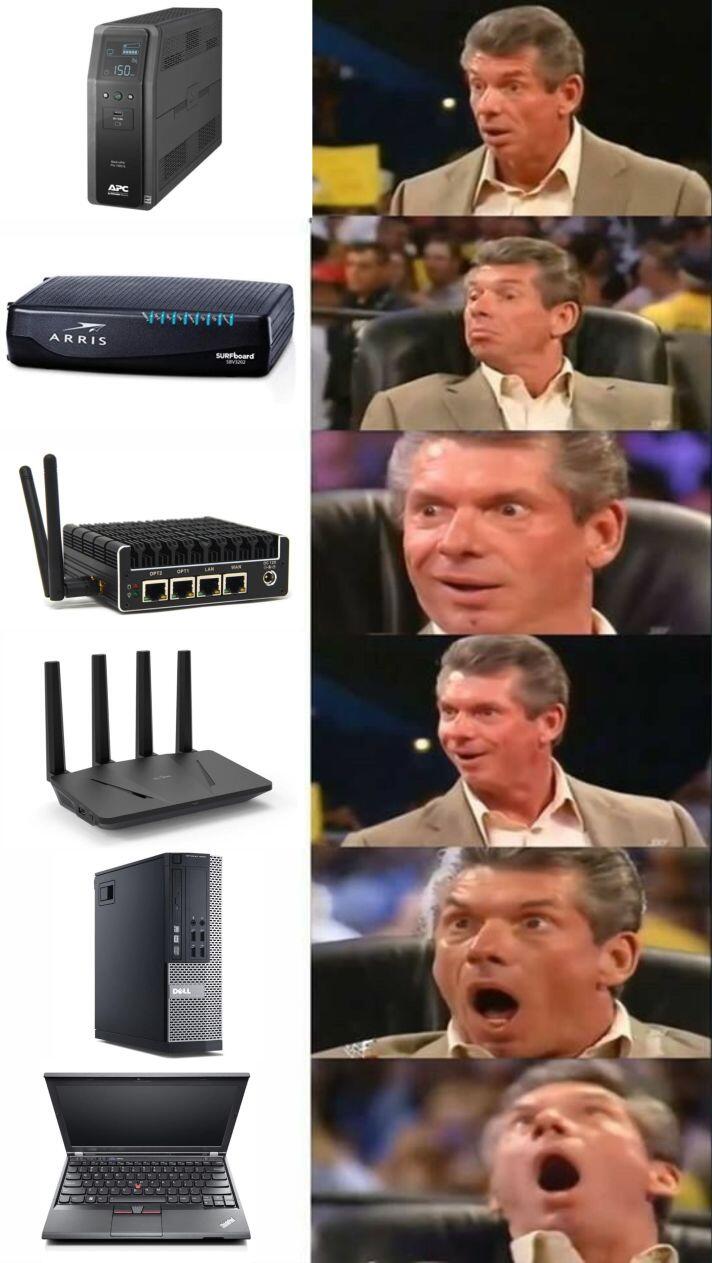
1) APC 1500

Surge protection and battery backup for loss of power without downtime to the network & allowing for proper shutdown of hardware/software.

Plug all your hardware into this.

Screw your internet cable into the back and run an internet cable out.

2) Arris Surfboard SVB3202

This is just a modem, no wifi, no bullshit. Just a nice, but really stupid modem that is just a modem.

Stop using your ISP gateway.

Screw the internet cable from APC into this modem and plug a WAN ethernet line out.

3) Protectli Vault fw4b

This is a four port firewall router plus an auxiliary wifi interface.

This device runs FOSS OPNsense firewall software to protect your home network.

You can decide what comes in and out, separate devices on the network and so much more with this firewall.

Free Open Source Software runs on this dedicated micro computer to control your internet flow.

This is bad ass hardware and Protectli has been rock solid with customer support.

Plug your WAN ethernet from the modem into the WAN port of the vault and plug a LAN ethernet line out.

4) GliNet Flint 1800 WiFi router

This sleek piece of hardware is the ultimate wifi router!

Take complete control of your home internet all from a very nice web based GUI.

This wifi router has four ports and four separate wifi networks each with own password protection.

Easy to add VPN with wiregaurd on the router and run tor on router. Covers every device connected.

Too many features to list including Adguard & DNS.

Plug the LAN ethernet from firewall vault into the LAN port on this wifi router.

5) Start9 DIY home server
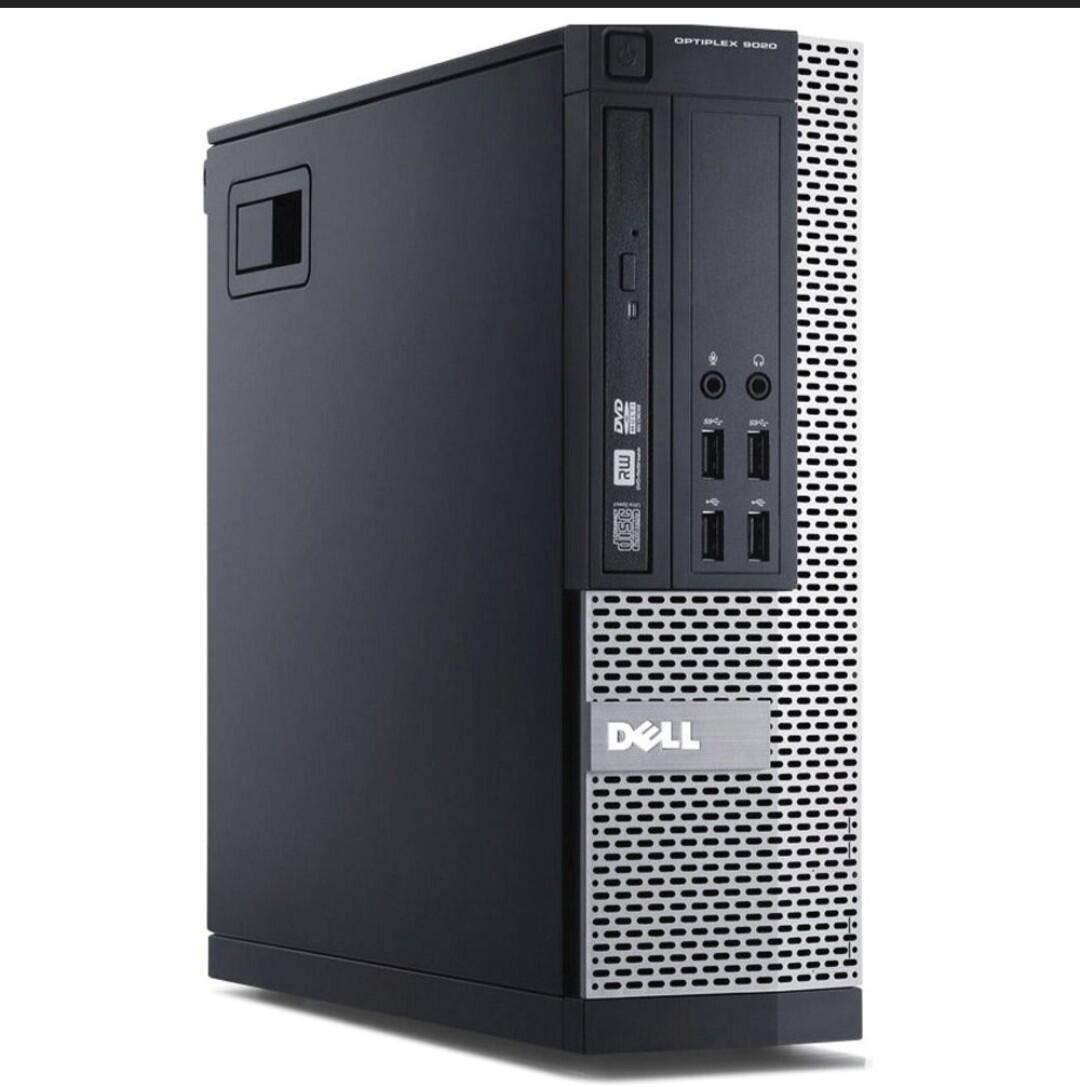
I took a used Dell Optiplex 9020 with 8G and put in a 1T SSD in it.

Flashed it with StartOS and added Bitcoin Core.

Sovereignty in bitcoin is to have your own keys and your own copy of the blockchain and verify your uxto sets against your copy that is in consensus.

Tor web GUI allows you full configurations of what services you wish to add such as LND and mempool.

Pair with your lightning wallet and Sparrow Wallet on laptop.

Plug an ethernet line from your server / nodes into an ethernet port on the GliNET WiFi router.

6) Classic X Thinkpad

This is a Bitcoin only dedicated laptop.

NoΒ bullshit, only necessary bitcoin things on this device. I got mine from MiniFree.

Coreboot/ Intel ME disabled

Debian

Sparrow Wallet

Tor

Terminal

OPNsense GUI

GLiNET GUI

Start9 GUI

This is the work station you interact with the Bitcoin network on...a clean linux laptop, behind a fire wall, thru a VPN and over TOR on private network isolated network!

All on hardware you own, running FOSS, in your own home.

7) De googled Pixel

Purchase unlocked with cash so as to not have identity tied to an ime number.

Run Graphene, wifi only, airplane mode

This is a secure private mobile device simply for running your hot/ lightning wallet, #nostr and connecting back to Start9 server away from home.

Can add Silent link service if needed.

Now is the time to take back control of your home network. Build a private home network that is representative of the value of what you hold.

Ensure you can always transact without censorship!

Reply to this note

Please Login to reply.

Discussion

Damn Daniel. This is the way.

Excellent suggestions!

My next step πŸ™ŒπŸΌ

Great writeup! Thank you! 🫑

Why imei matters?

Because regardless of using other privacy techniques the imei number is linked to your purchase

And what can that be used for?

everything done from the phone is linked to who purchased it...

Can't zap you πŸ€”

We both use minibits that seems weird

Indeed, but the invoice fetching fails from the minibits endpoint.

Hhm, got 2 21 sats zaps

Works! 🫑

Maybe does not like tor

link? lol t-y

But how do they link what is done on the phone to IMEI. As I see, apps can only get this info with special permissions

permissions:

"Android 10 (API level 29) adds restrictions for non-resettable identifiers, which include both IMEI and serial number. Your app must be a device or profile owner app, have special carrier permissions, or have the READ_PRIVILEGED_PHONE_STATE privileged permission in order to access these identifiers."

hey, sharing the love! t-y

Reposting this hardware list nostr:nprofile1qqstnem9g6aqv3tw6vqaneftcj06frns56lj9q470gdww228vysz8hqpzdmhxue69uhkzmr8duh82arcduhx7mn9qy2hwumn8ghj7etyv4hzumn0wd68ytnvv9hxgqgdwaehxw309ahx7uewd3hkcam28zl

nostr:nevent1qqs99ml9kch5f2gs0ts99kzdyy68v4gjql5fmm985l0nj7upkze8hmgpz3mhxw309ucnydewxqhrqt338g6rsd3e9upzpmd5wqn399avtfslyalne52du4xx066ue5sw7rva72d7rp59hvqyqvzqqqqqqy039jl3

good list πŸ‘

Extremely based

Man-cave laundry list ... ✌🏼✌🏼

Add another server running nextcloud and other self-cloud services and you are creating your own digital fort πŸ’ͺ

I use this stack and also run a Home Assistant Green to do little automations that make my life easier.

Add a bitaxe or two and you're perfect.

If you were to pick a network switch for more Ethernet ports what would you recommend?

Thank you for this. Also will these recommendations work with fiber connections?

Of course, the output of the fiber ONT device will be an ethernet port that goes right into your firewall.

Okay cool thank you. I didn't know if there would be speed considerations because my other router was older and couldn't handle the speeds

Can you point to a series of tutorial videos that can walk us through these setups step by step???

More people would do this if the process was manageable.

🌐 visual diagram of this network setup:

good setup

Only 1tb on start9? Not using electrum?

The start9 is 1tb for now. I don't really use it much tbh. I have a pruned node on it. I run a 2tb ronindojo full node separately that uses fulcrum.

Gotcha. Does the protectli not have WiFi? I'm confused by that part.

It does actually, i have two wifi routers as a result. I use the protectli one as a fallback.

Not all protecli devices have wifi, i chose to so that if I bork my network I can still connect around it.

I have a similar setup minus the non ISP modem, is your setup have an additional security or privacy benift or is just more like redundancy? I ask because I thought Opnsense would just take care of ISP from monitoring what devices are on your network and a VPN will encrypt the data packets from them inspecting them.

I don't want device from the isp in my home. I don't trust it at all to not be doing some bullshit.

Oh okay, that make sense. I agree that's the ideal way

Excellent setup! You have done your homework.