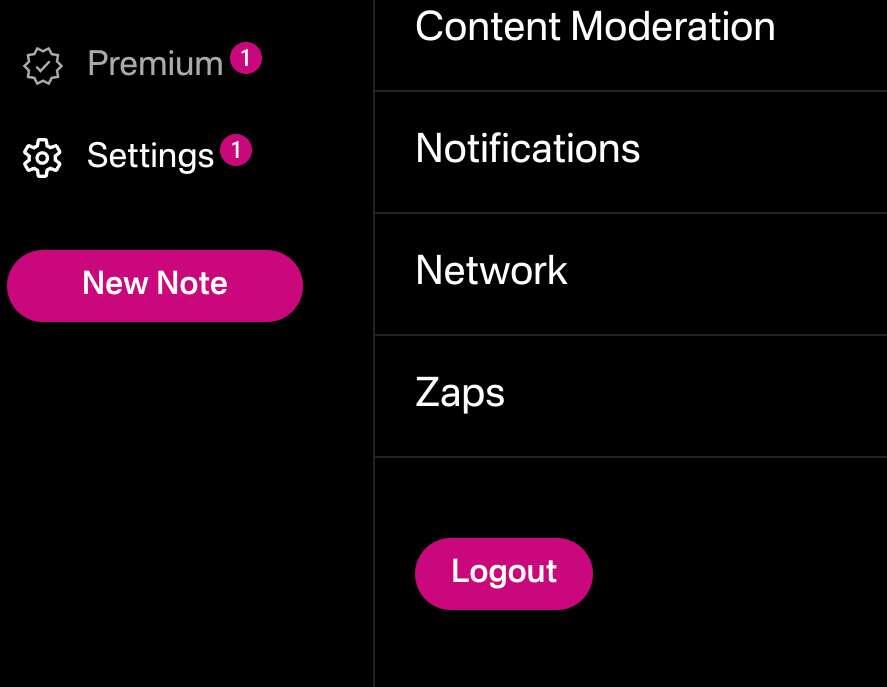
I need to log out of primal on browser. I swear the button was right there but I can't find it now. Where the heck do I log out on primal?

Note - If you tell me about another client I am totally muting your ass. It has NOTHING to do with my question. I also use other clients. DGAF right now about them, just this.
Reply to this note

Please Login to reply.

Discussion

Clearing browser data should be as well a way of login off, afaik... 🤔

Just tried that and it doesn't seem to work when logged in via Alby.

It prolly does log in automatically as you step in to the webpage... 🤔 maybe it be of help to take a look at the setting and check after permissions for primal. For example when using the nos2x addon, the settings let you chose if requests are handled manually or automatically; if set the later, then most likely yes, the client keeps apearing loged on as soon as you step in, -even after clearing data-, so for the addon granted permission to log in...

You can seemingly logout via Alby if you click on it and go to the toggle icon and hit disconnect. I am sure your right though there was a button for it before.

New version seems to not have that:

Hmm. I thought I did the update and this was the new version. Oh well

Click on Settings, and Logout is on the bottom of the pane that expands to the right after you select Settings.

...except that's not there for me.

How did you log in? Browser extension or nsec paste?

No, I didn't use an extension. Probably that's why.

What phone is this?

LOL I think they removed the "logout" action in the new version. I'll reply to this note with instructions for logging out by clear browser data

Hm. I've tried deleting all local browser storage sources that I can but primal.net seems to hang on to the session. I'm using the Alby extension, so maybe that's what's doing it. Perhaps pasting your nsec gives you the option to "log out" in the Primal UI whereas with an extension you are expected to use the extension UI to do so.

in that case, it would be Alby extension > "slider" icons on the Primal tile > scroll down to "Disconnect"

No idea, doesn't bloody work lately for me.

No idea what was changed...

If you're logged in by plugging your nsec directly into Primal, then you need to access your settings and the last settings option at the bottom will be a "logout" button.

If you're using an extension you will need to logout from the extension directly.

Probably your signer extension (Alby? Nos2x? Nsec. app?) sign out of that and you're good to go.

On my end, it is under settings, the very bottom option. I have to click it twice to actually logout.

Are you using an extension like alby or not? Because I am and I just have a version number there...

No, I am not using an extension.