πŸš€ nostr-relay-tray v2.0.0 Released!

What's new?

- 🌐 One-Click Public Access – Easily expose your relay to the internet.

- πŸ”§ Improved Event Filtering – More precise control over which events to accept or reject.

- πŸ—‘οΈ Conditional Event Deletion – Remove events based on specific conditions.

Own your relay, own your events!

1. Download the appropriate installer from https://github.com/CodyTseng/nostr-relay-tray/releases and install it.

2. Open nostr-relay-tray.

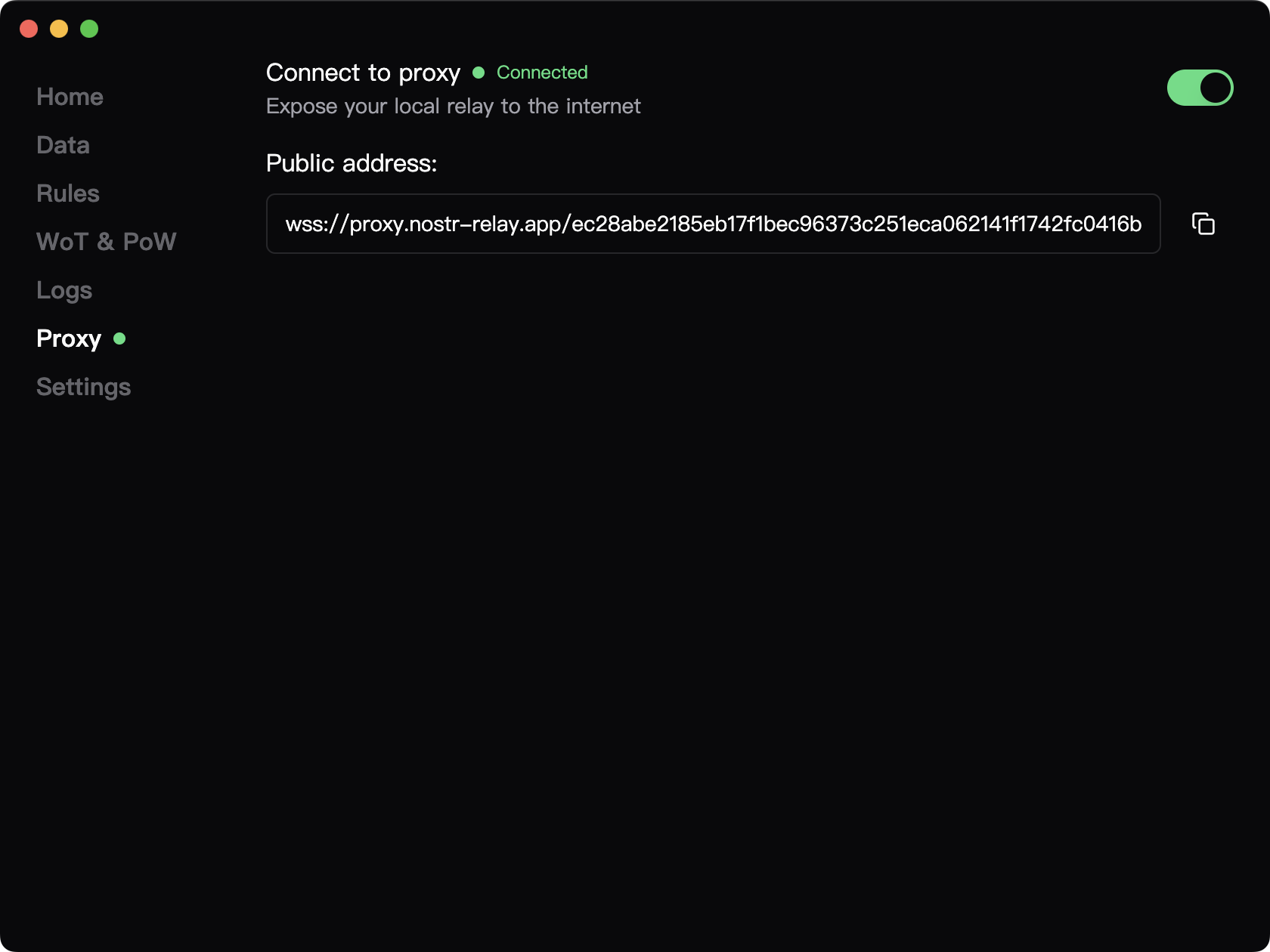
3. Go to Proxy -> Connect to Proxy, and toggle the switch.

4. Add the public address to your relay list.

5. To prevent receiving spam events, enable WoT (Web of Trust) under WoT & PoW.

#nostr #relay #devstr #grownostr #freedom
Reply to this note

Please Login to reply.

Discussion

I’ll upgrade today!

Looking forward to your feedback!

wow this is cool

is there other filterting options outside of WOT and POW ? can i make it so that I whitelist users to read/write ?

Currently, anyone can read, and only writing can be restricted. You can create an `allow` rule to permit specific users to write. For more details, refer to: https://github.com/CodyTseng/nostr-relay-tray#flexible-event-filtering

I see, so no nip 42 auth im guessing then. I'm testing it out in flotilla. Seems to work quite well for creating a space. very cool relay, easy to use. Would be cool if, the proxy name could be customized (could even be for e fee).

I'm planning to implement NIP-42 on the proxy service, so it might be supported sometime soon, haha. If everything goes well, I also plan to offer custom names as a paid service.

hell ya

just so i understand, by making an 'allow' npub for myself, for example., no one else can write to the relay? In that case the WoT wouldn't be necessary if im whitelisting nostr:npubs.

It depends on your purpose. If you just want to manually set up a whitelist, then you can turn off the WoT. Different strategies can be freely combined according to your needs, so you have the flexibility to choose the approach that suits you best.

i see. so if i have both on, either WoT users or whitelisted users can write to the relay. Thank you!

Yep!

Test

Good morning nostr:npub1syjmjy0dp62dhccq3g97fr87tngvpvzey08llyt6ul58m2zqpzps9wf6wl ! I downloaded and installed this and I do not see the new WOT & POW and Proxy options. What did I do wrong? I uninstalled the last one completely and even deleted the folders in App Data folders. Not sure what's up

You mean you can open the dashboard but don’t see the WoT and Proxy options? Could you let me know what system you're using and which installation package you downloaded? It's likely that you're opening an older version.

Hey Cody! Thanks for the reply. I am using Windows 11 and I downloaed and installed the nostr-relay-tray.Setup.2.0.0.exe package

Can you open it successfully? If so, could you share a screenshot?

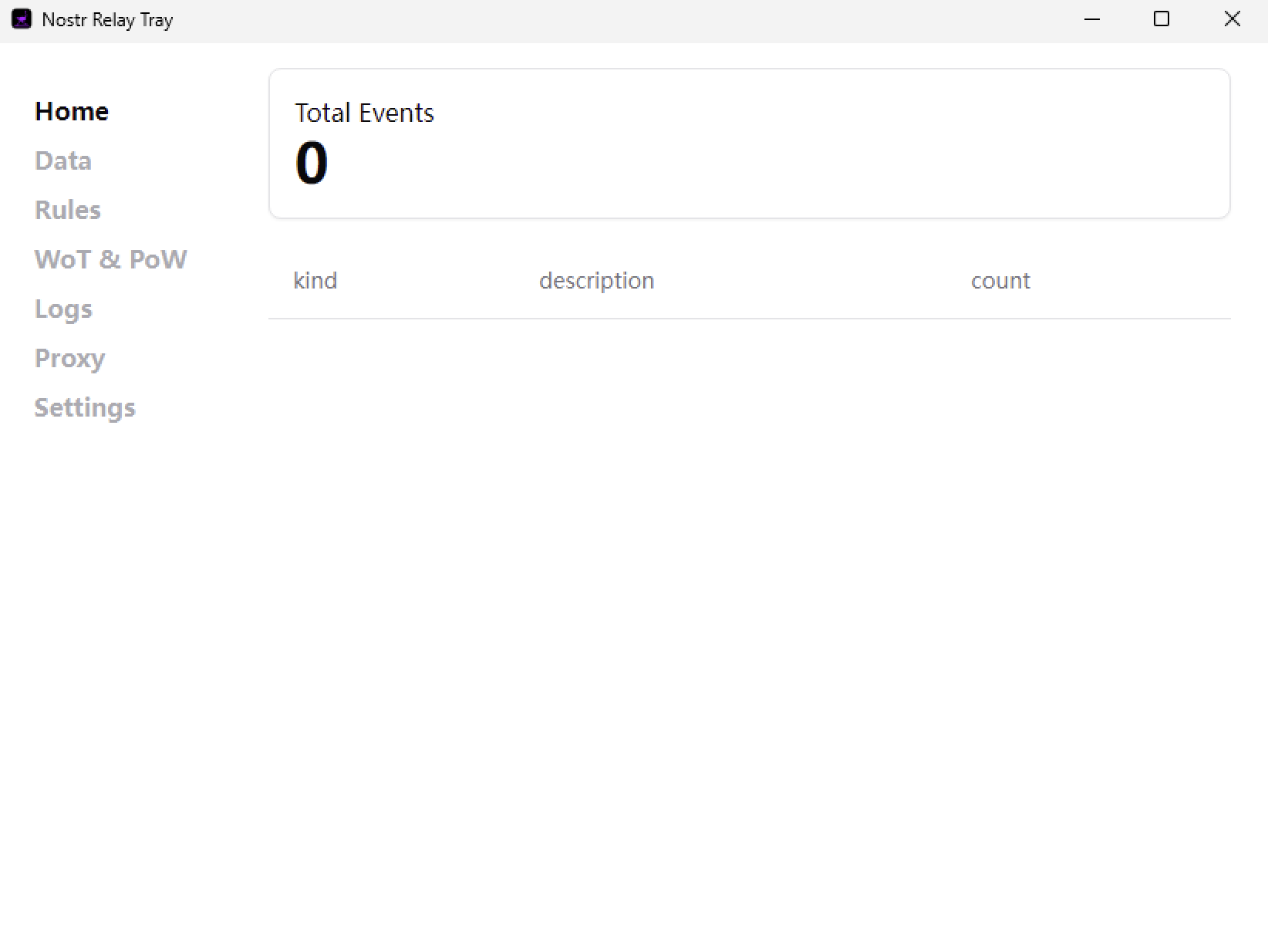
I can open it successfully and here is the screenshot of the installed 2.0.0 dashboard

This should be v1.8.0, could it be that I uploaded the wrong installation package? Let me try it on a Windows VM to see.

Ok. Thanks! I always assume I am doing something wrong so I wanted to check lol

I tested the installation package from GitHub on my virtual machine, and it works fine. Could it be that your installation failed?

https://github.com/CodyTseng/nostr-relay-tray/releases/download/v2.0.0/nostr-relay-tray.Setup.2.0.0.exe

I never got any message of failure. Let me try again I guess

Ok. I think I know what happened. The old one, once you choose quit, keeps running in the background. I got a message during install last time that the other one was still running so installation could not continue and it asked me if I wanted to retry. I clicked retry and it then acted like it was installing and completed. No error message of failure or anything. So, what I had to do was end the task in task manager, after I had already chose to quit the application just to get it to quit so I could install this new one. I do now have the 2.0.0 dashboard

Hahaha, I just ran into the same issue! And since the app isn’t signed, Windows blocked me several times too.

Thank you so much for your support! 😊

Thank you for your support as well πŸ™‚

My pleasure

Susan is a prominent investor in the cryptocurrency space, known for her insightful strategies and deep understanding of the rapidly evolving digital asset market. With a strong focus on Bitcoin and other major cryptocurrencies, she navigates the complexities of blockchain technology, market cycles, and regulatory landscapes to make informed trading decisions. Susan approach combines technical analysis with a keen eye on macroeconomic trends, allowing her to identify long-term opportunities while managing risk in the volatile crypto market. Her trading style emphasizes patience and adaptability, helping her capitalize on both bullish trends and market corrections. Investors following her moves are often drawn to her disciplined yet forward-thinking approach to crypto trading... Inbox πŸ‘

Susan on WhatsApp: +13184079133

For more guide πŸ™πŸ’―

Susan is a prominent investor in the cryptocurrency space, known for her insightful strategies and deep understanding of the rapidly evolving digital asset market. With a strong focus on Bitcoin and other major cryptocurrencies, she navigates the complexities of blockchain technology, market cycles, and regulatory landscapes to make informed trading decisions. Susan approach combines technical analysis with a keen eye on macroeconomic trends, allowing her to identify long-term opportunities while managing risk in the volatile crypto market. Her trading style emphasizes patience and adaptability, helping her capitalize on both bullish trends and market corrections. Investors following her moves are often drawn to her disciplined yet forward-thinking approach to crypto trading... Inbox πŸ‘

Susan on WhatsApp: +13184079133

For more guide πŸ™πŸ’―