
Hands-On With the New M4 OLED iPad Pro
Today is the official launch day of the new iPad Pro models, and these updated tablets mark the biggest feature and design refresh that we've seen for the iPad Pro in several years. We picked up one of the new 13-inch models to check out everything new.
Subscribe to the MacRumors YouTube channel for more videos.
When it comes to design, Apple is still offering 11-inch and 13-inch size options and the look hasn't changed a whole lot, but the bezels are slimmer and the iPads themselves are super thin. The 13-inch iPad Pro is the thinnest device Apple has made to date at 5.1mm, while the 11-inch iPad Pro is 5.3mm.
With the 13-inch model weighing in just over a pound, the decrease in weight and size is noticeable and makes it feel much more portable. The 11-inch model is under a pound, so it's even easier to carry around. This is a design change that you'll feel if you've used a 2018 or later iPad Pro.
The OLED display is, unsurprisingly, super nice. It's bright, the colors are vibrant, the blacks are incredibly black, and the contrast is much improved. The mini-LED display of the prior-generation 13-inch iPad Pro was good, but this is better. Still, if you have that one, it's probably not worth upgrading for OLED. Nano-texture, an add-on option for higher-end models, cuts down on glare, but it also diminishes the OLED display a bit because of the matte finish.
iPad into an awkward position if you have a keyboard attached. Note that Apple did pull the Ultra Wide camera, so there's just a single Wide lens and a LiDAR sensor.
The M4 chip is incredibly fast, fast enough that it's likely most people purchasing an iPad Pro aren't going to be able to take full advantage of its capabilities. It's going to be hard to max this chip out, and it'll handle audio and video editing with ease. Apple is focusing heavily on AI with its new operating system updates, so those AI will be able to take advantage of that processing power, and it'll come in handy for future proofing.
If you want to use the iPad Pro for anything that involves typing, the Magic Keyboard is a must. It's priced starting at $299, but it's thin, light weight, and the aluminum hand rest makes it feel Mac-like. It's got good key travel and the glass trackpad is a major improvement.
Apple Pencil users, the Apple Pencil Pro's haptic feedback is the most noticeable change. With the squeeze gesture, you can swap tools more quickly and have more feedback when creating sketches and art. Barrel roll also lets you use the Apple Pencil more like an actual writing or drawing implement. The Apple Pencil charges magnetically, and pairs automatically, like prior versions.
well worth a read. Still, there are some workflows that are adaptable to the iPad Pro, and it's a great portable machine. If you're a person who can make use of a tablet, this is the best one you can get.
Related Roundup: iPad Pro
Buyer's Guide: iPad Pro (Buy Now)
This article, "Hands-On With the New M4 OLED iPad Pro" first appeared on MacRumors.com
Discuss this article in our forums
Apple Previews iOS 18's Upgraded Magnifier App With New Reader Mode
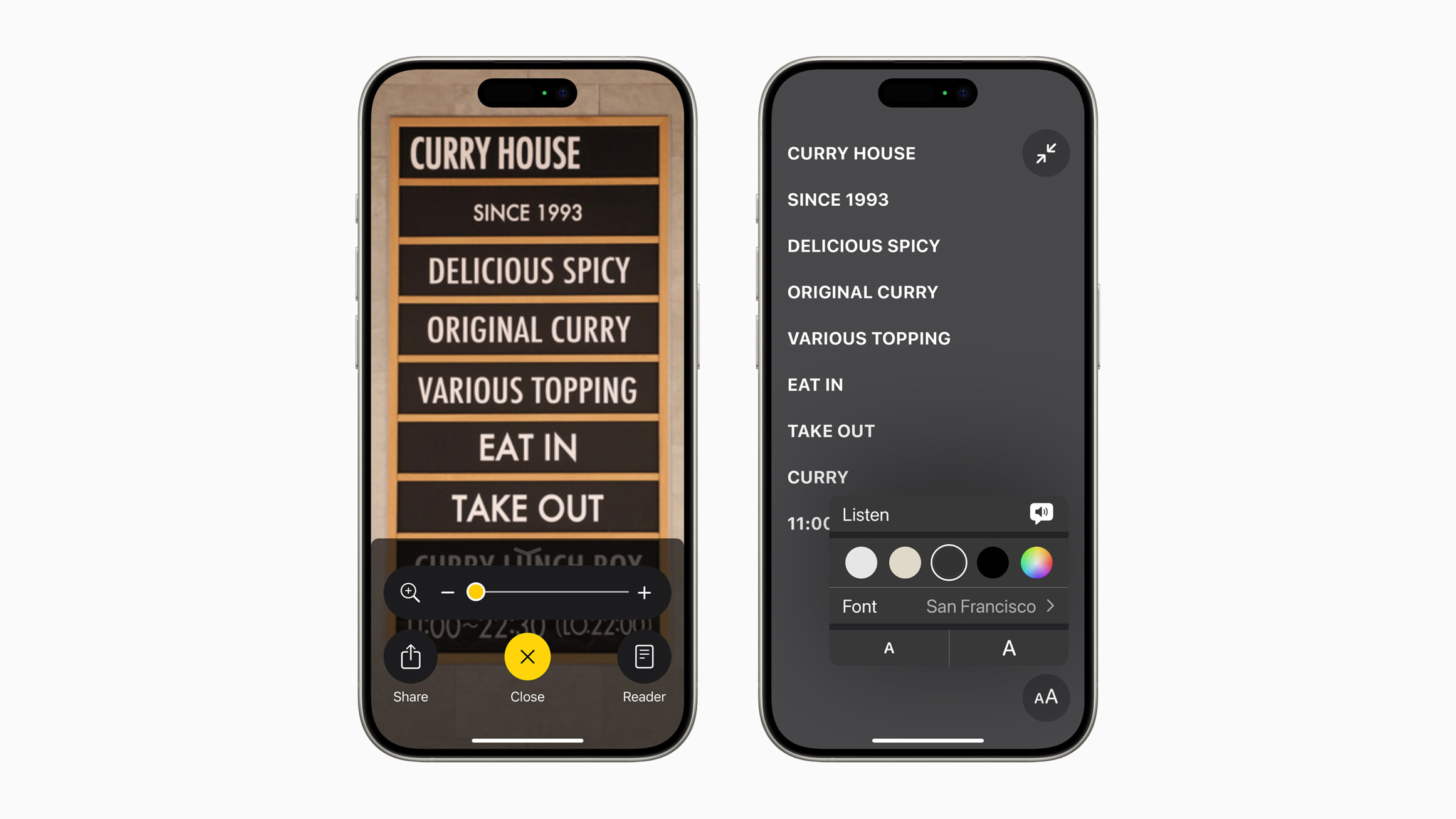
One of the new iOS 18 accessibility features that Apple previewed today is a Reader Mode in the Magnifier app, which will convert words in images to uniform lines of text. Apple did not provide any specific details about the feature, but it shared a screenshot showing that users will be able to change the font and have the text read aloud.
Apple also revealed that iOS 18 will allow iPhone users to easily launch the Magnifier app's Detection Mode with the Action button, which debuted on the iPhone 15 Pro models and is rumored to expand to the entire iPhone 16 lineup later this year. Detection Mode can identify and read aloud all text within an iPhone camera's field of view.
It is already possible to set the Action button to open the Magnifier app in general, so this will be an expansion of the app's integration with the button.
on June 10, and the update should be widely released in September.
Related Roundup: iOS 18
Tag: Accessibility
This article, "Apple Previews iOS 18's Upgraded Magnifier App With New Reader Mode" first appeared on MacRumors.com
Discuss this article in our forums
https://www.macrumors.com/2024/05/15/apple-previews-ios-18-magnifier-app/
Apple Previews Three New CarPlay Features Coming With iOS 18
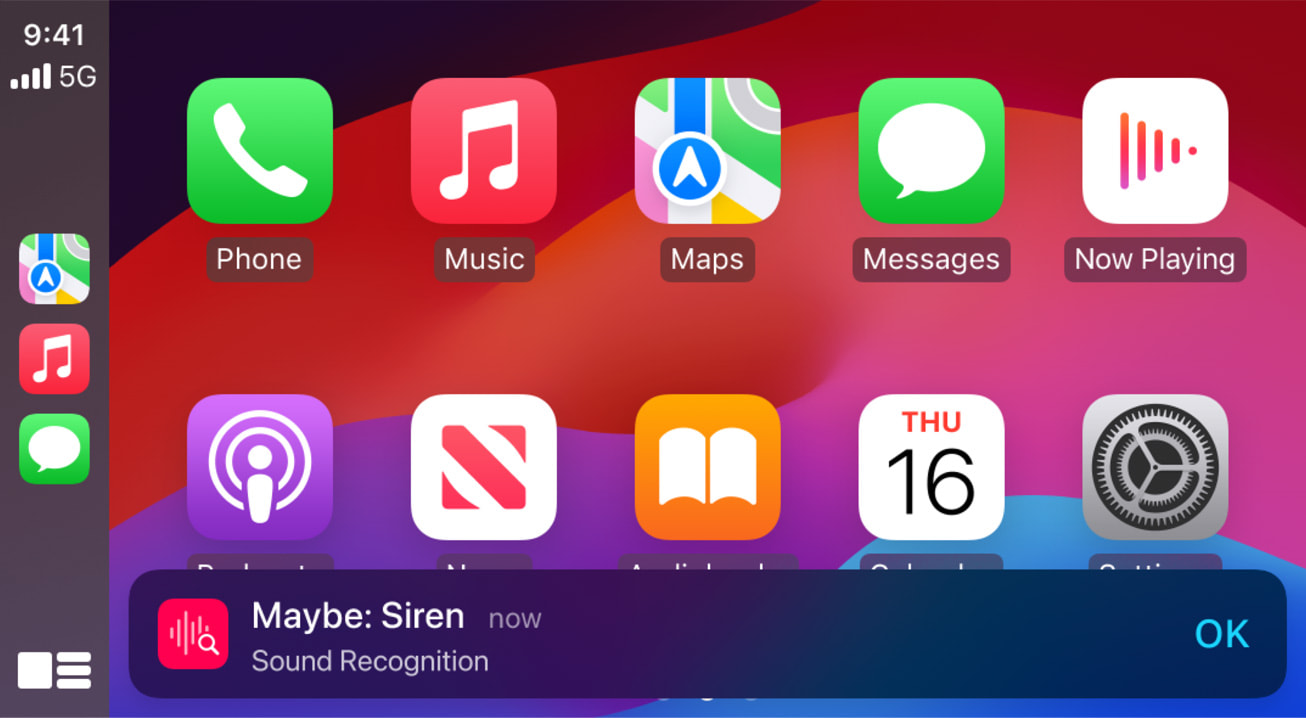
Apple today previewed new accessibility features coming with iOS 18 later this year, and this includes some new options for CarPlay.
Apple highlighted three new features coming to CarPlay:
Voice Control: This feature will allow users to navigate CarPlay and control apps with just their voice.
Color Filters: This feature will make the CarPlay interface visually easier to use for individuals with color blindness.
Sound Recognition: This feature will enable drivers or passengers who are deaf or hard of hearing to receive notifications on CarPlay for driving-related sounds, such as car horns and sirens.
All three of these features are already available on the iPhone and iPad.
on June 10, and the update should be widely released in September.
Related Roundups: CarPlay, iOS 18
Related Forum: HomePod, HomeKit, CarPlay, Home & Auto Technology
This article, "Apple Previews Three New CarPlay Features Coming With iOS 18" first appeared on MacRumors.com
Discuss this article in our forums
https://www.macrumors.com/2024/05/15/ios-18-accessibility-features-for-carplay/
Apple to Reduce Motion Sickness With Vehicle Motion Cues on iPhone

Apple today announced new accessibility features coming to its devices later this year, and one feature in particular that is likely to have widespread appeal among vehicle passengers is Vehicle Motion Cues, which aims to prevent motion sickness when looking at an iPhone or iPad.
According to Apple, research shows that motion sickness is commonly caused by a sensory conflict between what a person sees and what they feel, which can prevent some users from comfortably using iPhone or iPad while riding in a moving vehicle.
Vehicle Motion Cues are designed to avoid this sensory conflict with the use of visual elements on the display that indicate real-time changes in motion. Apple explains:
With Vehicle Motion Cues, animated dots on the edges of the screen represent changes in vehicle motion to help reduce sensory conflict without interfering with the main content. Using sensors built into iPhone and iPad, Vehicle Motion Cues recognises when a user is in a moving vehicle and responds accordingly. The feature can be set to show automatically on iPhone, or can be turned on and off in Control Center.
In addition to Vehicle Motion Cues, Apple is also set to introduce an eye tracking feature that will let users navigate their iPad and iPhone with just their eyes. It will also debut CarPlay voice control and new Music Haptics later this year. The latter uses the Taptic Engine in the iPhone to play taps, textures, and refined vibrations to the audio of the music, allowing users who are deaf or hard of hearing to experience music. The new features are expected to arrive as part of iOS 18, which is likely to be released in September.
Related Roundup: iOS 18
Tag: Accessibility
This article, "Apple to Reduce Motion Sickness With Vehicle Motion Cues on iPhone" first appeared on MacRumors.com
Discuss this article in our forums
https://www.macrumors.com/2024/05/15/apple-reduce-motion-sickness-feature/
Apple Announces iOS 18 Accessibility Features, Including Eye Tracking
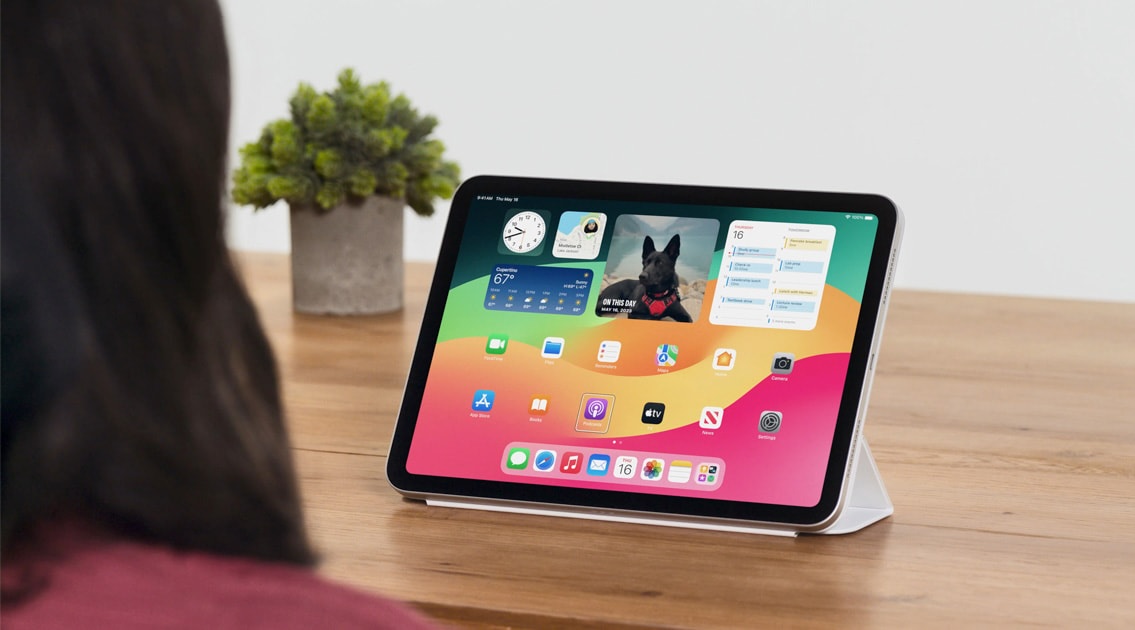
Apple today previewed several new accessibility features coming later this year with software updates like iOS 18, iPadOS 18, and visionOS 2. The announcement comes one day ahead of Global Accessibility Awareness Day.
Notably, an Eye Tracking feature is coming to the iPhone and iPad:
Powered by artificial intelligence, Eye Tracking gives users a built-in option for navigating iPad and iPhone with just their eyes. Designed for users with physical disabilities, Eye Tracking uses the front-facing camera to set up and calibrate in seconds, and with on-device machine learning, all data used to set up and control this feature is kept securely on device, and isn’t shared with Apple.
Related Roundup: iOS 18
Tag: Accessibility
This article, "Apple Announces iOS 18 Accessibility Features, Including Eye Tracking" first appeared on MacRumors.com
Discuss this article in our forums
https://www.macrumors.com/2024/05/15/ios-18-accessibility-features/
VMware Fusion Pro 13 Now Freely Available for Personal Use

VMware has announced that its Fusion Pro and Workstation Pro virtualization software is now free for personal use. For those unfamiliar with Fusion, it is designed to allow Mac users to operate virtual machines to run non-macOS operating systems like Windows 11.
The decision to make the software free was made by Broadcom, which acquired VMware in November 2023. In a blog post announcing the change, Broadcom said the move was part of a plan to simplify how the company brings VMware apps to market:
Fusion Pro and Workstation Pro will now have two license models. We now provide a Free Personal Use or a Paid Commercial Use subscription for our Pro apps. Users will decide based on their use case whether a commercial subscription is required.
support.broadcom.com.
Broadcom also said it had discontinued Workstation Player and Fusion Player, although existing customers can upgrade to the more feature-packed Pro version at no extra cost. Meanwhile, VMware Player will remain bundled with Workstation Pro.
VMware website.
Tag: Fusion
This article, "VMware Fusion Pro 13 Now Freely Available for Personal Use" first appeared on MacRumors.com
Discuss this article in our forums
https://www.macrumors.com/2024/05/15/vmware-fusion-pro-13-free-personal-use/
Extend M4 iPad Pro Battery Lifespan With This New Feature

Apple's new M4 iPad Pro and M2 iPad Air models feature a battery health setting that is new to iPads and when enabled prevents the devices from charging beyond 80% at all times, which can extend battery lifespan.
When the 80% hard limit is enabled, the iPad will never charge beyond that percentage, except on rare occasions to "maintain accurate battery state-of-charge estimates," according to Apple. Apple says reducing the time that a battery is fully charged can reduce the wear on the battery and improve its lifespan.
support document:
Reducing the time that your iPad spends fully charged reduces the wear on your battery. With iPad Pro (M4) and iPad Air (M2), you can choose to limit charging at 80 percent, which can help prolong your battery's lifespan. When you choose 80% Limit, your iPad will charge up to about 80 percent and then stop charging. If the battery charge level gets down to 75 percent, charging will resume until your battery charge level reaches about 80 percent again.
How to Set an 80% iPad Battery Charge Limit
Open the Settings app on your M4 iPad Pro or M2 iPad Air.
Tap Battery ➝ Battery Health.
Tap the switch next to 80% Limit to turn on the feature.
Note that from the new Battery Health settings menu you can also view the manufacture date of your iPad's battery, as well as the month and year on which it was first used.
dedicated how-to article.
Related Roundups: iPad Air , iPad Pro
Buyer's Guide: iPad Air (Buy Now), iPad Pro (Buy Now)
Related Forum: iPad
This article, "Extend M4 iPad Pro Battery Lifespan With This New Feature" first appeared on MacRumors.com
Discuss this article in our forums
https://www.macrumors.com/how-to/limit-ipad-pro-air-battery-charge/
M2 iPad Air and M4 iPad Pro Models Now Available for Same-Day Pickup

Starting today, Apple's new M2 iPad Air and M4 iPad Pro models are available for same-day or next-day pickup at Apple Stores, with no pre-order required. Online orders are also beginning to arrive to customers today.
Customers across the United States, Canada, Europe, Asia, and other regions can now place an order on Apple's website or in the Apple Store app and arrange for in-store pickup at a local retail location.
To order a product with Apple Store pickup, add the product to your bag on Apple.com, proceed to checkout, select the "I'll pick it up" option, enter your ZIP code, choose an available Apple Store location, and select a pickup date. Payment is completed online, and a valid government-issued photo ID and the order number may be required upon pickup.
The new 11-inch and 13-inch iPad Pro and is Apple's highest-end tablet, featuring the same M-series chips Apple uses for Macs. The latest iPad Pro models feature the M4 chip, a super slim design, Thunderbolt support, Face ID, up to 2TB storage, and OLED display technology.
Pricing on the 11-inch OLED iPad Pro starts at $999 with 256GB of storage, and pricing on the 13-inch OLED iPad starts at $1,299.
For those looking for an iPad Pro size that's more affordable, Apple also launched a new iPad Air in the same 11-inch and 13-inch sizes, but the iPad Air is thicker and heavier, lacks an OLED display, uses Touch ID instead of Face ID, and has an M2 chip instead of an M4 chip.
Related Roundups: iPad Air , iPad Pro
Buyer's Guide: iPad Air (Buy Now), iPad Pro (Buy Now)
Related Forum: iPad
This article, "M2 iPad Air and M4 iPad Pro Models Now Available for Same-Day Pickup" first appeared on MacRumors.com
Discuss this article in our forums
https://www.macrumors.com/2024/05/15/m2-ipad-air-m4-ipad-pro-now-available/
M4 iPad Pro Models Start Arriving to Customers in New Zealand and Australia

It's already Wednesday, May 15 in Australia and New Zealand, so customers who pre-ordered one of the new M4 iPad Pro or M2 iPad Air models are starting to receive their devices.
The new iPads were introduced last week, with the iPad Pro featuring OLED display technology, a next-generation M4 chip, and a thin and light design that makes it even thinner and lighter than the iPad "Air." Meanwhile, the iPad Air has the M2 chip that was previously in the iPad Pro, providing a nice upgrade over the M1, and Apple has also introduced a new 13-inch display size so you can get the Air in two sizes much like the Pro, but it's just an LCD display rather than an OLED display.
iPad Air vs. iPad Pro Buyer's Guide: 30+ Differences Compared
Apple Pencil Pro that works with both the iPad Air and iPad Pro models.
New Zealand doesn't have Apple retail locations, but stores in Australia will have the new iPad Pro and iPad Air models available for purchase. The iPad Pro and iPad Air didn't sell out and should be readily available, but there is a wait online for the nano-texture glass option on higher-capacity 1TB and 2TB iPad Pro models.
Following New Zealand and Australia, sales and deliveries of the new iPads will kick off in Asia, the Middle East, Europe, and finally, North America.
Pricing on the iPad Air starts at $599, while pricing on the iPad Pro starts at $999. The Magic Keyboard is priced starting at $299, while the Apple Pencil Pro is $129.
MacRumors because we'll have a hands-on review of the new iPad Pro tomorrow morning.
Related Roundups: iPad Air , iPad Pro
Buyer's Guide: iPad Air (Buy Now), iPad Pro (Buy Now)
Related Forum: iPad
This article, "M4 iPad Pro Models Start Arriving to Customers in New Zealand and Australia" first appeared on MacRumors.com
Discuss this article in our forums
https://www.macrumors.com/2024/05/14/m4-ipad-pro-new-zealand-australia/
Latest Version of Android Has Gemini AI at Its Core
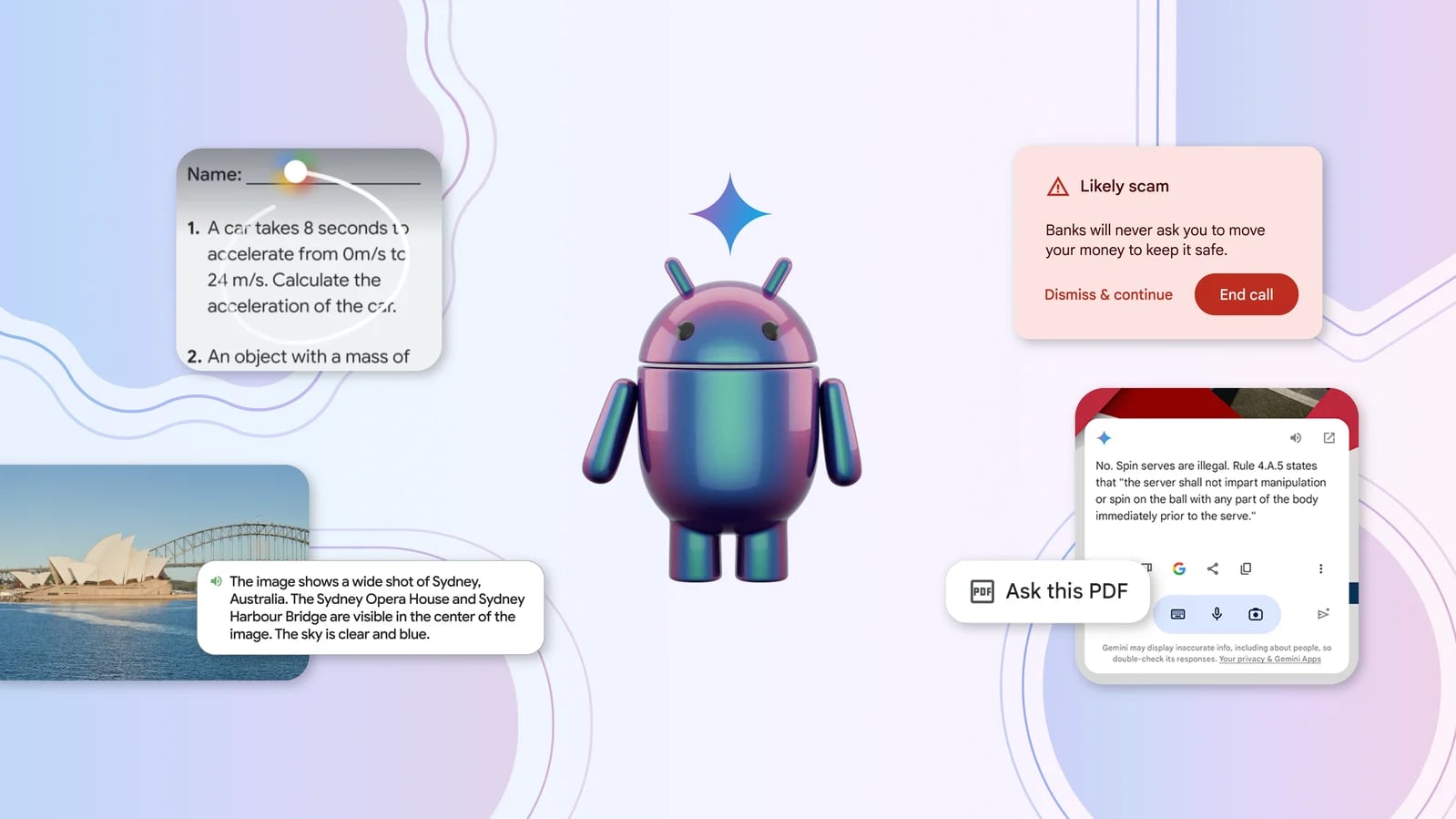
Google today announced several new AI features that it is building into the Android 15 operating system, giving us some insight into what Apple's iPhone operating system will be competing with later this year.
According to Google, Android has been designed with AI at its core, and Gemini is a foundational part of the Android experience that works at the system level. There is an AI powered search bar that can be used for answering queries and looking up information, and the Circle to Search feature can be used for solving math and physics problems or getting homework help as of today.
Gemini serves as the AI assistant on Android instead of Google Assistant, and the Gemini AI will be able to be brought up as an overlay on any app that's in use. Gemini is context aware and can anticipate what the smartphone user is doing and provide context in the moment. It can create images for texts and social media, or answer questions about a video that's being watched. It can parse PDFs, websites, and other content, providing summaries and translating.
Google is using on-device AI for some features in order to keep sensitive data private, and this is also Apple's plan. Multiple rumors have suggested that many of Apple's first AI features will run on-device rather than through a cloud server.
Gemini Nano, Google's on-device AI, currently does things like generate smart replies in messaging apps and summarize voice memos. Gemini Nano with Multimodality is coming to Pixel phones later this year, enabling new on-device AI features like TalkBack, which can help blind and low-vision users better interpret the world around them. Google is also developing a call screening feature that actively listens to calls and lets users know if it sounds like a scam.
Google today also announced Gemini 1.5 Flash, a lightweight version of its Gemini Pro AI model. Gemini Flash is more efficient, less expensive, and has lower latency, which makes it ideal for large scale rollouts. Google says that Gemini 1.5 Flash is able to deliver "impressive quality" for its size, excelling at summarization, chat applications, image and video captioning, and data extraction from long documents.
Gemini 1.5 Pro has also been improved and it is able to follow increasingly complex and nuanced instructions, including parsing documents up to 1,500 pages long or an hour of video content. Gemini can be interacted with in Google Messages, and Gemini Advanced subscribers will be able to experience a new mobile conversational experience that makes speaking with Gemini more intuitive. Customized versions of Gemini called Gems are also available to subscribers, for personalized assistants that can help with workouts, provide recipes, and more, with specific personalities.
Project Astra, another Google effort, focuses on AI agents that can be helpful in everyday life. Google demoed prototype agents able to identify objects, provide context on information from the camera, and recall a timeline of events for finding a lost item.
Google plans to provide more information on new features coming to Android 15 later this week.
Tags: Google, Android
This article, "Latest Version of Android Has Gemini AI at Its Core" first appeared on MacRumors.com
Discuss this article in our forums
Vision Pro Appears in Chinese Regulatory Database Before Expansion to New Countries

The Apple Vision Pro has shown up in China's product regulatory database as Apple prepares to bring the headset to additional countries sometime in the near future. Both the Vision Pro (A2117) and its Battery Pack (A2697) have shown up in the Chinese database, indicating that a launch in China could be coming soon.
Bloomberg said yesterday that Apple is planning to introduce the Vision Pro in a number of additional countries following the Worldwide Developers Conference, but Apple analyst Ming-Chi Kuo claimed in February that Vision Pro sales would expand to more countries before WWDC rather than after.
MacRumors has previously found evidence in Apple's backend code that Vision Pro would expand to Australia, Canada, China, France, Germany, Japan, Singapore, South Korea, and the United Kingdom, and it appears that information was correct as retail employees from these countries have been visiting Apple's Cupertino headquarters for Vision Pro training in recent days.
Related Roundup: Apple Vision Pro
Buyer's Guide: Vision Pro (Buy Now)
Related Forum: Apple Vision Pro
This article, "Vision Pro Appears in Chinese Regulatory Database Before Expansion to New Countries" first appeared on MacRumors.com
Discuss this article in our forums
https://www.macrumors.com/2024/05/14/vision-pro-chinese-database/
Apple Says It Stopped $7 Billion in Fraudulent Transactions in Last 4 Years
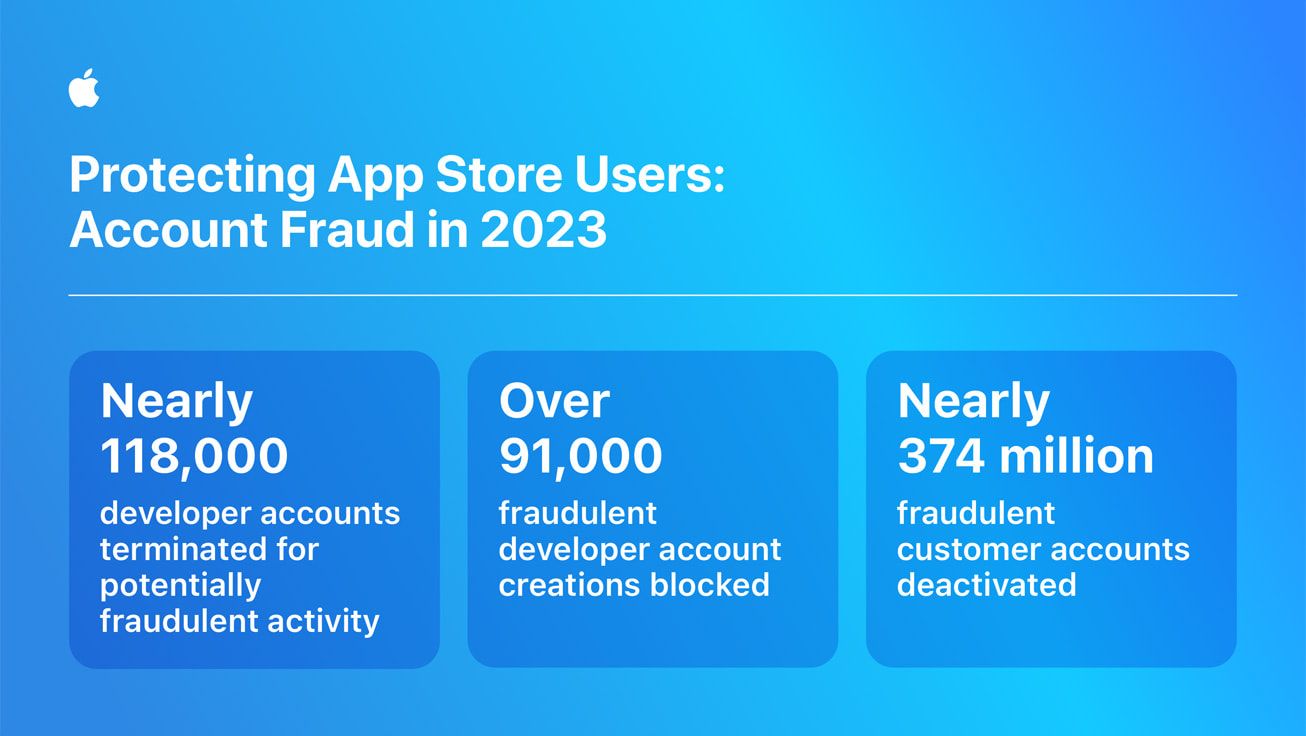
Apple today shared its fourth annual fraud prevention analysis, providing insight into how the App Store's rules protect users from fraudulent apps and other security issues.
Apple says that it prevented over $1.8 billion in fraudulent transactions in 2023 alone, and $7 billion during the period from 2020 to 2023. Apple blocked more than 14 million stolen credit cards and banned more than 3.3 million accounts from further transactions.
Over 1.7 million apps were rejected in 2023 for not meeting Apple's standards for privacy, security, and content. 118,000 developer accounts were terminated, down from 428,000 last year. The drop came from new efforts to prevent the creation of fraudulent accounts in the first place, plus more than 91,000 developer enrollments were rejected for fraud concerns.
Tag: App Store
This article, "Apple Says It Stopped $7 Billion in Fraudulent Transactions in Last 4 Years" first appeared on MacRumors.com
Discuss this article in our forums
https://www.macrumors.com/2024/05/14/apple-fraud-prevention-analysis-2024/
New iPad Pro and iPad Air Will Have Day-One Software Update With These Release Notes
The new iPad Pro and iPad Air will begin arriving to customers over the next 24 hours. It appears that the initial batch of the devices will have a special build of iPadOS 17.4 preinstalled, but an iPadOS 17.5 software update will be available in the Settings app right away, according to MacRumors contributor Aaron Perris.
iPadOS 17.5 has a special build number of 21F84 on the new iPads, and modified release notes that mention improved document scanning:
Apple News+
• Offline mode in Apple News+ gives you access to the Today feed and News+ tab, even when you don't have an internet connection
• Quartiles is a new and original daily word game that is now available in Apple News+
• Scoreboard in News+ Puzzles gives you access to new player data for Crossword, Mini Crossword and Quartiles, including stats and streaks
Tracking Notifications
• Cross-Platform Tracking Detection delivers notifications to users if a compatible Bluetooth tracker they do not own is moving with them, regardless of what operating system the device is paired with
Document Scanning
The new iPad Pro models with the M4 chip are equipped with "adaptive True Tone flash" for improved document scanning. It is unclear if the feature requires iPadOS 17.5, or if the update simply further optimizes the functionality.
With adaptive True Tone flash and AI, the new iPad Pro can eliminate shadows on scanned documents, as Apple explained in a press release:
It also now features a new adaptive True Tone flash that makes document scanning on the new iPad Pro better than ever. Using AI, the new iPad Pro automatically identifies documents right in the Camera app, and if a shadow is in the way, it instantly takes multiple photos with the new adaptive flash, stitching the scan together for a dramatically better scan.
Improved document scanning will be available in the Camera, Files, and Notes apps, and third-party apps will be able to offer the feature too.
The new iPad Air does not have adaptive True Tone flash, so it is unclear how document scanning is improved on those models, as Apple indicates.
already released on Monday for all other iPads, with a build number of 21F79 and no mention of improved document scanning.
Related Roundups: iOS 17, iPadOS 17
Related Forums: iOS 17, iPadOS 17
This article, "New iPad Pro and iPad Air Will Have Day-One Software Update With These Release Notes" first appeared on MacRumors.com
Discuss this article in our forums
https://www.macrumors.com/2024/05/14/new-ipad-pro-and-ipad-air-day-one-update/
iOS 17.5 Includes These 15 Security Fixes, But One Causes Another Bug
iOS 17.5 and iPadOS 17.5 include 15 security patches for the iPhone and iPad, according to a recently-published Apple support document, but unfortunately one of the patches has led to a software bug affecting alternative app marketplaces.
According to Mysk, a security patch related to the MarketplaceKit framework has resulted in a bug that prevents iPhone users in the EU from reinstalling an alternative app marketplace like AltStore if they happen to delete the app after initially installing it. Apple will likely fix this issue in a subsequent update, such as iOS 17.5.1.
has complained that the iOS kernel vulnerability they discovered was not eligible for payment under the Apple Security Bounty program. It is listed in the iOS 17.5 security fixes below under "AppleAVD."
Apple's full list of security patches included in iOS 17.5 and iPadOS 17.5:
AppleAVD
Available for: iPhone XS and later, iPad Pro 12.9-inch 2nd generation and later, iPad Pro 10.5-inch, iPad Pro 11-inch 1st generation and later, iPad Air 3rd generation and later, iPad 6th generation and later, and iPad mini 5th generation and later
Impact: An app may be able to execute arbitrary code with kernel privileges
Description: The issue was addressed with improved memory handling.
CVE-2024-27804: Meysam Firouzi (@R00tkitSMM)
AppleMobileFileIntegrity
Available for: iPhone XS and later, iPad Pro 12.9-inch 2nd generation and later, iPad Pro 10.5-inch, iPad Pro 11-inch 1st generation and later, iPad Air 3rd generation and later, iPad 6th generation and later, and iPad mini 5th generation and later
Impact: An attacker may be able to access user data
Description: A logic issue was addressed with improved checks.
CVE-2024-27816: Mickey Jin (@patch1t)
AVEVideoEncoder
Available for: iPhone XS and later, iPad Pro 12.9-inch 2nd generation and later, iPad Pro 10.5-inch, iPad Pro 11-inch 1st generation and later, iPad Air 3rd generation and later, iPad 6th generation and later, and iPad mini 5th generation and later
Impact: An app may be able to disclose kernel memory
Description: The issue was addressed with improved memory handling.
CVE-2024-27841: an anonymous researcher
Find My
Available for: iPhone XS and later, iPad Pro 12.9-inch 2nd generation and later, iPad Pro 10.5-inch, iPad Pro 11-inch 1st generation and later, iPad Air 3rd generation and later, iPad 6th generation and later, and iPad mini 5th generation and later
Impact: A malicious application may be able to determine a user's current location
Description: A privacy issue was addressed by moving sensitive data to a more secure location.
CVE-2024-27839: Alexander Heinrich, SEEMOO, TU Darmstadt (@Sn0wfreeze), and Shai Mishali (@freak4pc)
Kernel
Available for: iPhone XS and later, iPad Pro 12.9-inch 2nd generation and later, iPad Pro 10.5-inch, iPad Pro 11-inch 1st generation and later, iPad Air 3rd generation and later, iPad 6th generation and later, and iPad mini 5th generation and later
Impact: An attacker may be able to cause unexpected app termination or arbitrary code execution
Description: The issue was addressed with improved memory handling.
CVE-2024-27818: pattern-f (@pattern_F_) of Ant Security Light-Year Lab
Libsystem
Available for: iPhone XS and later, iPad Pro 12.9-inch 2nd generation and later, iPad Pro 10.5-inch, iPad Pro 11-inch 1st generation and later, iPad Air 3rd generation and later, iPad 6th generation and later, and iPad mini 5th generation and later
Impact: An app may be able to access protected user data
Description: A permissions issue was addressed by removing vulnerable code and adding additional checks.
CVE-2023-42893: an anonymous researcher
Maps
Available for: iPhone XS and later, iPad Pro 12.9-inch 2nd generation and later, iPad Pro 10.5-inch, iPad Pro 11-inch 1st generation and later, iPad Air 3rd generation and later, iPad 6th generation and later, and iPad mini 5th generation and later
Impact: An app may be able to read sensitive location information
Description: A path handling issue was addressed with improved validation.
CVE-2024-27810: LFY@secsys of Fudan University
MarketplaceKit
Available for: iPhone XS and later
Impact: A maliciously crafted webpage may be able to distribute a script that tracks users on other webpages
Description: A privacy issue was addressed with improved client ID handling for alternative app marketplaces.
CVE-2024-27852: Talal Haj Bakry and Tommy Mysk of Mysk Inc. (@mysk_co)
Notes
Available for: iPhone XS and later, iPad Pro 12.9-inch 2nd generation and later, iPad Pro 10.5-inch, iPad Pro 11-inch 1st generation and later, iPad Air 3rd generation and later, iPad 6th generation and later, and iPad mini 5th generation and later
Impact: An attacker with physical access to an iOS device may be able to access notes from the lock screen
Description: This issue was addressed through improved state management.
CVE-2024-27835: Andr.Ess
RemoteViewServices
Available for: iPhone XS and later, iPad Pro 12.9-inch 2nd generation and later, iPad Pro 10.5-inch, iPad Pro 11-inch 1st generation and later, iPad Air 3rd generation and later, iPad 6th generation and later, and iPad mini 5th generation and later
Impact: An attacker may be able to access user data
Description: A logic issue was addressed with improved checks.
CVE-2024-27816: Mickey Jin (@patch1t)
Screenshots
Available for: iPhone XS and later, iPad Pro 12.9-inch 2nd generation and later, iPad Pro 10.5-inch, iPad Pro 11-inch 1st generation and later, iPad Air 3rd generation and later, iPad 6th generation and later, and iPad mini 5th generation and later
Impact: An attacker with physical access may be able to share items from the lock screen
Description: A permissions issue was addressed with improved validation.
CVE-2024-27803: an anonymous researcher
Shortcuts
Available for: iPhone XS and later, iPad Pro 12.9-inch 2nd generation and later, iPad Pro 10.5-inch, iPad Pro 11-inch 1st generation and later, iPad Air 3rd generation and later, iPad 6th generation and later, and iPad mini 5th generation and later
Impact: A shortcut may output sensitive user data without consent
Description: A path handling issue was addressed with improved validation.
CVE-2024-27821: Kirin (@Pwnrin), zbleet, and Csaba Fitzl (@theevilbit) of Kandji
Sync Services
Available for: iPhone XS and later, iPad Pro 12.9-inch 2nd generation and later, iPad Pro 10.5-inch, iPad Pro 11-inch 1st generation and later, iPad Air 3rd generation and later, iPad 6th generation and later, and iPad mini 5th generation and later
Impact: An app may be able to bypass Privacy preferences
Description: This issue was addressed with improved checks
CVE-2024-27847: Mickey Jin (@patch1t)
Voice Control
Available for: iPhone XS and later, iPad Pro 12.9-inch 2nd generation and later, iPad Pro 10.5-inch, iPad Pro 11-inch 1st generation and later, iPad Air 3rd generation and later, iPad 6th generation and later, and iPad mini 5th generation and later
Impact: An attacker may be able to elevate privileges
Description: The issue was addressed with improved checks.
CVE-2024-27796: ajajfxhj
WebKit
Available for: iPhone XS and later, iPad Pro 12.9-inch 2nd generation and later, iPad Pro 10.5-inch, iPad Pro 11-inch 1st generation and later, iPad Air 3rd generation and later, iPad 6th generation and later, and iPad mini 5th generation and later
Impact: An attacker with arbitrary read and write capability may be able to bypass Pointer Authentication
Description: The issue was addressed with improved checks.
WebKit Bugzilla: 272750
Apple released iOS 17.5 and iPadOS 17.5 on Monday following around six weeks of beta testing.
Related Roundups: iOS 17, iPadOS 17
Related Forums: iOS 17, iPadOS 17
This article, "iOS 17.5 Includes These 15 Security Fixes, But One Causes Another Bug" first appeared on MacRumors.com
Discuss this article in our forums
https://www.macrumors.com/2024/05/14/ios-17-5-security-patches/
13-Inch iPad Pro Magic Keyboard ~50 Grams Lighter Than Older Model
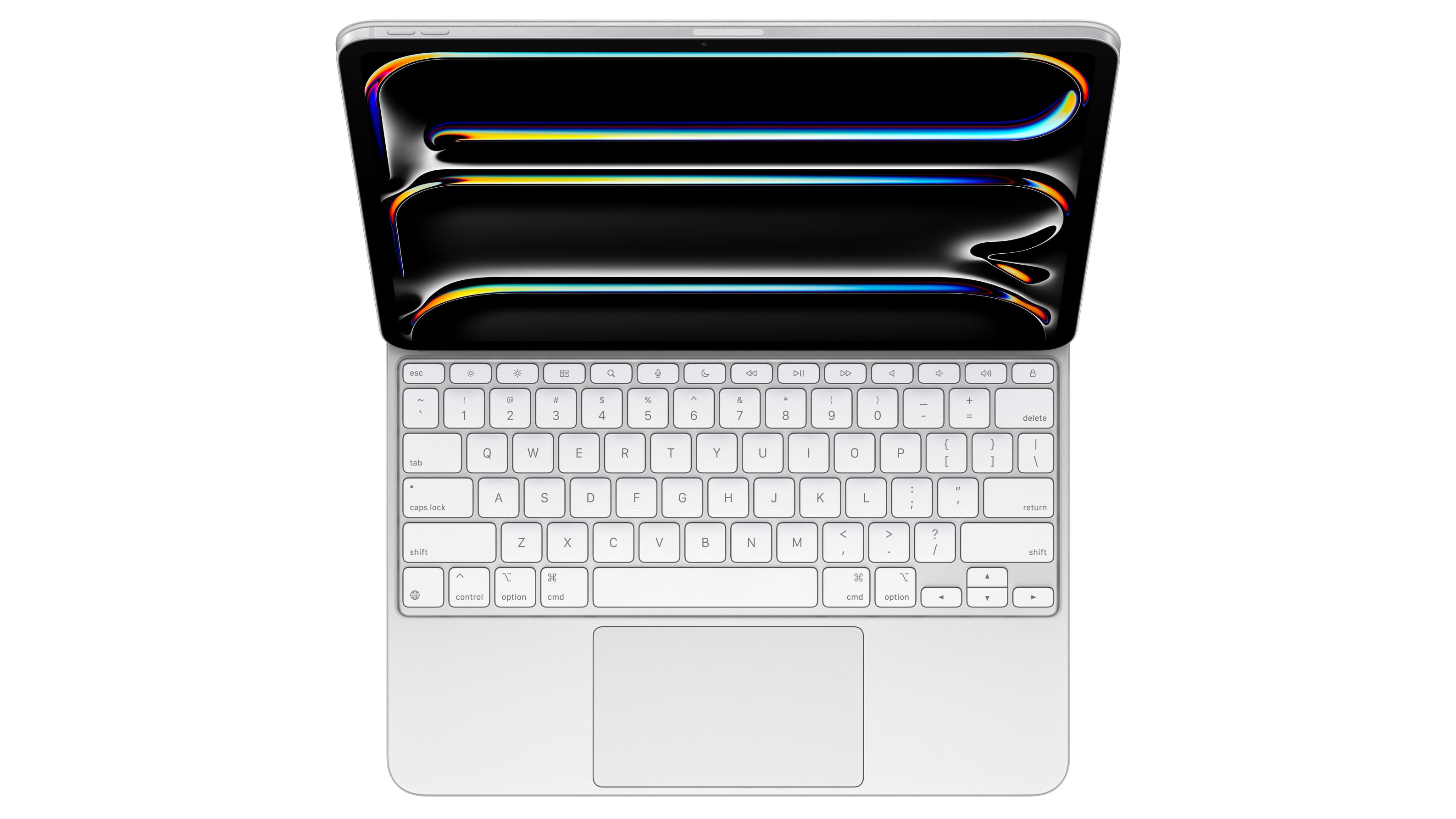
Apple's new Magic Keyboard accessory for the latest iPad Pro models is "thinner and lighter" than the model it replaces, according to the company.
Apple typically does not provide weight specifications for iPad accessories, but some early reviewers have effectively confirmed Apple's claims with their own figures for the 13-inch version of the Magic Keyboard.
Six Colors' Jason Snell weighed the 13-inch Magic Keyboard at 667 grams, while Brian Tong put the accessory at 662 grams and The Verge recorded 658 grams on its scales.
710 grams.
much lighter than the previous generation 12.9-inch iPad Pro, which weighed 682 grams.
MacBook Air.
MacRumors forum member who received theirs early. In comparison, previous model weighs 601 grams.
Tag: Magic Keyboard
This article, "13-Inch iPad Pro Magic Keyboard ~50 Grams Lighter Than Older Model" first appeared on MacRumors.com
Discuss this article in our forums
https://www.macrumors.com/2024/05/14/ipad-pro-magic-keyboard-accessory-weight/
Next-Generation iPad Air With M3 Chip Already Rumored

Apple's next iPad Air will use an M3 processor, according to details posted on X earlier today by a private account with a proven track record of sharing accurate information about Apple's plans.
Apple just last week announced its latest iPad Air models powered by the company's M2 chip. The two new 11-inch and 13-inch models replaced the previous M1-powered 10.9-inch iPad Air, which was released in 2022. Apple also just announced new M4 iPad Pro models that were until recently expected to feature the M3 chip.
10.8-inch OLED iPad Air, and that the tablet could come out between 2026 and 2028.
M1, according to Apple. Compared to iPad Air with A14 Bionic, it provides 3x faster performance. Like the previous model, the iPad Air starts at $599, while the 13-inch device starts at $799, and both sizes are available from Wednesday, May 15.
Related Roundup: iPad Air
Tag: M3
Buyer's Guide: iPad Air (Buy Now)
Related Forum: iPad
This article, "Next-Generation iPad Air With M3 Chip Already Rumored" first appeared on MacRumors.com
Discuss this article in our forums
https://www.macrumors.com/2024/05/14/next-gen-ipad-air-with-m3-chip-rumored/
iPad Pro: How Apple Intends to Avoid Another 'Bendgate' Controversy
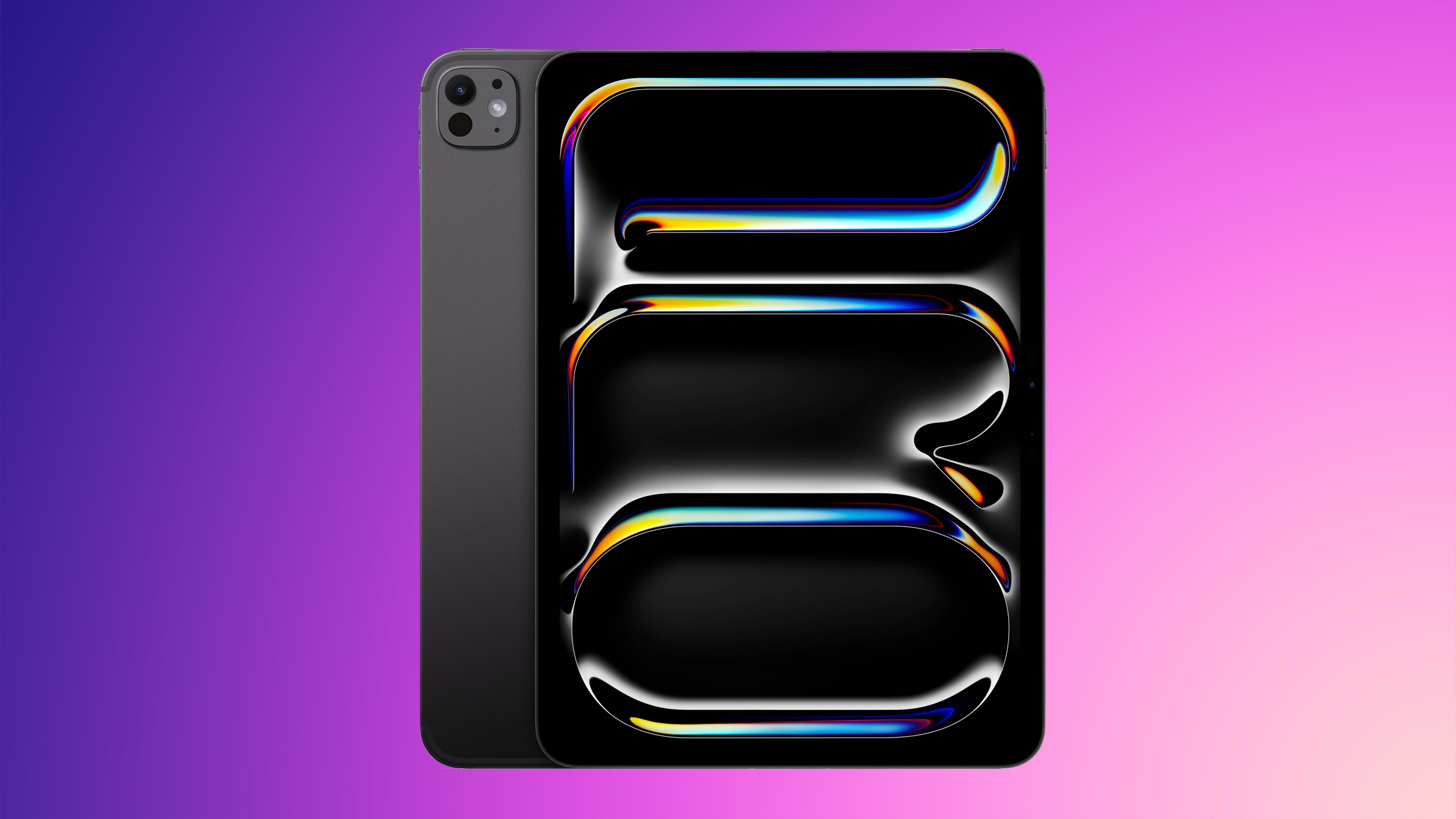
Apple's latest iPad Pro is the thinnest device the company has ever made... but does it bend? That's likely to be the question on the mind of anyone who remembers the last iPad Pro "bendgate" controversy.
In 2018, Apple responded to durability concerns shared by new iPad Pro owners by admitting to shipping its then-new models with a "very slight bend in the aluminum chassis," which it blamed on a "side effect of the manufacturing process."
Despite videos indicating that the 2018 iPad Pro models bent more easily than other models, Apple said the bend did not worsen over time or negatively affect the iPad's performance, and that concerns over the device's durability were unfounded.
Nevertheless, some iPad owners were understandably upset to find defects in devices that cost hundreds of dollars. Apple naturally wants to avoid a similar scenario with its latest 2024 models.
interview with Arun Maini, Apple's senior VP of hardware engineering John Ternus reveals that Apple has added a new protective "cowling" over the main logic board. This metal cover not only helps with heat dissipation, but also "effectively creates a central rib that runs through the whole thing and tremendously improves the stiffness of the products," according to Ternus.
No doubt the new iPad Pro models will be subjected to exaggerated pressure tests by some YouTubers, and we are bound to see more than a few bent out of shape in the process. Whether Apple's strengthend iPad Pro chassis will be enough to withstand the pressures of real-world everyday use over time is altogether another matter.
early reviews are anything to go by, a handful of outlets have noted that the devices do feel particularly durable despite their impressive thinness. Do you have lingering doubts? Let us know in the comments. Pricing on the M4 iPad Pro begins at $999, and it can be purchased from Apple's website.
Related Roundup: iPad Pro
Tag: Bendgate
Buyer's Guide: iPad Pro (Buy Now)
This article, "iPad Pro: How Apple Intends to Avoid Another 'Bendgate' Controversy" first appeared on MacRumors.com
Discuss this article in our forums
https://www.macrumors.com/2024/05/14/ipad-pro-structural-design-avoid-bendgate/
New iPad Air and iPad Pro Feature Battery Health Menu Including Cycle Count and 80% Charging Limit Option
Apple's latest iPad Air and iPad Pro models feature a new Battery Health menu in the Settings app that is not available on older iPads, and which includes options that were once limited to iPhone 15 models.
As confirmed by iCulture, visiting Settings ➝ Battery on the new iPads shows a new Battery Health menu that lists Battery Health (with a readout such as "Normal"), Maximum Capacity, Cycle Count, and a 80% Limit charging optimization option. Users can also see details about when the battery was produced and when it was first used.
referenced the Battery Health menu, and it was indeed suggested that it may be limited to Apple's new iPads. Notably, the Cycle Count readout and the option to more strictly prevent charging beyond 80% were up until now exclusive features of the iPhone 15 series, and cannot be found on older iPhones either.
Image credit: iCulture
The 80% Limit is separate from the Optimized Battery Charging feature on earlier iPhones, which intelligently delays charging past 80% until a more appropriate time by learning the device's daily charging routine. When the 80% hard limit is enabled, the iPad will never charge beyond that percentage, except on rare occasions to "maintain accurate battery state-of-charge estimates." Apple says reducing the time that a battery is fully charged can reduce the wear on the battery and improve its lifespan.
Related Roundups: iPad Air , iPad Pro
Buyer's Guide: iPad Air (Buy Now), iPad Pro (Buy Now)
Related Forum: iPad
This article, "New iPad Air and iPad Pro Feature Battery Health Menu Including Cycle Count and 80% Charging Limit Option" first appeared on MacRumors.com
Discuss this article in our forums
https://www.macrumors.com/2024/05/14/2024-ipad-air-pro-battery-cycle-count/
iOS 17.5 Features: What's New in iOS 17.5
Apple recently released iOS 17.5, the newest version of iOS. It brings some major changes to the iPhone if you're in the European Union, and some smaller updates if you're not.
Subscribe to the MacRumors YouTube channel for more videos.
In this article, we've rounded up everything new in iOS 17.5.
App Downloads From Websites (EU Only)
iOS 17.5 brings support for web-based app distribution in the European Union, letting developers offer their apps for download directly on their websites. iPhone users can download iOS apps from supported websites without using the App Store.
the iOS 17.4 changes that added alternative app marketplaces, this functionality is limited to the iPhone and can only be used in the EU. Developers need to be a member of the Apple Developer Program for two continuous years or more and must have more than one million first installs on iOS in the prior year to offer an app for download.
iPad later this year.
Apple News+
Apple News+ now has an offline mode that provides access to the Today feed and the News+ tab even without a cellular or Wi-Fi connection.
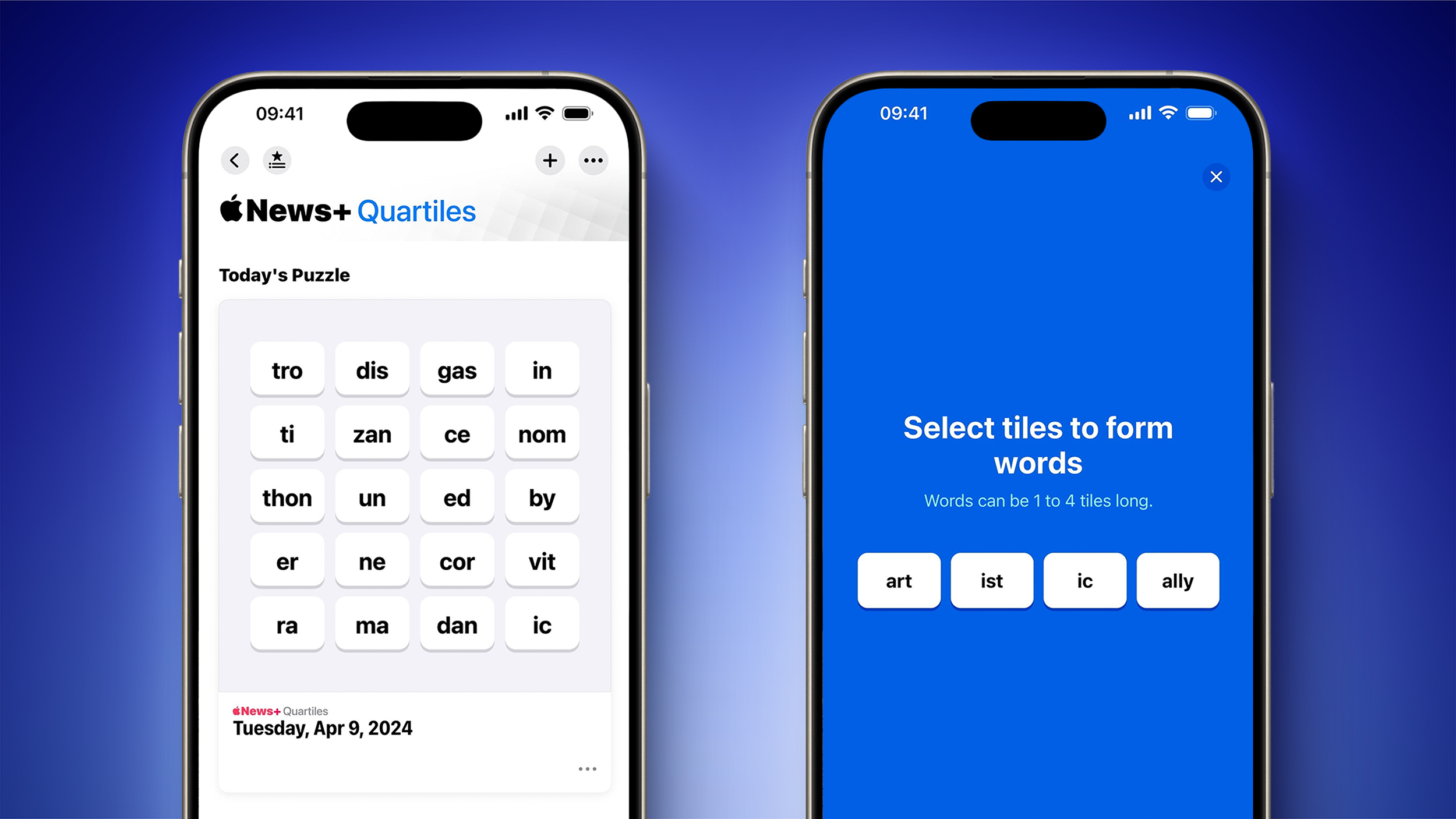
daily word game called Quartiles. The game requires players to combine tiles to form words and earn points. Quartiles is limited to customers who have a paid Apple News+ subscription.
The scoreboard feature for Apple News+ Puzzles includes new player data for Crossword, Mini Crossword, and Quartiles. Players can see their stats and streaks over time, similar to how The New York Times gaming app works.
Third-Party Item Tracker Alerts
iOS 17.5 adds support for third-party item trackers, a feature that Apple has been working on since last year.
Apple and Google developed a cross-platform solution for unwanted tracking alerts, and iOS 17.5 will let iPhone users know when a third-party tracker is nearby. "You can disable this item and stop it from sharing its location with the owner. To do this, follow the instructions provided on a website by the manufacturer of this item," reads code in the update.
Apple's release notes say that Cross-Platform Tracking Detection has been designed to provide notifications to users if a compatible Bluetooth tracker they do not own is moving with them, regardless of what operating system the device is paired with.
Android-based Find My Device network in April, timed with the initial rollout of Cross-Platform Tracking Detection.
Repair State
iOS 17.5 includes a repair state option that lets an iPhone be sent in for service without deactivating Find My and Activation Lock.
A new "Remove This Device" option is available in Find My, and using it with an iPhone puts the device into a repair state mode. Sending a device for repair has historically required turning off Find My, which is a way for Apple to ensure that the person requesting a repair owns the iPhone.
The repair state option leaves Find My turned on, and the iPhone continues to be trackable with the Find My app while it is being repaired. An iPhone put into a repair state lists that it is "Ready for Repair" in the Find My device section, and the iPhone remains functional while in the repair state.
Podcast Widget
The Podcasts widget that can be added to the Home Screen or the Lock screen now features a background that changes depending on the art of the podcast that's being played.
Mobile Device Management
MDM solutions are able to enforce a beta version during automated device enrollment. Automated device enrollment is designed to simplify initial device setup.
Code Changes
There were some code changes that we found in the iOS 17.5 beta that reference an iPad battery health feature that could possibly be available on the latest iPads. Battery health is not listed as an iPadOS 17.5 feature, so it is not clear if it is a feature that is available or something coming at a later date.
An iPad Battery Health menu would likely show maximum remaining capacity and charge cycle count, similar to the Battery Health menu on iPhone.
FaceTime calls, possibly for blocking spam, but it also has not been implemented.
More on iOS 17
A full rundown on all of the features that are available in iOS 17 can be found in our iOS 17 roundup.
Related Roundups: iOS 17, iPadOS 17
Related Forums: iOS 17, iPadOS 17
This article, "iOS 17.5 Features: What's New in iOS 17.5" first appeared on MacRumors.com
Discuss this article in our forums
Setapp's EU Alternative iPhone App Marketplace Launching on May 14
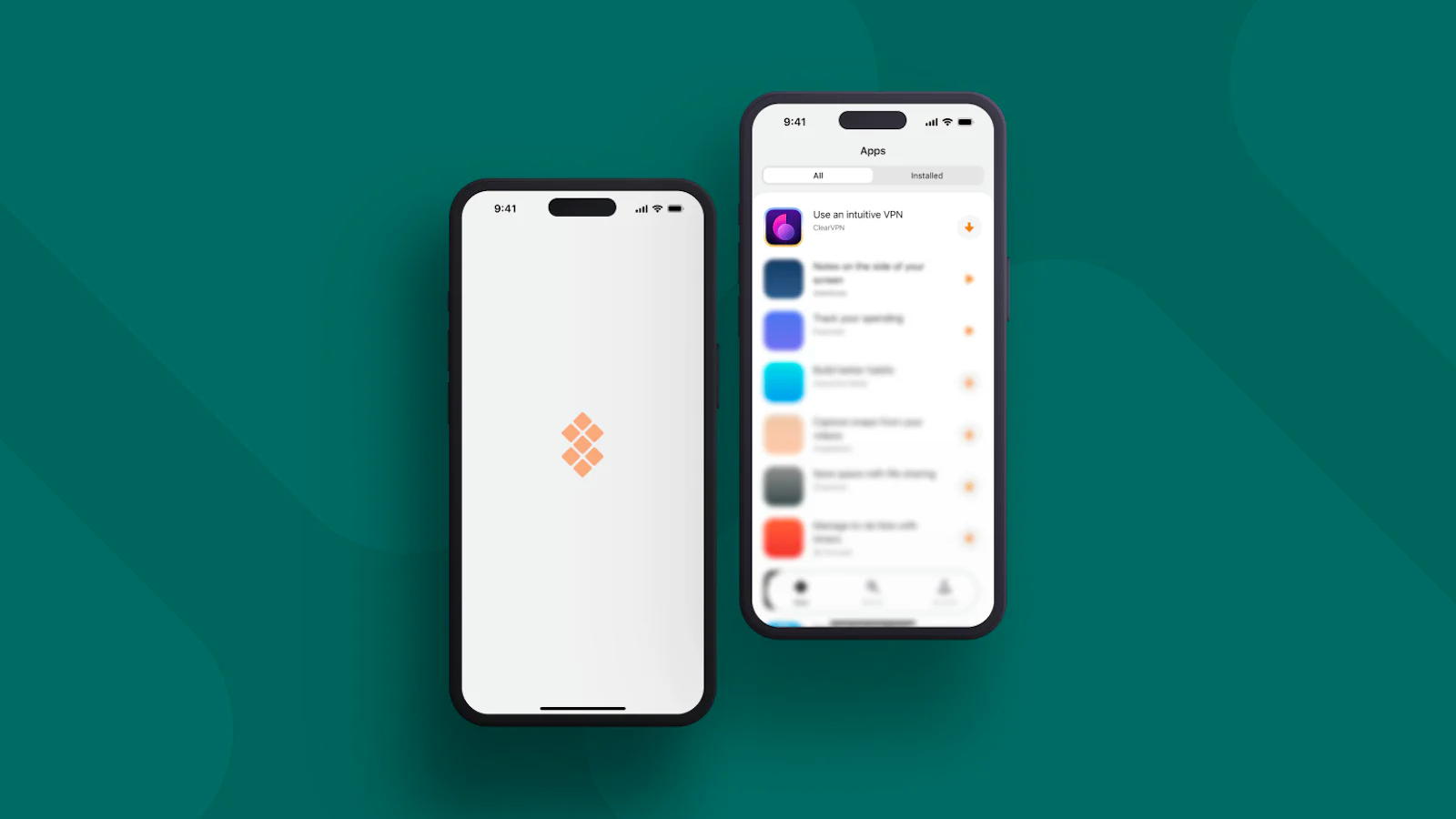
MacPaw today said that its Setapp alternative app marketplace for the iPhone will be launching on Tuesday, May 14 in the European Union.
A Setapp marketplace has been in the works since February, which is when Apple first announced the alternative app downloading options that would be coming in iOS 17.4.
For those unfamiliar with Setapp, it is a subscription-based service that lets users access dozens of apps for $9.99 per month. Popular apps like Ulysses, iStat Menus, Spark, Unite, Yoink, and more are available through the current subscription service.
According to MacPaw, Setapp will provide a "carefully selected assortment of apps" across categories like productivity, design, lifestyle, utility, and more.
App Store. Setapp will give developers a trusted alternative to App Store distribution with none of the standard fees, though it is worth noting that all apps that exceed 1 million first installs per year must pay the 0.50 euro Core Technology Fee to Apple.
Tag: Setapp
This article, "Setapp's EU Alternative iPhone App Marketplace Launching on May 14" first appeared on MacRumors.com
Discuss this article in our forums
https://www.macrumors.com/2024/05/13/setapp-iphone-marketplace-may-14/