
macOS Sequoia Includes Wallpaper With Classic Mac Graphics

macOS Sequoia has a fun new Macintosh dynamic wallpaper and screensaver combination that highlights classic Mac icons. Basic Apple Guy shared some high resolution screenshots of the new wallpaper, which can be used on other Apple devices.
On device, the Macintosh wallpaper animates and shifts through different retro graphics, with color options that include Spectrum, Accent, Blue, Red, Purple, Yellow, Dark Gray, Gray, Green, Orange, and Random.
Macintosh isn't the only new macOS Sequoia wallpaper, with Apple also adding "Helios," which is featured in macOS Sequoia marketing materials and Apple images. Helios animates with a gradient design.
Related Roundup: macOS Sequoia
Related Forum: macOS Sequoia
This article, "macOS Sequoia Includes Wallpaper With Classic Mac Graphics" first appeared on MacRumors.com
Discuss this article in our forums
https://www.macrumors.com/2024/06/11/macos-sequoia-wallpaper/
Here Are the Suggestions You'll See for Generating AI Images in iOS 18

iOS 18, iPadOS 18, and macOS Sequoia will all have built-in "Apple Intelligence," and one of the new AI features includes an Image Playground. With Image Playground, you can generate an image from a prompt, similar to what you can do with OpenAI's ChatGPT. While you can come up with anything, Apple will provide a selection of suggested concepts in categories like themes, costumes, and places.
Apple Intelligence isn't out yet, but iOS 18 does provide some insight into the concepts that Apple will suggest to users, as MacRumors contributor Steve Moser discovered. Apple's suggestions will be personalized, so if you're chatting with friends about going on a hike, you might see it pop up options like mountains and hiker. Note that this list is not exhaustive because it is missing some examples that are in Apple's marketing materials, but these are the options in the beta right now. Apple will also likely add new suggestions on an ongoing basis.
Nature and Environments
Mountains
Desert
Forest
Garden
Prairie
Rainforest
Waterfall
Volcano
Space
Starry Night
Seasons
Autumn
Spring
Summer
Winter
Costumes and Characters
Alien
Artist
Astronaut
Chef
Farmer
Hiker
Healthcare Worker
Mechanic
Pilot
Rancher
Racecar Driver
Robot
Royalty
Scientist
Superhero
Vampire
Themes
Adventure
Birthday
Graduation
Halloween
Masquerade
Party
Disco
Fantasy
Fireworks
Love
Places
Art Studio
City
Couch
Library
Lighthouse
Museum
Stadium
Stage
Items and Accessories
Baseball Cap
Beanie
Beret
Bike Helmet
Book
Bowtie
Crown
Flower Crown
Guitar
Hard Hat
Magic Wand
Microphone
Party Hat
Rubber duck
Scarf
Sunglasses
Surfboard
Sweatband
Top Hat
Beverages and Foods
Champagne Glass
Coffee
Tea
iPhone can take a photo of a contact that's on your device and use it to generate a fun cartoon-like image that you can share with them.
Apple adds a style to each image, and there's no option to generate something that looks real. There are three styles to choose from, including Animation, Illustration, and Sketch. Image generation is done on-device, so there's no limit on experimentation.
In the Notes app, Image Playground has a neat added feature that allows it to take a quick sketch you've made and turn it in to something more detailed, plus it can add images based on the context provided in your notes.
iPhone 15 Pro with A17 Pro chip, or an iPad or Mac with an M1 or better chip. Apple plans to start testing Artificial Intelligence in the iOS 18, iPadOS 18, and macOS Sequoia betas this summer.
Related Roundups: iOS 18, macOS Sequoia
Related Forums: iOS 18, iPadOS 18, macOS Sequoia
This article, "Here Are the Suggestions You'll See for Generating AI Images in iOS 18" first appeared on MacRumors.com
Discuss this article in our forums
https://www.macrumors.com/2024/06/11/apple-image-playground-suggestions/
Blackmagic Design Unveils Spatial Video Camera for Shooting Apple Vision Pro Content
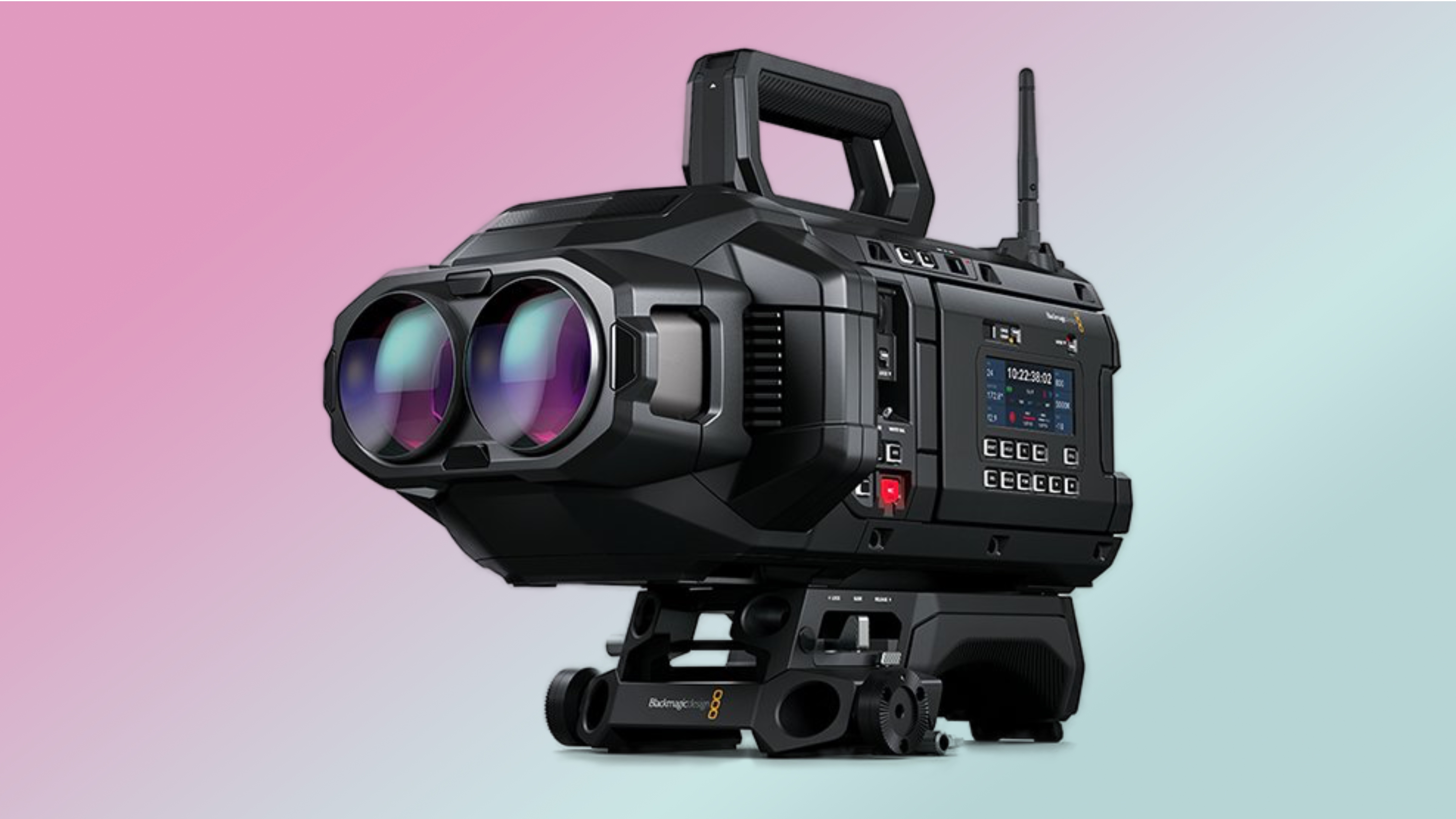
Blackmagic Design has announced the Blackmagic URSA Cine Immersive camera designed for shooting spatial video content for Apple's Vision Pro headset.
The URSA Cine Immersive camera features a custom stereoscopic 3D lens system with dual 8K sensors, capable of capturing a 180-degree field of view with spatial audio support. It is designed to capture content with a resolution of 8,160 x 7,200 per eye and offers 16 stops of dynamic range to ensure detail and color accuracy in every frame, with the ability to shoot stereoscopic 3D immersive cinema content at 90 frames per second.
The URSA Cine Immersive is constructed with a magnesium alloy chassis and a carbon fiber polycarbonate composite skin. It includes dual 5-inch HDR touchscreens and an external color status LCD screen. Connectivity options are extensive, including 12G-SDI out, 10G Ethernet, USB-C, and XLR audio ports, along with an 8-pin Lemo connector for power.
Introducing Blackmagic URSA Cine Immersive! New camera in development, designed to capture content for Apple Vision Pro with 8160 x 7200 resolution per eye, 16 stops of dynamic range for 90fps stereoscopic 3D immersive cinema content and more! Available later in 2024. Learn more! pic.twitter.com/5pbSDnJYuI
— Blackmagic Design (@Blackmagic_News) June 10, 2024
An 8TB Blackmagic Media Module comes built-in, which can store around two hours of 8K stereoscopic video recorded in Blackmagic RAW. The camera also supports Cloud Store, allowing for fast media upload and synchronization via the 10G Ethernet connection.
Apple Vision Pro headset.
Related Roundup: Apple Vision Pro
Tag: Blackmagic
Buyer's Guide: Vision Pro (Buy Now)
Related Forum: Apple Vision Pro
This article, "Blackmagic Design Unveils Spatial Video Camera for Shooting Apple Vision Pro Content" first appeared on MacRumors.com
Discuss this article in our forums
https://www.macrumors.com/2024/06/11/blackmagic-design-unveils-spatial-video-camera/
iOS 18 Notes App Supports Colors for Highlighting Typed Text
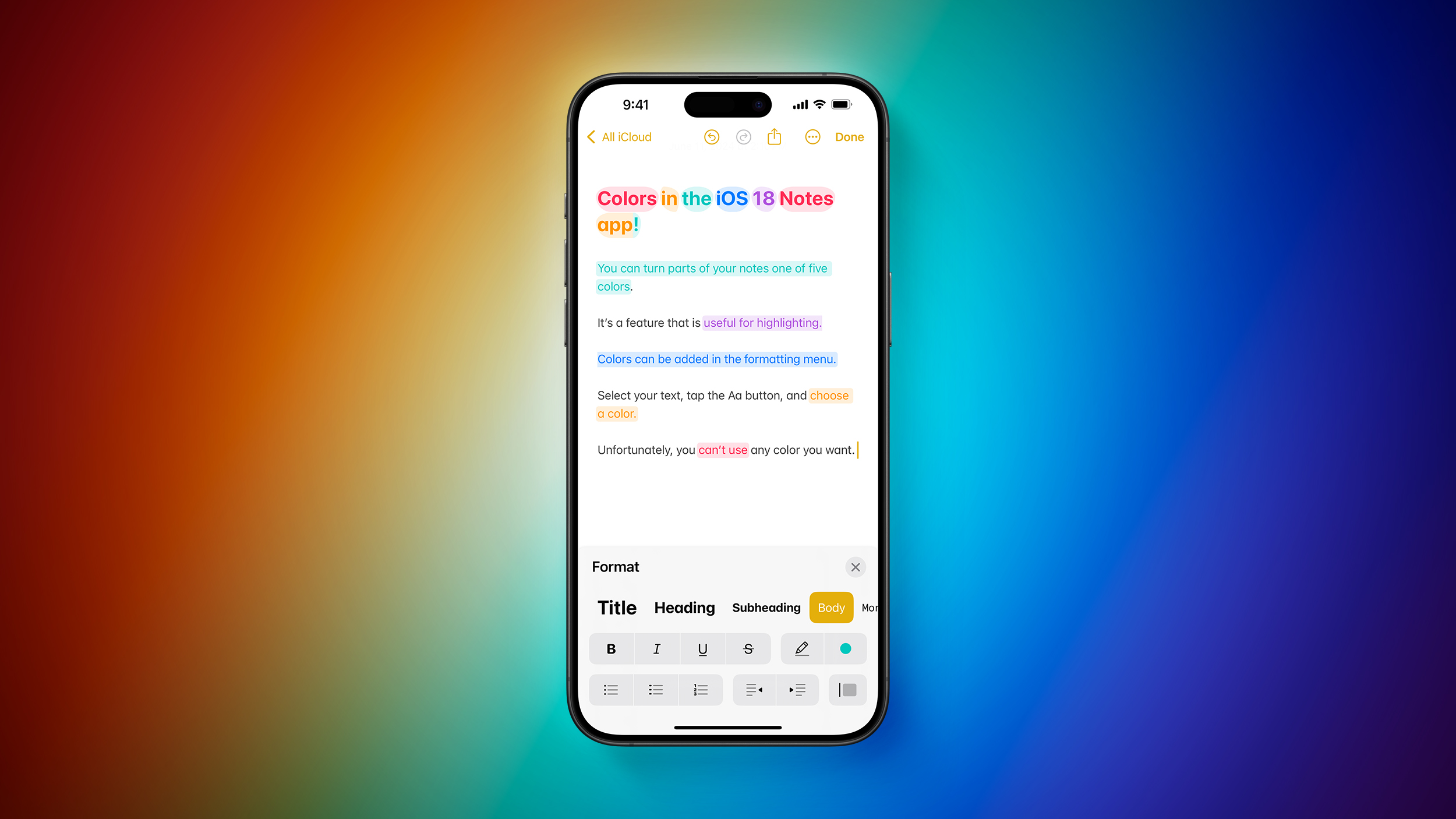
The Notes app in iOS 18 and iPadOS 18 supports colors for typed text for the first time, providing an option to add new hues to text.
Apple offers five colors, including purple, pink, orange, mint, and blue, and there is no option for custom colors. Colors can be added to text through the formatting interface that can be accessed by tapping on the Aa button, with the shade applied to any text that is selected. Both the text and the background turn the selected color when the feature is used.
The five color options are useful for highlighting select words and passages in text. Multiple colors can be used in the same sentence, but it is worth noting that there does not seem to be an option for colored text without the shaded background, or black text with a colored background.
iPad has supported multiple color options, but Apple has not made that a feature for typed text prior to now.
Other features in the iOS 18 Notes app include live audio transcription and summarization, collapsible section headers, and the option to have Notes solve typed math problems (or written on the iPad).
Related Roundup: iOS 18
Related Forums: iOS 18, iPadOS 18
This article, "iOS 18 Notes App Supports Colors for Highlighting Typed Text" first appeared on MacRumors.com
Discuss this article in our forums
https://www.macrumors.com/2024/06/11/ios-18-notes-app-colors/
Apple Music Features Improved Spotify-Like Queue System on iOS 18
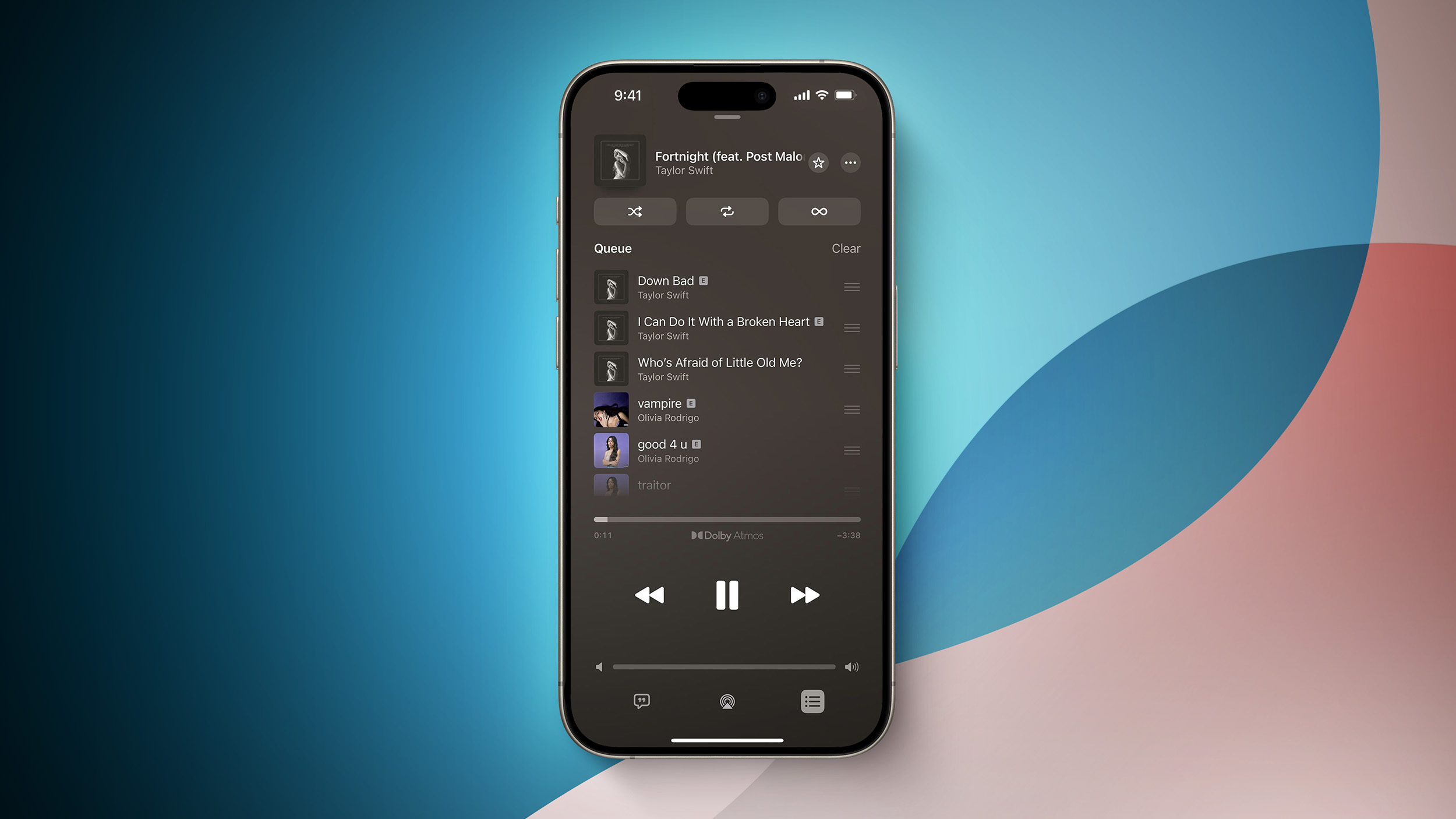
Apple has revamped the song queuing system in the Music app on iOS 18, and early reaction to the changes has been overwhelmingly positive.
Notable changes include a new "Add Songs to Queue" button at the bottom of the queue, an option to clear the entire queue all at once, and the ability to change the currently playing song without having the queue disappear. In addition, the former "Play Last" menu option has been replaced with "Add to Queue." While listening to a playlist, it is now possible to add a song to the queue for immediate playback after the current song, whereas the song would previously get added to the end of the playlist.
These changes bring the Apple Music's queuing system on iPhone more in line with Spotify, and the Android version of the Apple Music app. It also brings Apple Music's queuing system more in line with how it worked back on iOS 9.
Related Roundup: iOS 18
Tag: Apple Music
Related Forums: iOS 18, iPadOS 18
This article, "Apple Music Features Improved Spotify-Like Queue System on iOS 18" first appeared on MacRumors.com
Discuss this article in our forums
https://www.macrumors.com/2024/06/11/apple-music-new-queue-system-ios-18/
iOS 18 Adds Pop-Out Bezel Animation When Pressing iPhone Buttons
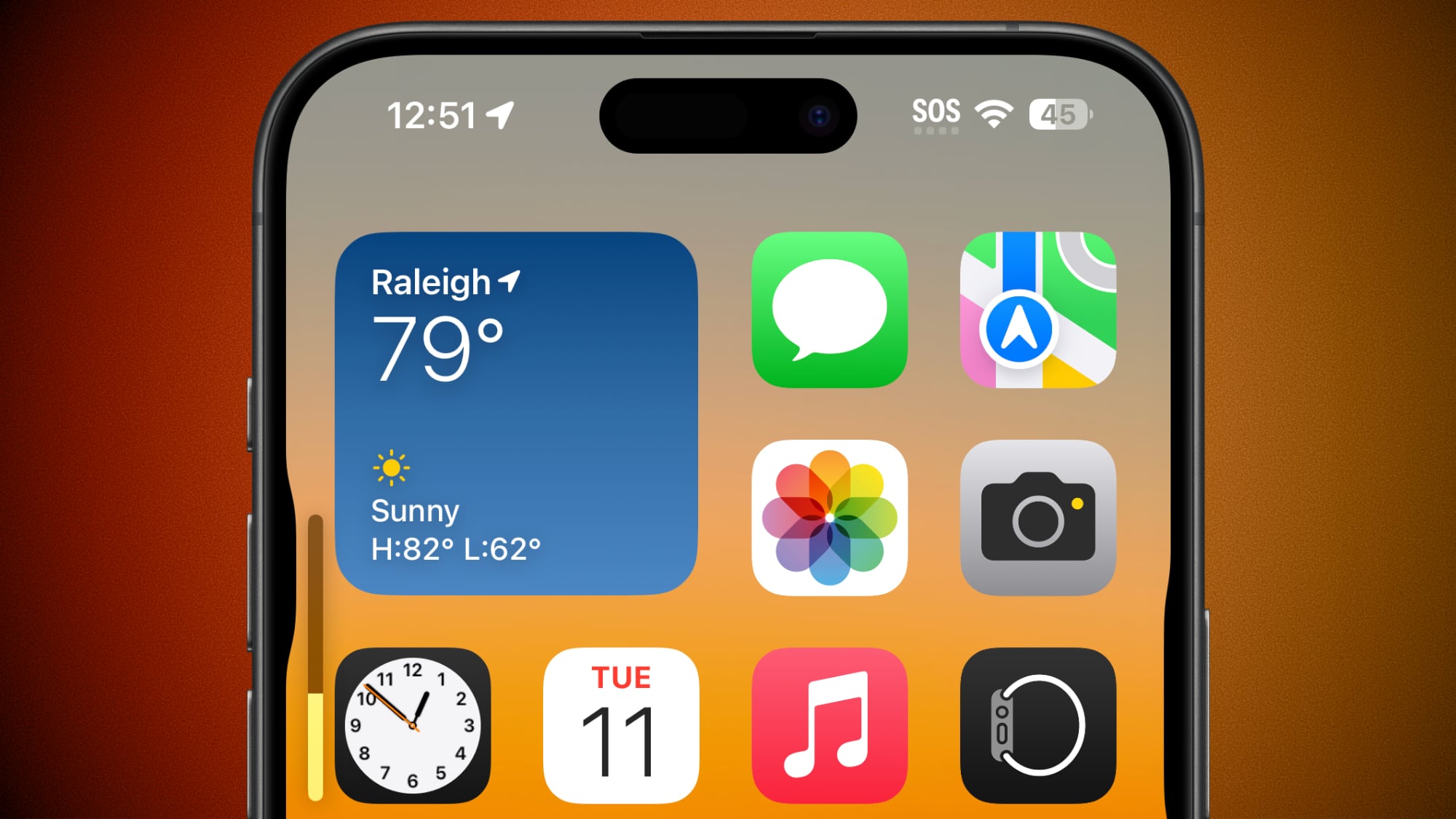
iOS 18 includes a small but interesting change for the buttons on the iPhone, adding more of a visual element when changing volume, activating the Action button, or locking the screen. When you press an iPhone button in iOS 18, the display bezel bulges outward slightly.
This feature is available for the volume buttons, Action button and the power button, and it will also likely be used for the Capture button that's rumored for the iPhone 16 models. With the iPhone 16, Apple is adding a dedicated button to make it easier to film and take photos in landscape orientation.
The button will be on the bottom right side of the iPhone, a good distance below the power button. Rumors suggest that the Capture button could be capacitive and flush with the side of the iPhone 16, so having the display pop out a bit when it's used would provide a useful visual indicator.
View this post on Instagram
A post shared by MacRumors (@macrumors)
This small feature can be seen on iPhones running iOS 18, but Apple did not include it on the iPad. As of right now, iOS 18 is available for registered developers, but Apple plans to release a public beta in July.
Related Roundup: iOS 18
Related Forums: iOS 18, iPadOS 18
This article, "iOS 18 Adds Pop-Out Bezel Animation When Pressing iPhone Buttons" first appeared on MacRumors.com
Discuss this article in our forums
https://www.macrumors.com/2024/06/11/ios-18-pop-out-button-animation/
'Apple ID' Renamed to 'Apple Account' Across iOS 18 and Other Updates
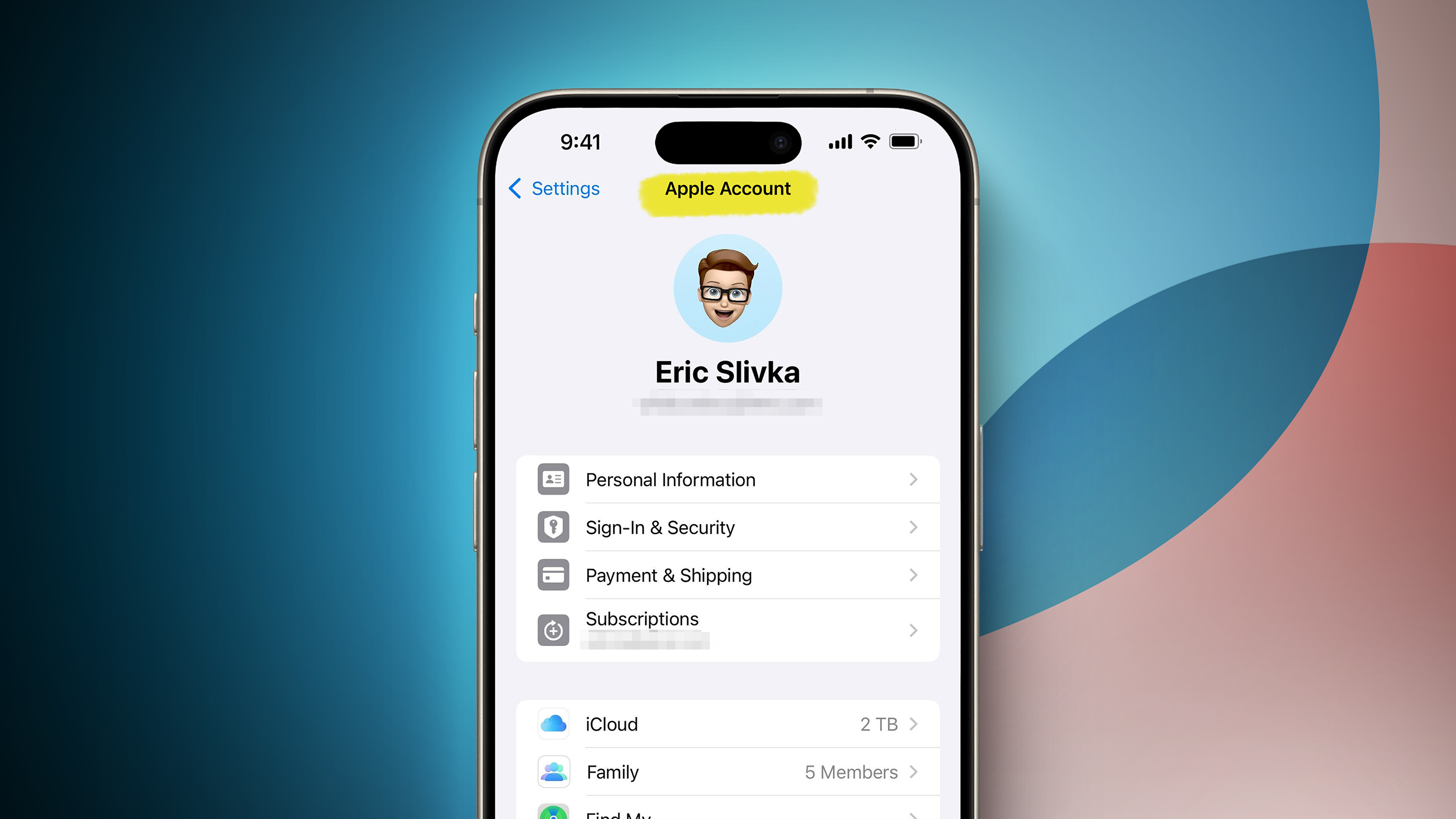
Earlier this year, we reported that "Apple ID" would be renamed to "Apple Account," and this change has now been officially announced.
Apple confirmed the change in a press release today, with "Apple Account" branding now used across iOS 18, iPadOS 18, macOS Sequoia, and watchOS 11:
With the releases of iOS 18, iPadOS 18, macOS Sequoia, and watchOS 11, Apple ID is renamed to Apple Account for a consistent sign-in experience across Apple services and devices, and relies on a user's existing credentials.
There are still some places where Apple ID branding remains for now, such as the Apple ID sign-in page on the web. The transition to "Apple Account" will likely be completed by time iOS 18 and the other software updates are publicly released later this year.
Related Roundup: iOS 18
Tags: Apple ID, Apple Account
Related Forums: iOS 18, iPadOS 18
This article, "'Apple ID' Renamed to 'Apple Account' Across iOS 18 and Other Updates" first appeared on MacRumors.com
Discuss this article in our forums
https://www.macrumors.com/2024/06/11/apple-id-renamed-to-apple-account/
Apple's Stock Price Reaches All-Time High After WWDC Announcements
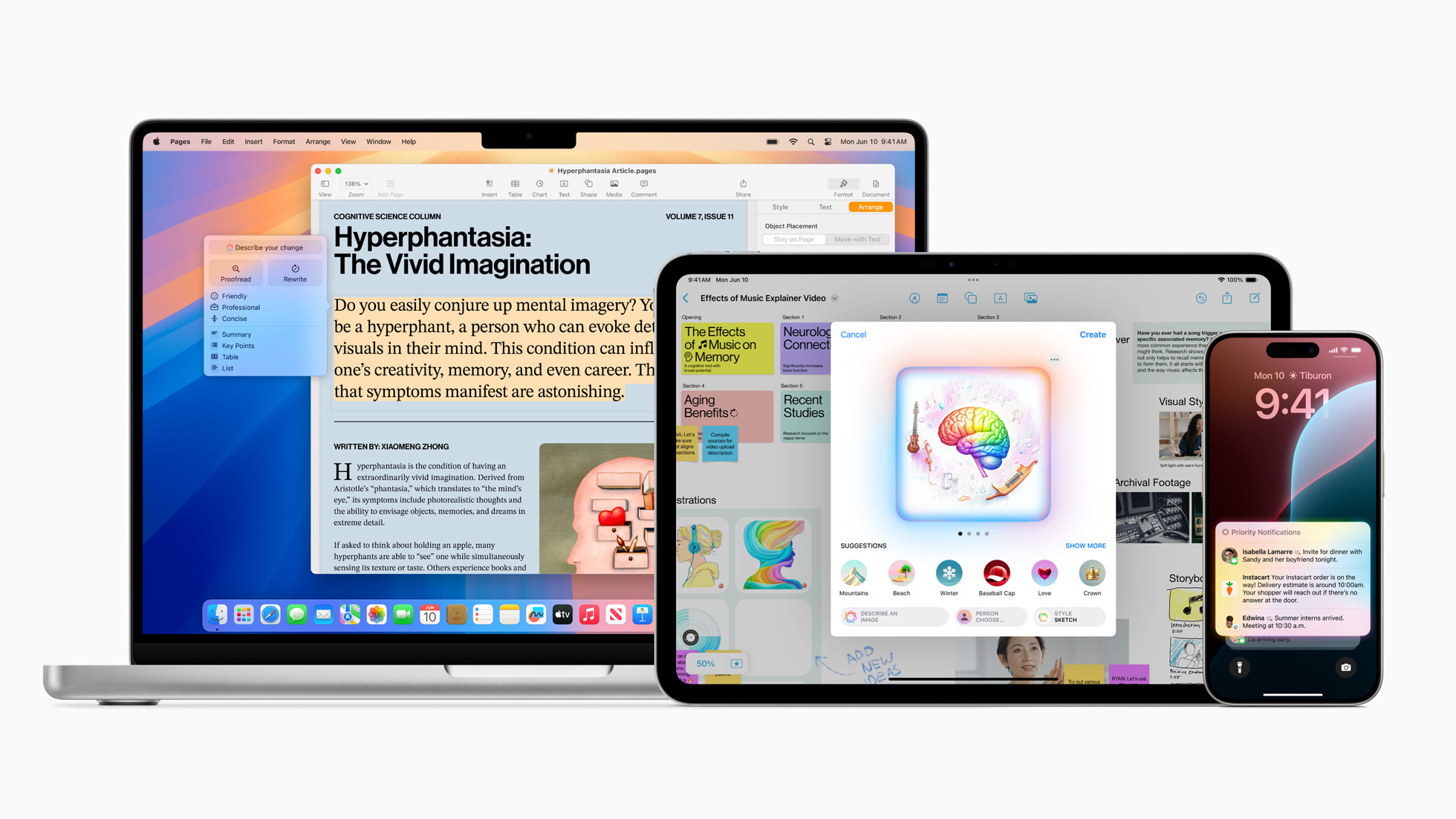
Apple's stock price has crossed the $200 mark and reached a new all-time high in intraday trading, one day after the company unveiled its Apple Intelligence suite of AI features coming with iOS 18, iPadOS 18, and macOS Sequoia.
Generative AI has been a hot topic ever since ChatGPT debuted in 2022, and investors had been waiting for Apple to unveil its own plans for the technology.
Nvidia briefly surpassed Apple to become the world's second most valuable company last week, amid strong demand for its AI server chips, but Apple has now regained second place with a $3.1 trillion market cap as of writing. Apple now trails only Microsoft, which has a nearly $3.2 trillion market cap as of writing.
available this summer. Even when the features launch to the public later this year, they will still have a beta label. Read our coverage of the Apple Intelligence announcement to learn more about the new capabilities.
Tag: AAPL
This article, "Apple's Stock Price Reaches All-Time High After WWDC Announcements" first appeared on MacRumors.com
Discuss this article in our forums
https://www.macrumors.com/2024/06/11/aapl-all-time-high-wwdc-2024/
Apple Reveals How Many iPhones Were Running iOS 17 Before WWDC
Apple has shared updated iOS 17 and iPadOS 17 adoption figures, revealing how many iPhones and iPads were running those software versions before WWDC.
These adoption numbers are based on iPhones and iPads that transacted on the App Store on June 9, the day before WWDC began, according to Apple.
The statistics are as follows:
77% of all iPhones were updated to iOS 17.
68% of all iPads were updated to iPadOS 17.
86% of all iPhones introduced in the last four years were updated to iOS 17.
77% of all iPads introduced in the last four years were updated to iPadOS 17.
first betas of iOS 18 and iPadOS 18 available to developers.
81% of all iPhones were updated to iOS 16 as of May 30 last year, so iOS 17 adoption peaking at 77% of all iPhones as of a later June 9 date this year means that iOS 17 adoption was not quite as high as iOS 16.
Related Roundups: iOS 17, iPadOS 17
Tag: iOS Adoption
Related Forums: iOS 17, iPadOS 17
This article, "Apple Reveals How Many iPhones Were Running iOS 17 Before WWDC" first appeared on MacRumors.com
Discuss this article in our forums
https://www.macrumors.com/2024/06/11/apple-shares-final-ios-17-adoption-stats/
Apple Reveals How Many iPhones Were Running iOS 17 Before WWDC
Apple has shared updated iOS 17 and iPadOS 17 adoption figures, revealing how many iPhones and iPads were running those software versions before WWDC.
These adoption numbers are based on iPhones and iPads that transacted on the App Store on June 9, the day before WWDC began, according to Apple.
The statistics are as follows:
77% of all iPhones were updated to iOS 17.
68% of all iPads were updated to iPadOS 17.
86% of all iPhones introduced in the last four years were updated to iOS 17.
77% of all iPads introduced in the last four years were updated to iPadOS 17.
first betas of iOS 18 and iPadOS 18 available to developers.
81% of all iPhones were updated to iOS 16 as of May 30 last year, so iOS 17 adoption peaking at 77% of all iPhones as of a later June 9 date this year means that iOS 17 adoption was not quite as high as iOS 16.
Related Roundups: iOS 17, iPadOS 17
Tag: iOS Adoption
Related Forums: iOS 17, iPadOS 17
This article, "Apple Reveals How Many iPhones Were Running iOS 17 Before WWDC" first appeared on MacRumors.com
Discuss this article in our forums
https://www.macrumors.com/2024/06/11/apple-shares-final-ios-17-adoption-stats/
iOS 18 Tidbits: Enhanced Flashlight Controls, Control Center Edit Mode, and More
With the first beta of iOS 18 now in the hands of developers, there are a handful of smaller changes and quality-of-life improvements being discovered in Apple's iPhone software that are worth highlighting.
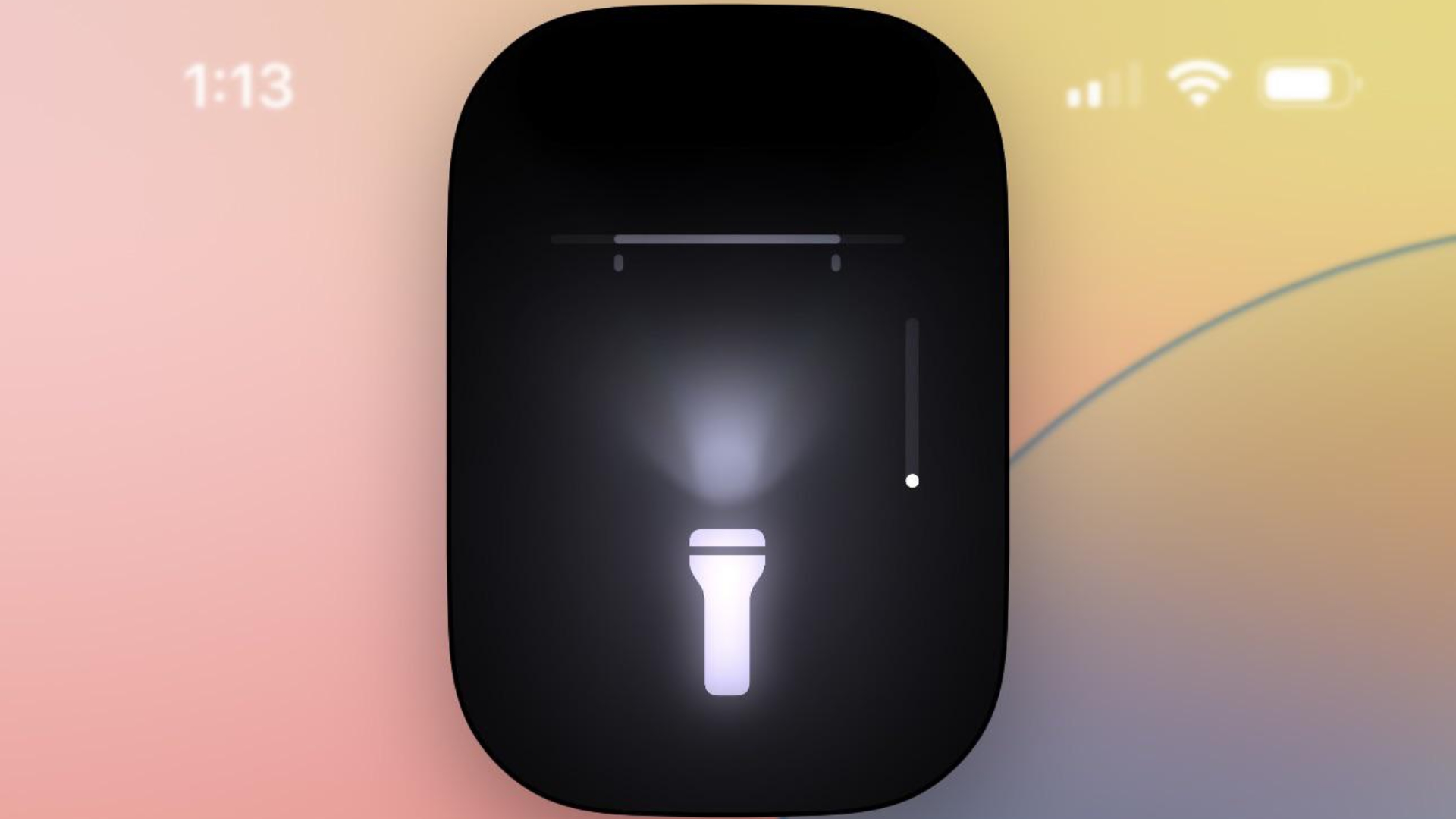
First up, Apple has improved the flashlight controls. In iOS 18, turning on the Flashlight via the Lock Screen or Control Center now brings up a small interface that lets you adjust the flood of light from the LED. In other words, you now have granular control over not only the intensity of light, but also the breadth of illumination.
new Passwords app, you can generate QR codes for saved Wi-Fi passwords, allowing them to be shared more easily with others.
In the Settings app, usually you scroll down to get to settings for individual apps installed on your iPhone. In the iOS 18 beta, Apple has moved settings for apps to a separate screen, so now you tap "Apps" at the bottom of the menu to access a separate searchable list.
In the redesigned Control Center, which now extends to multiple screens, tapping a new + icon in the top-left corner (or long-pressing on an empty area) reveals minus icons that let you remove individual buttons, similar to how you remove apps from the Home Screen, and there's a new Add a Control option at the bottom. There are also anchors that let you resize buttons or cards like the media player. So if you've always wanted to make the Shazam icon a 4x4 button, for example, now you can.
Apple in iOS 18 has also added a new Power button to the top-right corner of the Control Center, so you don't have to physically hold the Side button to bring up the "Slide to power off" screen.
In the Weather app, you can show forecasts for separate Home and Work locations. The new Home and Work labels can be toggled in Settings ➝ Apps ➝ Weather, under a new "Locations" section. Home and work locations can be updated by editing your Contacts card.
The first developer beta of iOS 18 is now available, with a public beta following in July. Apple will officially release the new iPhone operating system to the public in the fall.
Related Roundup: iOS 18
This article, "iOS 18 Tidbits: Enhanced Flashlight Controls, Control Center Edit Mode, and More" first appeared on MacRumors.com
Discuss this article in our forums
https://www.macrumors.com/2024/06/11/ios-18-flashlight-controls-center-edit/
iOS 18: Overhauled Calculator App Supports These 15 Conversions
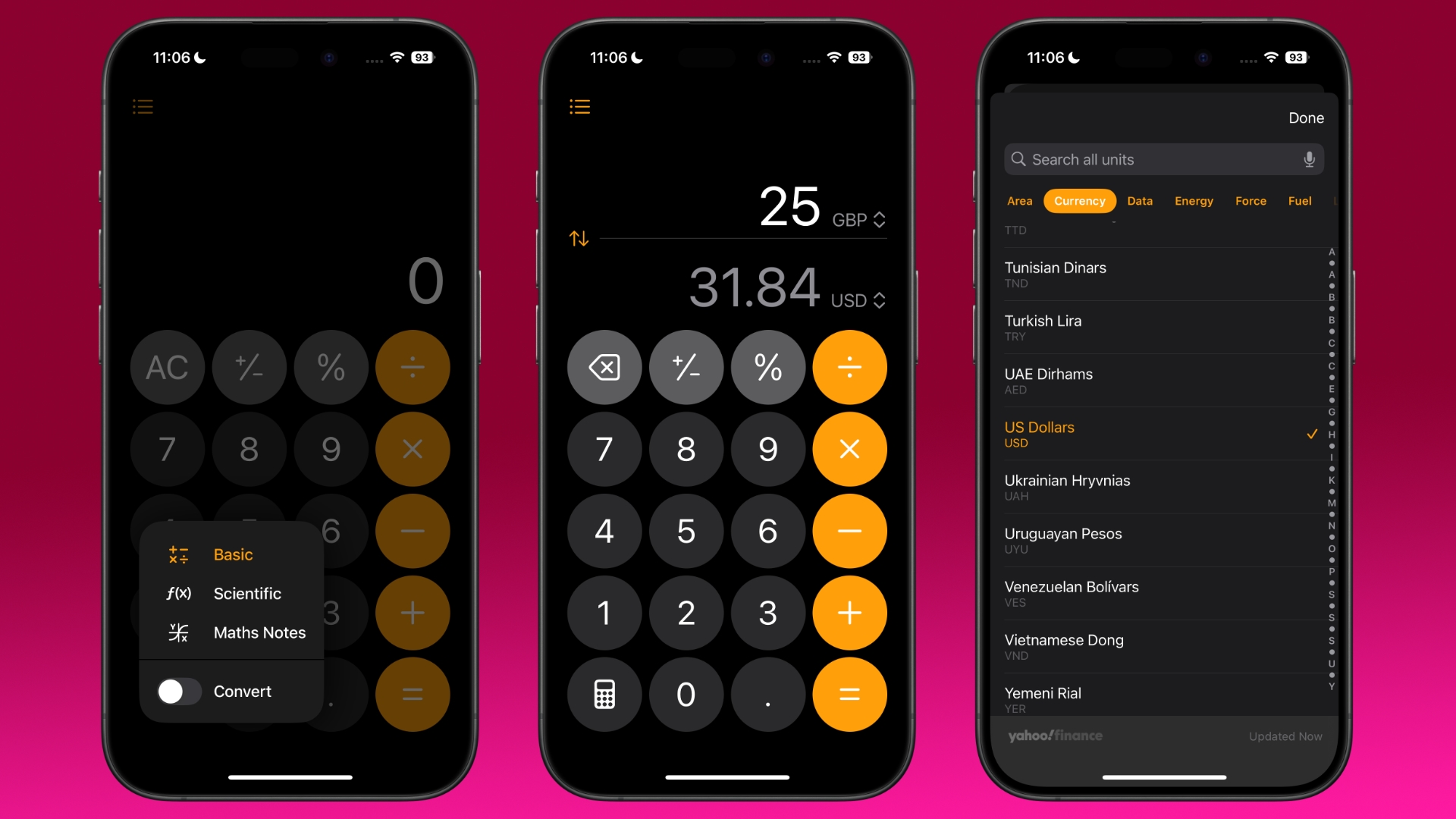
During its WWDC 2024 keynote on Monday, Apple introduced a new Calculator app for iPad that includes a new Math Notes feature, and there are similar changes to be found in the Calculator app in iOS 18.
The Calculator app on iPhone now has an additional button to switch between Basic, Scientific, and Math Notes in portrait or landscape view. Meanwhile, there's a useful new History feature that helps you keep track of previous calculations.
In addition, a new Convert option supports unit conversions for length, weight, currencies, and more. Here's the full conversions that are supported:
Angle
Area
Currency
Data
Energy
Force
Fuel
Length
Power
Pressure
Speed
Temperature
Time
Volume
Weight
In iPadOS 18, the new Calculator app lets users type or write out mathematical expressions with an Apple Pencil and see them solved in their own handwriting. These Math Notes are automatically accessible in the Notes app in a new Math Notes folder that can be accessed on both iPhone and iPad.
Related Roundup: iOS 18
This article, "iOS 18: Overhauled Calculator App Supports These 15 Conversions" first appeared on MacRumors.com
Discuss this article in our forums
https://www.macrumors.com/2024/06/11/ios-18-calculator-these-conversions/
Tap to Cash in iOS 18 Lets You Pay by Touching iPhones
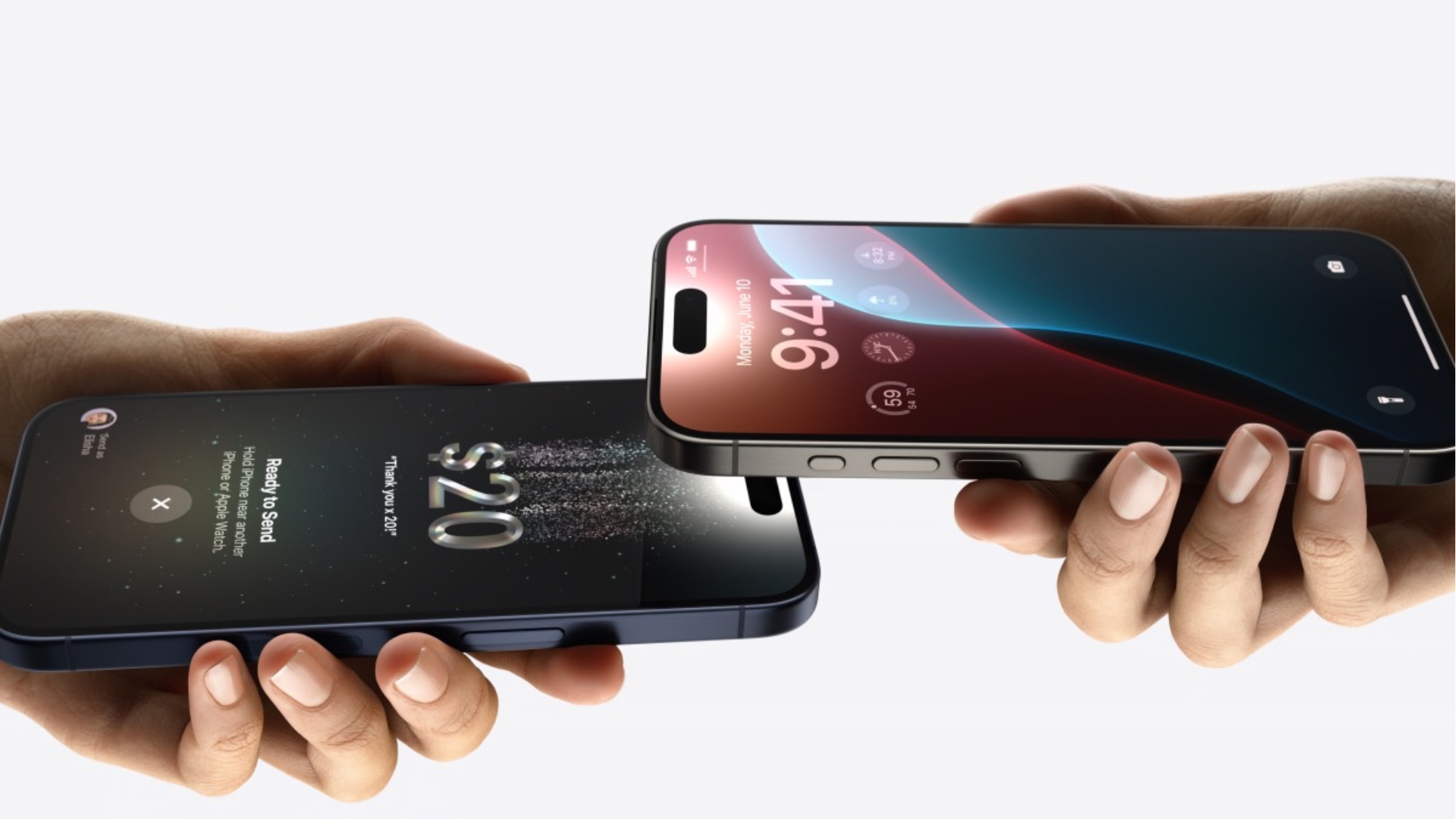
Among the slew of iOS 18 updates announced during Apple's WWDC 2024 keynote, the company revealed a new way of paying for things with Apple Cash, called Tap to Cash.
As the name suggests, Tap to Cash lets users pay for things simply by tapping two iPhones together. The feature is reminiscent of NameDrop, where users can exchange contacts by tapping their devices together.
Tap to Cash is an extension of Apple's Tap to Pay feature, and uses the same NFC functionality. Apple says that Tap to Cash allows users to transfer money without sharing any personal information, ensuring privacy is maintained.
iOS 18, including support for displaying information about rewards cards, such as points and redeemable gifts. Tickets for events will also gain better integration with the Wallet app, allowing users to see concert seat numbers, shortcuts for directions, and other information about events.
Related Roundups: Apple Pay, iOS 18
Tag: Tap to Cash
Related Forum: Apple Music, Apple Pay/Card, iCloud, Fitness+
This article, "Tap to Cash in iOS 18 Lets You Pay by Touching iPhones" first appeared on MacRumors.com
Discuss this article in our forums
https://www.macrumors.com/2024/06/11/tap-to-cash-ios-18-pay-touch-iphones/
iOS 18 Lets You Hide App Labels on Your iPhone Home Screen
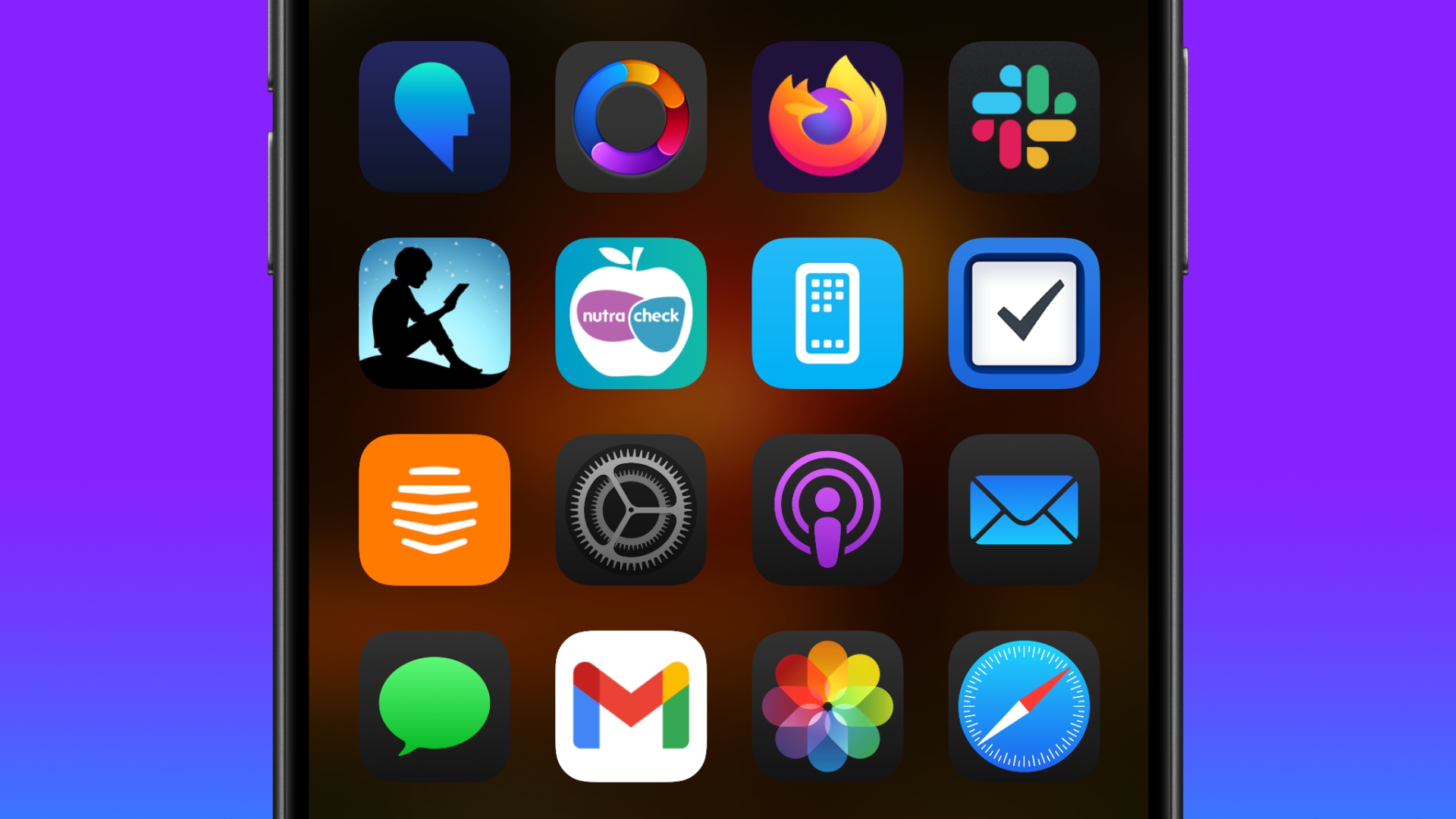
As part of its Home Screen customization overhaul, iOS 18 lets iPhone users hide the labels on app icons for a cleaner look.
Turning off the labels causes the icons to expand and take up the space where the text usually appears underneath. Here's how it currently works in the iOS 18 Developer Beta.
On the Home Screen, press and hold on an empty area.
Tap Edit in the top-left corner.
Tap Customize.
In the customization menu that appears, tap the Large button.
Tap anywhere on the Home Screen to save your preference.
As things stand, it's not possible to hide labels and keep app icons small, but this could change in succeeding beta versions.
place app icons anywhere, and a dark tint option for app icons.
iOS 18 announcement coverage for more details about the update, which is now available in beta for members of the Apple Developer Program.
Related Roundup: iOS 18
This article, "iOS 18 Lets You Hide App Labels on Your iPhone Home Screen" first appeared on MacRumors.com
Discuss this article in our forums
https://www.macrumors.com/2024/06/11/ios-18-hide-app-labels-home-screen/
Everything Apple Announced at WWDC 2024 in Nine Minutes
Apple crammed an overwhelming number of new features into its WWDC 2024 keynote event, introducing Apple Intelligence, iOS 18, iPadOS 18, macOS Sequoia, visionOS 2, watchOS 11, and tvOS 18. It was hard to keep up with everything that Apple highlighted, so we did a video of all of the new additions you won't want to miss.
Subscribe to the MacRumors YouTube channel for more videos.
We've also got a full recap of all of today's WWDC keynote coverage for a more in-depth look at each announcement.
Apple Intelligence
'Apple Intelligence' Personal AI Unveiled for iPhone, iPad, and Mac
Apple Unveils 'Image Playground' On-Device AI Image Generator
Siri Can Access ChatGPT Directly With iOS 18
Apple Intelligence Features Coming to iOS 18 Beta Testers This Summer
iOS 18 Apple Intelligence Feature Will Have Waitlist During Initial 'Limited Preview'
iOS 18 and iPadOS 18
Apple Announces iOS 18 With New Customization Features, Redesigned Photos App, and More
Apple Unveils iPadOS 18 With New Calculator App, Tab Bar, and More
iOS 18 Home Screen: Place Apps Anywhere and Dark Mode for Icons
iOS 18: New Control Center Features Multiple Customizable Screens
Apple Reveals New Head Gestures Coming to AirPods Pro Later This Year
Apple Unveils Calculator App for iPad With Math Notes, Apple Pencil Support
iMessage on iOS 18 Features Bold, Underline, Italics, and Text Effects
iOS 18's New 'Genmoji' Feature Lets You Create Your Own Emoji
Apple Releases New AirPods Pro 2 Beta Firmware With Support for iOS 18 Features
Apple Introduces Standalone 'Passwords' App
RCS Coming to Messages in iOS 18 for Improved Texts With Android Users
You Can Send Texts via Satellite in iOS 18
iOS 18 Lets You Swap Out Lock Screen Camera and Flashlight Buttons
iOS 18 Introduces More Charging Limit Options on iPhone 15 Models: 85%, 90%, and 95%
iOS 18 Brings New Insights, Widgets, and Health Integration to Apple's Journal App
iOS 18 Can Record and Transcribe Your Phone Calls
iOS 18 Lets You Lock and Hide Your Apps for Added Privacy
HomeKit in iOS 18 Includes Guest Access, Hands-Free Unlock, Electricity Usage Integration and More
macOS Sequoia
Apple Unveils macOS 15 Sequoia With iPhone Mirroring, Passwords App, More
macOS Sequoia and iPadOS 18 Drop Support for These Macs and iPads
iOS 18 and macOS Sequoia Add 'Rotate Wi-Fi Address' Option to Cut Down on Tracking
iOS 18 and macOS Sequoia Let Websites and Apps Automatically Update Existing Logins to Passkeys
watchOS 11
Apple Previews watchOS 11 With New Health and Workout Features
watchOS 11 Drops Support for These Apple Watch Models
tvOS 18
tvOS 18 Adds 'InSight' to Identify Actors and Songs in Apple TV+ Shows, Plus 'Enhanced Dialogue' Feature and More
tvOS 18 Compatible With Apple TV HD Released Nearly Nine Years Ago
visionOS 2
Apple Announces visionOS 2 With Ultra-Wide Mac Virtual Display, Travel Mode on Trains, and More
Apple Launching Vision Pro in These 8 Countries by Mid-July
Other Announcements
WWDC 2024 Apple Event Live Keynote Coverage: iOS 18, Apple's AI Push, and More
iOS 18, macOS Sequoia, and More Available in Public Beta in July
Apple Recaps 18 Key Announcements From WWDC 2024 Keynote in Short Video
Apple Releases First Betas of iOS 18, iPadOS 18, macOS Sequoia, tvOS 18, watchOS 11, and visionOS 2
Elon Musk Threatens to Ban Apple Devices Over ChatGPT Integration
Apple and Canon Announce Mirrorless Camera Lens Designed for Spatial Video Capture
Apple Provides Updated Look at Next-Generation CarPlay at WWDC 2024
MacRumors for additional coverage throughout the week as WWDC continues.
Related Roundups: iOS 18, macOS Sequoia, visionOS, watchOS 10
Related Forums: Apple Vision Pro, Apple Watch
This article, "Everything Apple Announced at WWDC 2024 in Nine Minutes" first appeared on MacRumors.com
Discuss this article in our forums
macOS Sequoia and iPadOS 18 Drop Support for These Macs and iPads
macOS Sequoia is still compatible with several Intel-based Macs, but it does drop support for 2018 and 2019 models of the MacBook Air.
macOS Sequoia is compatible with the following Macs, according to Apple:
MacBook Pro: 2018 and later
MacBook Air: 2020 and later
Mac mini: 2018 and later
iMac: 2019 and later
iMac Pro: 2017
Mac Studio: 2022 and later
Mac Pro: 2019 and later
"Apple Intelligence" suite of AI features will require an Apple silicon Mac with an M1 chip or newer. The new AI features can help you write faster, categorize mail, prioritize notifications, and more. A smarter version of Siri powered by Apple Intelligence will also be limited to Macs with an M1 chip or newer.
iPhone Mirroring will be available on both Apple silicon Macs and Intel-based Macs with the T2 security chip, letting you control your iPhone from your Mac's screen:
A user's custom wallpaper and icons appear just like on their iPhone, and they can swipe between pages on their Home Screen, or launch and browse any of their favorite apps. The keyboard, trackpad, and mouse on Mac also let a user interact with their iPhone, and audio even comes through. Users can seamlessly drag and drop between iPhone and Mac, and a user's iPhone remains locked, so nobody else can access or see what the user is doing. It also works great with StandBy, which stays visible, so users can get information at a glance. Additionally, users can review and respond to iPhone notifications directly from their Mac.
As for iPadOS 18, the update drops support for the first-generation 10.5-inch iPad Pro, second-generation 12.9-inch iPad Pro, and the sixth-generation low-end iPad.
iPadOS 18 is compatible with the following iPads, according to Apple:
iPad Pro: 2018 and later
iPad Air: 2019 and later
iPad mini: 2019 and later
iPad: 2019 and later
Related Roundups: iOS 18, macOS 15
This article, "macOS Sequoia and iPadOS 18 Drop Support for These Macs and iPads" first appeared on MacRumors.com
Discuss this article in our forums
https://www.macrumors.com/2024/06/10/macos-sequoia-and-ipados-18-compatibility/
iOS 18 Lets You Lock and Hide Your Apps for Added Privacy
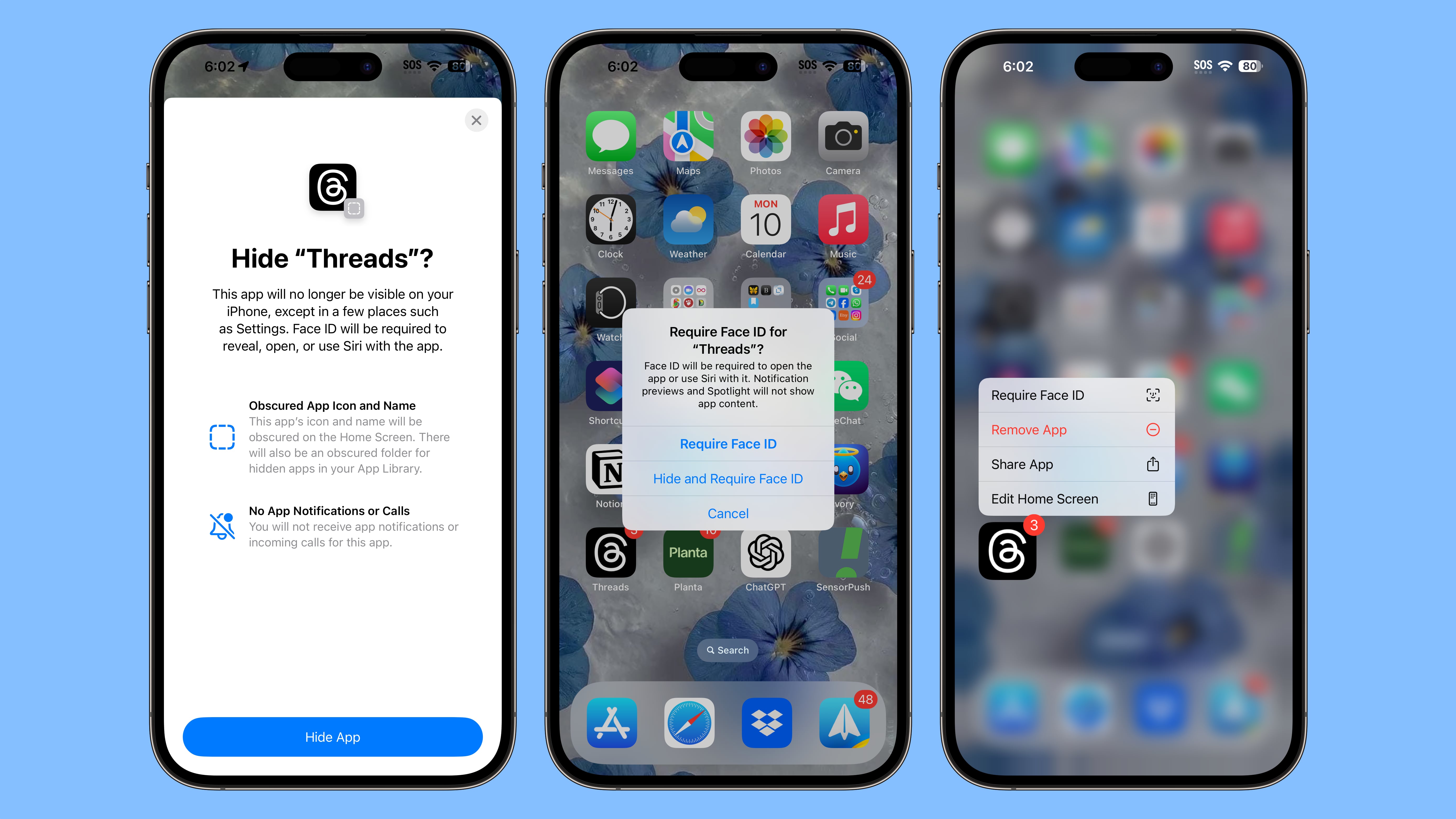
Apple is improving privacy in iOS 18, introducing a feature that allows apps to be locked or hidden, which makes them inaccessible without a Face ID scan.
If someone is using your phone and you've locked an app, when they try to open that app, they'll see a popup that says it can't be accessed without secondary authentication. Locking an app can be done by long pressing on it and selecting the Require Face ID option (or Touch ID on the iPhone SE).
Not all apps can be locked, with Apple not providing an option for innocuous apps like Maps, Clock, Calculator, and Stocks, but almost every other app can be locked, including third-party apps. When you lock an app, you have the option to hide it as well, which moves it into a locked, hidden apps folder that requires authentication to open.
Photos app. Hiding an app means that you will not receive incoming notifications or calls from it, and it will only be available from a "Hidden" folder in the App Library.
iPad.
Related Roundup: iOS 18
This article, "iOS 18 Lets You Lock and Hide Your Apps for Added Privacy" first appeared on MacRumors.com
Discuss this article in our forums
iOS 18 Can Record and Transcribe Your Phone Calls

One of the interesting new features coming in iOS 18 will let you automatically record and transcribe your live phone calls through the Phone app.
After answering a call or placing a call, you can enable recording. All call participants are notified that the call is being recorded, so there are no surprises and everyone is aware of the recording from the start. As the call is recorded, the iPhone is also able to provide a transcript.
The upcoming Apple Intelligence features can generate a summary of key points that were included in the call, so you can look back at what was important at a glance.
Phone call transcription will be available in English (U.S., UK, Australia, Canada, India, Ireland, New Zealand, Singapore), Spanish (U.S., Mexico, Spain), French (France), German (Germany), Japanese (Japan), Mandarin Chinese (China mainland, Taiwan), Cantonese (China mainland, Hong Kong), and Portuguese (Brazil).
Other new features for the Phone app include a search interface for call history, autofill for a number when you start typing in digits, and the option to seamlessly switch SIM cards.
Related Roundup: iOS 18
This article, "iOS 18 Can Record and Transcribe Your Phone Calls" first appeared on MacRumors.com
Discuss this article in our forums
https://www.macrumors.com/2024/06/10/ios-18-record-phone-calls/
iOS 18 Introduces More Charging Limit Options on iPhone 15 Models: 85%, 90%, and 95%
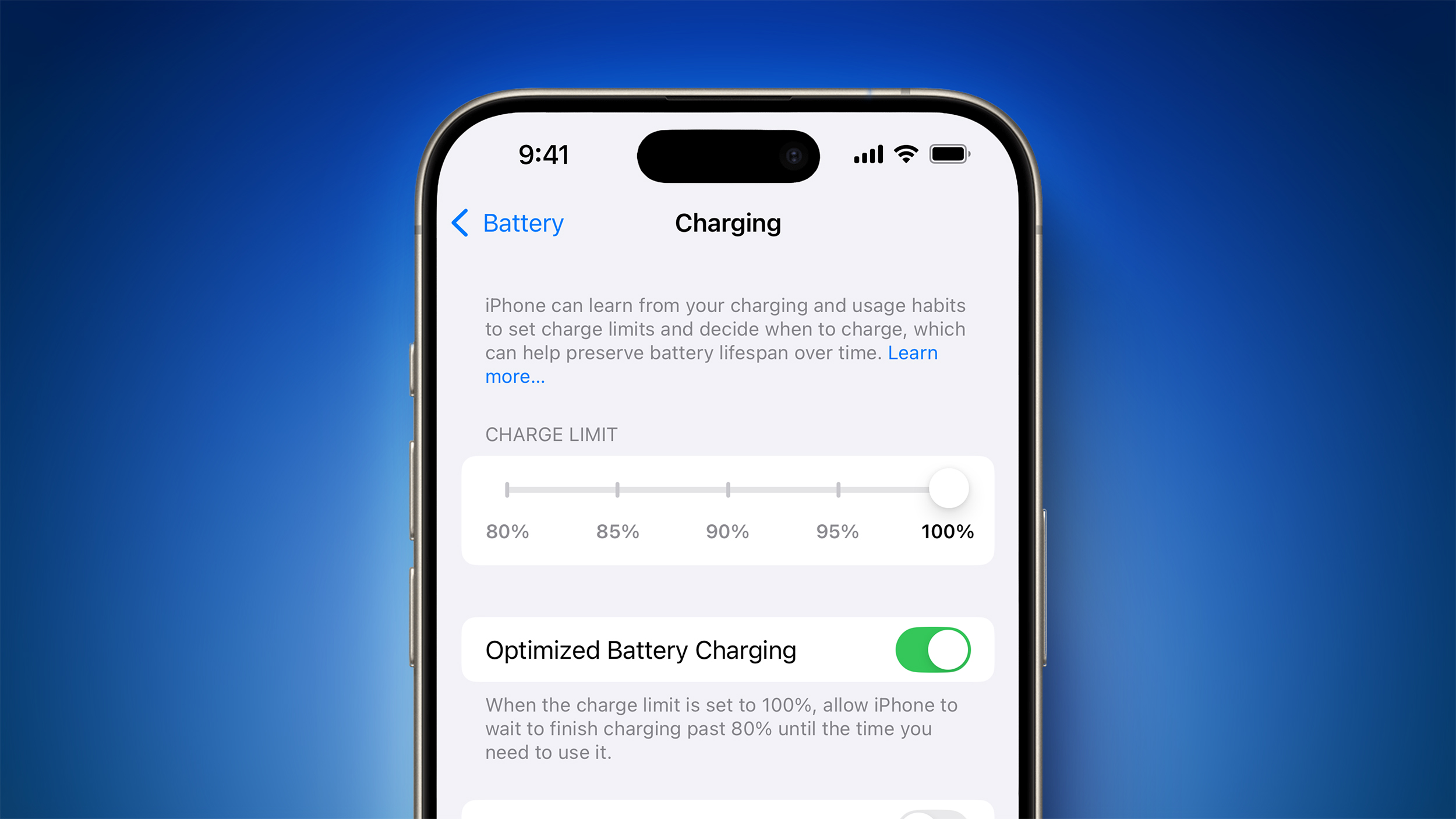
All four iPhone 15 models feature a setting that prevents the devices from charging beyond 80% while toggled on, which can potentially improve an iPhone battery's lifespan by reducing the time that the battery is fully charged. And with iOS 18, Apple has taken this feature a step further by adding new 85%, 90%, and 95% charging limit options.
Screenshot: Aaron Perris
The feature can be found in the Settings app under Battery → Charging.
The charging limit feature remains exclusive to the iPhone 15 lineup on the first iOS 18 beta, with the option not found on the iPhone 14 Pro or older.
first iOS 18 beta is now available for Apple Developer Program members, and a public beta will follow in July. Following beta testing, the update should be widely released to all users with an iPhone XS or newer in September.
Related Roundup: iOS 18
This article, "iOS 18 Introduces More Charging Limit Options on iPhone 15 Models: 85%, 90%, and 95%" first appeared on MacRumors.com
Discuss this article in our forums
https://www.macrumors.com/2024/06/10/ios-18-introduces-more-charging-limits/
iOS 18 Lets You Swap Out Lock Screen Camera and Flashlight Buttons
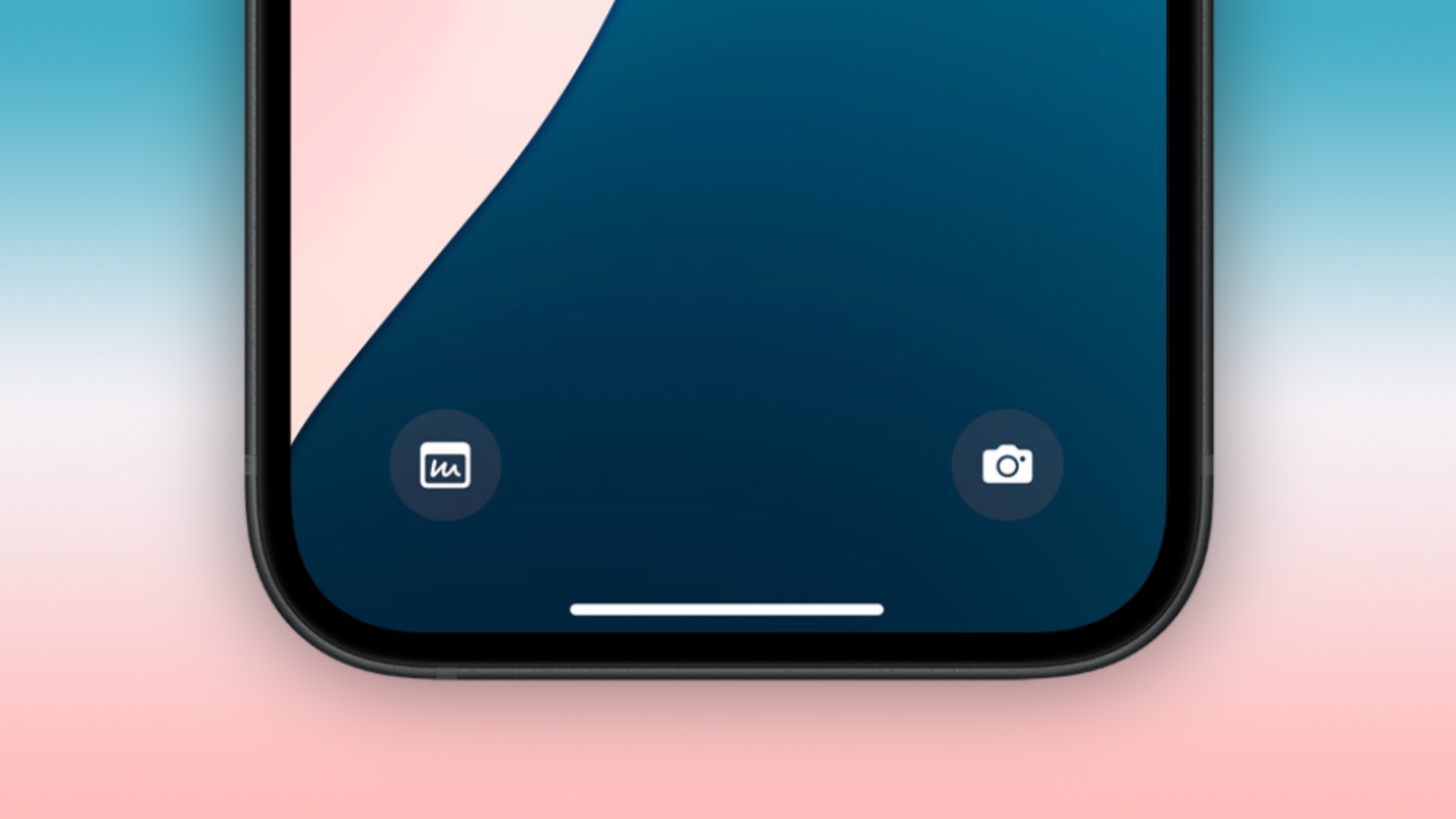
iOS 18 allows users to change the two shortcut buttons on the Lock Screen to an action of their choice for the first time.
Users can now swap out the two controls at the bottom of the Lock Screen for a different action of their choosing. Shortcuts to functions like Translate, Notes, and music recognition in Shazam, and more are available. The full list of actions is as follows:
Here are all the options to replace the camera and flashlight buttons on the Lock Screen on iOS 18 pic.twitter.com/ZS6j5xWQzF
— Aaron (@aaronp613) June 10, 2024
iPhone 15 Pro and iPhone 15 Pro Max.
Related Roundup: iOS 18
This article, "iOS 18 Lets You Swap Out Lock Screen Camera and Flashlight Buttons" first appeared on MacRumors.com
Discuss this article in our forums
https://www.macrumors.com/2024/06/10/ios-18-swap-out-lock-screen-buttons/