Both teams have done a great job, you can't go wrong with either. Slightly more choice of services and remote connection options on Umbrel currently but I prefer Start9's ethos

Social engineering 😬 if my barber mentions anything about climate change I'll be on to him working for the state 🤣
🤣 I thought you where joking, it's actually a thing. 🤡🌍

NEW EPISODE DROPPED... I sat down with John O'Connell from the TaxPayers' Alliance to talk about how Britain racked up over £12 trillion in real debt, why the tax burden is breaking the country, and how bloated government is killing growth.
Links to full episode - https://linktr.ee/PeterMcCormack
🫡


I hope so 🫡🤙

I haven't yet...
I'm hoping to reinstall and nothing is lost. I have a back up but it's a few weeks old so I assume my recent labels will be lost, but we shall see 😬


I think you right about onion realays 🧅 🤙


🫡 Start9 still goat and I will likely come back with their next release. Umbrel works though and currently has a hand full more quality of life features for my use case.

So Bluesky has just banned some guy exclusively on Turkey only because the Turkish government asked.
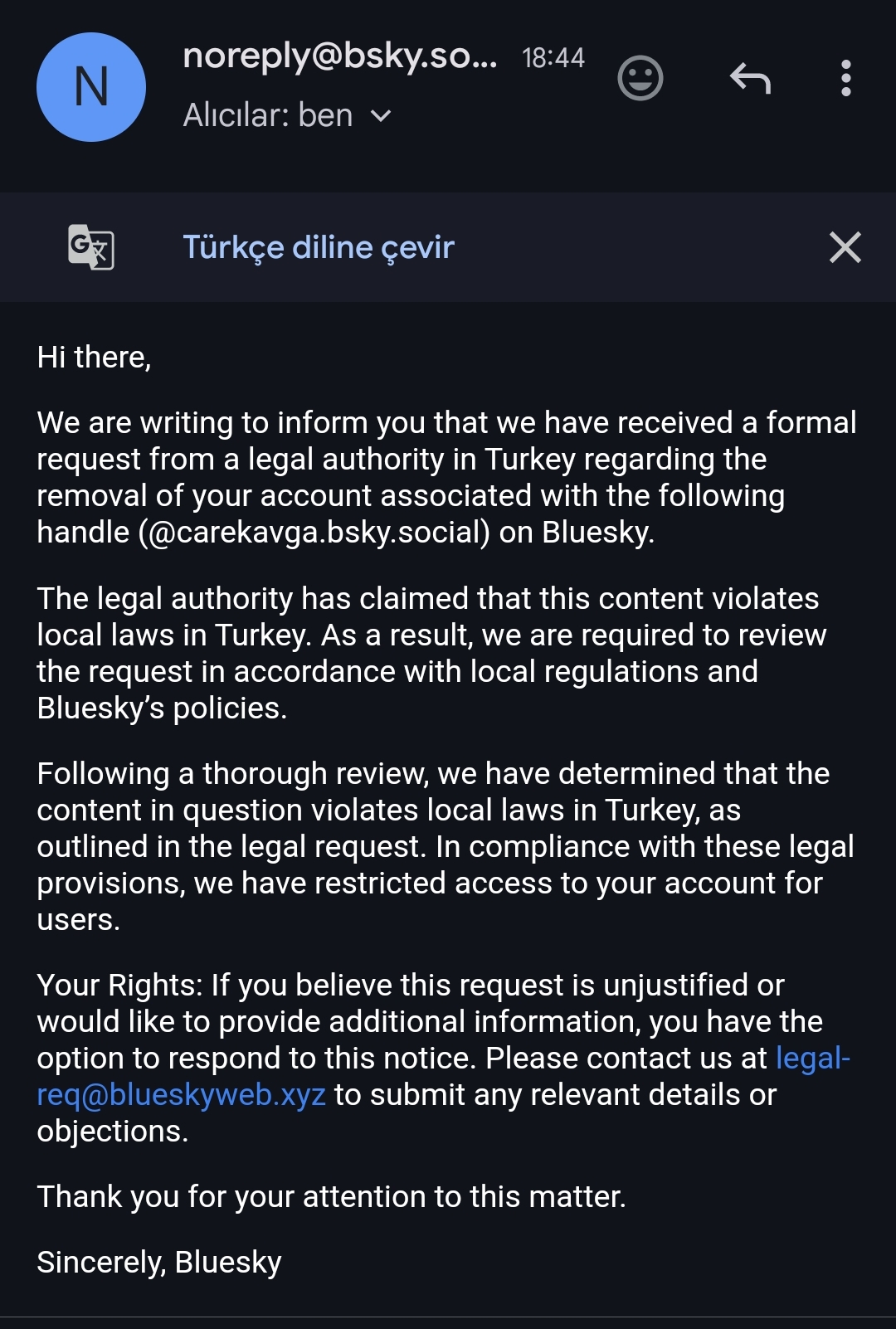
(from https://x.com/aliskorkut/status/1912191854939943362, this is the profile: https://bsky.app/profile/carekavga.bsky.social)
I'm fairly certain nostr relay operators contacted by a government would censor notes from an npub if requested.

The reason I migrated to an atomic #Linux distro, in my case Fedora Silverblue, is that it's impossible to brick.
By (A) pushing all user applications into containers and then (B) running OS updates atomically in a transaction, a working state of your #Linux machine can be maintained no matter what crazy things you experiment with.
PopOS is legacyware, as are most distros.
Am I correct in saying though your only meant to run flatpaks so the apps you install arent always packaged by the original developer?
All received using self hosted Alby Hub 🤙🤙not sure why it's slow though... Thanks for the headsup


AntennaPod (PodCasts)
Amethyst
Auxio (offline music player)
Voice (audiobooks)
Book's Story (epub reader)
ReadYou (RSS feeds)
Futo Keyboard
Organic Maps
Immach (self hosted photos)
Brave Browser
Mullvad
Alby Go
Molly (signal fork that's seems a bit lighter on battery usage when not using play services)
Easy Notes




The original R5 Turbo was 👌👌


That was wild 😵💫😵💫🤢🤢 how did your blood work look before and after?

Just got my first Thinkpad! A T14. Going to install Fedora later 🫡 coming from MacOS should be interesting

Who's created it?
Or is it 50+(25*10) I am no longer confused😂



Bitaxe solo mining to a self hosted Public Pool via Umbrel
https://video.nostr.build/7ccd8e52a2be4509d1edd06e311d53b8eb612548074b831a94833cad136b84f4.mp4


Installed Fedora KDE Plasma 42 Beta early this morning as my primary driver, and it's glorious.
The ProtonVPN Linux app is for GNOME, so it looks like I'll need to manually config that for a while since the Flatpak is not an official app and generally not recommended by Proton if you have other options—no big deal.
Now, it's time to have some fun finishing the setup and diving deeper into customization.
One thing I am immediately impressed with is the integration of KDE Connect...
"(Some) Features
• Shared clipboard: copy and paste between your phone and your computer (or any other device).
• Notification sync: Read and reply to your Android notifications from the desktop.
• Share files and URLs instantly from one device to another.
• Multimedia remote control: Use your phone as a remote for Linux media players.
• Virtual touchpad: Use your phone screen as your computer's touchpad and keyboard.
All this without wires, over the already existing Wi-Fi network, and using TLS encryption."
It naturally requires a lot of permissions to do all of this useful stuff, but it's open source and does not collect or share any data.
"KDE Connect never sends any information to KDE nor to any third party. KDE Connect sends data from one device to the other directly using the local network, never through the internet, and using end to end encryption."
https://f-droid.org/packages/org.kde.kdeconnect_tp/
#IKITAO #Linux #Tech
Is it best to download apps from the default Fedora repos or use the instructions from apps websites (I.e. mullvad & brave) to install their own app repos to download?
If the latter, how are future DNF updates handled? Will it update from the default repos or the apps repo?
Got a thinkpad on the way and will be the first time running Linux is a daily.
nostr:nprofile1qqsyvrp9u6p0mfur9dfdru3d853tx9mdjuhkphxuxgfwmryja7zsvhqpzamhxue69uhhv6t5daezumn0wd68yvfwvdhk6tcpz9mhxue69uhkummnw3ezuamfdejj7qgwwaehxw309ahx7uewd3hkctcscpyug AFAIK, #Nostr clients currently lack native functionality to prevent AI tools like Gemini from accessing mobile users' screens—unlike some other apps I've used recently. I think it would be a solid feature to add to #Amethyst. What do you think?
If your concerned about client side scanning it may be wise to consider another OS. Or am I missing something?