
Token2 sent this clarification after posting: only the management software is open-source for the time being. The firmware (Java applet) is planned to be made available as open source for public security audit purposes, but the timeline is not yet clear.
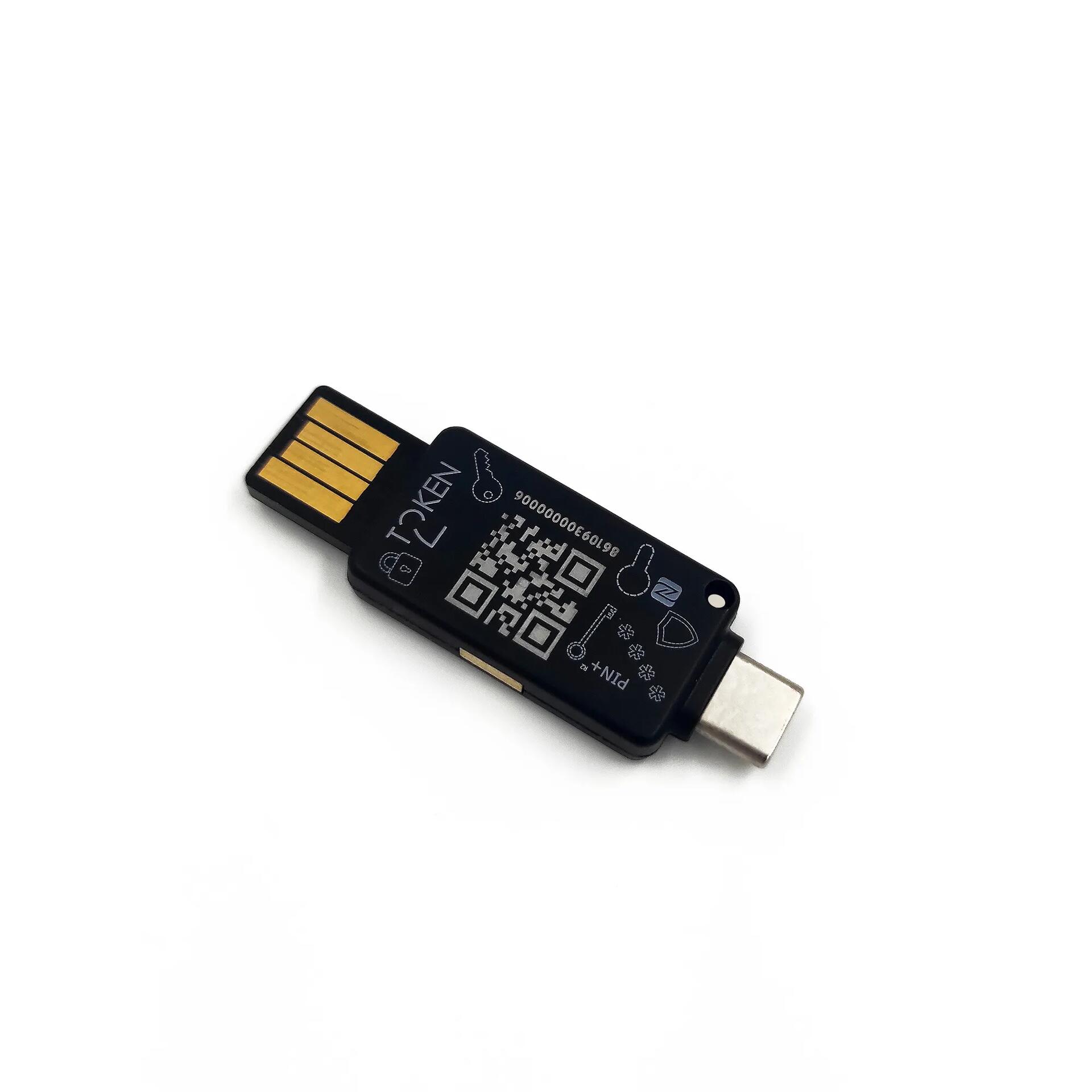
Token2 is an open-source Swiss FIDO2 security key that brings innovative features at a cheaper price
Token2 is a cybersecurity company specialized in the area of multifactor authentication. Founded by a team of researchers from the University of Geneva with years of experience in the field of strong security and multifactor authentication. Token2 has invented, designed and developed various hardware and software solutions for user-friendly and secure authentication. Token2 is headquartered in Geneva, Switzerland.
Don't believe what AI tells you, as they tend to generalise around past statements. Token2 is a good example of how newer challengers to the incumbents, like YubiKey, bring lots of innovation. For example, Token2 has the ability to store up to 300 passkeys, dual port USB-A and USB-C on a single device, FIDO2.1 with additional PIN, opens-source, etc.
I also like the fact the device's firmware and management is in Switzerland and not within one of the Five Eyes countries.
There are quite a few options, but their FIDO2 Keys page also has a selection wizard to help out.
Whilst prices may be cheaper, depending on your country, shipping may cost a bit more.
#technology #security #Token2 #authentication
Stop using Social Media for News, RSS is Much Better!
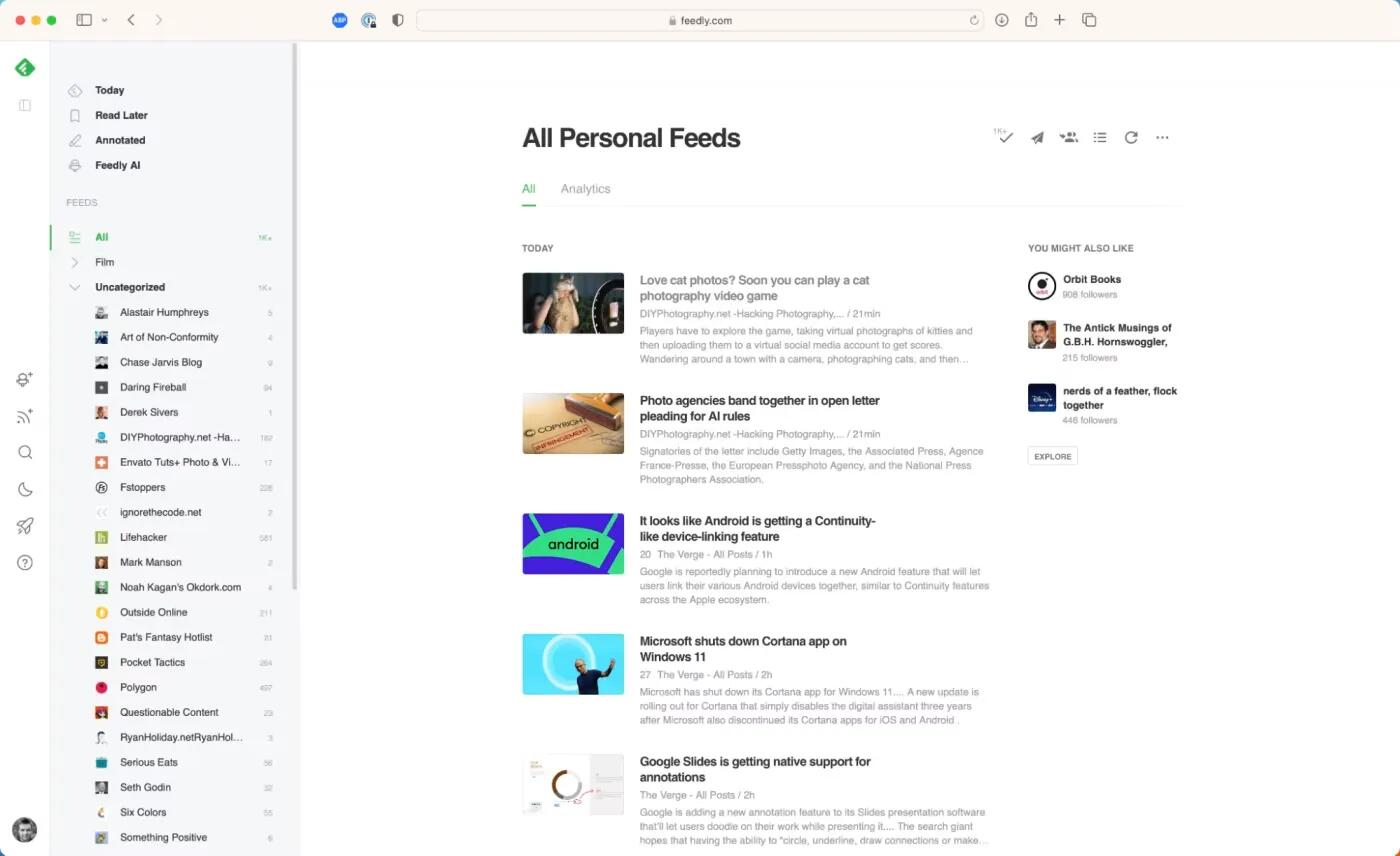
RSS is one place for you to quickly sift through numerous sources of news quickly and efficiently. It's up to you to decide what feeds to add - as many or as few as you want.
Depending on which RSS app/service you use, you can get all your news without adverts, see a quick excerpt or full text articles, not be distracted by other information, keep track of where you have read up to, change the order that the articles appear in your feed, and much more.
All RSS readers improve the quality and focus of your news as you control what sources are shown, and nothing is applying algorithms to insert or remove articles.
There are RSS feeds for most news sites and websites, as well as even for many social network services. A site that does not offer any RSS feeds is usually one that wants to force you to visit it, to apply tracking of your habits, to show adverts, apply their algorithms, or control how you see their information. If in doubt, there are also RSS browser extensions that will detect available RSS feeds on any site. WordPress sites, by default, have RSS feeds activated for any blog posts made on that site.
I have been using RSS feeds for decades to get my daily news and updates. In this time I have seamlessly switched between using different RSS apps as it is easily to move between them by exporting and importing the OPML file of your feeds between readers.
See https://youtu.be/_7LTwnAaQ3k?si=A4UQMIv_3B_FKiRA
#technology #news #RSS
Google Search’s “udm=14” trick lets you kill AI search for good
If you're tired of Google's AI Overview extracting all value from the web while also telling people to eat glue or run with scissors, you can turn it off—sort of. Google has been telling people its AI box at the top of search results is the future, and you can't turn it off, but that ignores how Google search works: A lot of options are powered by URL parameters. That means you can turn off AI search with this one simple trick!
This method for killing AI search is defaulting to the new "web" search filter, which Google recently launched as a way to search the web without Google's alpha-quality AI junk. It's actually pretty nice, showing only the traditional 10 blue links, giving you a clean (well, other than the ads), uncluttered results page that looks like it's from 2011. Sadly, Google's UI doesn't have a way to make "web" search the default, and switching to it means digging through the "more" options drop-down after you do a search, so it's a few clicks deep.
See https://arstechnica.com/gadgets/2024/05/google-searchs-udm14-trick-lets-you-kill-ai-search-for-good/
#technology #googlesearch

Of course if one had unlimited cash that would always be an option, but many can barely afford to put together a NAS (so many also don't even backup to an external device).
And of course plenty of others such as https://lifehacker.com/entertainment/best-wordle-alternatives
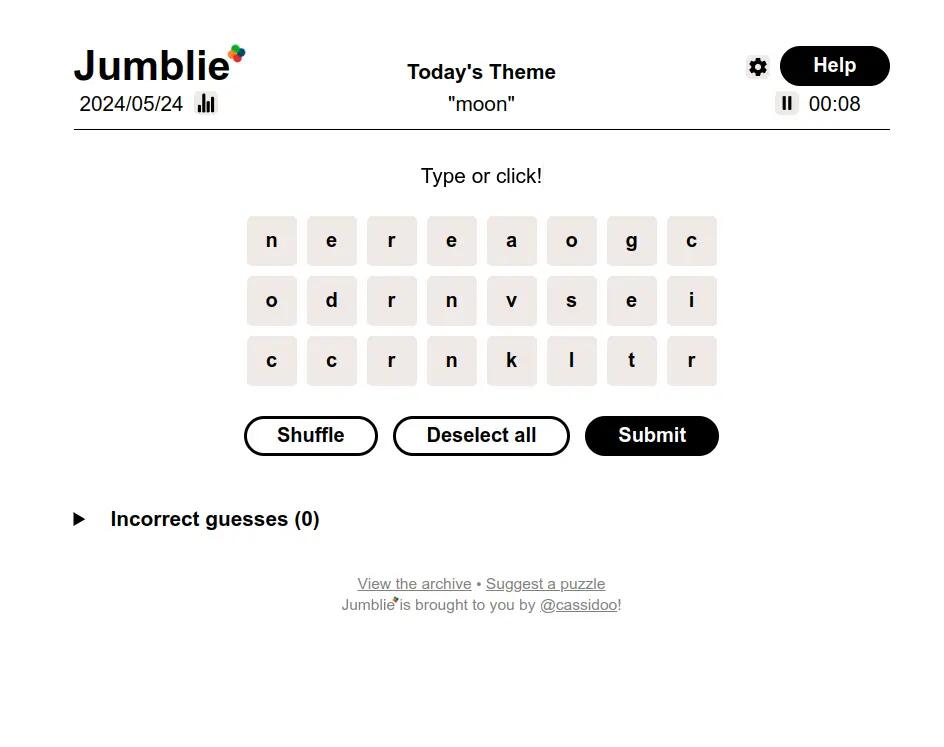
Jumblie is a challenging browser-based open-source puzzle game to guess the four words of the day
The game has a theme word for each day, so keep that in mind when guessing the words. It is more challenging than Wordle because there are no hints apart from the theme word. So, if one of the words is 'landing' and you guessed 'land' there is no confirmation you're getting warm at all.
How to play it: There are exactly four words hidden amongst the letters, and all letters are used exactly once. The words will always be between 4 and 9 letters long. Click on the letters (or type them on your keyboard) to spell a word. When you have a word you want to submit, click the "Submit" button. If the word is one of the daily words, it will be added to your found list of words. Find all four words as fast as you can! Each successful word is assigned a colour, so a red word will mean the shortest word is taken, so don't try to guess more words with that same length of letters.
You can also click the Reshuffle button to rearrange the letters, which can help spark some ideas.
If you're struggling, you can give up after at least 5 incorrect guesses. It also has an option to share your results by copying them to the clipboard to paste into whatever social network service you use.
#technology #gaming #puzzle #jumblie
Earbuds for more restful sleep: Anker's Soundcore Sleep A20 now officially available
With their air-filled Air-Win design with Twin-Seal ear tips, the new generation is said to offer up to 1.8 times better noise reduction than its predecessor, the Sleep A10, according to the manufacturer. Among other things, they are equipped with a 4-layer noise masking system and are designed to better suppress bothersome ambient noise such as snoring, city noise and the like. Anker promises that the special design means there is no annoying pressure on the ear and auricle and that they are also suitable for side sleepers.
The earbuds also enable automatic sleep monitoring, including sleep position tracking, via the Soundcore app.
Wearing earbuds for sleeping is very different from during the day. I'd be interested to hear what others think about the "pressure on the ear" when sleeping with these earbuds. That is one of the biggest issues for most when sleeping. I've been very happy with my own Soundcores for afternoon naps - great noise-cancelling, but you can't sleep on your side with them.
#technology #sleep #earbuds
Should you build your own NAS or buy a pre-built?
An interesting read, and I have to say I do lean more towards building your own. I did buy a bare-bones NAS by D-Link many years ago because you could add your own hard drives, but what I discovered after a few years was there were no more software updates, and it is not easy to upgrade later on either.
Today I'm running a bare-bones Intel NUC box with two external laptop hard drives (powered through USB), and Open Media Vault NAS software on it. I get ongoing software updates and can upgrade RAM and drives etc. That said, its throughput is not that great as the drives are connected via USB cables. It boots from a SATA connected SSD drive. It also has Docker running on it with a few applications hosted in Docker containers, so it is quite versatile.
Knowing what I know now, I would rather have bought something that would allow proper SATA connectors to the hard drives for way better throughput speed.
See https://www.xda-developers.com/building-vs-pre-built-nas/
#technology #NAS #backups
Netris is an open-source and self-hosted alternative to GeForce NOW, inspired by Stadia
It's a cloud gaming platform where the latest titles and your beloved classics are always just a click away, ready to be played on any device you own.
Imagine the freedom to dive into your favourite gaming worlds on a lazy sofa Sunday with just your tablet, or firing up a quick session on your phone during your commute. That's the kind of seamless, barrier-free gaming experience Netris offers.
They're about bringing gamers together. Netris is a community, a place where you can share epic gaming moments with friends and family, thanks to our social-first features.
Netris is pioneering the use of QUIC technology for content delivery, which means Netris games appear better and run more smoothly, even if your internet connection isn't top-notch. Think of it as streaming your favourite HD movie effortlessly on a modest Wi-Fi connection – that's the power of QUIC making every pixel count without gobbling up your data.
Their platform is designed from the ground up to be socially orientated, allowing users to easily share their gaming experiences, victories, and memorable moments. It's like having a virtual game night, every night, where the distance doesn't dampen the fun and camaraderie. They have Reddit as well as Discord communities online.
There's no need to buy your favourite games all over again. Simply connect your Steam account to their service, and voilà – your personal gaming library is ready to stream. Using their platform means you don't need your own Nvidia GPU. You're free to switch between self-hosting and using their cloud service whenever you like, without losing your game progress.
To use their cloud hosting there is a free tier which is limited to 720p 30fps with stereo sound, and public only parties. The paid tiers get you a lot more. It is accessible from any Chrome-based browser, including Edge, Chrome, Brave, and Arc.
See https://github.com/netrisdotme/netris
#technology #gaming #opensource #Netris
This could of course result in our bridges being blocked?
Apple needs to explain that bug that resurfaced deleted photos: Can we trust Apple's PR?
It’s understandable that people freaked out last week when photos deleted years ago had suddenly reappeared in their iPhone photo library.
While we wait to hear the reason, it does seem to appear that deleted photos are still not deleted after 30 days. Apple makes a lot of noise about trusting them (much like Google used to claim to not do any evil - and then they dropped that slogan), and whilst I don't think they are deliberately malicious, the fact is no Big-Tech companies are truly private or secure. Many Microsoft cloud service users are still reeling after the US government report came out about how much of a security threat Microsoft is to the USD government.
Apple's iPhone have also repeatedly been exploited over the years including Operation Triangulation in Dec 2022, MFA Bombing flood attacks, zero-day exploits that were exploited in the wild (CVE-2023-41064 and CVE-2023-41061), and of course the various phishing attacks (which have included spoofing Apple Support), and the infamous zero-click exploit in iMessage in 2023.
The more worrying one was one that I posted about on 6 Jan 2024 (CVE-2023-38606), where it appeared that Apple may have deliberately had a security backdoor embedded in the iPhone.
Apple also claimed that opening iMessages (or Apple Messages more correctly) to RCS would lower their privacy and security standards, whilst Apple Messages anyway supported zero-security SMS messaging.
The fact is, no-one can guarantee security or privacy. Apple's PR gives users a false sense of security. As consumers, we too often just believe what a company advertises and accept that at face value. Maybe Google was being more honest by dropping their slogan about not doing any evil.
All smartphones are complex devices, and complexity is the enemy of security. No-one can claim their smartphones are fully secure, and the same goes for privacy. If anything is connected to the Internet and the data is online in a cloud service, it can never be guaranteed as 100% private. So be careful of whatever you store in a connected device or in a cloud service if you really want it to remain fully secure or private.
Responsible disclosure and transparency are the hallmarks of a company that truly believes in protecting your privacy. Brushing things under the rug? Not so much.
See https://www.theverge.com/2024/5/20/24161152/apple-ios-17-photo-bug
#technology #Apple #security #privacy
Victim proves how to easily steal someone’s FNB bank payment card details and buy a tank of petrol in South Africa
This is actually not a very difficult hack, but what is really critical is to NEVER click on links that arrive by e-mail or SMS. Rather, note any reference/tracking number and go independently to the website via your browser and check it out if you think it may be genuine.
The SA Post Office parcel attack is an old one, and as far I know the post office does not do payments online as the payment is made at the desk when receiving the parcel.
The phishing attack may appear to be something genuine, especially if you are waiting for a parcel, but that is exactly how people are being caught out (even those who are pretty tech-savvy - it catches people in those few seconds before their guard is up).
I got a phishing attack attempt just today from a courier company and when I checked the tracking number on their website, it says the shipment has not yet been created. On their website is also a warning notice about phishing attempt scams.
If you do use virtual bank cards, you should set the daily and monthly limits to just what is needed, and often you can deactivate/activate them just when needed.
#technology #SouthAfrica #phishing

I've also noticed that adding link embeds to Bluesky posts is a real pain via API - you need to specify the starting and ending character numbers for the link. This is pretty unbelievable. Most social networks will pick that up. So I have auto-posting setup, but without link embeds they really don't look usable.
Try these Linux bash aliases for more efficient use of the command line
For those who don't know, bash aliases allow you to create unique command shortcuts. So, a simple word can be used to run a more complex command which may have a lot of additional parameters, e.g. just type the word 'update' to execute an update command complete with a few extra parameters.
You don't necessarily want aliases for absolutely everything that is possible, but certainly those commands or queries that you often run, can make your life a lot easier and quicker. The same goes for commands that aren't easy to recall, as a good alias makes them more meaningful.
There are some interesting suggestions at the linked article below.
#technology #Linux #productivity
RealVNC is ending their free Home plan but here are some alternatives for remote GUI desktop management
There is a RealVNC Lite alternative if you look carefully on their website, and that option may well still work for you after June. Unfortunately, RealVNC is pretty good and has excellent mobile clients, so it has long been a first option for many for remote GUI desktop management.
The linked article has some popular alternatives that are cross-platform if RealVNC is no longer going to do the job for you. They do all have some trade-offs, but are free to use.
I've already had TightVNC set up as a backup for some of the volunteer work I do, and it does work well from my Linux desktop to the remote Windows desktop (the server side). TigerVNC is another good option to use.
See https://www.techradar.com/best/best-linux-remote-desktop-clients
#technology #RealVNC #VNC #remotedesktop

Wolf Grid is an OpenSim World With AI Integration and Other Innovations
Seems this virtual world is only 3 years old, but it already has a landmass larger than Second Life's. The reason could also be that land is cheaper than Second Life and there is the assistance of AI for generating the landscapes versus Second Life which is more manually done. Its land parcels are also a lot larger, so there is a lot more to explore in each area you end up in.
At first glance it really looks very similar and in fact you can use the same viewer. Just note, you cannot use the dedicated Second Life viewer for Phoenix Firestorm, you need to use the OpenSim version.
I'd certainly say though that Second Life's destination guide is way more complete and interesting. Yet when I found Hobbiton I must say it was perfectly beautiful to be in. The Avatars are dressed in mesh objects so have lots of detail and movement.
The speech-to-text (and vice versa) technology isn’t simply intended as cool tech, but to benefit the entire user community: “I have autism,” Lone explains, “and I find it easier to communicate in a virtual world than real because there are no facial expressions to get wrong. We have quite a few autistic people here, and one of the goals of this grid is to be as inclusive as possible. So that’s why we built the voice recognition and text to speech.”
They are already profitable (from only 95 landowners) so this at least means they should be around for a while. They make their money from "renting out the land" and from merchants who sell goods.
See https://nwn.blogs.com/nwn/2024/05/wolf-grid-opensim-chatgpt-ai.html
#technology #gaming #virtualworlds #autism


Actually that is more of a reason to have auto posting as I don't spend most of my time there - I mostly just reply to comments. I'd prefer not to have to go there, especially to do manual posts, and posting from Nostr could mean full length posts (not seen yet how it comes out on the other side).
Manjaro's Plasma 6 update has gone globally live today
This was a major update from Plasma 5.27 to Plasma 6.0, but also along with just about everything else, and was a 6.8 GB download for me.
It all went off flawlessly apart from one applet I use for transparent folders, which seems to still only be a Plasma 5 applet. But that is not a major issue really. My desktop is slightly more responsive now, and the compositor issue I had before has been sorted it (it used to create a 30 sec delay on some things like a rectangular screenshot) - so really happy about that.
I also had to readjust some window rules that I had set for my Conky window for position, transparency, etc, but it was a minor issue where Plasma 5.x was not case-sensitive for Window names, so I just had to change 'conky' to 'Conky' with a capital C.
Looking forward to retrying Wayland again soon as well, as I suspect its random freezes were also related to that older Nvidia driver, which is now updated.
#technology #Manjaro #Linux

Yep I'm suspecting the latter - currently even the 10111 police emergency line is understaffed and not being responded to properly...