
Anyone else out here paying attention to the Kaspa HardFork
I should post more
*april, middle of april xD
That's awesome! Before then, I'll be I Berlin middle of August. Would love to meet any Berliner Nostriches then!!
DM me <3

Finally wrapping up on the Great Refactor of the nostr:nprofile1qqs2xugc5jyguqkj36rk0syv4tmnkjdtmtperttl7x9rqjy3ustdcvcppemhxue69uhkummn9ekx7mp0qy2hwumn8ghj7un9d3shjtnyv9kh2uewd9hj7qg6waehxw309aek2mnyd96zumn0wdnxcctjv5hxxmmd9uxa0uz8 codebase. Not much functional change apart from more efficient event fetching, so now everything can be fetched at once and displayed up front rather than requiring shoppers to manually "load more" to see older listings, including their own. Biggest thing was abstracting the signer checks for NIP-07, NIP-46, and encrypted nsecs, so implementing new Nostr functionality just requires dropping in a signer object and the respective signing calls are handled on the fly. Passphrase inputs for unencrypting locally stored nsecs are now also capable of being remembered across an existing session, removing the need for constant inputting at each page route.
https://github.com/shopstr-eng/shopstr/commit/d1b726866740b119547632e9c1011812ec780e92
Still a few minor improvements to add here and there, but generally able to focus more on some new merchant tooling and discovery/trust mechanisms! Be on the lookout... 👀
#shopfreely #SovEng 🫡🏴☠️

I understand that nostr private keys are generated with https://bips.xyz/340
I'm interested to know what the likelihood of generating the same priv key twice is.
In other words, how many private keys are possible, and how does a generator like the one in nostr-tools generate new keys?
Saving this for Future Reference ;)
How to create a nostr app quickly using [applesauce](https://hzrd149.github.io/applesauce/)
In this guide we are going to build a nostr app that lets users follow and unfollow [fiatjaf](nostr:npub180cvv07tjdrrgpa0j7j7tmnyl2yr6yr7l8j4s3evf6u64th6gkwsyjh6w6)
## 1. Setup new project
Start by setting up a new vite app using `pnpm create vite`, then set the name and select `Solid` and `Typescript`
```sh
➜ pnpm create vite
│
◇ Project name:
│ followjaf
│
◇ Select a framework:
│ Solid
│
◇ Select a variant:
│ TypeScript
│
◇ Scaffolding project in ./followjaf...
│
└ Done. Now run:
cd followjaf
pnpm install
pnpm run dev
```
## 2. Adding nostr dependencies
There are a few useful nostr dependencies we are going to need. `nostr-tools` for the types and small methods, and [`rx-nostr`](https://penpenpng.github.io/rx-nostr/) for making relay connections
```sh
pnpm install nostr-tools rx-nostr
```
## 3. Setup rx-nostr
Next we need to setup rxNostr so we can make connections to relays. create a new `src/nostr.ts` file with
```ts
import { createRxNostr, noopVerifier } from "rx-nostr";
export const rxNostr = createRxNostr({
// skip verification here because we are going to verify events at the event store
skipVerify: true,
verifier: noopVerifier,
});
```
## 4. Setup the event store
Now that we have a way to connect to relays, we need a place to store events. We will use the [`EventStore`](https://hzrd149.github.io/applesauce/typedoc/classes/applesauce_core.EventStore.html) class from `applesauce-core` for this. create a new `src/stores.ts` file with
> The event store does not store any events in the browsers local storage or anywhere else. It's in-memory only and provides a model for the UI
```ts
import { EventStore } from "applesauce-core";
import { verifyEvent } from "nostr-tools";
export const eventStore = new EventStore();
// verify the events when they are added to the store
eventStore.verifyEvent = verifyEvent;
```
## 5. Create the query store
The event store is where we store all the events, but we need a way for the UI to query them. We can use the [`QueryStore`](https://hzrd149.github.io/applesauce/typedoc/classes/applesauce_core.QueryStore.html) class from `applesauce-core` for this.
Create a query store in `src/stores.ts`
```ts
import { QueryStore } from "applesauce-core";
// ...
// the query store needs the event store to subscribe to it
export const queryStore = new QueryStore(eventStore);
```
## 6. Setup the profile loader
Next we need a way to fetch user profiles. We are going to use the [`ReplaceableLoader`](https://hzrd149.github.io/applesauce/overview/loaders.html#replaceable-loader) class from [`applesauce-loaders`](https://www.npmjs.com/package/applesauce-loaders) for this.
> `applesauce-loaders` is a package that contains a few loader classes that can be used to fetch different types of data from relays.
First install the package
```sh
pnpm install applesauce-loaders
```
Then create a `src/loaders.ts` file with
```ts
import { ReplaceableLoader } from "applesauce-loaders";
import { rxNostr } from "./nostr";
import { eventStore } from "./stores";
export const replaceableLoader = new ReplaceableLoader(rxNostr);
// Start the loader and send any events to the event store
replaceableLoader.subscribe((packet) => {
eventStore.add(packet.event, packet.from);
});
```
## 7. Fetch fiatjaf's profile
Now that we have a way to store events, and a loader to help with fetching them, we should update the `src/App.tsx` component to fetch the profile.
We can do this by calling the `next` method on the loader and passing a `pubkey`, `kind` and `relays` to it
```tsx
function App() {
// ...
onMount(() => {
// fetch fiatjaf's profile on load
replaceableLoader.next({
pubkey: "3bf0c63fcb93463407af97a5e5ee64fa883d107ef9e558472c4eb9aaaefa459d",
kind: 0,
relays: ["wss://pyramid.fiatjaf.com/"],
});
});
// ...
}
```
## 8. Display the profile
Now that we have a way to fetch the profile, we need to display it in the UI.
We can do this by using the [`ProfileQuery`](https://hzrd149.github.io/applesauce/typedoc/functions/applesauce_core.Queries.ProfileQuery.html) which gives us a stream of updates to a pubkey's profile.
Create the profile using `queryStore.createQuery` and pass in the `ProfileQuery` and the pubkey.
```tsx
const fiatjaf = queryStore.createQuery(
ProfileQuery,
"3bf0c63fcb93463407af97a5e5ee64fa883d107ef9e558472c4eb9aaaefa459d"
);
```
But this just gives us an [observable](https://rxjs.dev/guide/observable), we need to subscribe to it to get the profile.
Luckily SolidJS profiles a simple [`from`](https://docs.solidjs.com/reference/reactive-utilities/from) method to subscribe to any observable.
> To make things reactive SolidJS uses accessors, so to get the profile we need to call `fiatjaf()`
```tsx
function App() {
// ...
// Subscribe to fiatjaf's profile from the query store
const fiatjaf = from(
queryStore.createQuery(ProfileQuery, "3bf0c63fcb93463407af97a5e5ee64fa883d107ef9e558472c4eb9aaaefa459d")
);
return (
<>
{/* replace the vite and solid logos with the profile picture */}
{fiatjaf()?.name}
{/* ... */}
);
}
```
## 9. Letting the user signin
Now we should let the user signin to the app. We can do this by creating a [`AccountManager`](https://hzrd149.github.io/applesauce/accounts/manager.html) class from `applesauce-accounts`
First we need to install the packages
```sh
pnpm install applesauce-accounts applesauce-signers
```
Then create a new `src/accounts.ts` file with
```ts
import { AccountManager } from "applesauce-accounts";
import { registerCommonAccountTypes } from "applesauce-accounts/accounts";
// create an account manager instance
export const accounts = new AccountManager();
// Adds the common account types to the manager
registerCommonAccountTypes(accounts);
```
Next lets presume the user has a NIP-07 browser extension installed and add a signin button.
```tsx
function App() {
const signin = async () => {
// do nothing if the user is already signed in
if (accounts.active) return;
// create a new nip-07 signer and try to get the pubkey
const signer = new ExtensionSigner();
const pubkey = await signer.getPublicKey();
// create a new extension account, add it, and make it the active account
const account = new ExtensionAccount(pubkey, signer);
accounts.addAccount(account);
accounts.setActive(account);
};
return (
<>
{/* ... */}
Are you following the fiatjaf? the creator of "The nostr"
);
}
```
Now when the user clicks the button the app will ask for the users pubkey, then do nothing... but it's a start.
> We are not persisting the accounts, so when the page reloads the user will NOT be signed in. you can learn about persisting the accounts in the [docs](https://hzrd149.github.io/applesauce/accounts/manager.html#persisting-accounts)
## 10. Showing the signed-in state
We should show some indication to the user that they are signed in. We can do this by modifying the signin button if the user is signed in and giving them a way to sign-out
```tsx
function App() {
// subscribe to the currently active account (make sure to use the account$ observable)
const account = from(accounts.active$);
// ...
const signout = () => {
// do nothing if the user is not signed in
if (!accounts.active) return;
// signout the user
const account = accounts.active;
accounts.removeAccount(account);
accounts.clearActive();
};
return (
<>
{/* ... */}
Are you following the fiatjaf? ( creator of "The nostr" )
{account() === undefined ? : }
);
}
```
## 11. Fetching the user's profile
Now that we have a way to sign in and out of the app, we should fetch the user's profile when they sign in.
```tsx
function App() {
// ...
// fetch the user's profile when they sign in
createEffect(async () => {
const active = account();
if (active) {
// get the user's relays or fallback to some default relays
const usersRelays = await active.getRelays?.();
const relays = usersRelays ? Object.keys(usersRelays) : ["wss://relay.damus.io", "wss://nos.lol"];
// tell the loader to fetch the users profile event
replaceableLoader.next({
pubkey: active.pubkey,
kind: 0,
relays,
});
// tell the loader to fetch the users contacts
replaceableLoader.next({
pubkey: active.pubkey,
kind: 3,
relays,
});
// tell the loader to fetch the users mailboxes
replaceableLoader.next({
pubkey: active.pubkey,
kind: 10002,
relays,
});
}
});
// ...
}
```
Next we need to subscribe to the users profile, to do this we can use some rxjs operators to chain the observables together.
```tsx
import { Match, Switch } from "solid-js";
import { of, switchMap } from "rxjs";
function App() {
// ...
// subscribe to the active account, then subscribe to the users profile or undefined
const profile = from(
accounts.active$.pipe(
switchMap((account) => (account ? queryStore.createQuery(ProfileQuery, account!.pubkey) : of(undefined)))
)
);
// ...
return (
<>
{/* ... */}
Loading profile...
Welcome {profile()?.name}
{/* ... */}
);
}
```
## 12. Showing if the user is following fiatjaf
Now that the app is fetching the users profile and contacts we should show if the user is following fiatjaf.
```tsx
function App() {
// ...
// subscribe to the active account, then subscribe to the users contacts or undefined
const contacts = from(
accounts.active$.pipe(
switchMap((account) => (account ? queryStore.createQuery(UserContactsQuery, account!.pubkey) : of(undefined)))
)
);
const isFollowing = createMemo(() => {
return contacts()?.some((c) => c.pubkey === "3bf0c63fcb93463407af97a5e5ee64fa883d107ef9e558472c4eb9aaaefa459d");
});
// ...
return (
<>
{/* ... */}
{/* ... */}
fallback={ Sign in to check if you are a follower of the fiatjaf ( creator of "The nostr" )
}
>
checking...
Congratulations! You are a follower of the fiatjaf
Why don't you follow the fiatjaf? do you even like nostr?
{/* ... */}
);
}
```
## 13. Adding the follow button
Now that we have a way to check if the user is following fiatjaf, we should add a button to follow him. We can do this with [Actions](https://hzrd149.github.io/applesauce/overview/actions.html) which are pre-built methods to modify nostr events for a user.
First we need to install the `applesauce-actions` and `applesauce-factory` package
```sh
pnpm install applesauce-actions applesauce-factory
```
Then create a `src/actions.ts` file with
```ts
import { EventFactory } from "applesauce-factory";
import { ActionHub } from "applesauce-actions";
import { eventStore } from "./stores";
import { accounts } from "./accounts";
// The event factory is used to build and modify nostr events
export const factory = new EventFactory({
// accounts.signer is a NIP-07 signer that signs with the currently active account
signer: accounts.signer,
});
// The action hub is used to run Actions against the event store
export const actions = new ActionHub(eventStore, factory);
```
Then create a `toggleFollow` method that will add or remove fiatjaf from the users contacts.
> We are using the `exec` method to run the action, and the [`forEach`](https://rxjs.dev/api/index/class/Observable#foreach) method from RxJS allows us to await for all the events to be published
```tsx
function App() {
// ...
const toggleFollow = async () => {
// send any created events to rxNostr and the event store
const publish = (event: NostrEvent) => {
eventStore.add(event);
rxNostr.send(event);
};
if (isFollowing()) {
await actions
.exec(UnfollowUser, "3bf0c63fcb93463407af97a5e5ee64fa883d107ef9e558472c4eb9aaaefa459d")
.forEach(publish);
} else {
await actions
.exec(
FollowUser,
"3bf0c63fcb93463407af97a5e5ee64fa883d107ef9e558472c4eb9aaaefa459d",
"wss://pyramid.fiatjaf.com/"
)
.forEach(publish);
}
};
// ...
}
```
## 14. Adding outbox support
The app looks like it works now but if the user reloads the page they will still see an the old version of their contacts list. we need to make sure rxNostr is publishing the events to the users outbox relays.
To do this we can subscribe to the signed in users mailboxes using the query store in `src/nostr.ts`
```ts
import { MailboxesQuery } from "applesauce-core/queries";
import { accounts } from "./accounts";
import { of, switchMap } from "rxjs";
import { queryStore } from "./stores";
// ...
// subscribe to the active account, then subscribe to the users mailboxes and update rxNostr
accounts.active$
.pipe(switchMap((account) => (account ? queryStore.createQuery(MailboxesQuery, account.pubkey) : of(undefined))))
.subscribe((mailboxes) => {
if (mailboxes) rxNostr.setDefaultRelays(mailboxes.outboxes);
else rxNostr.setDefaultRelays([]);
});
```
And that's it! we have a working nostr app that lets users follow and unfollow fiatjaf.


The location of this nostr:npub1purpleye8gzrzss99nzqqnemtf7g8xxj8p950nkyknnuqzycuh5qnazkzp meetup was the shore of Lake Constance. Beautiful.
But windy! ❄️❄️
Thank you, to everyone who came. 🥰 It always energizes me to meet in Real Life. Zusammenkommen really does matter. 🫂
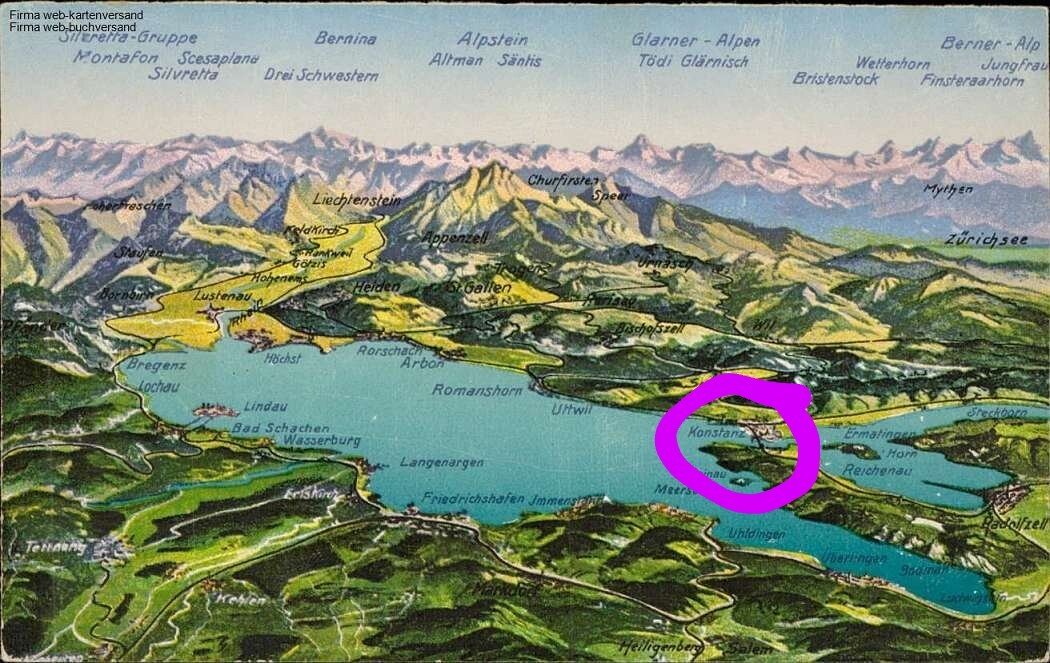



#Konstanz #Germany #PurpleKonnektiv
Great to be there!
Does NOSTR already have a standard to sign an event with multiple pubkeys?
say you have a post that is actually a collaboration between two authors
it's in their interest to reach out to both of their followers with the same event
rather than tagging, commenting, replying, they may like to BOTH sign the event, and for BOTH of their user bases to see the same event

Announcing npub.world 🌎, the most powerful profile search in nostr.
Powered by nostr:nprofile1qythwumn8ghj7un9d3shjtnswf5k6ctv9ehx2ap0qythwumn8ghj7un9d3shjtnwdaehgu3wvfskuep0qy2hwumn8ghj7un9d3shjtnyv9kh2uewd9hj7qgswaehxw309ajjumn0wvhxcmmv9uq3qamnwvaz7tmp9ehx7uewd3hkctcqyzc9vksdj5z80qglxhlhdevcrm0x02gydx5hlmkp8hqh7d3fph4luhfrueu relay and web of trust services, it allows you to find profiles and reputable followers so you can -finally!- find exactly who you are looking for.
Alpha version but quite solid and fast in our tests!
Try it out:
Awesome stuff 👏

I would counter, optimistically, that NOSTR allows anyone to have any number of identities. One being hacked does not mean that all are lost, more can be made, and old content remains accessible!

well, how exciting that you're there to see it! It always starts somewhere ;)

Hey folks! 👋 I’m Maligana, a dedicated ⚡ Bitcoin advocate from Tanzania 🇹🇿, exploring the limitless potential of decentralized money.
Right now, I’m soaking in the vibes at the Bali Timechamber 🌴✨, and guess what?
This wild guy nostr:nprofile1qqsx45yrjtgm4glklaafgz0z4309gs6cwfja3d99s8rqvlvgagcptpq6c3kna 🧠🔥 just convinced me to jump on Nostr—even though I actually downloaded Damus two years ago! 😆📲
Looking forward to connecting with like-minded Bitcoiners 🧡⚡ and exchanging ideas on the future of financial sovereignty!

Cool! Hello 👋 How's bitcoin adoption looking in Tanzania?
they are many steps ahead
Did you know
In India, people have been implementing Open Data protocols on massive scale?
Becknprotocol.io
they have open ride sharing for example
nammayatri.in