


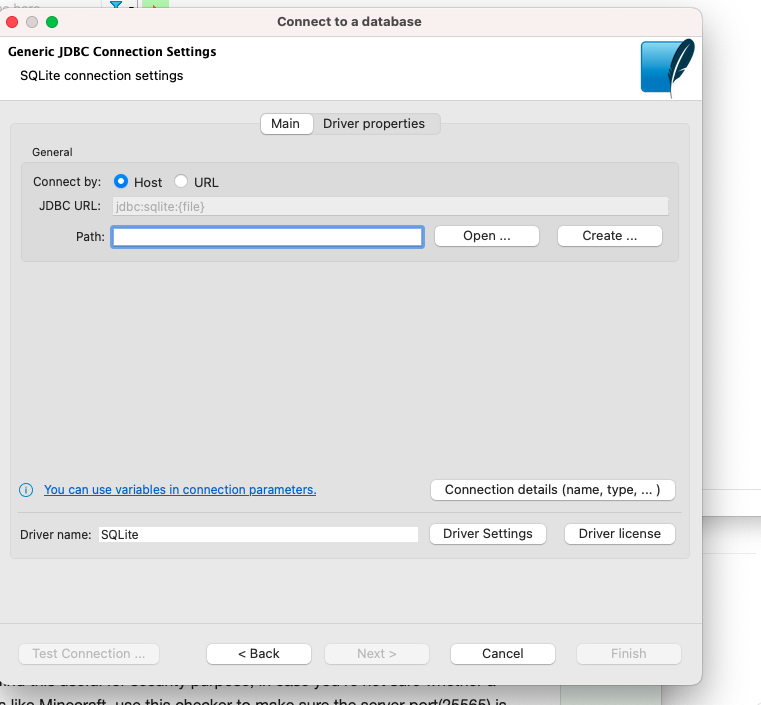
I think you can continue from point 6 on image
1. Make sure that SQLite is installed on the remote VM, and that the database file is accessible (e.g., in a shared directory).
2. Ensure that the VM is configured to allow incoming connections on the appropriate port (default is 1234).
3. Launch DBvear and create a new SQLite connection.
4. In the general tab, enter a name and specify the database file location in the "Database" field. If the database file is located on the remote VM, you'll need to provide the full path to the file on the VM.
5. In the "Driver properties" tab, specify the JDBC driver for SQLite.
6. In the connection setting tab, enter the IP address or hostname of the remote VM in tje "Host" field. If the database is accessible over a specific port, enter the port number. Also, enter the username and password for the VM if required.
7. Save and test ;)
Así es como me wiento ahora 🤣

¿Alguien que siga #eurovision?


Siempre es mejor tener dónde elegir, sin duda 😊
Totally true 😂




Usando #amethyst, ¿alguien sabe cómo reactivar la traducción automática? 🤔

😂😂 tal vez va siendo hora de comprar un router nuevo
GM! ☕⛅
console.log('testing status: ', status);

GM! ☀️☕
Me levanto, hago caffe mientras checkeo coinmarcketcap, seguido de #Nostr 📋✅
Sin ese caffe no soy persona 🤪
TODO List actualizada. Necesitaba poder tenerla en el móvil.
Change log:
- Ahora guarda los valores, podemos cerrar y/o refrescar y no perderemos la lista (en el mismo navegador).
- En caso de abrir con un móvil la lista se adapta a la pantalla.
- Literales e iconos
Si falla quitad la "s" de https, no tiene certificados
Necesitaba una lista de tareas y he creado esta en un momento:
zzlist.rf.gd
Por si a alguien le sirve de algo 😉 no descartemos actualizaciones 😂