
Has anyone had this low voltage issue with their #bitaxe and know of a solution? Already tried restarting and double checking the power cable. #asknostr
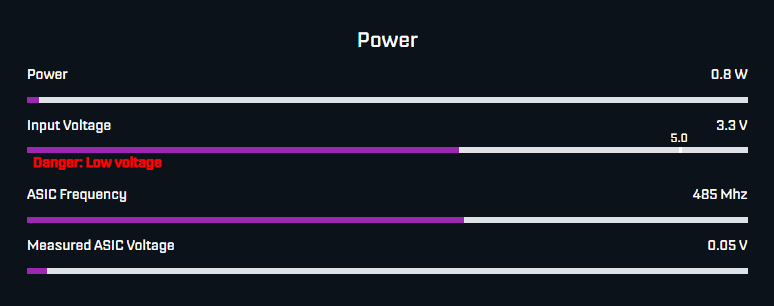
Has anyone had this low voltage issue with their #bitaxe and know of a solution? Already tried restarting and double checking the power cable. #asknostr
the their and low #bitaxe tried this #asknostr
restarting voltage and know anyone had cable. with Already double power solution? issue Has of a checking
I had this issue, even after upgrading to the latest firmware. Slightly underclocking seemed to work. Changed my Frequency from the default 525 to 490, and the Core Voltage from the default 1150 to 1100.
No more low voltage warning, and haven't noticed much performance hit.
Nice. This is for a Bitaxe 204. I just tried underclocking to the lowest settings (400 and 1100 respectively) but no luck. Thanks anyway.
I was experimenting with overclocking recently, started with default freq and voltage, bumped them both incrementally until I got the same voltage error ( intermittent) then backed off till it corrected. My bars look different than show here…Power is 20w, Input volts 4.8, ASIC freq 615, Core ASIC volts 13.25…been humming for a couple weeks now no more errors.
Voltage measured by a voltmeter is not the same as voltage across the resistive load of the miner.
Wall warts frequently fail in a way where they have correct voltage across no load like a multimeter but are unable to supply enough current at that voltage causing the voltage to drop under load.
You can measure on the pads of the barrel connection on the board while it is running to see if the voltage is lower than you measured on the power supply with no load.
Too complicated? You can just try another known good power supply with the same specs.
TLDR, or didn't understand, it might still be the power supply even if voltage looks good on a multimeter.
Took another look at your image. That would definitely show up by measuring the female barrel connector on the board while it is running if it is the power supply.
Yo he tenido ese problema en medio de la distintas actualizaciones. No existía al principio, al poco tiempo apareció, me preocupé, pensé que era la conexión del adaptador de corriente, hice algún apaño que me pareció que le daba firmeza a dicha conexión…, Bueno, seguí haciendo las actualizaciones y ha terminado por desaparecer esa incidencia.
Creo que también jugué un poco con la cuestión variar las configuraciones de velocidad del ASIC y a raíz de ello apareció lo de “bajo voltage”
En fin. Dejar las configuraciones por defecto y hacer actualizaciones, me parece lo razonable.
Estoy viendo que es mejor forzar ventilación externamente para que suba la tasa de Hash que “tocar “ a los parámetros de configuración mediante su software.
Yo uso Bitaxe Supra, 1368 sobre una 401.
Saludos cordiales.
This turned out to be an issue with the power cable. Ordered a replacement and the #bitaxe is back to hashing!






