Folks who have not yet done a notedeck test drive: you see these three + buttons.
What do you think they do? 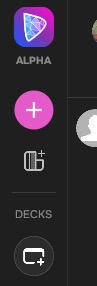
Folks who have not yet done a notedeck test drive: you see these three + buttons.
What do you think they do?
Asking the difficult questions 😅
call a lifeguard, quick!
city buildings with a twinkling star.
Jordi LaForge's visor with twinkling star.
Add another panel of some kind?
the "Decks" heading below with its own "+" add button makes me doubt that a bit... but maybe there is a difference between "decks" and "panels in a deck" - like multiple desktop spaces with many windows in each.
They are the same
I think people are just going to click em and find out but it's definitely a mystery from the icons alone.
1) create note
2) vertical view
3) horizontal view