
Chances are everyone here knows this, but in case you don’t, set your max charge level on devices to 80% to make your battery last longer.
Discussion

huh?
You don’t want to charge devices to 100% due to thermal stress from higher voltage. More wear and tear.

Yep. Using the feature on Pixel 9..

My phones have a setting specifically for this. It's called Battery Protection on Samsung. It stops charging when it gets to 85%. And on the newer phones it has a basic setting that cuts off at 85% and an advanced setting that sets the cutoff based on your particular useage patterns. So sometimes it could be 85%,snd other times it could 90-95%. It fluctuates. In any case, it's a smart thing to do especially if you anticipate using the phone for 3+ years. It's not as important if you're someone who gets a new phone every two years.
Here's the setting screen on my phone 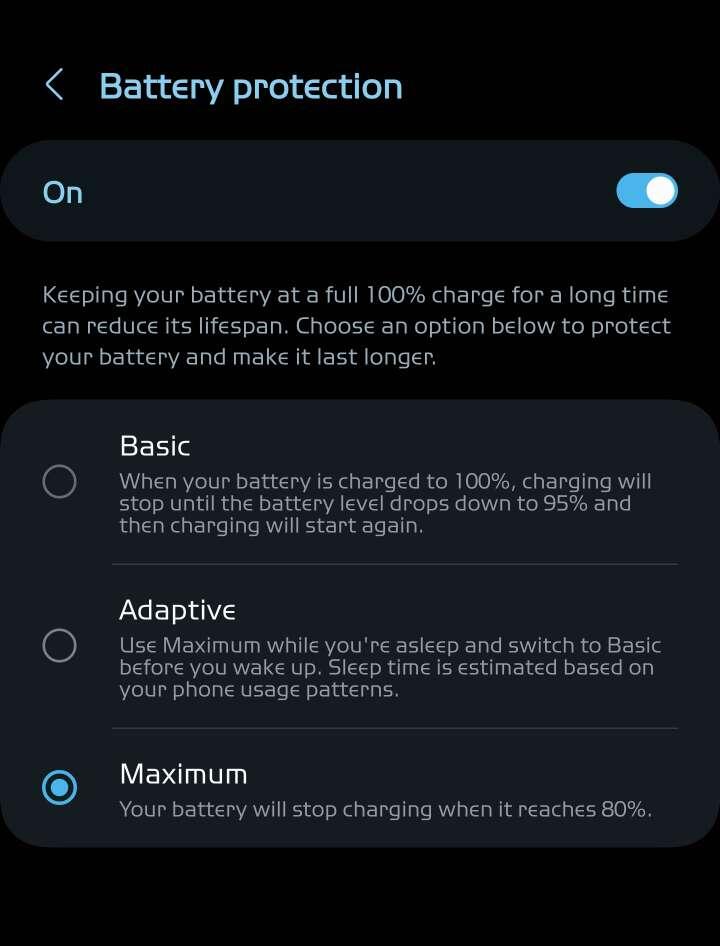
🙌

And charge before it gets below 30% (ish).
The only time I drop below 30% is if I'm out of the house for an extended time. I usually maintain 80-85% charge while I'm at home or work, and then charge to 100% right before I head out so I have a full charge when I'm out and about. If I'm away from home or work for a long time, dropping below 30% is a possibility. But it's pretty rare. I try not to be away from an outlet for such long periods of time. When I do return home, it gets charged back to the 80-85% level again. It's worked pretty well. I've got one device that I've been using for 5+ years and battery performance hasn't degraded.

#Android stock, #calyxOS and #grapheneOS do this automatically now 👍

Thank you! I just adjusted the settings on my Graphene Os

And start charging when the battery level drops to 20%.

today i learned… thanks kat