
iOS 18's New Game Mode Makes iPhones Faster and More Responsive

With iOS 18, Apple is adding Game Mode to iPhone. A similar Game Mode was added to macOS Sonoma last year, and the same performance-enhancing features apply, according to Apple.
When enabled, Game Mode optimizes the gaming experience by giving the game the highest priority access to your iPhone's processor, while lowering usage for background tasks.
Apple says Game Mode also improves the responsiveness of connected AirPods and game controllers by reducing input latency and audio latency.
There's nothing to set up with Game Mode – it turns on automatically when you launch a game or an app associated with a game, as indicated by a brief notification.
The feature is designed for AAA titles like Assassin's Creed Mirage and Resident Evil Village. Capcom announced on Monday that Resident Evil 7 is coming to iPhone, iPad, and Macs on July 2, providing another opportunity to see how the new Game Mode performs in iOS 18 and iPadOS 18.
Related Roundup: iOS 18
Tag: Game Mode
Related Forums: iOS 18, iPadOS 18
This article, "iOS 18's New Game Mode Makes iPhones Faster and More Responsive" first appeared on MacRumors.com
Discuss this article in our forums
https://www.macrumors.com/2024/06/13/ios-18-game-mode-faster-iphone/
Apple Reportedly Not Paying OpenAI to Use ChatGPT in iOS 18

Alongside its Apple Intelligence feature set, Apple on Monday announced a partnership with OpenAI that will allow Siri to access ChatGPT directly in iOS 18, iPadOS 18, and macOS Sequoia to provide better responses in relevant situations. But according to a new Bloomberg report, nobody is paying cash to anybody for the arrangement.
From Mark Gurman's report:
Apple isn't paying OpenAI as part of the partnership, said the people, who asked not to be identified because the deal terms are private. Instead, Apple believes pushing OpenAI's brand and technology to hundreds of millions of its devices is of equal or greater value than monetary payments, these people said.
Despite the agreement, the partnership for OpenAI could become expensive, as more and more Apple device users tap into ChatGPT's capabilities and suck up more of the company's compute power and budget.
However, Gurman notes that OpenAI could profit from the deal by encouraging Apple users to subscribe to ChatGPT Plus for $20 a month. If these users sign up through an Apple device, Apple may also be in a position to receive a commission.
Additionally, Apple plans to increase its earnings from AI through revenue-sharing agreements with its partners. According to the report, Apple is already discussing offering Google's Gemini chatbot as an additional option, an agreement that should be in place later this year.
Ultimately, Apple aims to take a portion of the revenue generated from monetizing chatbot results on its operating systems, anticipating that more users will rely on AI instead of search engines. Such a shift could eventually reduce the massive amounts of revenue Apple currently earns from its lucrative search deal with Google.
Tags: Bloomberg, ChatGPT, OpenAI
This article, "Apple Reportedly Not Paying OpenAI to Use ChatGPT in iOS 18" first appeared on MacRumors.com
Discuss this article in our forums
https://www.macrumors.com/2024/06/13/apple-not-paying-openai-chatgpt-ios-18/
Hackers Access Tile's Internal Tracking Tools, Customer Data
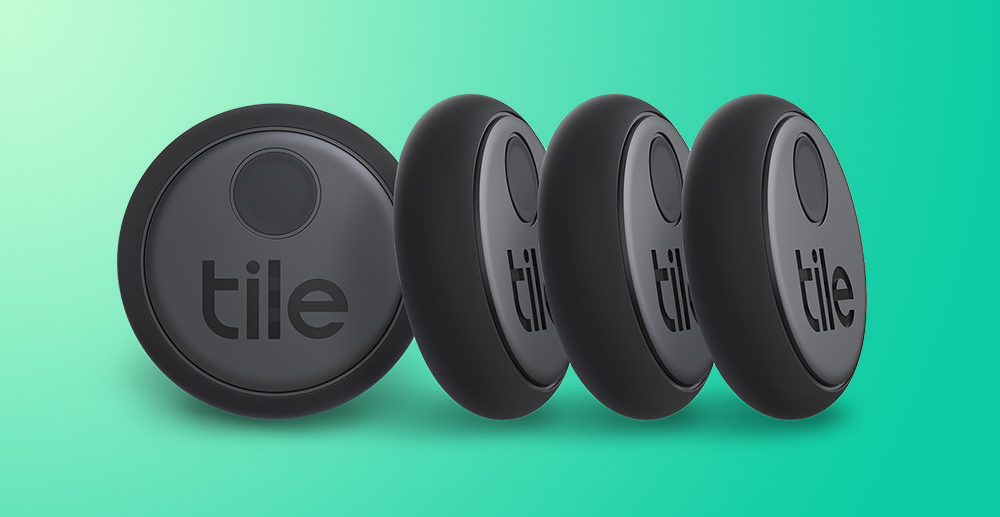
Tile, known for its Bluetooth tracking devices, was recently hacked, according to a report from 404 Media. A hacker was able to gain access to Tile's internal tools that are used for processing location data requests for law enforcement officers, and that gave the hacker customer names, addresses, email addresses, and phone numbers.
Data breaches are not uncommon these days, but Tile was not forthcoming about the attack and did not mention it until being contacted by 404 Media. The site learned about the breach from the hacker. Tile parent company Life360 published a statement about the attack on its website after being prompted to do so by 404 Media.
Similar to many other companies, Life360 recently became the victim of a criminal extortion attempt. We received emails from an unknown actor claiming to possess Tile customer information. We promptly initiated an investigation into the potential incident and detected unauthorized access to a Tile customer support platform (but not our Tile service platform). The potentially impacted data consists of information such as names, addresses, email addresses, phone numbers, and Tile device identification numbers. It does not include more sensitive information, such as credit card numbers, passwords or log-in credentials, location data, or government-issued identification numbers, because the Tile customer support platform did not contain these information types.
While no location information was obtained, the incident is alarming because of the nature of the tool that the hacker was able to access. The hacker was able to get into Tile's system using credentials from a former Tile employee, and was able to get into a tool that could be used to look up Tile customers by phone number. Part of that tool allowed for searching location history.
404 Media that the hacker would not have been able to access location data from the platform that was attacked, but did not confirm whether the hacker had the appropriate authentication to perform a location request once the internal tool was accessed.
This article, "Hackers Access Tile's Internal Tracking Tools, Customer Data" first appeared on MacRumors.com
Discuss this article in our forums
https://www.macrumors.com/2024/06/12/tile-hacked-customer-data-obtained/
iOS 18 Adds More Control Over Adaptive Audio on AirPods Pro 2
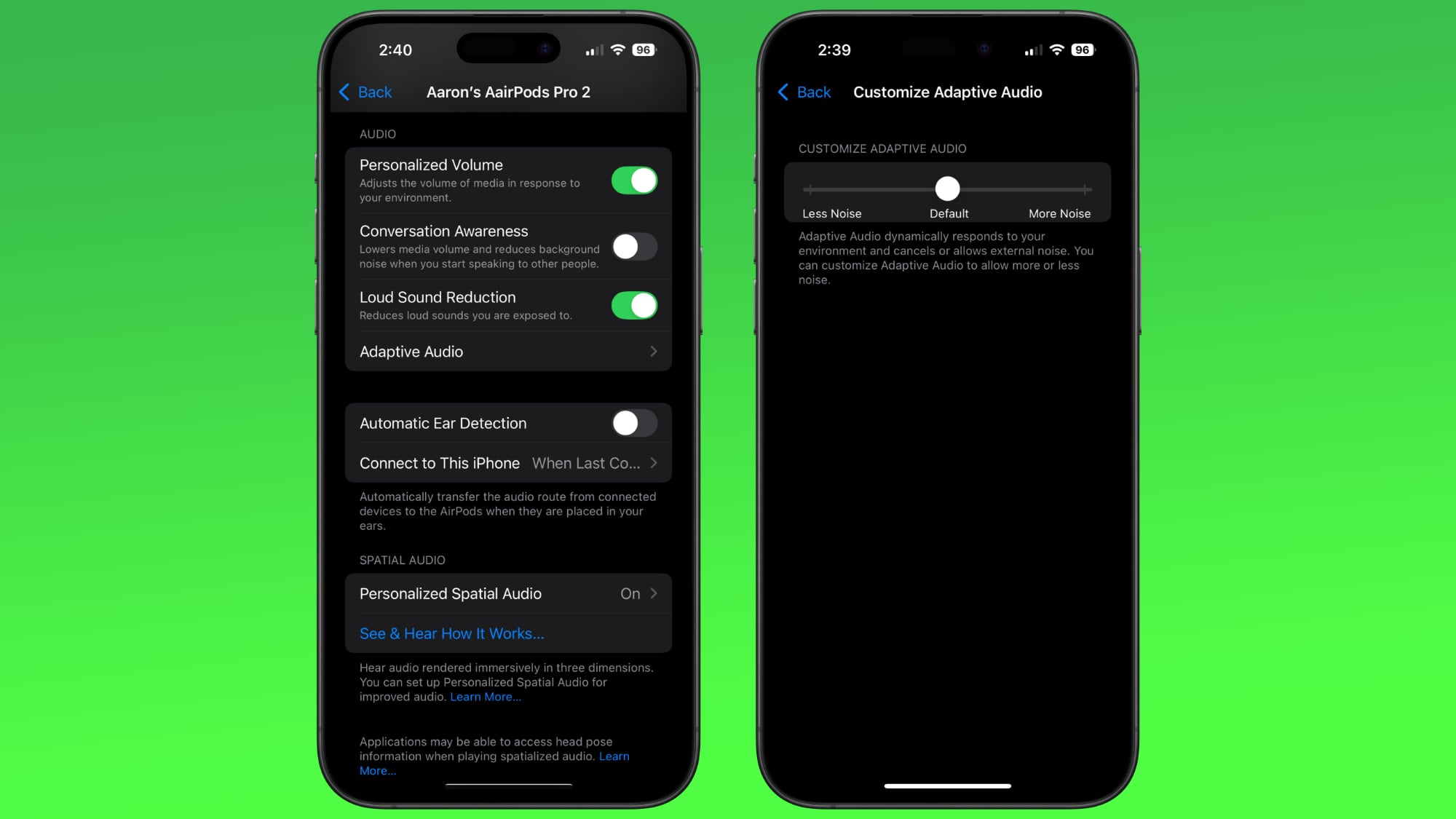
Apple's second-generation AirPods Pro have an Adaptive Audio feature that includes Adaptive Noise Control, Personalized Volume, and Conversation Awareness, which are all features that adjust sound and Active Noise Cancellation in response to the environment around you.
Right now, Adaptive Audio is an all or nothing setting, but that's set to change in iOS 18. Apple added a "Customize Adaptive Audio" menu that lets you adjust the setting to allow for more or less noise.
latest beta firmware are connected to an iPhone running iOS 18, you can open up the AirPods section of the Settings app to see a new Adaptive Audio section.
Tapping into it presents a slider bar where you can adjust Adaptive Audio for Less Noise or More Noise, impacting the Adaptive Audio settings. The feature will mostly apply to Adaptive Noise Control, a feature that blends Transparency and Active Noise Cancellation. It is designed to tweak the level of noise control based on changing conditions in the environment, so being able to set it to allow for more noise or less noise will come in handy.
The setting will also impact Personalized Volume, an option that adjusts the volume of the AirPods Pro 2 based on your personal volume preferences and environmental conditions.
macOS Sequoia.
Related Roundups: AirPods Pro, iOS 18
Buyer's Guide: AirPods Pro (Neutral)
Related Forums: AirPods, iOS 18, iPadOS 18
This article, "iOS 18 Adds More Control Over Adaptive Audio on AirPods Pro 2" first appeared on MacRumors.com
Discuss this article in our forums
https://www.macrumors.com/2024/06/12/ios-18-adaptive-audio-options/
Your iPhone 15 Can Show the Time When It's Out of Battery in iOS 18
The iPhone has had a Power Reserve function that holds back a small amount of battery life to allow features like Find My and NFC unlocking to work even when your device has died, and in iOS 18, Apple seems to be improving the feature further for the iPhone 15 models.
As demonstrated on Reddit, when the battery on an iPhone running iOS 18 is exhausted, the phone can continue to show the time in the upper left corner of the device, which is a small but useful upgrade. The battery icon still shows up, and you'll see "iPhone is Findable" while reserve battery is left.
It appears that this feature is limited to the iPhone 15 models. We tested on an iPhone 14 Pro Max and were not ale to get the time to show up, but it did work as expected with an iPhone 15 Pro Max.
Related Roundup: iOS 18
Related Forums: iOS 18, iPadOS 18
This article, "Your iPhone 15 Can Show the Time When It's Out of Battery in iOS 18" first appeared on MacRumors.com
Discuss this article in our forums
https://www.macrumors.com/2024/06/12/ios-18-time-no-battery-life/
Apple Maps Rivals AllTrails on iOS 18 With New Hiking Features in U.S.
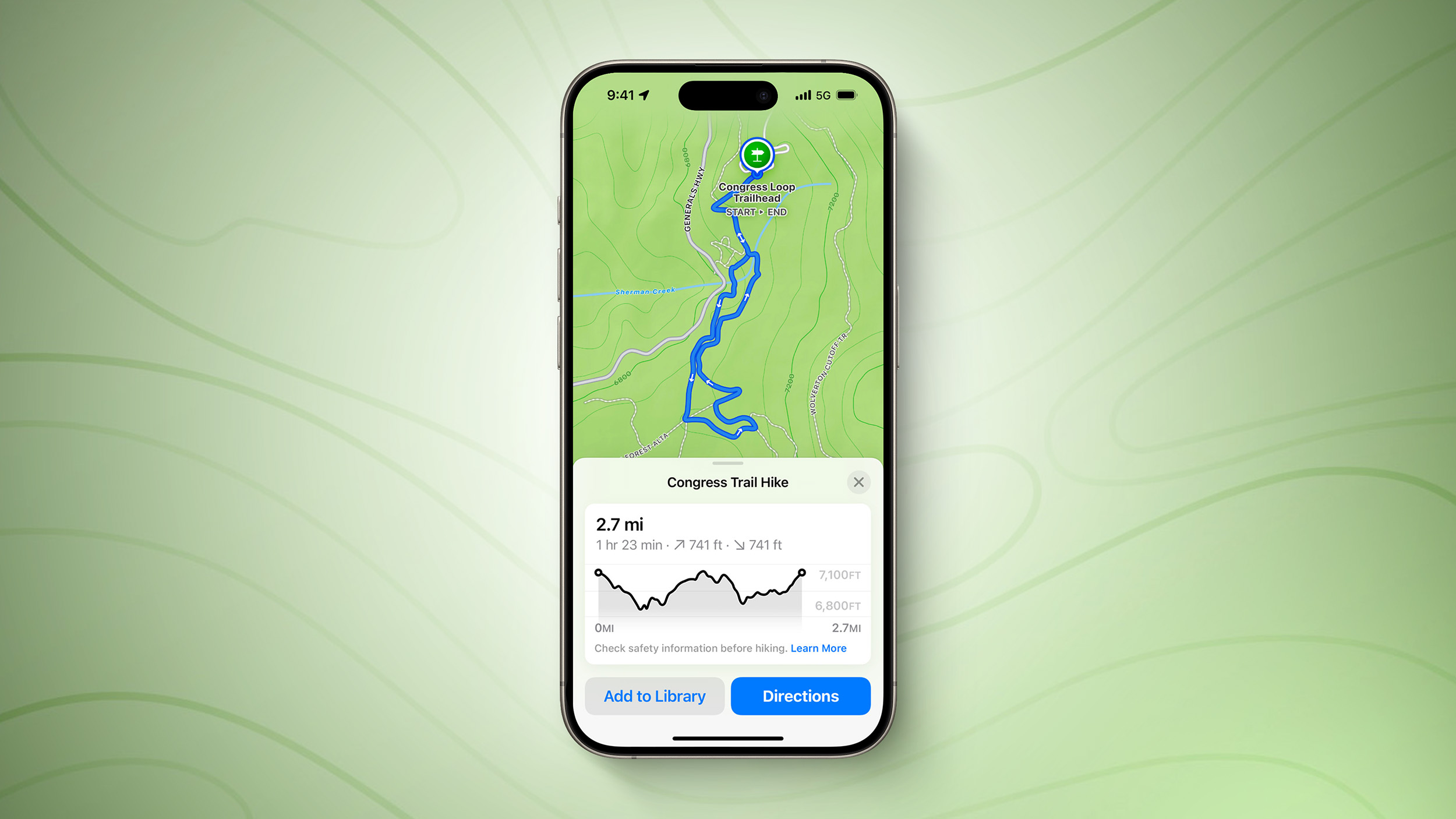
Just months after naming AllTrails the iPhone App of the Year in 2023, Apple has added new hiking features of its own to the Maps app on iOS 18.
Apple Maps users in the U.S. can browse thousands of hikes across all 63 national parks in the country, filtered by length, elevation, and route type. Users can also create and save their own custom walking and hiking routes, with one-way, out-and-back, and loop routing options to choose from where available.
Apple Maps added topographic maps on the Apple Watch with watchOS 10 last year, and these maps are now available on the iPhone too with iOS 18. Topographic maps and hikes can be saved for offline access with turn-by-turn voice guidance.
on Apple's website.
Apple Maps introduces even more ways to explore the world, including hikes and custom walking routes. Users can browse thousands of hikes across national parks in the United States — filtered by length, elevation, and route type — and save them to use while offline. Users can also create their own custom walking routes with just a few taps to plan everything from a local exercise route to a full-day walking tour in a new city. Additionally, they can save their favorite national park hikes, custom walking routes, and places to an all-new Places Library, and add personal notes about them.
MacRumors contributor Aaron Perris exclusively revealed that these features were coming to Apple Maps on the iPhone earlier this year.
Related Roundup: iOS 18
Tag: Apple Maps
Related Forums: iOS 18, iPadOS 18
This article, "Apple Maps Rivals AllTrails on iOS 18 With New Hiking Features in U.S." first appeared on MacRumors.com
Discuss this article in our forums
https://www.macrumors.com/2024/06/12/apple-maps-hiking-features-on-ios-18/
iOS 18 Will Let You Activate Third-Party Camera From iPhone's Lock Screen or Action Button

iOS 18 includes a new LockedCameraCapture framework for developers, which will bring some useful new functionality to third-party apps with camera features. The update will let a third-party camera app be opened directly from the Lock Screen.
The expansion of Control Center in iOS 18 allows for third-party apps to be added to Control Center for quick access, and Control Center integrates with both the Lock Screen and the Action button. With this integration, third-party camera apps such as Halide will be able to create a Control Center camera button, which can then be added to the Control Center and stored in the new Control Center gallery.
The Lock Screen's standard Camera and Flashlight quick access buttons can be replaced with other Control Center integrations, including third-party ones, plus the Action button can be set to a Control Center control. So the ultimate result of all of this interconnection is the option to have a quick access camera button for a third-party camera app on the Lock Screen, rather than being limited to Apple's built-in Camera.
iPhone is locked, mimicking the functionality that's available with the standard Camera app.
Use the LockedCameraCapture framework to create an extension that allows people to launch your app's camera experience and capture content quickly when the device is locked. This extension makes your camera experience accessible to people from Control Center, the Lock Screen, or the Action button.
The framework allows for a button that opens directly into the camera of an app, even if the camera is not the app's only feature. Instagram, Snapchat, TikTok, and similar social networks could use this option to create a Control Center camera button able to be added to the Lock Screen that will allow for the quick capturing of photos and videos that could then be uploaded after unlocking a device.
Note that this would not upload content directly, as there is wording in the framework that requires the iPhone to be unlocked to view or complete a task with the video or photo captured from a locked iPhone.
Home Screen.
Related Roundup: iOS 18
Tag: Apple Developer Program
Related Forums: iOS 18, iPadOS 18
This article, "iOS 18 Will Let You Activate Third-Party Camera From iPhone's Lock Screen or Action Button" first appeared on MacRumors.com
Discuss this article in our forums
https://www.macrumors.com/2024/06/12/ios-18-activate-camera-app-lock-screen/
iOS 18 Adds Control Center Options to Action Button on iPhone 15 Pro
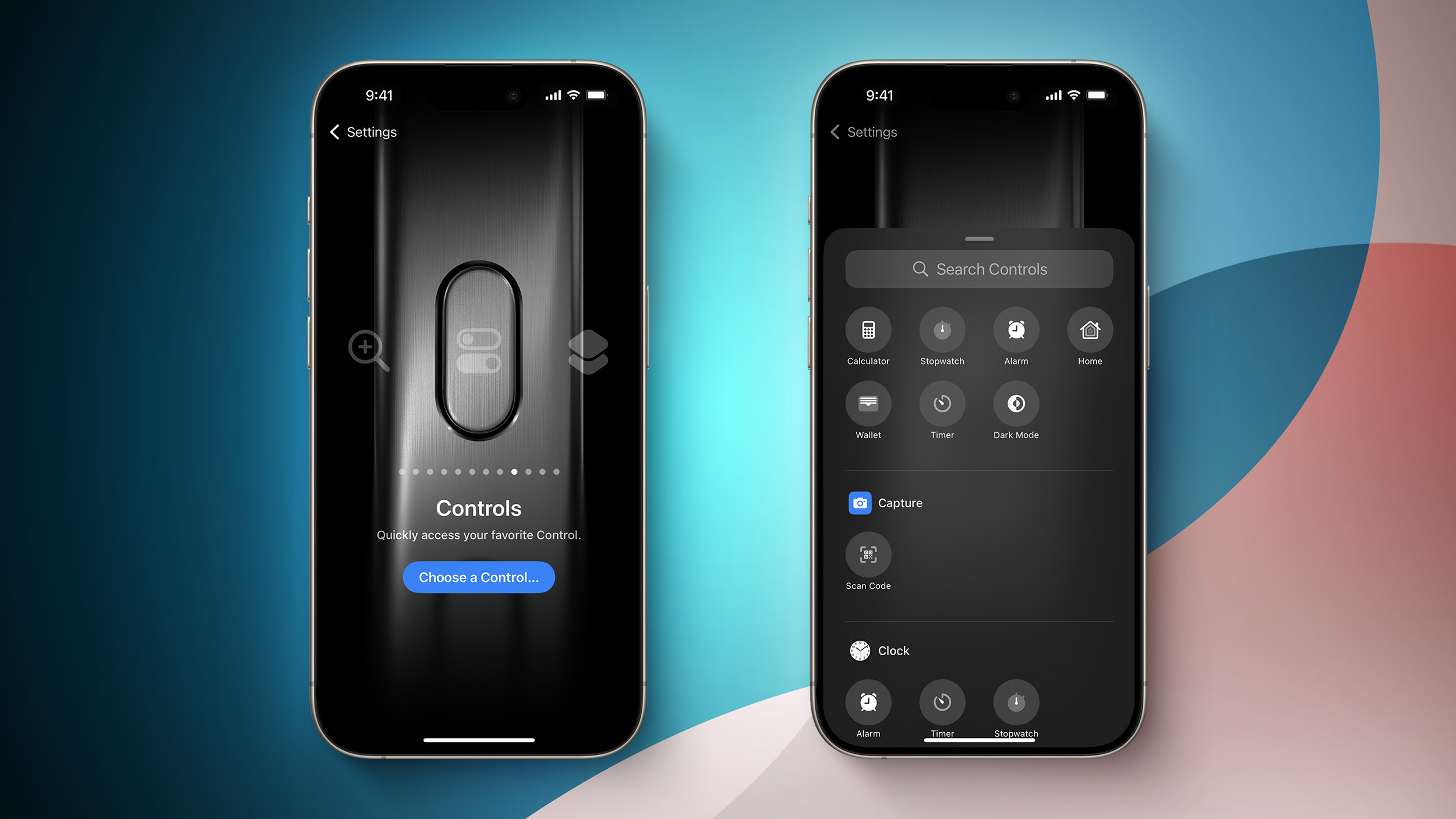
iPhone 15 Pro and iPhone 15 Pro Max models have an Action button in place of the Ring/Silent switch on older iPhones, and iOS 18 makes it even more useful.
Screenshot Credit: Aaron Perris
iOS 18 allows the Action button to be assigned to one of the dozens of controls available in the new Control Center gallery, allowing the Action button to invoke Dark Mode, Low Power Mode, Airplane Mode, Personal Hotspot, Screen Mirroring, Screen Recording, Orientation Lock, the virtual Apple TV Remote, Shazam, and much more.
These new options are in addition to the previous actions that were already available for the Action button on iOS 17, including Ring/Silent, Do Not Disturb, Camera, Flashlight, Voice Memo, Magnifier, Translate, Shortcut, and Accessibility. Some of the new Control Center options were already possible with the Shortcut or Accessibility options.
expanded to all four iPhone 16 models later this year, so these new controls will come to even more devices.
Related Roundup: iOS 18
Tag: Action Button
Related Forums: iOS 18, iPadOS 18
This article, "iOS 18 Adds Control Center Options to Action Button on iPhone 15 Pro" first appeared on MacRumors.com
Discuss this article in our forums
https://www.macrumors.com/2024/06/12/ios-18-control-center-options-action-button/
Tim Cook Discusses Apple Intelligence and More in Videos With iJustine and MKBHD

Following the WWDC keynote on Monday, Apple CEO Tim Cook discussed Apple Intelligence and more with popular tech content creators Justine Ezarik (iJustine) and Marques Brownlee (MKBHD), and the interviews are now available to watch on YouTube.
Cook touched on how Apple Intelligence features are designed to improve the lives of customers, with strong privacy safeguards in place.
Apple Intelligence features will allow users to summarize text, create custom emoji and images, receive priority notifications, and more. Siri is also getting smarter with Apple Intelligence, with richer language understanding and more per-app controls. These features will require an iPhone 15 Pro or newer, or a Mac or iPad with an M1 chip or newer.
later this summer.
Tags: Tim Cook, Apple Intelligence
This article, "Tim Cook Discusses Apple Intelligence and More in Videos With iJustine and MKBHD" first appeared on MacRumors.com
Discuss this article in our forums
https://www.macrumors.com/2024/06/12/tim-cook-apple-intelligence-interviews/
iOS 18 Actively Recommends Charging Limit Based on iPhone 15 Usage
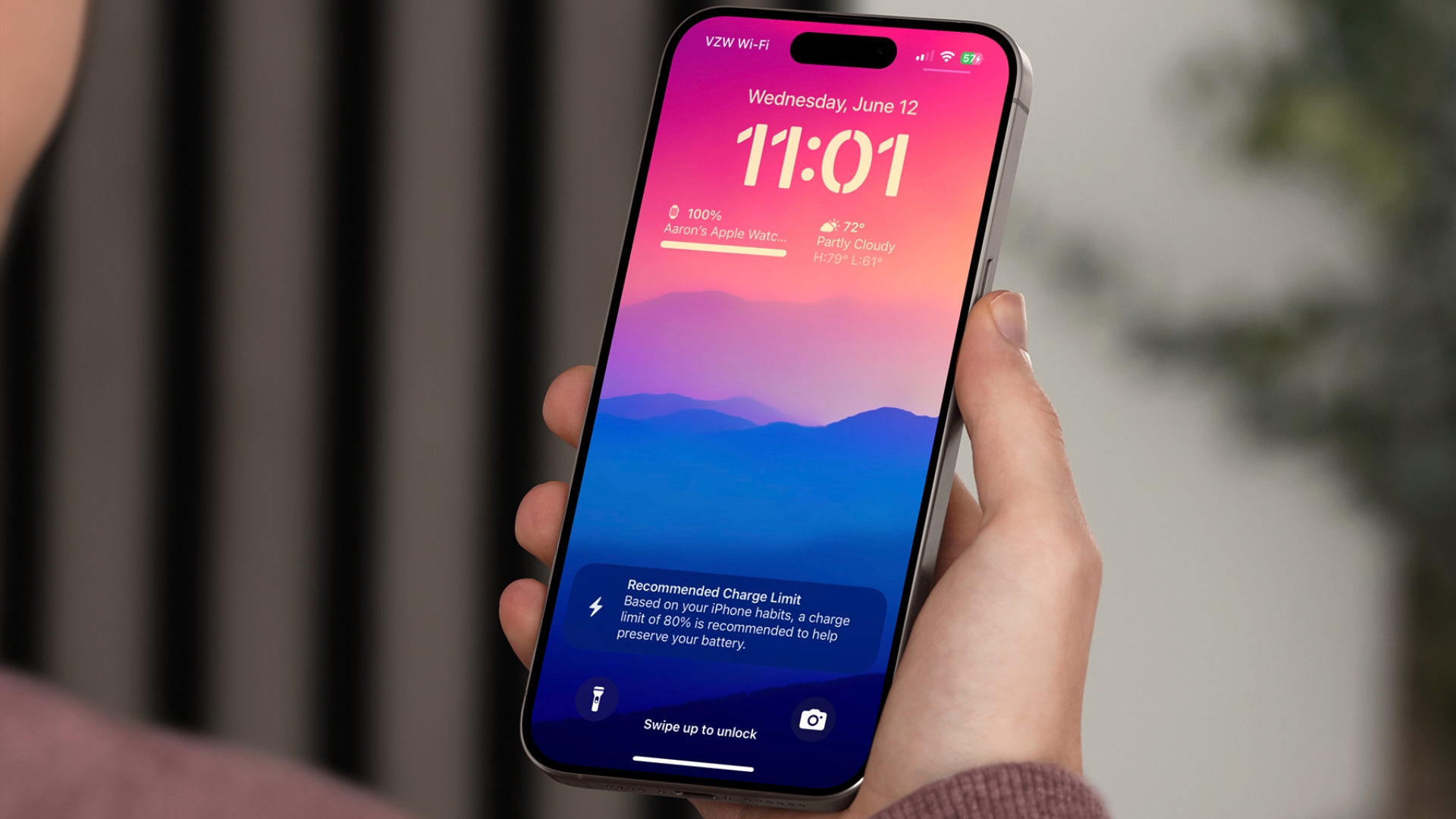
On iPhone 15 models, iOS 18 will recommend that users set a particular charging limit for their device based on their recent usage habits, with the aim of potentially improving their iPhone battery's lifespan by reducing the time that the battery is fully charged.
All four iPhone 15 models feature a setting that prevents the devices from charging beyond 80% while toggled on, and iOS 18 expands the feature by adding new 85%, 90%, and 95% charging limit options. With the new limit options, iOS 18 now takes a proactive approach to improving battery longevity by recommending a specific charging limit to users via a notification.
The recommendation also appears in the Settings app under Battery → Charging. The charging limit feature remains exclusive to the iPhone 15 lineup on the first iOS 18 beta, with the option not found on the iPhone 14 Pro or older.
In a related change, anecdotal reports suggest that iOS 18 could be recalibrating some devices' maximum battery capacity percentage. In Settings ➝ Battery ➝ Battery Health, "Maximum Capacity" is a measure of battery capacity relative to when the device was new. Lower capacity can result in fewer hours of usage between charges.
How to Get the iOS 18 Developer Beta on Your iPhone
Related Roundup: iOS 18
Related Forums: iOS 18, iPadOS 18
This article, "iOS 18 Actively Recommends Charging Limit Based on iPhone 15 Usage" first appeared on MacRumors.com
Discuss this article in our forums
https://www.macrumors.com/2024/06/12/ios-18-charging-limit-recommendations/
Amazon's New Sale Has Big Savings on AirPods and Beats Headphones
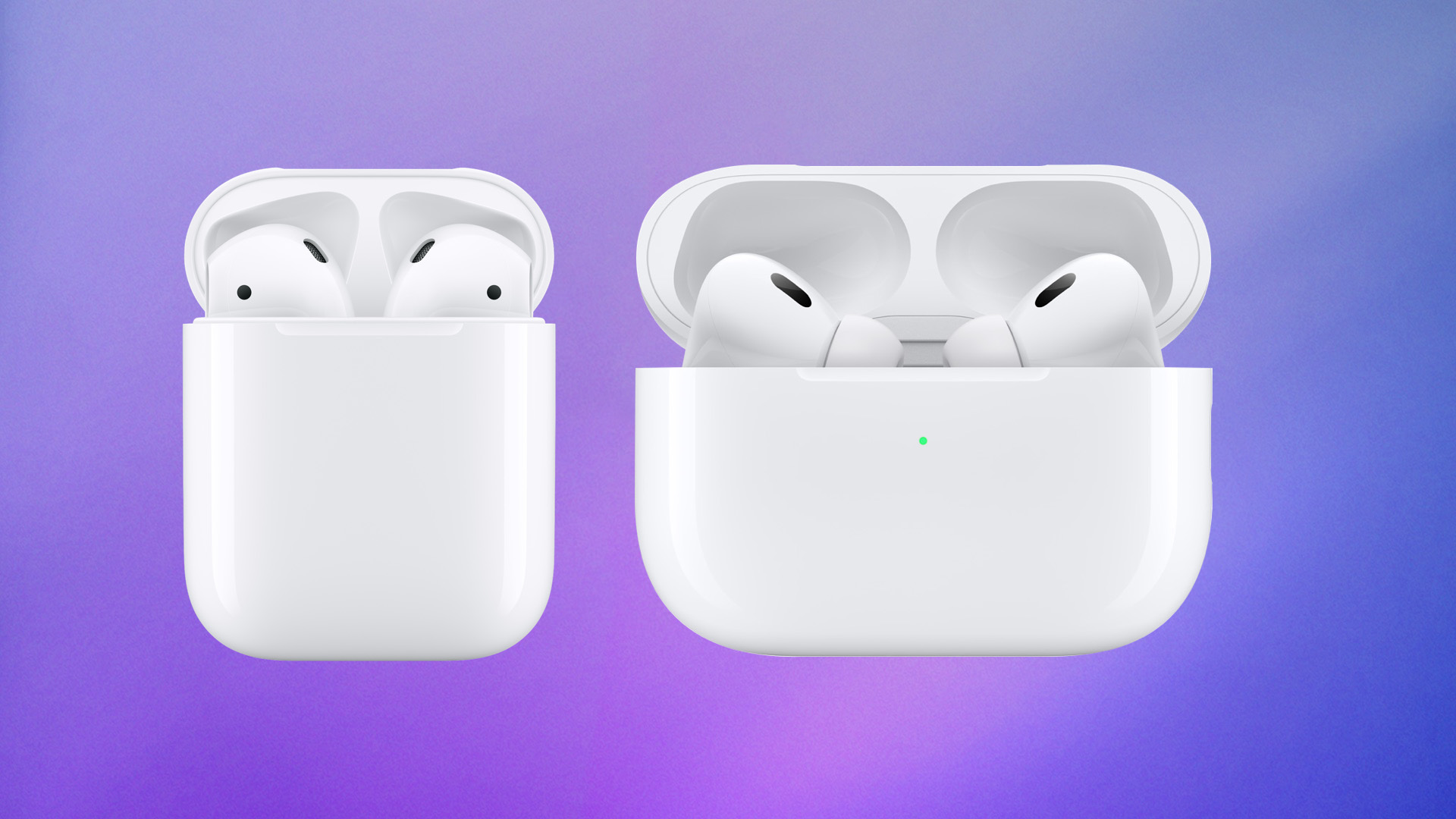
Amazon has nearly every AirPods model on sale this week, with two versions hitting their all-time low price. Additionally, we're tracking solid deals on a few Beats headphones, including $70 off the new Beats Solo 4 and $170 off the Beats Studio Pro.
AirPods
Note: MacRumors is an affiliate partner with Amazon. When you click a link and make a purchase, we may receive a small payment, which helps us keep the site running.
$79.99 for the AirPods 2, down from $129.00 and about $10 cheaper than the last time we tracked this deal.
$49 OFF
AirPods 2 for $79.99
$189.99, down from $249.00, and the AirPods Max for $449.00, down from $549.00. The latter model is available at this price in all five colors: Space Gray, Silver, Sky Blue, Pink, and Green.
$59 OFF
AirPods Pro 2 (USB-C) for $189.99
$100 OFF
AirPods Max for $449.00
Beats
$129.95, down from $199.99. These headphones launched at the end of April and feature upgraded performance and fit, longer battery life, USB-C, 50 hours of playback, and more.
$179.95, down from $349.99. Amazon has this big discount available in all four colors of the headphones, with delivery available as soon as this Friday, June 14 for Prime members.
Beats Studio Buds - $79.99, down from $149.95
Beats Solo 4 - $129.95, down from $199.95
Beats Fit Pro - $159.95, down from $199.95
Powerbeats Pro - $159.95, down from $249.95
Beats Studio Pro - $179.95, down from $349.99
If you're on the hunt for more discounts, be sure to visit our Apple Deals roundup where we recap the best Apple-related bargains of the past week.
Related Roundup: Apple Deals
This article, "Amazon's New Sale Has Big Savings on AirPods and Beats Headphones" first appeared on MacRumors.com
Discuss this article in our forums
https://www.macrumors.com/2024/06/12/amazons-savings-airpods-beats/
Safari 18 Features: Highlights, New Reader Mode, and Video Viewer
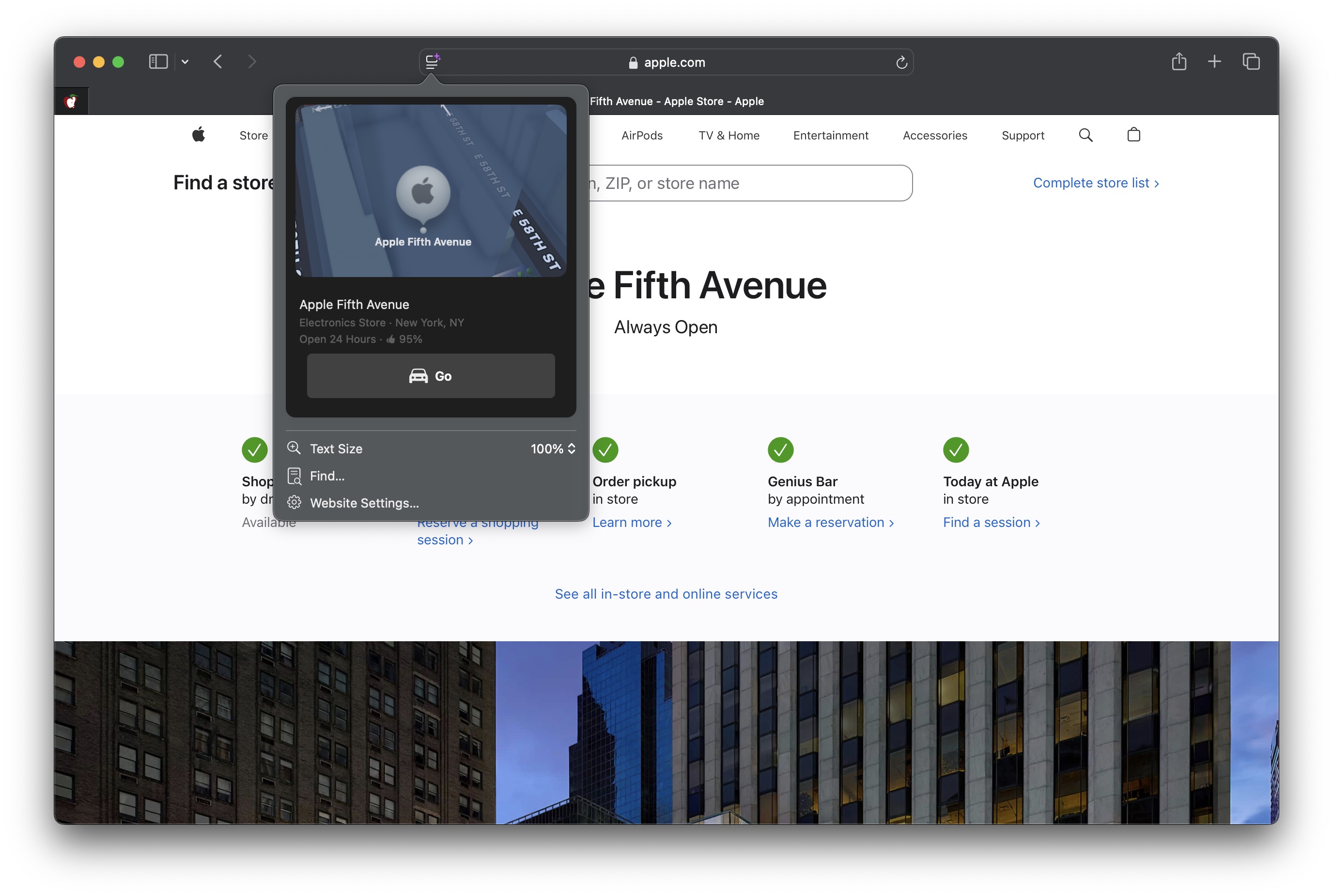
In macOS Sequoia, Apple has some additional features in Safari 18 that are likely to be welcomed by Mac users. Here's a quick rundown of what's new.
Safari's headline feature in macOS 15 is something called Highlights, which aims to make it easier to discover information on the web.
Highlights can be accessed via a new site menu icon that appears in the address bar, from which you can quickly pull up relevant information about a site, such as directions, summaries, or quick links to learn more about people, music, movies, and TV shows.
As of writing this, Highlights does not appear to work outside of the United States, so it is likely to be region-specific at this early state. However, there are other changes to Safari that are live wherever you are located.
The Reader mode in Safari has received an overhaul, and now offers more customization options once you have enabled it on a site using the Reader button in the address bar.
If you click the button again, a dropdown menu lets you change the theme (white, off-white, gray, black) and choose your preferred font (Athelas, Charter, Georgia, Iowan, New York, Palatino, San Fransisco, Seravek, and Times New Roman).
In this menu, you can also find text size options by percentage (from 50% to 300%), as well as a "Find..." option to find a word or phrase on a page, and a button to Hide Reader mode.
Apple Intelligence, which will not be introduced until later in the year.
Meanwhile, when Safari detects a video on the page, a new Video Viewer mode puts the media front and center, which allows you to adjust the window without obscuring the video. It also helpfully presents system playback controls within an overlay, including Picture in Picture.
In other Safari-related changes, macOS Sequoia beta adds support for opening links directly in web apps. Now, when you click a link, that link should open in the web app instead of your default web browser. You can also now personalize web apps on Mac with Safari Web Extensions and Content Blockers.
visionOS, macOS Sequoia and macOS Sonoma brings inline predictive text to the web, and you can now set which Safari profile should be used to open particular websites.
Related Roundup: macOS Sequoia
Tag: Safari
Related Forum: macOS Sequoia
This article, "Safari 18 Features: Highlights, New Reader Mode, and Video Viewer" first appeared on MacRumors.com
Discuss this article in our forums
https://www.macrumors.com/2024/06/12/safari-18-highlights-new-reader-mode-video-viewer/
Apple Passes Microsoft to Become World's Most Valuable Company Again

Apple's stock price continues to surge following its WWDC keynote this week, where it introduced an Apple Intelligence suite of AI features coming to the iPhone, iPad, and Mac. In intraday trading today, Apple overtook Microsoft to become the world's most valuable company again, but the two tech giants may trade places throughout the day.
Apple had a market cap of $3.28 trillion as of writing, compared to $3.25 trillion for Microsoft.
Tag: AAPL
This article, "Apple Passes Microsoft to Become World's Most Valuable Company Again" first appeared on MacRumors.com
Discuss this article in our forums
https://www.macrumors.com/2024/06/12/apple-is-the-worlds-most-valuable-company-again/
iOS 18 Lock Screen Multicolor Clock Option Likely Coming to Widgets
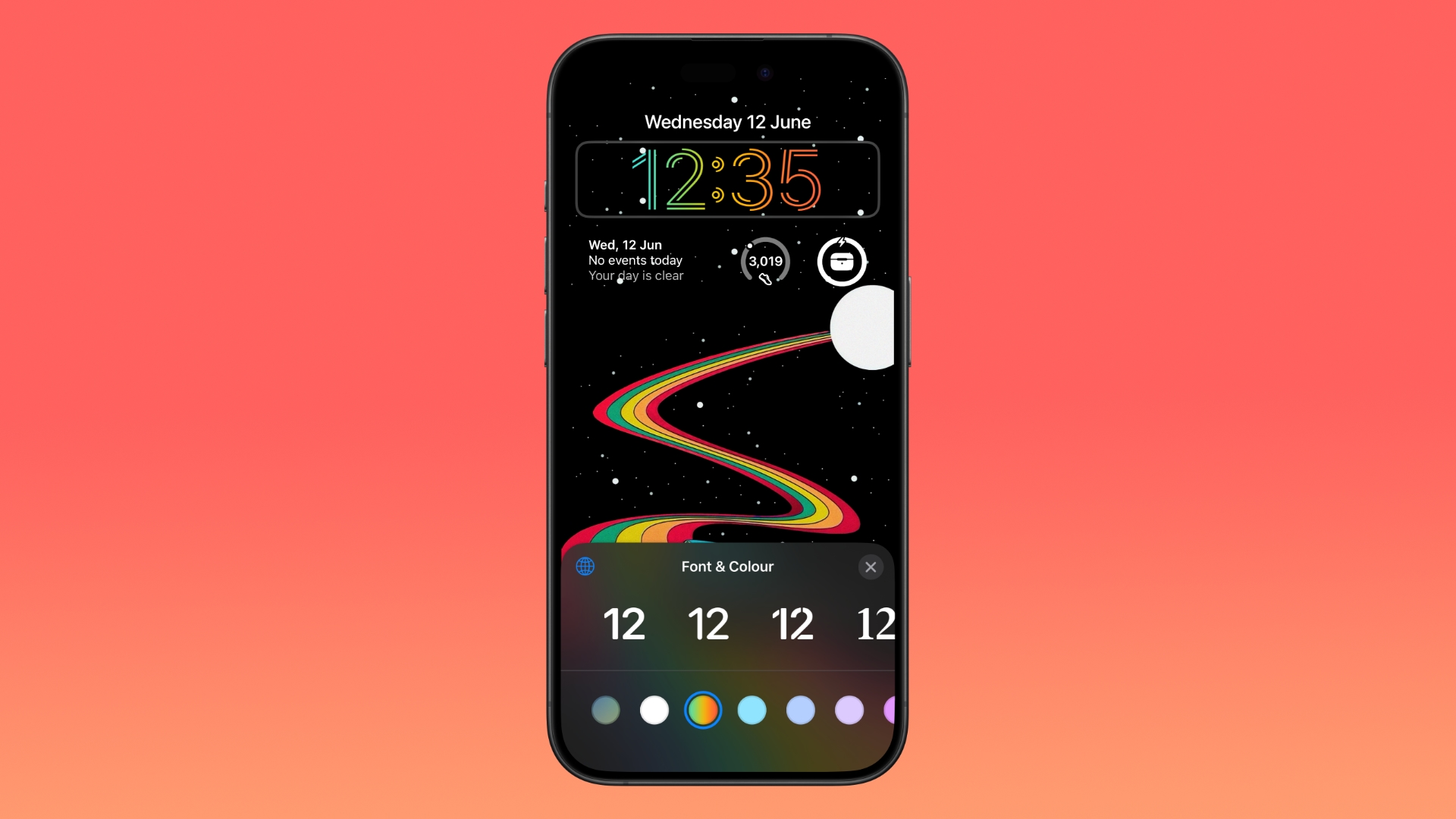
Apple in iOS 18 has added a new multicolor swatch to the Font & Color customization options on the Lock Screen, so now you can display the time in rainbow colors against your chosen wallpaper.
Unlike the other color swatches, the multicolor option does not currently apply to widgets and the date, which stay white when the rainbow effect is applied. However, this is likely to be a bug or something Apple intends to implement but has not yet got around to doing so in the developer beta.
iOS 18 also allows users to change the two shortcut buttons on the Lock Screen to an action of their choice for the first time.
Related Roundup: iOS 18
Related Forums: iOS 18, iPadOS 18
This article, "iOS 18 Lock Screen Multicolor Clock Option Likely Coming to Widgets" first appeared on MacRumors.com
Discuss this article in our forums
https://www.macrumors.com/2024/06/12/ios-18-lock-screen-multicolor-clock-option/
macOS Sequoia: How Window Tiling Currently Works
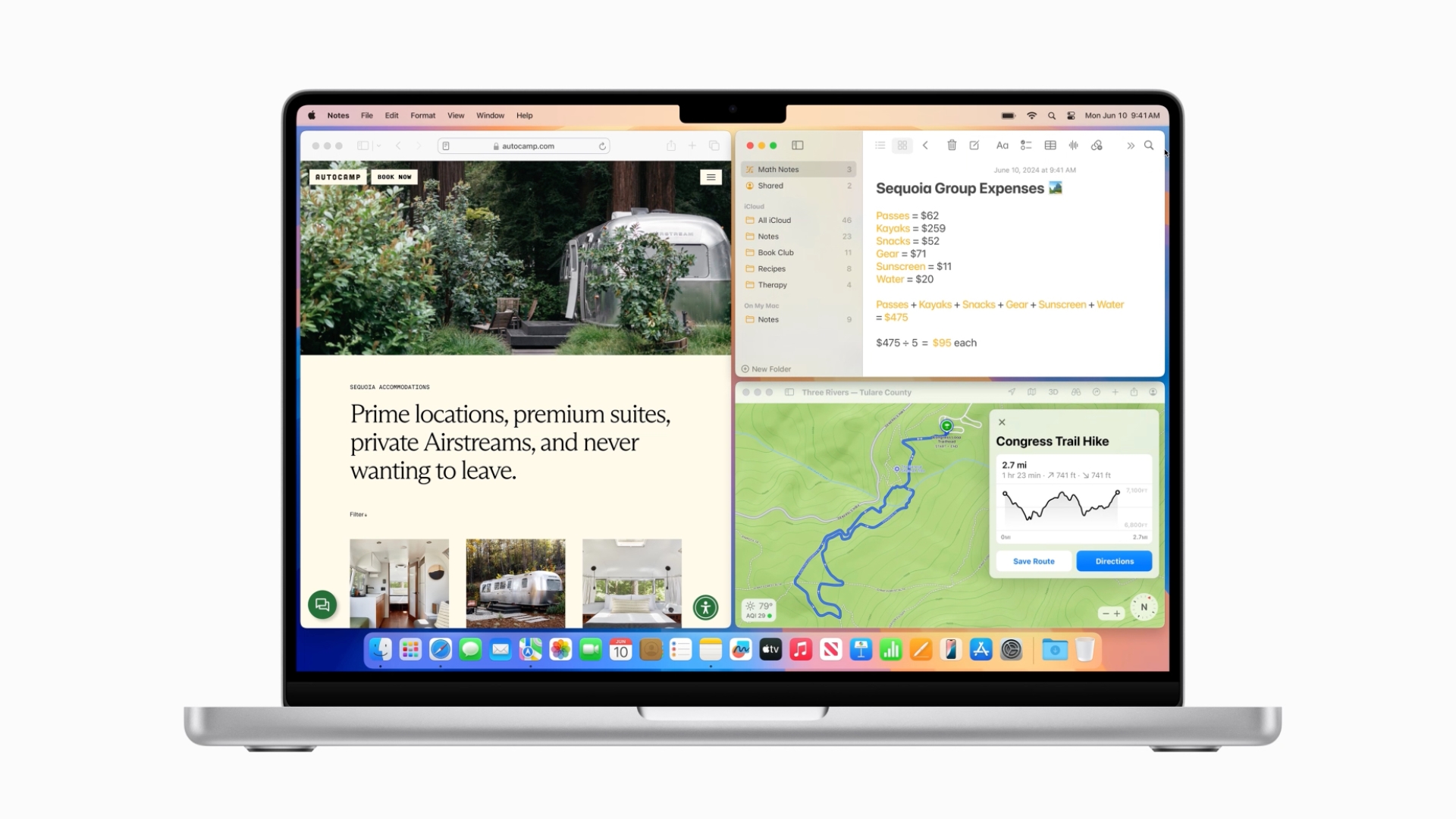
With macOS Sequoia, Apple has introduced a new window tiling management feature that aims to make it easy to arrange open windows into a layout that works best for you.
PC users have had tiling since at least Windows 7 and Aero Snap, and if you've ever used those, the new window tiling feature in macOS Sequoia will be familiar. In the absence of the feature, Mac users have relied on several third-party tools like Magnet, Moom, and Rectangle to achieve similar results, but as things stand, in beta 1, window management in macOS still needs some work before it can approach the utility of those apps.
When you drag a window to the edge of the screen, macOS Sequoia suggests a tiled position by displaying a frame, and you release the window to drop it right into place. This way, you can quickly arrange two app windows side by side, or place four windows in corners to keep several apps in view at once. When a window has been dragged to tile on one side or the other, dragging it back immediately resizes it to its original width and height, which is a nice touch.
The dragging system is far from infallible though. If you drag a window to the side of the screen and hold it for more than a couple of seconds, you can sometimes unintentionally switch to an adjacent desktop space if one is active. It can also be quite tricky to place certain app windows so that they snap to corners.
Also, some apps by design will not reduce down beyond a certain size, so you can end up with tiled windows overlapping each other or falling off the screen. If you have a group of apps that play nice together when tiled, the tiling system can leave unsightly gaps between the windows where the desktop wallpaper is exposed, but there's a setting that can rectify this.
In System Settings, you'll find tiling options in a new section in the Desktop & Dock menu. For example, tiling can be activated by holding the Option key while dragging windows. You can also toggle off "Tiled windows have margins," which reduces gaps between windows.
Image credit: MacRumors forum member Danbalsh
macOS 15 also adds new tiling options to the green traffic light in the top corner of windows. Hover your pointer over the green button, and a menu appears with options to move and resize or fill and arrange all open windows. These options generally seem to work better than the drag-to-snap tiling system in its current state.
Related Roundup: macOS Sequoia
Related Forum: macOS Sequoia
This article, "macOS Sequoia: How Window Tiling Currently Works" first appeared on MacRumors.com
Discuss this article in our forums
https://www.macrumors.com/2024/06/12/macos-sequoia-window-tiling/
Alogic Unveils 5K 27-Inch Touchscreen Display and More
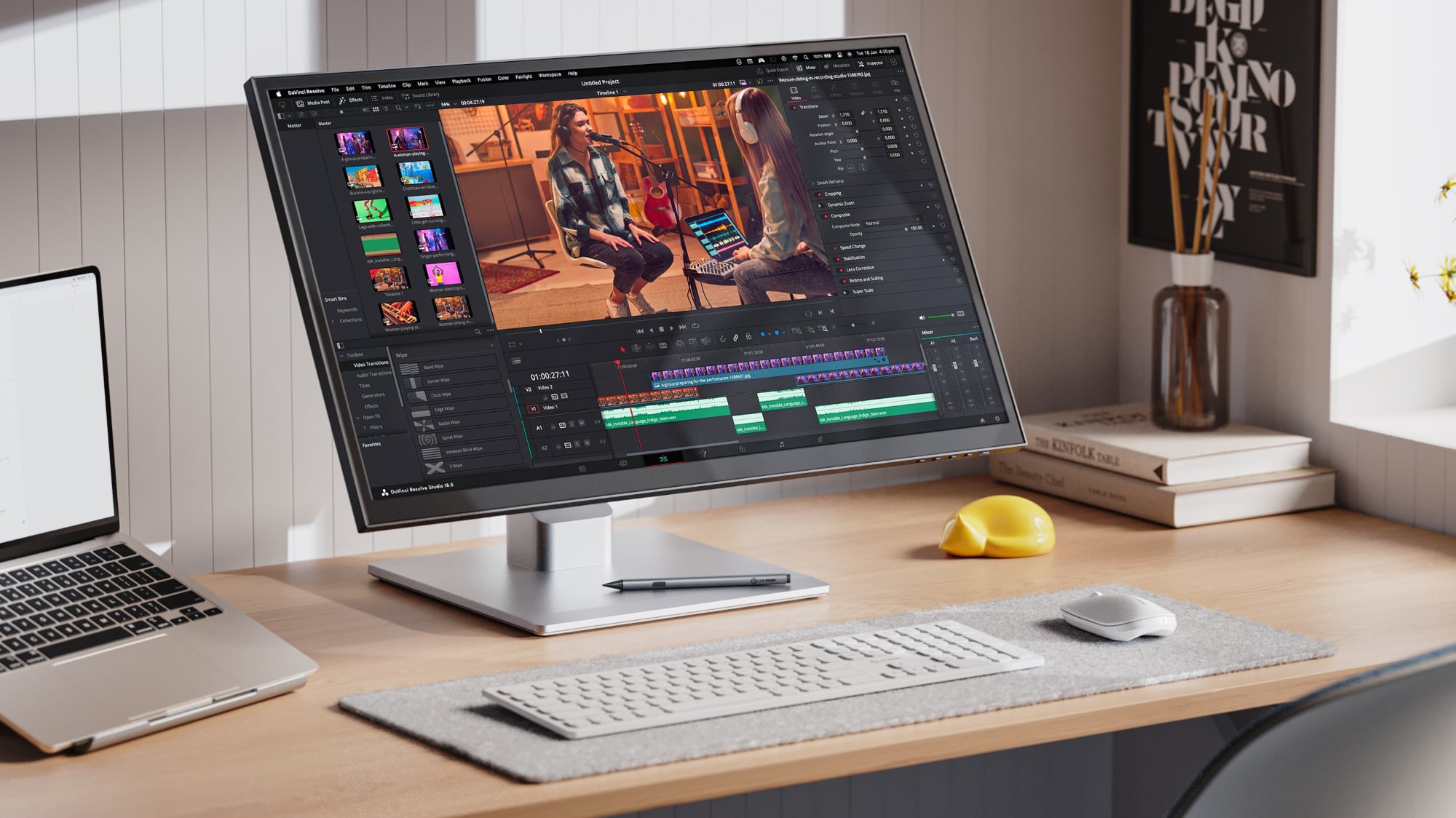
Alogic today introduced several new display options that it plans to ship out later in 2024, including a 5K 27-inch touchscreen display, several ultrawide displays, and portable touchscreen monitors.
The Clarity Touch 5K 27" UHD Monitor has a resolution identical to that of the Studio Display or the LG UltraFine 5K, but with the added benefit of touch integration. We previously reviewed a pair of 4K Clarity displays with touchscreen capabilities and found the touchscreen to be useful in certain circumstances for scrolling through websites, accessing controls, and performing simple tasks in apps. The touchscreen can be interacted with using a finger or a stylus.
Alogic's 5K touchscreen display supports HDR 400, is able to charge a connected Mac at up to 65 watts over USB-C, and it includes several connectivity options. There are two HDMI 2.1 ports, a DisplayPort 1.4 port, a USB-C port, two USB-A ports with 7.5-watt charging for accessories and 5 Gb/s data transfer speeds, and a 3.5 mm audio jack. Slim bezels maximize display area and there is an adjustable stand that works in either landscape or portrait orientation.
There are also three new ultrawide displays coming from Alogic, including the 34-inch Edge Ultrawide QHD Monitor, the 40-inch Ultrawide QHD Monitor, and the 34-inch Horizon Ultrawide QHD Touchscreen. The two Edge displays each have a 3440x1440 resolution and a slim design that prioritizes aesthetics, while the Horizon has a 3440x1440 touch display and a foldable stand so that it can be converted into a tablet mode.
For extra display space on the go, Alogic has also introduced the Xtend 15.6-inch and Xpand 17-inch Portable 5K Touchscreen Monitors, both of which have a tablet-like design and a cover that folds out into a small stand. Pressure-sensitive stylus input is supported, with Alogic aiming these displays at artists and traveling workers.
Alogic's final new display, the Slate 28-inch Double Vertical QHD Monitor, has a 16:18 resolution and it looks like two 2560x1440 resolution displays stacked vertically. It is ideal for web browsing, coding, and similar applications, and Alogic says it works well as secondary display.
The two Edge displays will launch next month, while the rest of the display options are set to come out in September 2024. More information can be found on the Alogic website.
Tag: Alogic
This article, "Alogic Unveils 5K 27-Inch Touchscreen Display and More" first appeared on MacRumors.com
Discuss this article in our forums
https://www.macrumors.com/2024/06/12/alogic-5k-touchscreen-display/
iOS 18 Photos App Adds New Utilities Categories for Finding QR Codes, Receipts, Illustrations and More
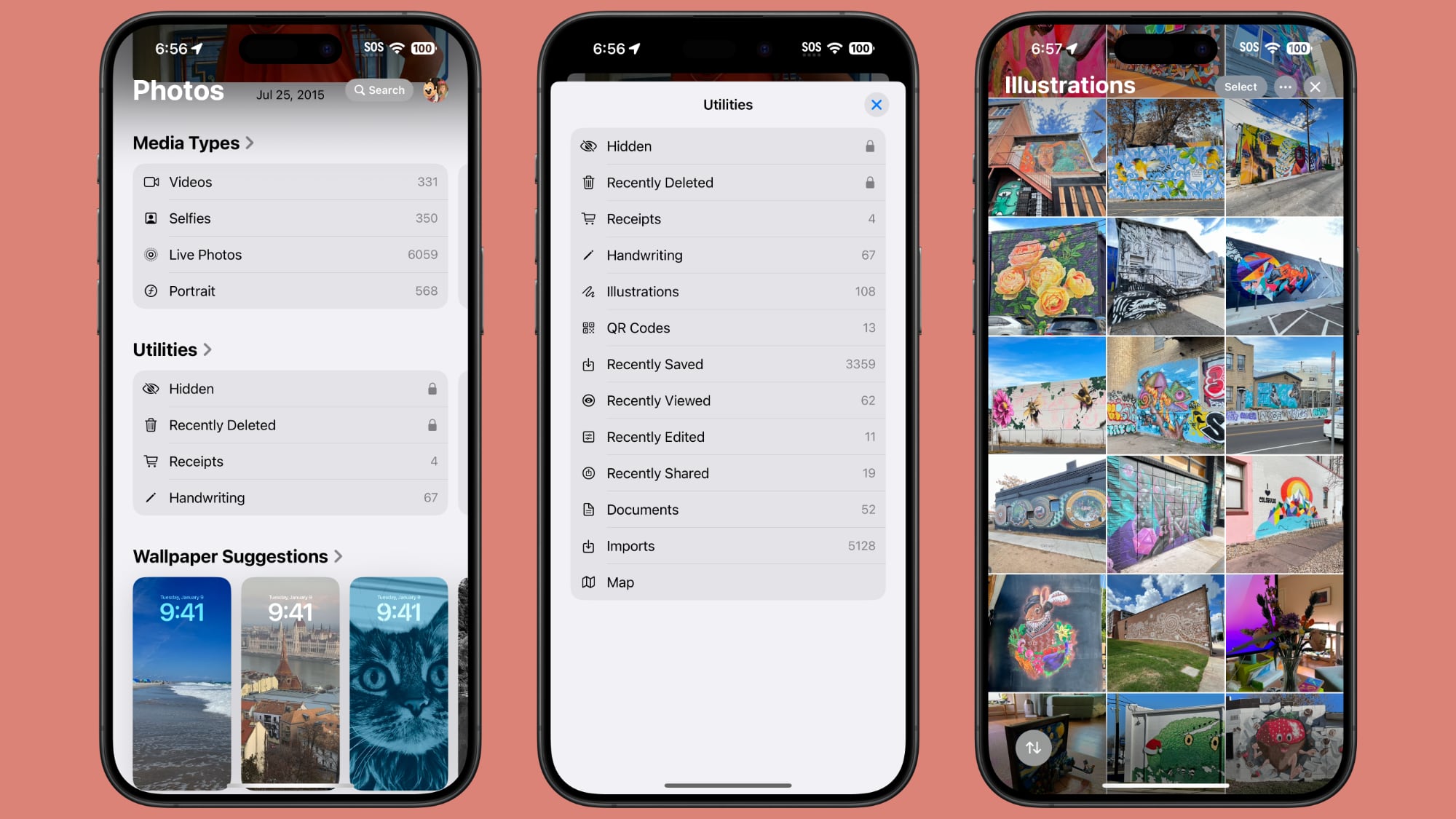
Apple introduced a new design for the iOS 18 Photos app that replaces the Library and For You sections with a more integrated all-in-one view, and part of that redesign includes an overhauled Utilities section that makes it easier to find different types of images.
Rather than being limited to Imports, Duplicates, Hidden, and Recently Deleted as in iOS 17, the Utilities section of the app has all of the following categories:
Hidden
Recently Deleted
Duplicates
Receipts
Handwriting
Illustrations
QR Codes
Recently Saved
Recently Viewed
Recently Edited
Documents
Imports
Maps
You've been able to search for things like receipts in prior versions of iOS, and still can, but having them in a dedicated Utilities section makes them quicker to locate.
Along with Utilities, the Photos app also features Media Types, and while this section is largely the same, there is a new Animated category. The Animated category and the Illustrations utility section may be aimed at the image generation tools that are coming to iOS 18 as part of the Apple Intelligence feature set.
macOS Sequoia as well as iOS 18.
Related Roundup: iOS 18
Related Forums: iOS 18, iPadOS 18
This article, "iOS 18 Photos App Adds New Utilities Categories for Finding QR Codes, Receipts, Illustrations and More" first appeared on MacRumors.com
Discuss this article in our forums
https://www.macrumors.com/2024/06/11/ios-18-photos-app-utilities/
iOS 18 Photos App Adds New Utilities Categories for Finding QR Codes, Receipts, Illustrations and More
Apple introduced a new design for the iOS 18 Photos app that replaces the Library and For You sections with a more integrated all-in-one view, and part of that redesign includes an overhauled Utilities section that makes it easier to find different types of images.
Rather than being limited to Imports, Duplicates, Hidden, and Recently Deleted as in iOS 17, the Utilities section of the app has all of the following categories:
Hidden
Recently Deleted
Duplicates
Receipts
Handwriting
Illustrations
QR Codes
Recently Saved
Recently Viewed
Recently Edited
Documents
Imports
Maps
You've been able to search for things like receipts in prior versions of iOS, and still can, but having them in a dedicated Utilities section makes them quicker to locate.
Along with Utilities, the Photos app also features Media Types, and while this section is largely the same, there is a new Animated category. The Animated category and the Illustrations utility section may be aimed at the image generation tools that are coming to iOS 18 as part of the Apple Intelligence feature set.
macOS Sequoia as well as iOS 18.
Related Roundup: iOS 18
Related Forums: iOS 18, iPadOS 18
This article, "iOS 18 Photos App Adds New Utilities Categories for Finding QR Codes, Receipts, Illustrations and More" first appeared on MacRumors.com
Discuss this article in our forums
https://www.macrumors.com/2024/06/11/ios-18-photos-app-utilities/
iOS 18's Battery Section Tells You If You Used a Slow Charger
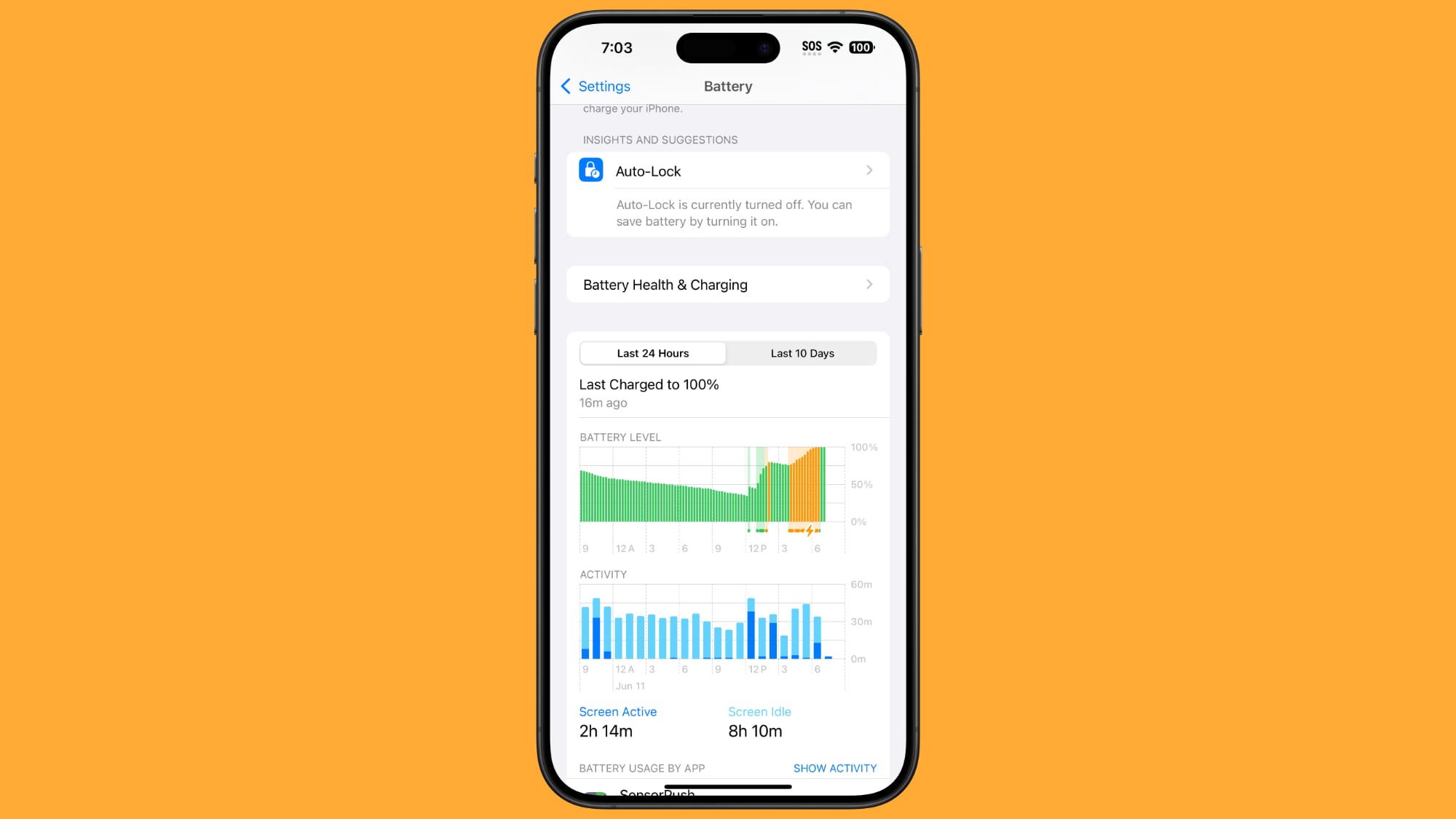
Apple updated the Battery section of the Settings app in iOS 18 to add a feature that lets you know if you charged your iPhone with a "slow" charger.
Periods of slow charging are shown with an orange bar in the portion of the Battery settings that show battery usage and charging over the past 24 hours or the past 10 days.
a Redditor who highlighted the feature. It's not clear what exactly is considered "slow," but the designation is useful for those who are seeing slow charging speeds and aren't sure why.
Image via Reddit
MagSafe while being limited to Qi speeds or below, so this feature could help iPhone users understand why their devices aren't charging at optimum speed. There does not appear to be an option to enable an alert when charging from a slow charger, which could be an arguably better feature because the battery settings are somewhat hidden.
Related Roundup: iOS 18
Related Forums: iOS 18, iPadOS 18
This article, "iOS 18's Battery Section Tells You If You Used a Slow Charger" first appeared on MacRumors.com
Discuss this article in our forums
https://www.macrumors.com/2024/06/11/ios-18-slow-charger-battery-settings/
Video: iOS 18's Best Features
Since there was so much to take in at yesterday's WWDC keynote event, we thought we'd revisit iOS 18 and highlight some of the most exciting features that Apple introduced.
Subscribe to the MacRumors YouTube channel for more videos.
Note that we've left out Apple Intelligence, which is what Apple is calling the AI features that it plans to add. Apple Intelligence will be limited to Apple's newest iPhones, but the features we've listed will be available on older iPhones, too.
Related Roundup: iOS 18
Related Forums: iOS 18, iPadOS 18
This article, "Video: iOS 18's Best Features" first appeared on MacRumors.com
Discuss this article in our forums