Vanadium version 122.0.6261.64.0 released:
https://github.com/GrapheneOS/Vanadium/releases/tag/122.0.6261.64.0
#GrapheneOS #privacy #security #browser

Strongly suggest Molly for Signal:
https://github.com/mollyim/mollyim-android?tab=readme-ov-file#features
Hardened fork with message DB encrypted with a passphrase, RAM wiper, inbuilt Orbot Tor proxy support and supporting multiple devices including ones without phone numbers and much more.
If you're compromised to that level, they could read your notification contents. Change in the options not to show any. If they can record the screen you're finished regardless. Apps are only as secure as the OS running on them and this is why you use a hardened OS.
Our features page now has a section listing the features added by our Vanadium browser and WebView:
https://grapheneos.org/features#vanadium
It explains the approach to content filtering, anti-fingerprinting and state partitioning including current limitations. Major improvements are coming.
#GrapheneOS
For the people wishing to see on Nostr the features #GrapheneOS Vanadium browser has:
- Type-based Control Flow Integrity enabled
- Hardware memory tagging (MTE) enabled for the main allocator
- Strict site isolation and sandboxed iframes
- JavaScript JIT disabled by default with per-site override option
- Native Android autofill implementation to avoid needing sandboxed Google Play for autofill support
- WebGPU disabled for attack surface reduction
- WebRTC IP handling policy toggle to control peer-to-peer WebRTC mode
- Compiler hardening: automatic variable initialization, strong stack protector, well defined signed overflow
- High performance content filtering engine using EasyList + EasyPrivacy with a per-site override option
- More complete state partitioning without origin trial opt-out
- High entropy client hints replaced with the frozen user agent values to avoid leaking device/OS info
- Battery API always shows the battery as charging and at 100% capacity
- Trivial subdomain hiding disabled
- Consistent browser behavior across users without usage of feature flags and seed-based trials
- Nearly all remote services disabled by default or removed. Only connects to GrapheneOS servers by default. There are only 2 default services: component updates such as certificate authority and certificate revocation updates and DNS-over-HTTPS connectivity checks when enabled
- Web search and global search intents to replace the need for an OS search app
- Option to always open links from other apps, custom tabs and search intents in Incognito mode
Better default settings, including non-user-facing flags:
- Reduce Accept-Language header by default (only available via chrome://flags)
- Third party cookies disabled by default
- Payment support disabled by default
- Website background sync disabled by default
- Sensors access disabled by default
- Protected media (DRM) disabled by default
- Hyperlink auditing disabled by default
- Do Not Track enabled by default mainly to avoid users differentiating themselves from others by enabling it since it has no real value
- WebRTC IP handling policy set to the most private value by default instead of the least private value (turned into a user-facing option by Vanadium)
Our features page now has a section listing the features added by our Vanadium browser and WebView:
https://grapheneos.org/features#vanadium
It explains the approach to content filtering, anti-fingerprinting and state partitioning including current limitations. Major improvements are coming.
#GrapheneOS
Brave has a bit more going for it, options for extra filter lists etc. The lists we use are ones Brave uses by default though, but not all. This is only the initial implementation right now.
VanadiumConfig is not a traditional "app" but rather a split APK that makes up the filtering config for Vanadium itself. This is so if we update VanadiumConfig, it can update without requiring the whole browser. GmsCompatConfig and AppCompatConfig work the same way.
This is the initial build of ad blocking and it definitely could have room for improvement in the future.
GM! 🔥 BIG UPDATE: Vanadium version 122.0.6261.43.1 released:
Our new Vanadium release has initial adblocking support
- currently using EasyList + EasyPrivacy for now
- no cosmetic filters or advanced features yet
- filters updated via Vanadium Config app
- standard filters used to avoid user distinction
https://github.com/GrapheneOS/Vanadium/releases/tag/122.0.6261.43.1
#GrapheneOS
GmsCompatConfig (sandboxed Google Play compatibility layer configuration) version 96 released:
https://github.com/GrapheneOS/platform_packages_apps_GmsCompat/releases/tag/config-96
#GrapheneOS #privacy #security
Organic Maps is a good open maps app with an Android Auto preview as well if that helps!

We have had Android Auto since December 30th,, you can find the usage guide here:

Accrescent is one of the best and secure options. Compliments the GrapheneOS setup very well but is one of the smallest app repositories because it's new. Apps the project recommend (which rarely does happen) like Molly appear on there. Strongly recommend this one personally.
I seriously hope the library grows. Other options have shortcomings but unfortunately end up being the only way to get apps.

GrapheneOS is reproducible: https://grapheneos.org/build#reproducible-builds
Profile Guided Optimization, essentially a compiled performance improving technique
Vanadium version 122.0.6261.43.0 released:
- update to Chromium 122.0.6261.43
- checkout PGO profiles by default now that PGO is enabled by default for Android production builds
#GrapheneOS
#GrapheneOS project announcement:
TLDR: Moving away from Signify keys to OpenSSH keys to sign releases, which has better platform support and is overall a benefit.
SSH public key for signing GrapheneOS releases:
contact@grapheneos.org ssh-ed25519 AAAAC3NzaC1lZDI1NTE5AAAAIIUg/m5CoP83b0rfSCzYSVA4cw4ir49io5GPoxbgxdJE
This key has been used for signing our Git tags since January 2023 and will also replace signify for factory images releases.
Official builds of GrapheneOS are signed with per-device signing keys for updates and verified boot. Those signatures are automatically verified.
The signatures for source releases (Git tags) and factory images are a separate thing and we're standardizing on using SSH for those.
We replaced GPG with signify for signing factory images in 2019 prior to SSH having file signing support. Signify is perfectly modern, unlike GPG which is a poorly designed legacy technology. However, SSH signing is a lot more broadly available than signify and is a bit nicer.
Our SSH public key is signed with our previous GPG and SSH keys:
Key: https://grapheneos.org/allowed_signers
Signify signature: https://grapheneos.org/allowed_signers.sig
GPG signature: https://grapheneos.org/allowed_signers.asc
GPG key has been fully retired for a while and the signify key will also be retired going forward.
We've completed replacing the factory images signify signatures with OpenSSH signatures. It only impacts users following the traditional CLI install guide. It's a nice improvement since Windows and macOS have it in the base install and nearly all Linux distributions package it.
Each supported OS for installation either has a Chromium-based browser in the base install (Android, ChromeOS, Windows) or a first party repository with one available, so the web install avoids this problem and relies on verified boot for verifying the flashed firmware and OS.
For users who install GrapheneOS over CLI rather than a web installer, this is good to know, it should also be helpful:
#GrapheneOS project announcement:
TLDR: Moving away from Signify keys to OpenSSH keys to sign releases, which has better platform support and is overall a benefit.
SSH public key for signing GrapheneOS releases:
contact@grapheneos.org ssh-ed25519 AAAAC3NzaC1lZDI1NTE5AAAAIIUg/m5CoP83b0rfSCzYSVA4cw4ir49io5GPoxbgxdJE
This key has been used for signing our Git tags since January 2023 and will also replace signify for factory images releases.
Official builds of GrapheneOS are signed with per-device signing keys for updates and verified boot. Those signatures are automatically verified.
The signatures for source releases (Git tags) and factory images are a separate thing and we're standardizing on using SSH for those.
We replaced GPG with signify for signing factory images in 2019 prior to SSH having file signing support. Signify is perfectly modern, unlike GPG which is a poorly designed legacy technology. However, SSH signing is a lot more broadly available than signify and is a bit nicer.
Our SSH public key is signed with our previous GPG and SSH keys:
Key: https://grapheneos.org/allowed_signers
Signify signature: https://grapheneos.org/allowed_signers.sig
GPG signature: https://grapheneos.org/allowed_signers.asc
GPG key has been fully retired for a while and the signify key will also be retired going forward.
We've completed replacing the factory images signify signatures with OpenSSH signatures. It only impacts users following the traditional CLI install guide. It's a nice improvement since Windows and macOS have it in the base install and nearly all Linux distributions package it.
Each supported OS for installation either has a Chromium-based browser in the base install (Android, ChromeOS, Windows) or a first party repository with one available, so the web install avoids this problem and relies on verified boot for verifying the flashed firmware and OS.
Vanadium version 121.0.6167.178.0 released 10 hours ago, btw:
See the changes:
- update to Chromium 121.0.6167.178
- disable selecting initial search query text for the web and global search intents added by GrapheneOS
#GrapheneOS
https://github.com/GrapheneOS/Vanadium/releases/tag/121.0.6167.178.0
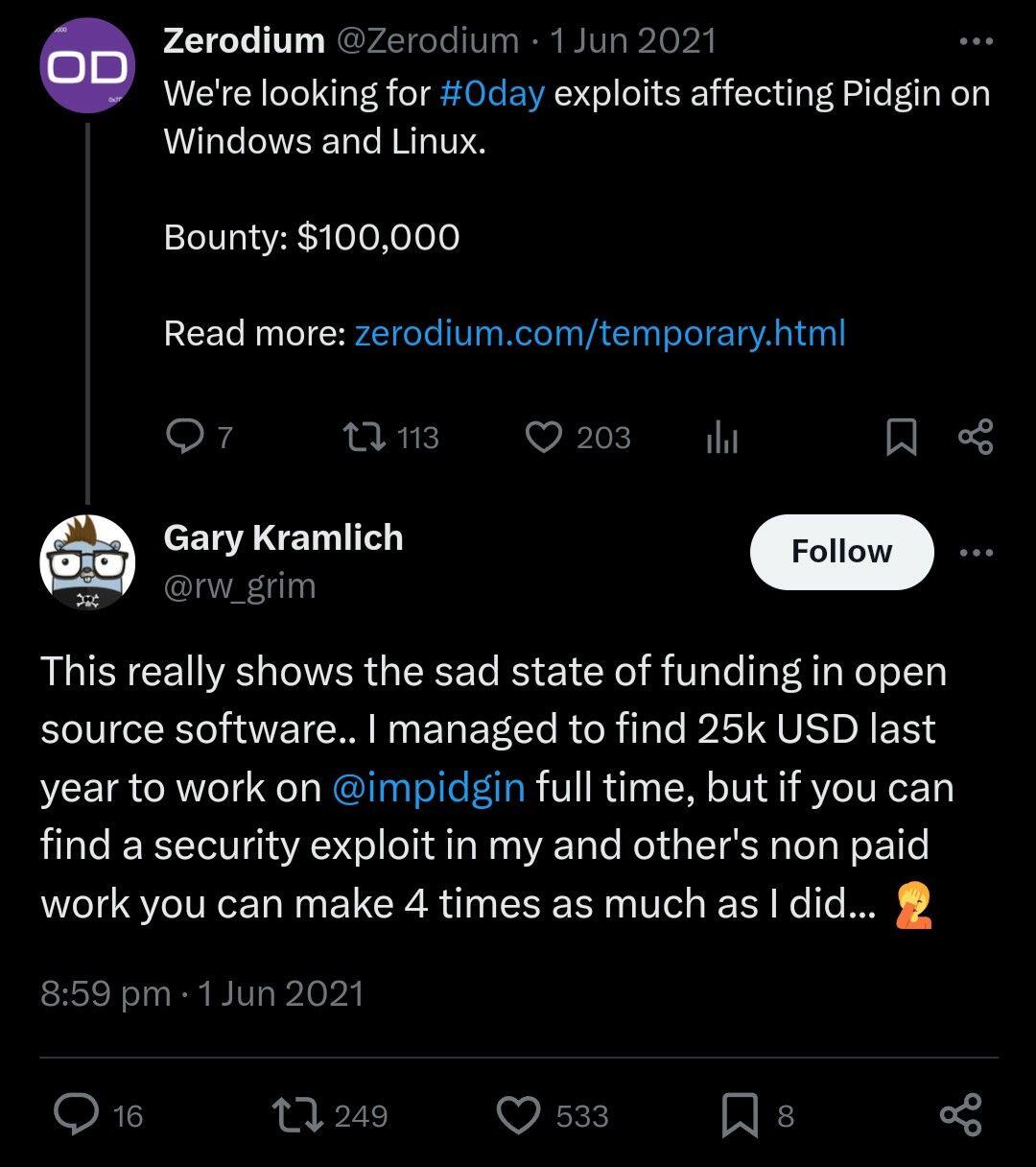
A self-reliant, full-time open source software developer lives off of donations to continue their work, put food on the table and put a roof over their head. Exploit brokers offer bounties on exploiting their work for tens of thousands regardless, money that could have helped these developers not live off waiting for the next donation or having to run fundraisers.
There's an ethical question behind an industry like that.
My Nostr likes list looks like this