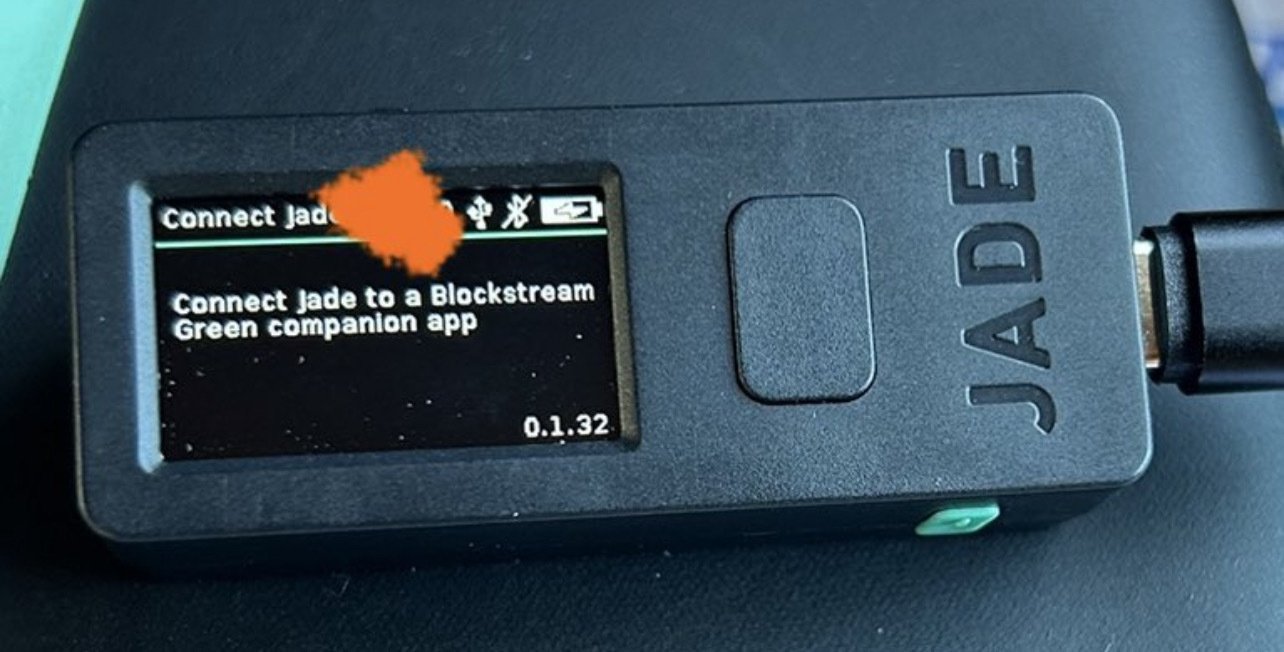
Anyone have any ideas how I can get past this screen? Pressed all the buttons, nothing happens.

Been at least a year since I’ve switched it on, the firmware is super old, but I can’t update as I can’t get off this screen.

nostr:npub1jg552aulj07skd6e7y2hu0vl5g8nl5jvfw8jhn6jpjk0vjd0waksvl6n8n

Reply to this note

Please Login to reply.

Discussion

Do you have the app?

Yes but it’s not connected to the device yet

Have you tried to connect with Bluetooth turned on or air gapped?

I wanted to use air-gapped but rn I can’t do anything.

This device worked in the past. All I’ve used it for is to calculate a 24th word checksum, and that is what I want to do now as I am working on a seed-rolling tutorial.

Try the green desktop app? Unfortunately that means you are going to need a usb connection.

Yea was hoping to avoid but don’t see another way rn

I’ve updated a couple of jades using the desktop app and usb without issues and they then worked way better air gapped afterwards too - good luck

Either connect to a laptop with the original USB cable or connect to an iPhone over Bluetooth.

Then upgrade the firmware over and over again until one of the attempts succeeds.

The stock firmware on those old devices are so badly broken. I've been there. This is the only thing that worked.

Once you've gotten the firmware upgraded it should work much more smoothly.

To upgrade the firmware you might have to initialize a wallet first. Just do it quickly with 12 words and no passphrase.

Afterwords you can factory reset.

Problem is, I can’t initialize as I can’t get off that screen

Thanks for the response. I was hoping to keep it air-gapped, but sounds like that may not be an option.

I can’t activate the blue tooth (which is currently disabled) since I can’t get off that screen.

I guess losing the airgap just to update might be fine, since my

purpose for the device is to calculate a 24th word checksum for a seed-rolling tutorial

Only the Jade Plus can maintain a true airgap. The original needs a hard connection (USB/BT) to upgrade firmware, and since the stock firmware is defective, you have little choice.

One option is to boot up Tails on a computer, install Green, then use that to upgrade Jade.

Ohh you’re right! I forgot I did have to connect it once before!

It's easy, I just "fixed" a blockstream jade with version 0.21 firmware (very ancient)

1. Clone this repo on your computer

https://github.com/Blockstream/Jade

2. Plug your jade into it via USB

3. Run this command: `update_jade_fw.py`

4. Profit