
The best time to play with computer kernels is after beer

When launching a new bar, hire the best DJ for opening night.
In Vilnius, that’s nostr:npub14wxtsrj7g2jugh70pfkzjln43vgn4p7655pgky9j9w9d75u465pqvagcye
nostr:npub1m0sxqk5uwvtjhtt4yw3j0v3k6402fd35aq8832gp8kmer78atvkq9vgcru
Loved dancing with nostr:nprofile1qqs2hr9cpe0y9fwytl8s5mpf0e6ckyf6sld22q5tzzezhzkl2w2a2qspr3mhxue69uhkummnw3ezucnfw33k76twv4ezuum0vd5kzmqpzdmhxue69uhhqctfvshxummnw3ezumrrqy28wumn8ghj7un9d3shjtnyv9kh2uewd9hst7z7ul and nostr:nprofile1qqsrat92w6pjd47uaq8kact6mgveh6l8av7p5c9nnv2wpfvthtrxleqpr3mhxue69uhkummnw3ez6vp39eukz6mfdphkumn99e3k7mgpr3mhxue69uhkummnw3ez6vpj9eukz6mfdphkumn99e3k7mgpremhxue69uhkummnw3ez6vpn9ejx7unpveskxar0wfujummjvu840r3k at the closing party of #nostriga
I have it back 😁 I tried zapping you 180k but didn't work - send me an invoice please

I got mine back.
The step that helped from nostr:nprofile1qqstxwlea9ah3u6kjjszu6a7lrnhqkfh8eptp2z6v0e9558tlkkl2rgpzemhxue69uhk2er9dchxummnw3ezumrpdejz7qgwwaehxw309ahx7uewd3hkctcpremhxue69uhkummnw3ez6ur4vgh8wetvd3hhyer9wghxuet59u4kl3vp:
"To get them back you can try to copy the pending local backup as "encoded token" and paste it into receive ecash screen (you might need to remove brackets to get clean cashuA... token."

Never too many. Like village pubs

Block as in JD's gig? I don't believe it

Thinking about it.
I don't know how effective they'll be with the bandwidth but definitely better than nothing.
The outbox model is where each of your followers can see your chosen relays.
This means when they want to update their feed they know which relays to query for your information.
#minibits wallet has had a pending transaction for a few days now so I haven't been able to pay nostr:nprofile1qqs8rsxmsmdutd5ftgk0j2ymdk4qy3cau5fkju9tq0au9lua46uwueqpyemhxue69uhkvars9e5xzmrfveshstnjwa6xsttpv93ksetw9ejx2tmwdaehgustzgh0z for dinner...
Anyone know how to force cancel the transaction? 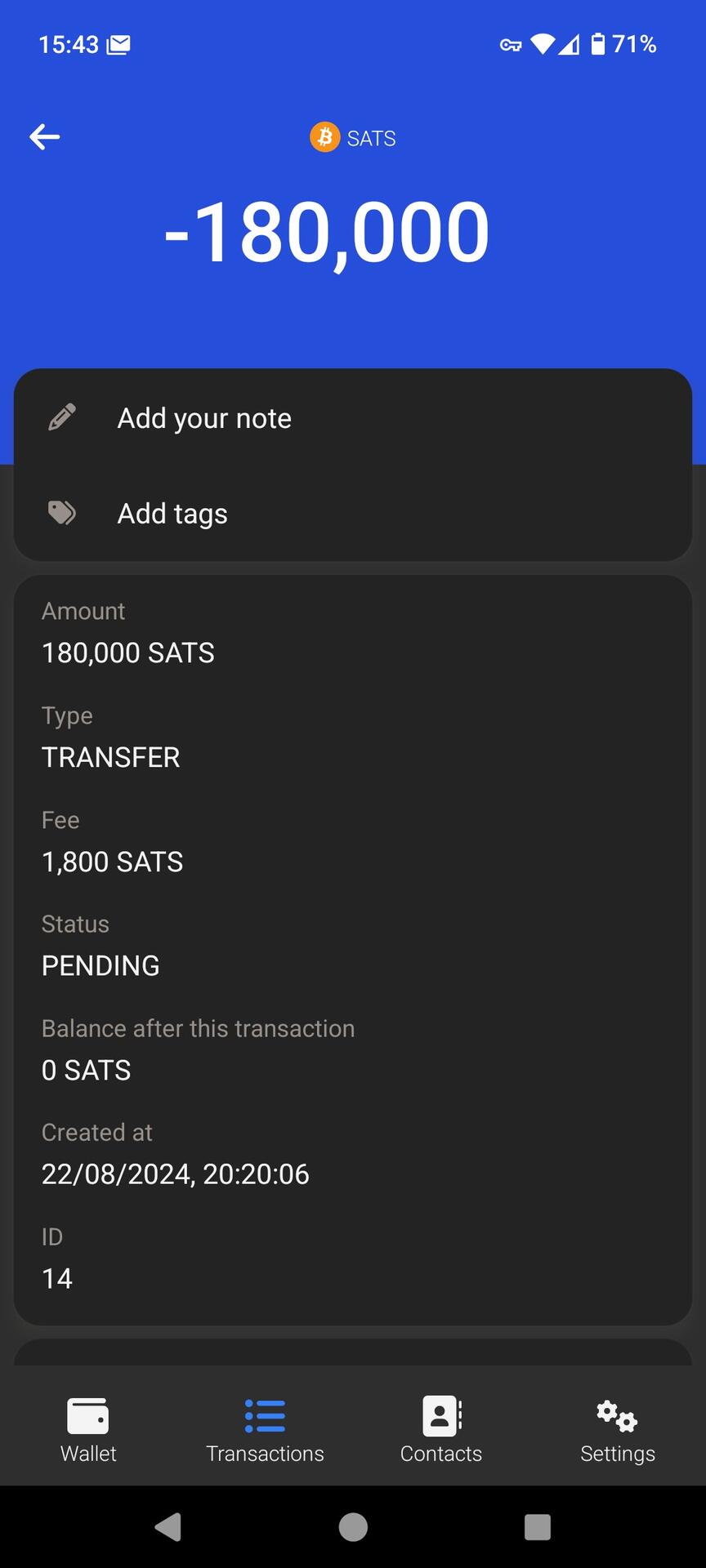
YouTube's algorithm is one I can live with 
and sometimes it's even pretty good
I get to come home to this beautiful boy #dogstr https://video.nostr.build/2586d83ccd6f9ff794b799d17b1c1bff96210985dce70c52eb4af667a7a26c37.mp4
A summary of the telegram story. Some people are saying there's a lot more to it such as Israeli influence due to hacked data...


You're set bhb?? I already have a shirt but would love to meet you

Setting up nostr in Riga, Baltic Honeybadger 2024. Huge thanks nostr:nprofile1qqsr7acdvhf6we9fch94qwhpy0nza36e3tgrtkpku25ppuu80f69kfqpzamhxue69uhhyetvv9ujumn0wd68ytnzv9hxgtcpz4mhxue69uhhyetvv9ujuerpd46hxtnfduhszythwden5te0dehhxarj9emkjmn99uwrrtwk for guiding me! #bhb2024 #introductions
Welcome and have fun :-)

Technically it is and always has been distributed since relays aren't mirrors of each other.
Bitcoin is decentralised, nothing else of any importance is. It's very inefficient/expensive/slow to run decentralised networks.
Pushing changes before the flight, what could go wrong.
Riga here I come! 

Unless you have a prior project with IPFS I would simply use blossom. But since you asked:
# Step 1: Get filesize and hash using ipfs-car. The hash is the CID.
```
const { exec } = require('child_process');
async function getFileHashAndSize(file) {
return new Promise((resolve, reject) => {
const npxPath = '/usr/local/bin/npx'; // Full path to npx
exec(`${npxPath} ipfs-car hash ${file}`, (error, stdout, stderr) => {
if (error) {
return reject(new Error(`Error getting file hash: ${error.message}`));
}
const hashOutput = stdout.trim();
const hash = hashOutput.split(' ')[0];
exec(`wc -c < ${file}`, (error, stdout, stderr) => {
if (error) {
console.error(`Error executing wc command: ${stderr}`);
return reject(new Error(`Error getting file size: ${error.message}`));
}
const size = stdout.trim();
resolve({ hash, size });
});
});
});
}
```
# Step 2: Create JSON to upload to endpoint using acquired hash and filesize
```
function createStoreJson({ hash, size }) {
try {
if (!hash || !size) {
throw new Error('Invalid hash or size');
}
return {
tasks: [
[
'store/add',
'did:key:{StorageRepoID}',
{
link: {
'/': hash,
},
size: parseInt(size, 10),
},
],
],
};
} catch (error) {
throw new Error(`Error creating JSON: ${error.message}`);
}
}
```
# Step 3: Post JSON (not file) to web3 endpoint. This then tells you whether the data already exists or if you have to then upload the file as well.
```
// WEB3_STORAGE.ENDPOINT = https://up.web3.storage/bridge
async function postFun(json) {
try {
const response = await axios.post(WEB3_STORAGE.ENDPOINT, json, {
headers: {
'X-Auth-Secret': WEB3_STORAGE.SECRET,
'Authorization': WEB3_STORAGE.AUTH,
'Content-Type': 'application/json',
},
});
return response.data;
} catch (error) {
let errorMsg = `Error posting to ${WEB3_STORAGE.ENDPOINT}: ${error.message}`;
if (error.response) {
errorMsg += `\nResponse status: ${error.response.status}`;
errorMsg += `\nResponse data: ${JSON.stringify(error.response.data)}`;
}
throw new Error(errorMsg);
}
}
```
# Step 4: Post the file if step 3 returns false. The endpoint (puturl in this case) will be provided by the previous step, and is ALWAYS an AWS endpoint 😀
I've left the JSDoc comment here since there's a few more parameters.
```
/**
* Function to upload a file using a PUT request.
* @param {Object} params - The parameters for the PUT request.
* @param {string} params.putUrl - The URL to send the PUT request to.
* @param {number} params.size - The size of the file in bytes.
* @param {string} params.checksumSha256 - The SHA-256 checksum of the file.
* @param {string} params.filename - The path to the file to be uploaded.
* @returns {Promise
*/
async function putFun({ putUrl, size, checksumSha256, filename }) {
try {
const response = await axios.put(putUrl, fs.createReadStream(filename), {
headers: {
'Content-Length': size,
'x-amz-checksum-sha256': checksumSha256,
},
maxBodyLength: Infinity,
});
return { status: response.status, data: response.data };
} catch (error) {
let errorMsg = `Error putting file: ${error.message}`;
if (error.response) {
errorMsg += `\nResponse status: ${error.response.status}`;
errorMsg += `\nResponse status: ${error.response.data}`;
}
throw new Error(errorMsg);
}
}
```
I'm forced to use the ipfs-car CLI library now web3.storage (and nft.storage) have started to make their process a bit more restricted. I avoid using their NodeJS libraries wherever possible since they change / break too often. https://web3.storage/docs/concepts/car/#ipfs-car
Previously you could shove any data you want to an IPFS endpoint and it would kindly return the IPFS CID, now you need to generate the CID and some other file-specific info prior to uploading.
Thankfully getting data is still straightforward and can be requested anonymously from any number of IPFS gateways.
Happy to share NodeJS snippets if you want a primer since it's a bit tedious to work through their docs.