

That was a great listen 🫡 signed is as guest as Amber isn't supported on Nests 👎 (or I couldn't see that option anyway)
nostr:nprofile1qqsrxra3gv0lnkxz2pcxh0xuq9k4f9dr7azwq3aypqtnay4w0mjzmtqpz4mhxue69uhk2er9dchxummnw3ezumrpdejqzrthwden5te0dehhxtnvdakqz8thwden5te0dehhxarj94c82c3wwajkcmr0wfjx2u3wdejhghqs4nu any invite codes going? I want to onboard a few others.
🤙
if you have an account you can invite your friends.
here are some to get you started:
https://getalby.com/auth/users/new?invite_code=0e4633be

Right now you connect it with the Alby account for notifications like this, channel recommendations, etc.
in one of the future versions this will be optional and users have full control over these features.

no, we recommend 1GB of storage to have enough space. but it does not need much.
no wallet of satoshi is not. but please ask them - hopefully they will add support for it.

Alby Hub sadly does not work with CLN. So this is currently not supported, yet.
For CLN there is this NWC plugin: https://github.com/gudnuf/cln_nwc (not sure how active it is developed)
With that you could manually link the alby lightning address to your CLN. - but I have never done this with CLN and that plugin.
nostr:npub1getal6ykt05fsz5nqu4uld09nfj3y3qxmv8crys4aeut53unfvlqr80nfm
I am looking into running the alby hub on my desktop PC, what are the minimum specifications that my PC needs to run this on a linux OS? Thank you.
I think a typical Desktop PC should be fine. Alby Hub for default usage does not have any high requirements.
But we're still in the process of collecting real world data. So let us know how it goes for you.
Just keep in mind on a desktop computer you need to keep the app open to be able to send/receive.

thanks for the feedback!!
> I'm currently just a bit nervous with automated channel closures
no need to be nervous! the worst thing is that you will have to wait a few days until your sats are available as onchain balance
BUT with the Alby Cloud subscription our plan is that it's taken care of and you'll always have a channel to receive. Even if it closes a new one will be opened for you. So no worries.
> we need to keep the web app opened
That is only the case if you use the Desktop app. If you use the a cloud or pi version then you don't need to keep the web app open. The node will keep running in the background.

at this point they are not optional as those are options within the app.

yeah, the ultimate question is if there will be use cases that are impossible with the legacy world. We see some exciting, but that whole ecosystem still has to grow and it takes times.

so less than a cup of coffee per month?

Alby can't close the channel as users can open channels with any peer and by default we recommend some awesome LSPs (Megalith, Olympus, LNServer) are used. Alby is not an LSP.
Alby/the hosting provide could shut down the servers then you'd have to migrate somewhere else.

nostr:npub1mw6tm8kery0dwmz670vvg74z0xzttwt3y7yppya5rulufpkkaj7qmg2922 you're not on the Alby Hub, yet??
cool, let me know how it goes and if you need help.


Yes, that's how lightning works currently. Nodes have to be able to talk to each other.
That's why we recommend an always-on device and also offer reliable cloud hosting.
then don't use a lightning wallet 😉 there are good other options.
The Alby Extension is not for you then. The Alby Extension is about Bitcoin AND nostr.

yeah, sorry about that. multiple accounts across the extension and the web app is not very good. we hope to get better there.
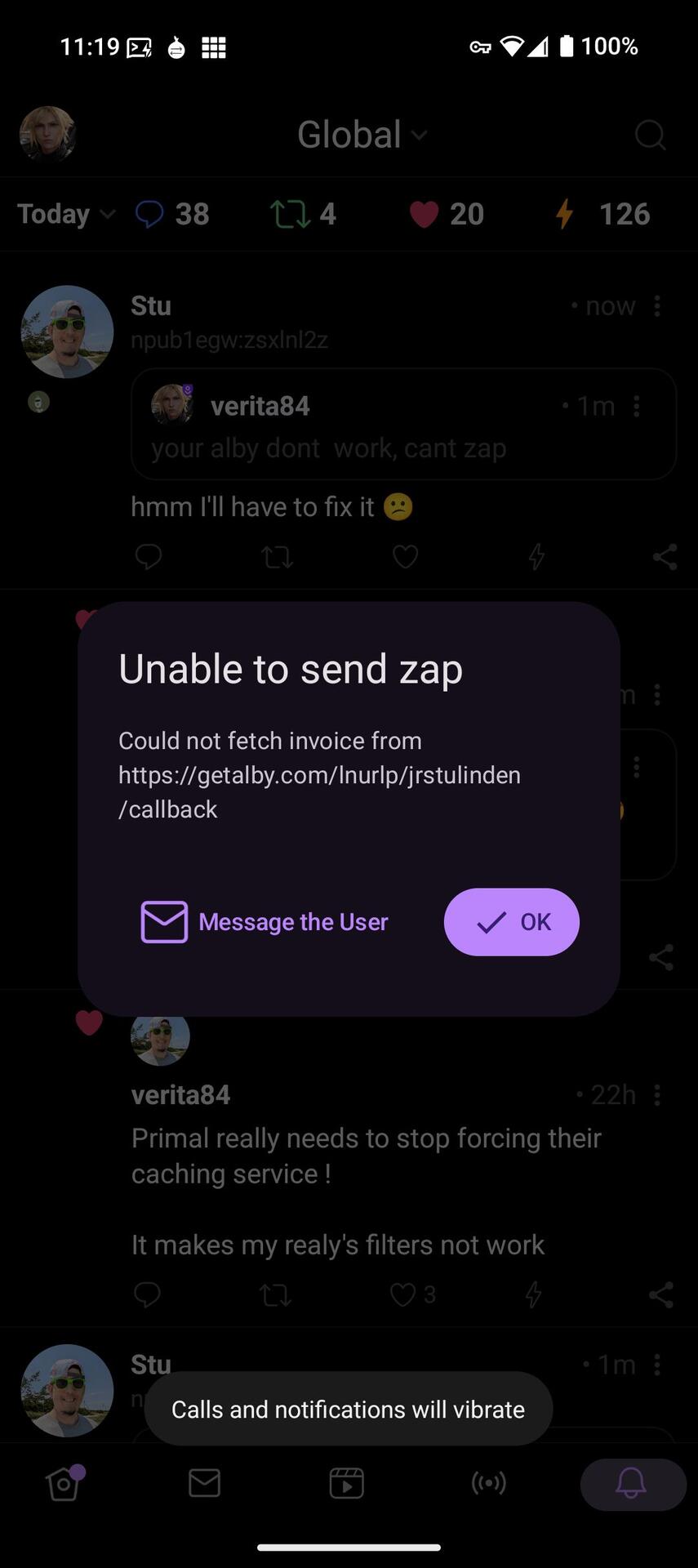
Can I help? If you're using the desktop wallet then you have to make sure the app is running. Lightning can only work if the node is online.

Someone tried to send me a zap and it didn't work. I tried to fix it by completing the wallet configuration and wallet link on my Alby's account, but then have been told my account is still unable to receive Zaps.
Can anyone else please try zapping me and/or suggest troubleshooting steps to try? 🙏
I've read https://nostr.how/en/zaps and nothing in particular sticks out as the possible cause.
Did you setup your Alby Hub already? Are you using the desktop app?
if so make sure that the app is running and is connected otherwise it will not work.
And you have to make sure that your hub has a channel - you might miss this.