
In the past I used cyanogenmod , nostr:nprofile1qqstnr0dfn4w5grepk7t8sc5qp5jqzwnf3lejf7zs6p44xdhfqd9cgspzpmhxue69uhkummnw3ezumt0d5hszrnhwden5te0dehhxtnvdakz7qgawaehxw309ahx7um5wghxy6t5vdhkjmn9wgh8xmmrd9skctcnv0md0 does #GrapheneOS team plan to extend support to other cheap devices? What the problem extend support to other devices? The hardware is so different or unsupported or have closed source driver?
They need to meet the security requirements on here:
https://grapheneos.org/faq#future-devices
If they don't then we aren't interested in supporting it. Users will just paint flaws caused by less secure devices to be a GrapheneOS problem.
Some are just totally incompetent, for example, Fairphone 4 set ther verified boot keys as publicly available test keys, meaning anyone can just sign an update with those same keys. Samsung kills certain device features via an eFuse when the non-stock OS is installed.
I won't lie, my older articles make me cringe.
GrapheneOS version 2024110400 released:
https://grapheneos.org/releases#2024110400
See the linked release notes for a summary of the improvements over the previous release.
Forum discussion thread:
https://discuss.grapheneos.org/d/17094-grapheneos-version-2024110400-released
#GrapheneOS #privacy #security
Latest #GrapheneOS release contains the latest Security Patch Level and fixes bugs breaking SMS/MMS in user profiles partially caused by Android 15.

Appears to be a known Android 15 issue that's looked into. Most reports say it's not been happening for a while though.

GrapheneOS has a duress password that erases the phone instantly and wipes secure element when triggered, the USB controls feature can disable data lines or the port entirely in hardware when booted to the OS and can be configured separately to it.

I've not had this issue. I'd try restart device, and if not, try a mobile network reset: settings -> system -> reset
Is there an alert of an error / crash log?
Simple Crypto Widget is now Material 3! Good time to have widgets since #GrapheneOS patched the upstream bug of widgets disappearing in user profiles ;)
https://github.com/hwki/SimpleBitcoinWidget/releases/tag/btc-8.6.0
#GrapheneOS device deployment and management was mentioned in the requirements for a director-level job vacancy in a large (multi-million) NGO about wildlife and environment preservation. Their overall security commitments outside of their mobile security demands is also very impressive.
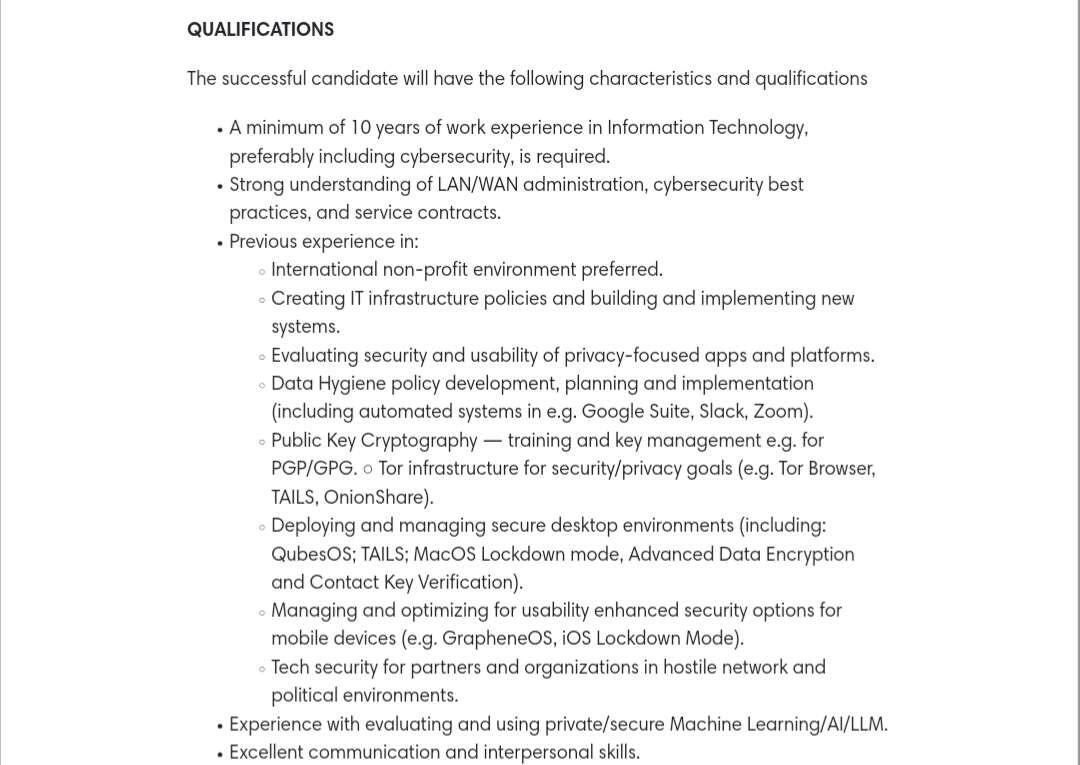
It is great to see big organisations with big requirements choose GrapheneOS because they know we provide security and privacy other platforms do not have. For too long users with tougher security requirements were left in the dark because every commercial OEM is often thinking about seamlessness or user experience. Users should have the choice to go above.
Let it be a message to every exploit broker and mercenary who tries to use our name / the platforms we support for marketing an urgency to attack our work: You cannot claim your actions to be for the greater good. You want to target a project that protects people in organisations campaigning for a cause far more important than yours. GrapheneOS works for good while you arm oppressors who work agsinst causes like the ones above.
The security community's greatest principle is transparency and you can't claim yourself to be trailblazers when you keep research a secret and we will continue our work in spite.
Stock AOSP apps are lackluster and it is in our books to replace or change more of them in the future. It's already been done for our Camera app.
Likely an upstream issue from Android 15... It may also depend on the keyboard apps being used.

We don't have this feature as a priority because it would be detectable with forensic analysis. People would just trust the feature too much thinking its existence would be hidden when it would only trick a bystander. GrapheneOS is well known, they'd just treat any device installed as likely to have a hidden profile.
We suggest keeping things in a separate profile and deleting it when things get heated. No data is worth keeping if you're being targeted over it. If you were someone like a whistleblower you'd ideally provide copies to others or make encrypted backups to a trusted cloud they aren't aware of should the device be taken.

Some discord users put this in their bios, the hour changes automatically

This device is called a Cellebrite UFED Touch, it's a device sold by Cellebrite - a forensics firm from Israel. It's a tablet preinstalled with Cellebrite UFED, a software suite for mobile device data extractions, which can be run portably. Also has a SIM cloning tool attached to it.
It's a tool sold to forensics firms or police to do forensic cloning of a phone's data. That footage is several years old and the software looks different now. There have also been newer generations of the device. It comes in a big carry case with cables for every major new and old smart device.
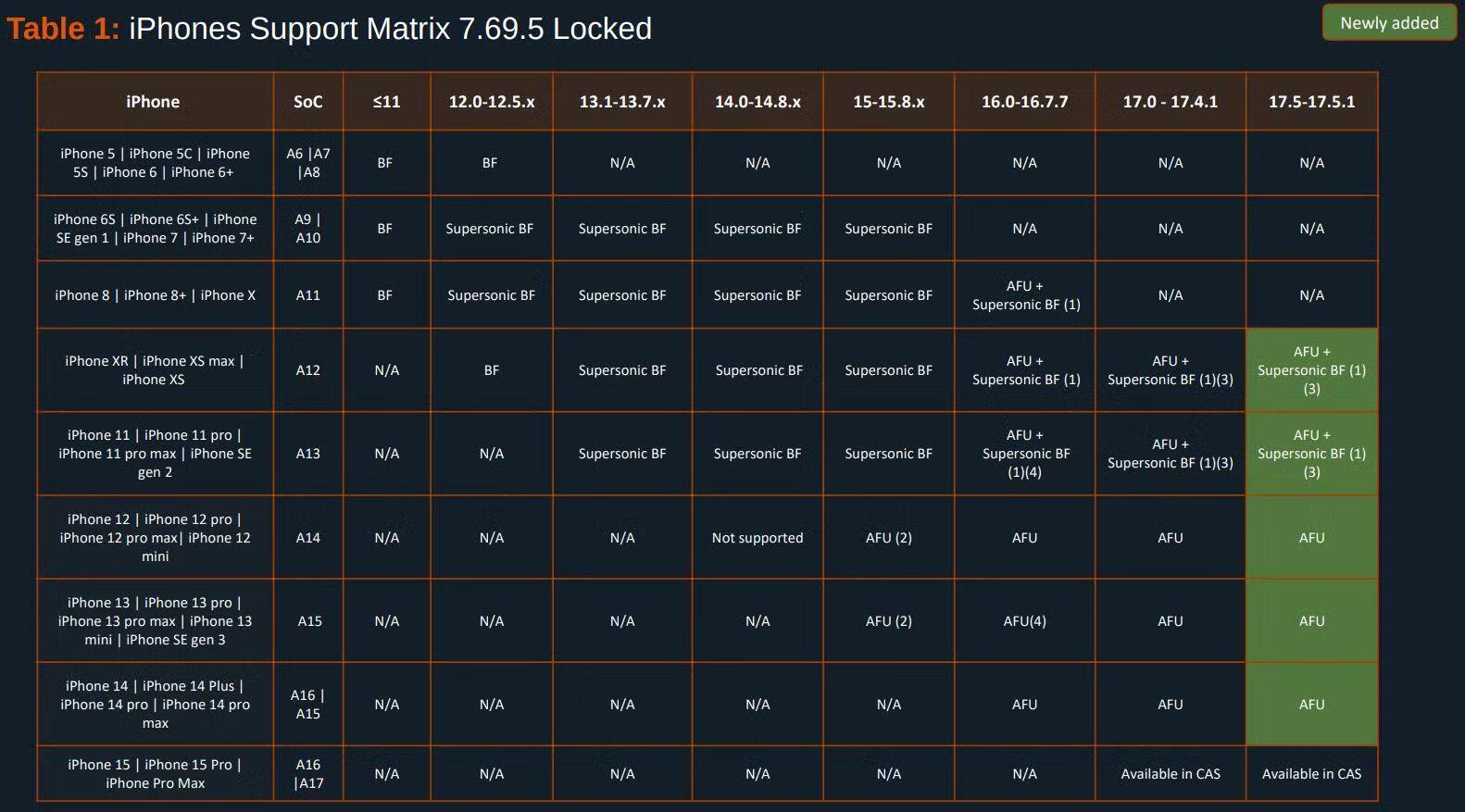
Cellebrite use existing exploits (like checkM8 on older iPhones) or develop their own, unknown exploits to try and brute force the credentials of phones so an investigator can unlock them. Cellebrite sell unique variations of UFED (Cellebrite Premium, Cellebrite Insurers) strictly for law enforcement or government clients that use unknown/zero-day exploits on certain devices which have a far greater device support catalog.
Cellebrite typically compromise new iOS versions or iPhones a few months after releasing. The only devices they struggled with long-term are Pixel devices with #GrapheneOS installed on it, where they have no brute force capability and can only work on versions before 2022. (This doesn't imply the exploit was AVAILABLE in 2022, and it likely wasn't).
Here are their device catalog just before this year's generation of smart devices were released:
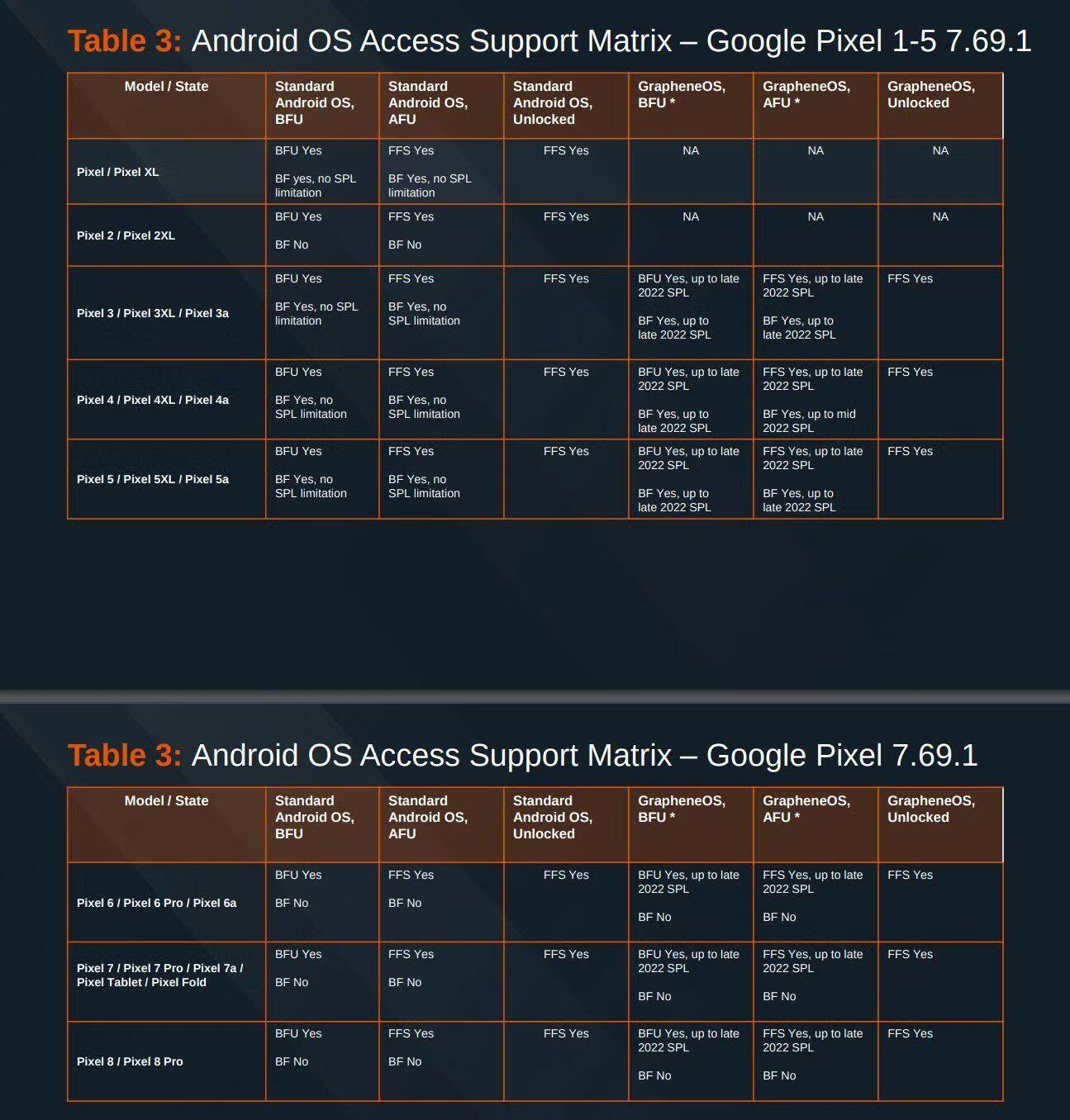
For apps like Signal, SimpleX or others, if a person can have total access of the device and navigate the screen etc. then they can just open your app like a normal user and read the messages. Cellebrite sell a tool called Physical Analyser which reads the UFED data extraction and automatically parses/loads the data to put all the messages in all supported apps in one timeline for the investigator to read. If an app is supported by PA, just read there, if not, then just navigate the phone and take pictures of a screen with the camera.
Protecting the application data with encryption via a passphrase helps. Molly (hardened Signal fork) does that, if they can't brute force the passphrase then they can't read the messages. Duress PINs for the apps don't help in this case because the data is cloned. A duress PIN for the OS would be a better countermeasure because the device wouldn't be cloned in that state.
Protections already exist against these tools: First best choice is to use a very strong password that is impossible to brute force.
Cellebrite isn't the only retailer in this space, there is also MSAB who sell XRY, and Magnet who sell GrayKey. Their capabilities generally are the same across retailers.

When we had previous reports for this it was usually because their phone had automatically rebooted from our auto reboot feature (it may unlock slower for first unlocks), or if they are switching between profiles and there may also be a slowness as the profile is starting up.
I can't really say I experienced this myself although I use the latest device which will be faster. My 6th generation Pixel didn't have any noticeable differences.
#GrapheneOS version 2024102400 is out. It brings back the a stricter DNS leak block that was previously reverted due to it breaking a lot of popular VPN apps (notably Proton VPN). An additional fix was made for the VPN DNS routing to prevent the compatibility issues from before. The ancient Android bug to do with widgets in secondary users disappearing have also been fixed by us.
IMPORTANT NOTICE that only affects a small amount of users: Apps which were only installed in secondary users but not Owner before updating to Android 15 and which were then installed in Owner after updating to Android 15 will have a one-time revocation of their Network/Sensors permissions after updating to this release as a minor consequence of migrating them from Android 14 again. If you installed an app, check those permissions!
Changes since the 2024102100 release:
- switch back our original stricter approach to DNS leak blocking from our [2024050900](https://grapheneos.org/releases#2024050900) release with an additional fix for an Android DNS routing bug causing requests to the VPN DNS servers to be routed incorrectly, which should avoid the compatibility issues experienced with certain VPN apps when we tried to ship it before
- avoid resetting Network or Sensors back to the global default after app updates in a specific case when migrating the state from Android 14 or earlier
- add an extra one-time migration of Network and Sensors being disabled in Android 14 to Android 15 to work around an issue with the previous migration of the permission state which occurred for some users with some of their apps
- fix ancient Android bug causing widgets to disappear from the user's home screen when the user stops, which was a major usability issue for secondary users
- Keyboard: extend fix for upstream layout bug in landscape mode to fully fix it for 3-button navigation in addition to the default gesture navigation
- Gallery: fix upstream cropping activity bug when both the input and output URI is the same to fix setting profile pictures for user profiles
- raise backup service transport (Seedvault) timeout from 10 minutes / 5 minutes to 60 minutes / 30 minutes to handle very large backups, particularly for the device-to-device mode which includes nearly all app data
- temporarily revert enforcing minimum 64kiB stack guard size for arm64 since Facebook recently included a buggy stack overflow check for the React Native Hermes runtime that's incompatible with larger gap sizes and beginning to be shipped by apps (revert was not applied for Android 15 port)
- Sandboxed Google Play compatibility layer: add stubs for update_engine wrapper API to avoid potential Play services crashes if the existing approaches to disable the update service fail
- Pixel 8, Pixel 8 Pro, Pixel 8a: disable Wi-Fi HAL debug logging to avoid memory corruption caught by hardware memory tagging on GrapheneOS
- kernel (6.1): update to latest GKI LTS branch revision
- use hardened GrapheneOS 6.6 LTS kernel for microdroid virtual machines for both arm64 and x86_64
- Vanadium: update to version 130.0.6723.73.0
- GmsCompatConfig: update to version 145

Apps cannot IPC between Owner and Private Space. Having a Private Space for Google Play is a way of setting one up.
The copy/paste clipboard is shared between Owner and Private Space though.
#GrapheneOS fully supports the Private Space feature in Android 15, which is essentially a separate user nested inside of the Owner user.
We strongly recommend it as a replacement for a work profile managed by a local profile admin app. It has better OS integration and isolation.
Private Space is an isolated workspace (profile) for apps and data similar to both user profiles and work profiles. All 3 forms of profiles also have entirely separate VPN configuration which is very useful even if you connected to the same VPN, since exit IPs can be separate.
All forms of profiles have separate encryption keys. You can keep a Private Space at rest while the Owner user is logged in just as you can with a secondary user.
Private Space makes it easier to share data than users. The clipboard is shared, but we could add a setting for it.
GrapheneOS users choose to use the OS in different ways. A lot of people largely use open source apps and not sandboxed Google Play. Others use sandboxed Google Play in their main profile. Many use sandboxed Google Play in a dedicated profile to choose which apps use it.
Regardless of how people choose to use sandboxed Google Play, they're regular sandboxed apps without special access. Private Space makes it easier to use a dedicated profile for sandboxed Google Play though.
It's also worth noting you can still use a work profile alongside it.
All of our features including Contact Scopes, Storage Scopes and sandboxed Google Play have full support for Private Space. We added support for it significantly before the release of Android 15, even before the initial early release of the source code was published in September.
#GrapheneOS: We've finally fixed the ancient Android bug causing widgets/shortcuts to disappear in secondary users when switching away from them. It will be included in our next release. This issue impacts every Android-based OS with secondary user support and was a major usability issue.
We've also fixed 2 more Android 15 regressions in AOSP. AOSP Gallery had a long time bug in the cropping activity which started breaking setting profile pictures for users in Android 15. We also extended our AOSP keyboard landscape layout fix for the legacy 3 button navigation.
