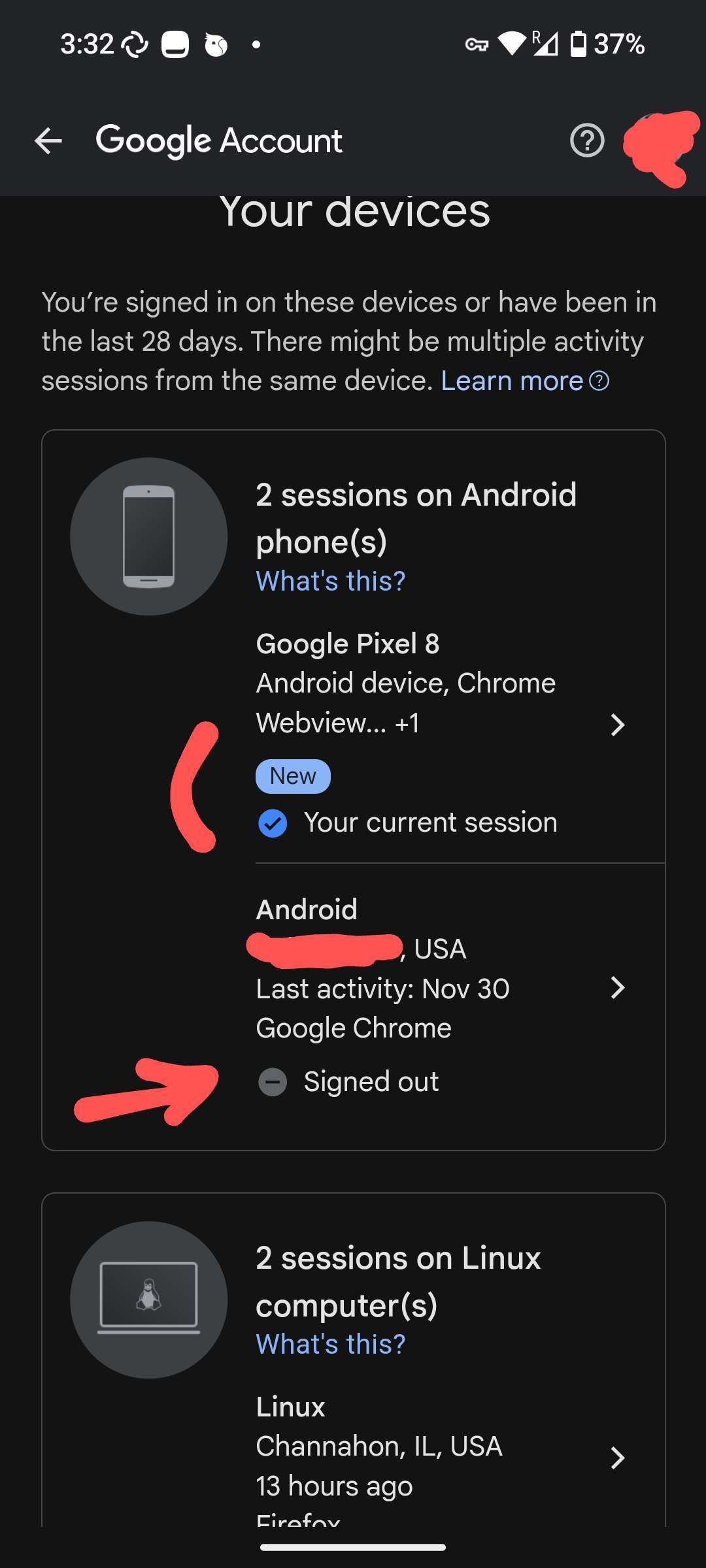
I have a secondary user profile in #Graphene running Google Play Services.

It has an always-on VPN.

When I went to check my logged in devices in that Google account, it shows the location as my real location - which never was the VPN server I connected to. The clock is not even set to this city.

Why is this information leaking?

Seems like a pretty nasty bug.

nostr:nprofile1qqstnr0dfn4w5grepk7t8sc5qp5jqzwnf3lejf7zs6p44xdhfqd9cgspzpmhxue69uhkummnw3ezumt0d5hszrnhwden5te0dehhxtnvdakz7qgawaehxw309ahx7um5wghxy6t5vdhkjmn9wgh8xmmrd9skctcnv0md0 would you know

Reply to this note

Please Login to reply.

Discussion

play services have various methods to understand real location. One is the gps, another is called like "enanched location tracking" and is able to map the network you connect and directly determine the ip.

This kind of traking happens "ahed" of the vpn tunneling (playservices have access to the wifi you are connecting and directly trasmit the ip to google... throug the vpn, but the damage is already done😅)

It has zero access to location services, so GPS can't be.

Is it really true that Play Services has access to the wifi IP?

You said the other profile was running a VPN, yes?

Not just your main profile

Both yes

Hmm..

I've noticed in other profiles, since its so well sandboxed, certain features do not work like I thought (i.e. running VPN on admin, expecting it to pass through to sub profile), hence why I asked

Not sure then wish I could help more

cc nostr:nprofile1qqsz9ackramwqadeuz39pfz83p9vpxcykcmwlltuwqafyw2w60ann6qpz4mhxue69uhhyetvv9ujuerpd46hxtnfduhszythwden5te0dehhxarj9emkjmn99uq3jamnwvaz7tmswfjk66t4d5h8qunfd4skctnwv46z75q6q67

Is there a difference if you disable networking for Google Play Services?

Another thought, GPS works in tandem with Google Play Store and GmsCompatConfig so try turning them all 3 off and see if that changes anything on your Google Account.

I'm also curious... theres a setting accessible in "sandboxed google play options" that is called "google location accurancy" where is described how this thing works..

@franzap do you have "Reroute location requests to the OS" checked? Although I don't know what it does.

Also, according to the description, with Google Location Accuracy off it still (thinks it) gets access to device sensors such as wifi and GPS. Being sandboxed should mean that access is denied though?

nostr:nprofile1qqs9g69ua6m5ec6ukstnmnyewj7a4j0gjjn5hu75f7w23d64gczunmgpz4mhxue69uhhyetvv9ujumt0wd68ytnsw43qz9thwden5te0v35hgar09ec82c30wfjkcctexf34p3

Secure hardware is a lie and this can't be fixed with software. 🤷

Well if I didn't connect to Guulag at all then maybe it's not a lie

We don't have decentralized manufacturing.

I don't pretend to be immune to a targeted attack but for this level of stuff Graphene is supposed to protect. You don't need decentralized manufacturing for this

Your Sim is actually 2 sims. You are powned before you even start.

Let me check your scenario, I have silent.link which is an eSim with a private number (inbound only) and trust me nobody calls it's only for activations...

Oh...yeah that's even more hacked. Cell service is not secure at all as it's based on handshakes and passing along information. This is why 2FA apps even exist.

Hold your horses. What.the.heck are you even talking about? What does 2FA apps have anything to do with sim? Ok anyways, moving on.

nostr:nprofile1qqs8y6s7ycwvv36xwn5zsh3e2xemkyumaxnh85dv7jwus6xmscdpcygprpmhxue69uhkv6tvw3jhytnwdaehgu3wwa5kuef0ekucf3, here is my screenshot. I followed the exact same steps as you did (let me know if I skipped something):

1. I don't have my VPN on currently

2. I went into Google Play Store > Manage GAccount > Security and looked for old or existing signed devices (showed my location obviously) and signed out.

3. Turned my VPN on and Connected to Canada or whatever

4. Went back in the Google signed devices settings and saw this: (no IP, nothing)

Appreciate this. I don't know where it got the location from in my case

well, you have to be very specific about where you found that "location": same screenshot as above?

if yes, it'll be a good idea to use a throwaway Google account (id you really) have to use one, otherwise, simply be content with the sandboxed GPS included in the OS

2fa through text is a thing that gets hacked all the time...

you're talking about sim swapping. That is totally irrelevant to what our dude is questioning here which is his IP potentially being leaked by his own Google account .

No I'm talking about how cell towers hand off data and how every Sim has two processors and one you can't turn off.

No thanks. I don't need a service trying to sell me on how secure they are. If someone is selling something they aren't a trusted source of information. Thanks for the info though. 👍

Are they getting the geolocation from your Sim maybe? Your Sim can be used to trace you via cell towers and isn't affected by a VPN.

How can it be called unprivileged if it has access to SIM geolocation, however that works

No clue, simply a theory. I could be wrong.

is the location service turned on in the Google profile? it may be getting it from your wifi, cellular, etc.

Do you use Chrome? I'm not sure if `gethostbyname()` (I think) Android bug that bypasses the VPN's configured DNS server still exists and whether that is to blame, or whether that is at least fixed in nostr:nprofile1qqs9g69ua6m5ec6ukstnmnyewj7a4j0gjjn5hu75f7w23d64gczunmgpz4mhxue69uhhyetvv9ujumt0wd68ytnsw43qz9thwden5te0v35hgar09ec82c30wfjkcctexf34p3

I use Vanadium but I think I signed in thru Google Maps anyway. It does not have the location permission

No one else has reported this and every other query I looked in our forums and chats shows theirs as expected. I can't consider it a bug without it being reproduced. Please check your profile's settings and apps.

I would evaluate what apps you are using that has location permissions. You may have provided a location access even if you think you may have not or you haven't realised.

Apps can embed Google services into their own apps and integrate Play accounts for IAPs, etc.

Enabling location accuracy also gives Google location in exchange for more accurate locations optionally. Some had enabled this before.

I've only seen users report when relating to:

https://github.com/GrapheneOS/os-issue-tracker/issues/502 which has been known for years (it's in our FAQ) but this is only registered country code of the SIM and nothing further than that. I've also heard this isn't even used for what you're talking about either.

The session data may also be historical (did you initially set up or install without the VPN?) and I would see what happens if you remove that session and sign in again. Google also attempts to infer location based on location specific Google searches on the accounts.

just so you know I also made a Google account just for this, and I've not been able to reproduce it. I have all the privacy settings in the Google account maxed out. on other platforms it just tells me the device used to sign in and nothing else.

Also tried with a new profile and wasn't able to reproduce yet

Thank you!

- I'm 100% positive I did not use it without VPN always on. It's the first thing I did. Maybe the VPN app itself disconnected and leaked

- The SIM country code could be, but this was down to the city level

- Improve location accuracy is and always was OFF

- Location was disabled for the whole profile, not just one app. Never touched this since profile setup

- I did not log into Google in non-Google apps

That said, it could have "guessed" due to Maps usage?

When I checked for permissions on Play Services I found: Network, Sensors, SMS

Maybe SMS was the issue?

Or just the VPN app malfunctioning

SMS wouldn't provide this access at all. It's likely a VPN issue, I had the project account reply to you about more info as well. It's through Mastodon so it may not show everything correctly, a project-wide Nostr account is being considered though.

Appreciate your help