

lets put this where it cant be censored.
Iyah May - Karmagedon
https://cdn.satellite.earth/e595b0a173cefdee1e1ba4bbdfc2670232e960ed75f8e44a5f48bef824b9140f.mp4
Someone bring her to nostr

Did you read anything specific to SMS in there?
Pretty sure the leak comes via the SMS permission

There are a few on Zapstore.
Try all of them and simply ensure they don't get the Network permission
Other than network. Network permission does not mean leaking your IP, not with Graphene. In theory
I told you no permissions were given

Ok guys:
Reroute to OS is ON
Improve location accuracy is OFF
The only weird thing I noticed is Google Play Services app had access to SMS (besides Network and Sensors)
Could that cause the leak?
Obviously I did not give those permissions. It was Graphene defaults
Just removed Sensors and SMS
I don't get your point

Do you use Chrome? I'm not sure if `gethostbyname()` (I think) Android bug that bypasses the VPN's configured DNS server still exists and whether that is to blame, or whether that is at least fixed in nostr:nprofile1qqs9g69ua6m5ec6ukstnmnyewj7a4j0gjjn5hu75f7w23d64gczunmgpz4mhxue69uhhyetvv9ujumt0wd68ytnsw43qz9thwden5te0v35hgar09ec82c30wfjkcctexf34p3
I use Vanadium but I think I signed in thru Google Maps anyway. It does not have the location permission

Hold your horses. What.the.heck are you even talking about? What does 2FA apps have anything to do with sim? Ok anyways, moving on.
nostr:nprofile1qqs8y6s7ycwvv36xwn5zsh3e2xemkyumaxnh85dv7jwus6xmscdpcygprpmhxue69uhkv6tvw3jhytnwdaehgu3wwa5kuef0ekucf3, here is my screenshot. I followed the exact same steps as you did (let me know if I skipped something):
1. I don't have my VPN on currently
2. I went into Google Play Store > Manage GAccount > Security and looked for old or existing signed devices (showed my location obviously) and signed out.
3. Turned my VPN on and Connected to Canada or whatever
4. Went back in the Google signed devices settings and saw this: (no IP, nothing)
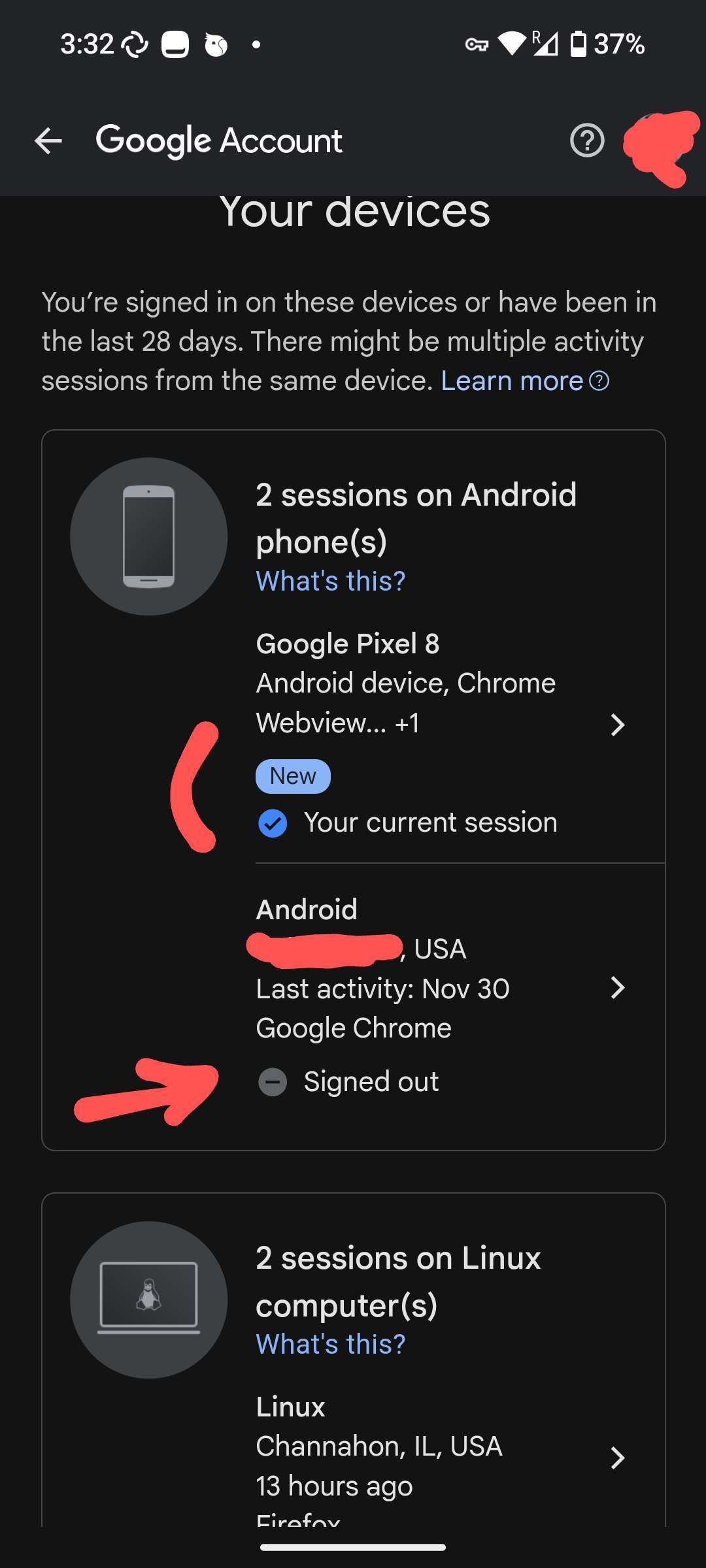
Appreciate this. I don't know where it got the location from in my case
No permissions were given. The user profile is irrelevant to this issue actually

I don't pretend to be immune to a targeted attack but for this level of stuff Graphene is supposed to protect. You don't need decentralized manufacturing for this


How can it be called unprivileged if it has access to SIM geolocation, however that works
If so, "unpriviledged" is very misleading
Well if I didn't connect to Guulag at all then maybe it's not a lie

Does anyone else know if Play Services can determine the real IP, bypassing the VPN?
#asknostr #Graphene
It has zero access to location services, so GPS can't be.
Is it really true that Play Services has access to the wifi IP?