

So the idea for web apps is to host on a ICANN domain and load it's data from a relay which uses DHT?
Please share a URL to query, happy to give it a try!

Okay, I'll bite 😅
How would that domain look like and how would browsers resolve it? Are there any examples I could take a look at to better understand the idea?


Yeah, also couldn't find any specs. Seems to work similar to NIP-04 DMs though...

Yes. But it's not just the relay list, the `pzap` (encrypted zap content afaik) is rather big, also for short zap comments (maybe because of the padding?)

You should be fine, that's exactly the point of using signer extensions: You don't give your private key to 3rd party websites, but websites instead request signatures from an extension.

Hey nostr:nprofile1qqsyv47lazt9h6ycp2fsw270khje5egjgsrdkrupjg27u796g7f5k0spzemhxue69uhk2er9dchxummnw3ezumrpdejz7qgwwaehxw309ahx7uewd3hkctcprdmhxue69uhkummnw3ez6vfwde3x7tnpdenkzmnf9e3k75xqss4 if I am mobile and want to onboard someone to my hub, that's not possible through Alby Go, correct? I believe I need to connect back to the Hub UI itself?
Not through Alby Go, no. But you can use Alby Hub on your mobile as well (if you are on the same network).
You would need to go back to the Alby Hub, create a new Friends & Family connection and hand the connection secret to the user you want to onboard.

Your hub needs to be online if you want to receive. So unless you keep your notebook running 24/7 you might consider running it on a personal mini-computer / VPS / cloud, etc.

Interesting. So with local broadcasting you can send data between apps directly?
Does this reliably work for you? Did you need to change the battery optimizer settings? I've read quite some stories about mobile OS killing your background processes to prevent battery drain etc. 😅

Love the term "Pull Notifications" 😅
So instead of using Android / Apple push notifications this app just tries to keep a WS connection open in the background and displays local notifications?

I don't have the commands ready, but you should find guides on how to generate these things in the LND docs:
https://docs.lightning.engineering/
Putting out a bounty of 21k sats for a detailed guide on how to make it work. 🔥
If you have a running LND node you can just run Alby Hub next to LND and connect these two by choosing "Advanced Setup" during the Alby Hub setup.
Alby Hub then uses your existing LND node to facilitate payments.

And what would you want to share here? An image? The preimage? 😅
The percentage fee display is awesome, isn't it? Really helped me get a feeling for how much you actually pay for routing recently...


Thanks for reporting 🙌 I guess product names shouldn't be translated 🙈 Fix is on the way!

nostr:npub1getal6ykt05fsz5nqu4uld09nfj3y3qxmv8crys4aeut53unfvlqr80nfm it would be cool if the wallet was the first tab in Alby hub 😉
Home view could become “Get Alby” above Alby Cloud. It’s not a view that changes much but takes up a prominent location / space.
We had big plans for the dashboard with some nice little charts, some stats about your recent usage, etc but got lost in the details.
What would you like to see on this page? Do you even need such a thing?

Not really, other than the obvious ones (backups, etc).
Technically you don't put any sats into Alby Go, but the sats are in Alby Hub. You can think of Alby Go as a "remote control" for your Hub.

nostr:npub1getal6ykt05fsz5nqu4uld09nfj3y3qxmv8crys4aeut53unfvlqr80nfm
I need some help.
I’m trying to connect my son’s Alby wallet to my Alby Hub so he can utilize my LN node’s liquidity.
When he scans the QR code given he gets the error below. Tried it 3 times.
Any help would be appreciated.
Thank you. 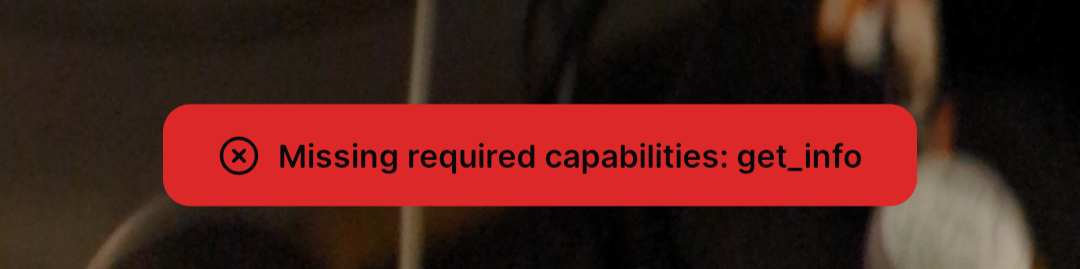
That should be fixed with the latest release of Alby Hub. Can you try upgrading?
You should though 🤔 Does this link work for you?
https://play.google.com/store/apps/details?id=com.getalby.mobile
Yes, I think they're tied to separate Lightning accounts, but anything else would make it even more confusing I guess.
nostr:npub1xv8mzscll8vvy5rsdw7dcqtd2j268a6yupr6gzqh86f2ulhy9kkqmclk3x By the way, there's a small UI bug: when you switch accounts, it doesn't immediately update the npub that you can copy from the nostr icon...
Thanks for reporting, will be fixed in the next release of the extension!